Undeclared Variable:
An undeclared variable is one that has not been declared in the current scope.
Attempting to access an undeclared variable will result in a ReferenceError.
Example:
console.log(brain); // ReferenceError: brain is not defined
Undefined Variable:
An undefined variable is one that has been declared but has not been assigned a value.
JavaScript initializes declared variables with undefined by default.
Example:
    let heart;
    console.log(heart); // Outputs: undefined
Null Variable:
A null variable is one that has been explicitly assigned the value
null.It represents the intentional absence of any object value.
Example:
    let soul = null;
    console.log(soul); // Outputs: null
In summary:
"Undeclared" means the variable has not been declared or defined in the current scope.
"Undefined" means the variable has been declared but not assigned a value, or it can be the default value of uninitialized variables.
"Null" means the variable has been intentionally set to a value representing the absence of any object.
The scope is one of the important concepts in JavaScript, it manages the availability of variables. If you would like to code in JavaScript, you must understand the scope.
Scope
The Scope is the accessibility of variables, functions, and objects in some particular part of your code during runtime. In JavaScript, Scopes are created by code blocks, functions, etc.
"Scope is a policy that manages the accessibility of variables."
Why is Scope Needed?
Scope Provides some level of security to our code. i.e variables can be accessed from a particular part of your code
It also reduces the namespace collisions. i.e, we can use the same variable names in different scopes.
Types of Scope
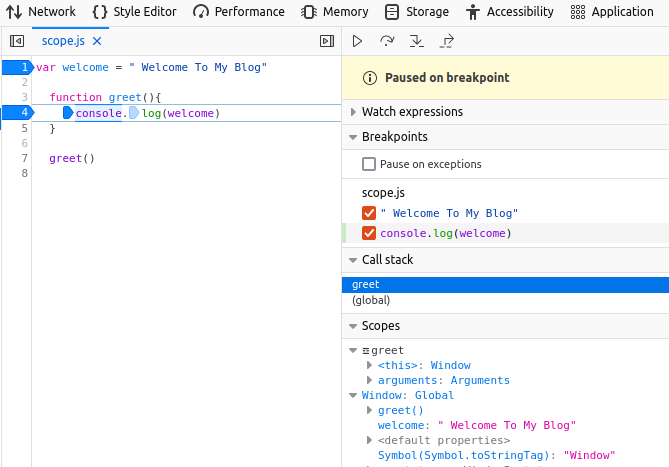
1) Global Scope - This is the outermost scope, any variable that's not inside any function or block is inside the global scope. It can be accessed from anywhere in the program.
Ex: 1.1
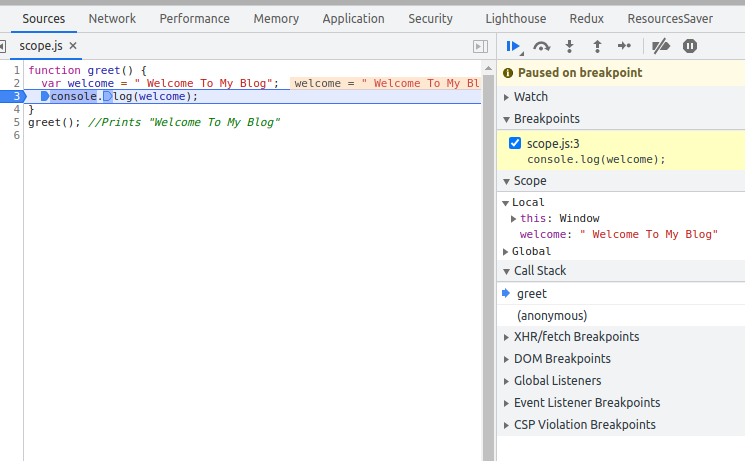
 2) Function or Local Scope - It defines the boundary of a variable, outside of that boundary it cannot be accessed. Variables declared inside the function having local scope i.e they can be used inside the function boundary only.
Ex: 1.2
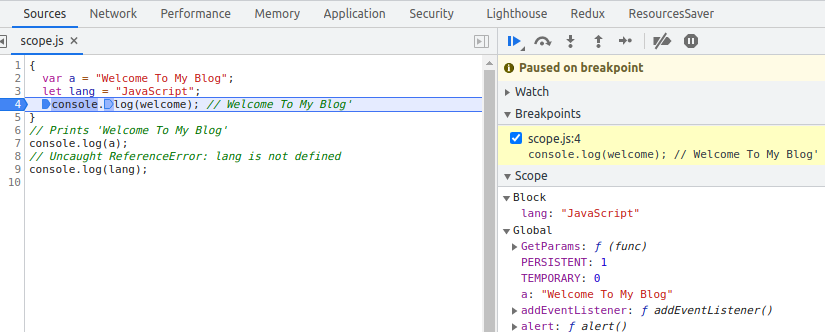
 3) Block Scope - A code block (code between curly braces) in JavaScript defines a scope for variables declared using let and const, unlike var variables they can be scoped to the nearest pair of curly braces. i.e that can't be accessed outside of that pair of curly braces.
Ex: 1.3
 4) Lexical Scope - It defines function accessibility, A function can access anything which is available in its lexical environment it does not matter whether that function is physically present or not.
Lexical Environment - The environment where the function is physically available is called the lexical environment.
4) Lexical Scope - It defines function accessibility, A function can access anything which is available in its lexical environment it does not matter whether that function is physically present or not.
Lexical Environment - The environment where the function is physically available is called the lexical environment.Ex: 1.4
In example 1.4, function 'c( )' has a lexical environment of a function ' a( )' which has a lexical environment of Global Execution which has a lexical environment of null i.e GE has no lexical environment.
Due to the lexical environment, function 'c( )' has the access to variable b because variable b is lexically available to function 'c( )'.
it works like this way if 'c( )'has a lexical environment of function 'a( )' then function 'a( )'s' all lexical environment is also available to 'c( )' but the opposite is not true i.e child having access to all its parent lexical environment but the parent doesn't have access to its child lexical environment.
How JavaSciprt assign the value of variables?
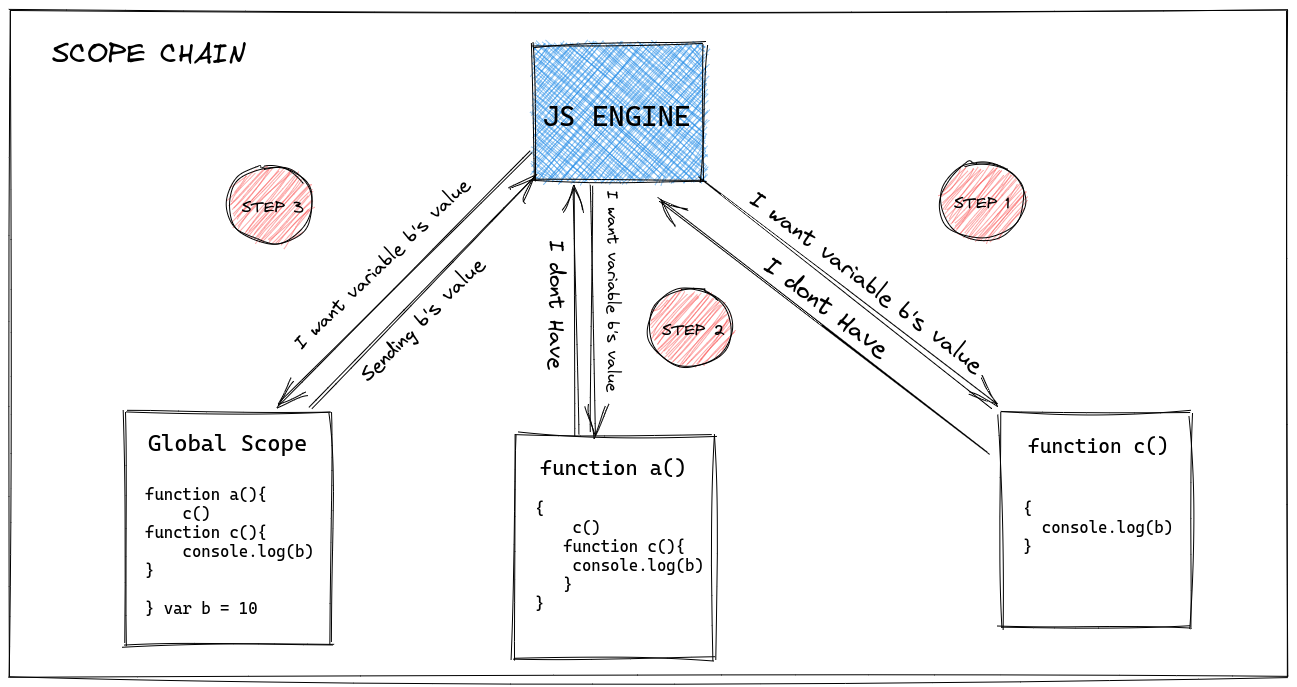
Javascript always start looking for variable's value from local to global, Example 1.4 line no 4 Js engine will first search value of 'b( )' in his local environment i.e inside function 'c( )' if it is not available then it will look in its lexical environment i.e inside function 'a( )' and if it is not available there also it will keep checking in all the lexical environment which available to 'c( )'.
References:
- https://dmitripavlutin.com/javascript-scope/
- https://carbon.now.sh/
- https://excalidraw.com/
Have you ever thought about what happens when you run a JavaScript program?
If you are or want to be a JavaScript developer, you must know what happens when you run your JS program or how the JavaScript Programs get executed internally.
To know what happens when you run a Javascript program, you must understand the Javascript execution context.
In this post, I will discuss the execution context, its types, and the creation of the execution context.
So without further ado, let's get started :)
Execution Context
It is the concept of describing the internal working of code. OR we can say it is a playground for JS code where they get evaluated and executed line by line. Execution context is created by JavaScript Engine whenever a code gets executed.
Types of Execution Context
Global Execution Context - This is the default or base execution. Any JavaScript code which does not reside in any function is in the global execution context.
Functional Execution Context - Every time a function is invoked, a brand new execution context is created for that function. Each function has its own execution context.
Creation of Execution Context
Execution Context is Created in two phases:
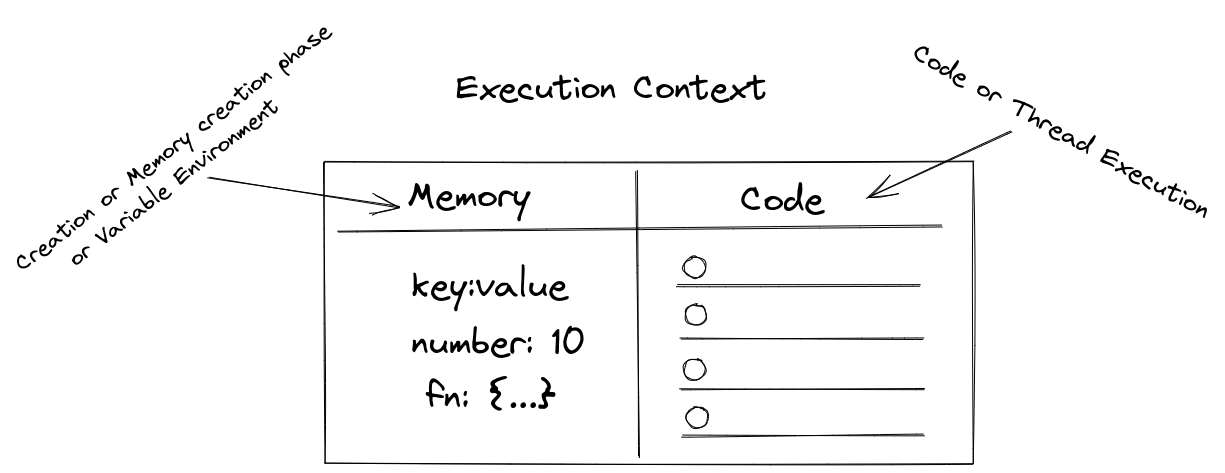
Creation or Memory creation phase or variable environment - During the Creation phase JavaScript will allocate memory to all the variables and functions. And, they are stored in key-value pair, where the variable key is the name of the variable and value is defined with undefined keyword, whereas for function key is the name of the function and, value is all the code inside that function.
Code Execution Phase - In this Phase Code is executed line by line. and all the assignment to the variable is done here.
Let's understand The creation of execution context with example.
Ex:1
1.     let number = 2
2.     function square (n){
3.        let answer = n * n
4.        return answer
5.      }
6.     let square2 = square(number)
7.     let square4 = square(4)
When we execute the above code, an Execution Context has created and, It has two-phase, memory creation and code execution phase.
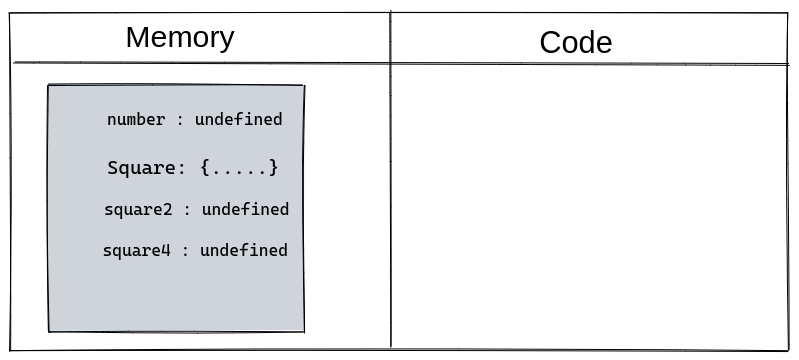
Phase-I: Memory Creation
In Phase one, memory will be allocated to variables and functions, and, they will be assigned with some value. the variable will be assigned with an undefined keyword whereas the function will copy as it is. See the image below:
Phase-II: Code Execution
In Phase two, code is executed line by line and, it will start assigning actual value and, the calculation part will also be done here.
So let's see how Ex 1 will get executed.
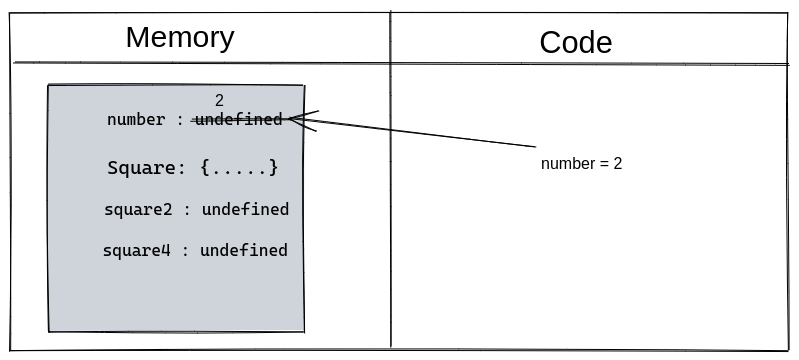
Line no 1: It will assign a value 2 to a number variable.
Line no 2-5: It will get skipped because the function will run only through invocation.
Line no 6: Functions will get invoked and, whenever the function gets invoked, it will create a new execution context and have the memory and code creation phase.
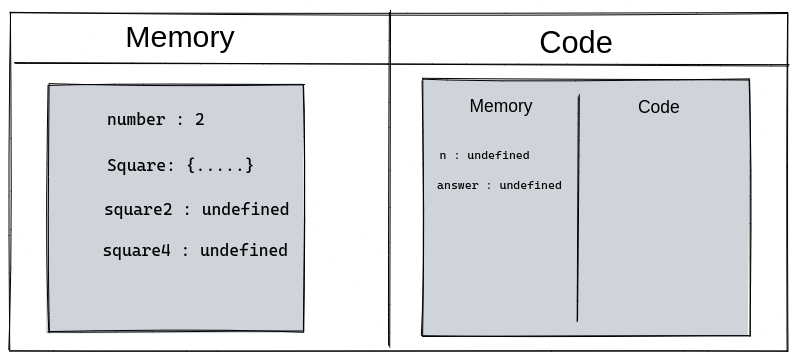
Line no 2: It will assign value to n from the number variable which is being resided in the memory execution phase.

Line no 3: Answer variable will hold the value of n*n i.e. is 4

Line no 4: Return will take back the controller to from where the function was invoked i.e line no 6, with a value 4, and the execution context which creates for the function will get removed.
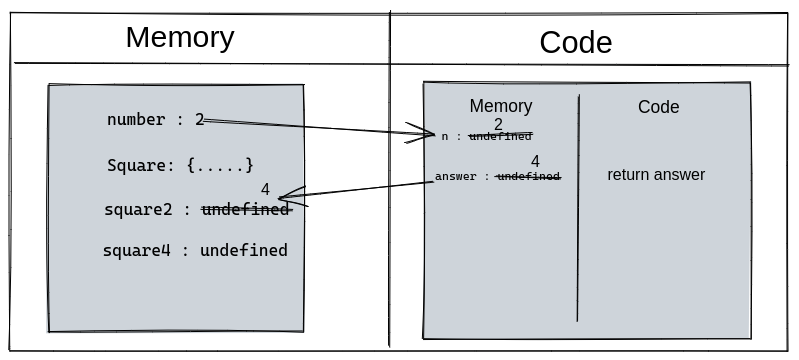
Line no 7: Will execute the same way as line no 6, So skipping this.
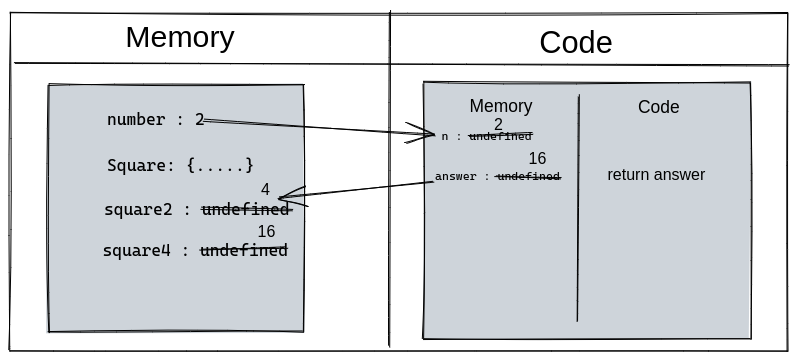
After line no 7 nothing is left to execute, So the execution context will be removed.
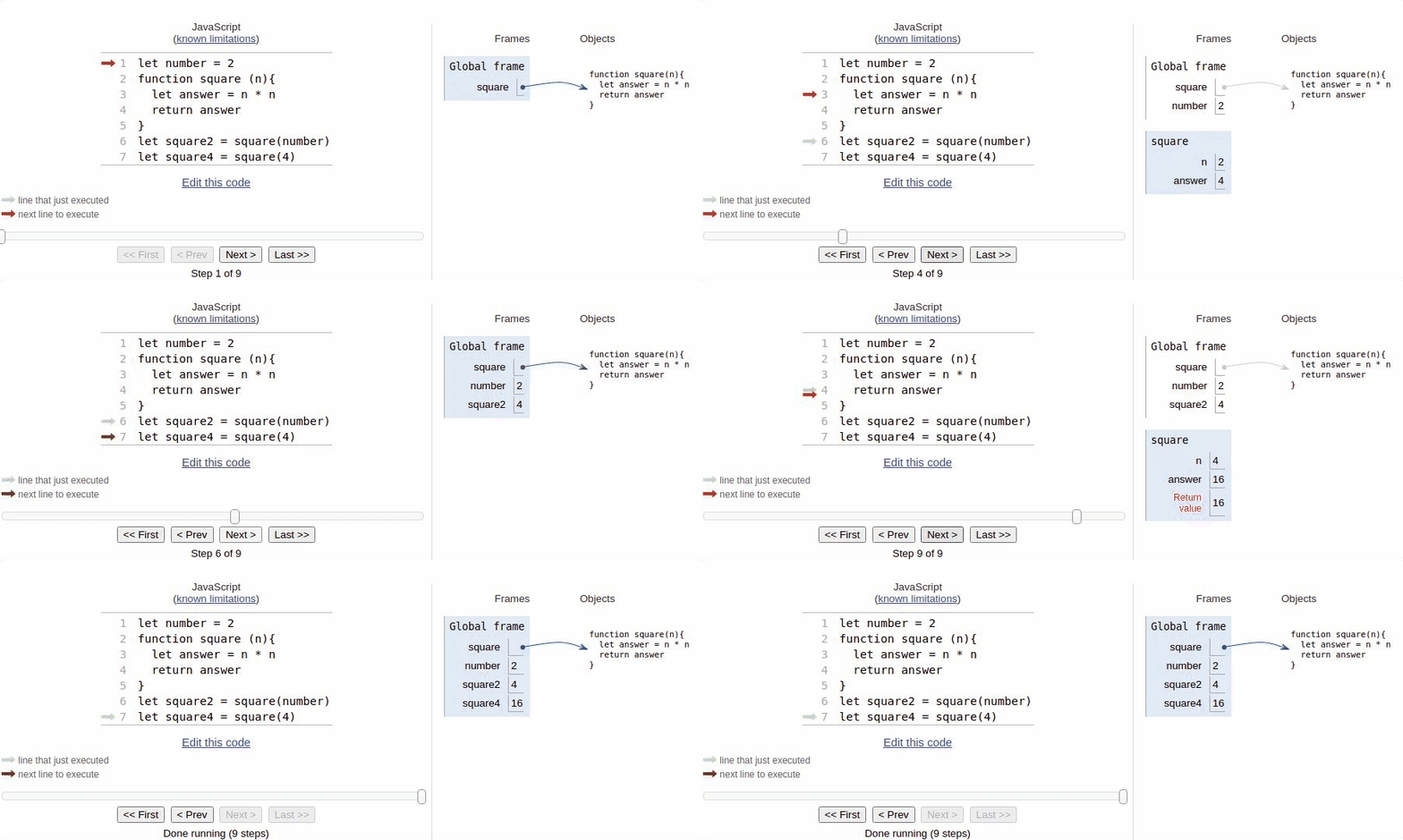
Visualzation of the Ex:1
That's All !!!
References :
Python Tutor
Check the Python Tutor, it helps you visualize your code.
Excali Draw
Excalidraw is a virtual collaborative whiteboard tool that lets you easily sketch diagrams that have a hand-drawn feel to them.
]]>
It was an exciting experience whenever you create something for the first time. For me, it is my first NPM package and also my first Open source contribution. In this article, I will describe how easy to publish NPM Package.
Step 1: npm account
Step 2: Login
We will use Console or Terminal to Login
$ npm adduser or npm login
You’ll get a prompt for your username, password, and email.
Logged in as username to scope @username on https://registry.npmjs.org/.
Step 3: Let’s make a package
Create a Folder

$ mkdir directory_name

Create a File - Package.json inside the folder

$ cd directory_name

$ npm init

Edit the name in package.json
{
    "name": "@username/number-system-converter"
}
Note:  username: Your NPM username prefix with the '@' symbol
Step 4: Publish Package
npm publish --access=public - first time
npm publish - for update
If everything goes well You will see
]]>+@username/[email protected]

30 Seconds of Knowledge - Web Extension that lets you gain new developer skills, every time you open a New Tab. Source
Bitly | Powerful Short Links - Create short, customized, powerful links from any page and share them with the world. source
ColorZilla - Advanced Eyedropper, Color Picker, Gradient Generator, and other colorful goodies. source
GoFullPage (Full Page Screen Capture) - Capture a screenshot of your current page in entirety and reliably—without requesting any extra permissions! source
Grammarly for Chrome - Write your best with Grammarly for Chrome. source
Honey - Automatically find and apply coupon codes when you shop online! source
iorad - Tutorial creation made easy. Instantly make guided, step-by-step directions for any website. Directly in the browser. source
OneTab - Save up to 95% memory and reduce tab clutter source
Print Friendly & PDF - Print Friendly and PDF any Webpage source
Save All Resources - Save all resources files with retaining folder structure. source
Stylebot - Change the appearance of the web instantly source
svg-grabber - A tool to quickly preview and get all the svg assets from a website. source
Tab Resize - Split Screen made easy. Resize the CURRENT tab and tabs to the RIGHT into layouts on separate windows source
Toby for Chrome - Better than bookmarks. Organize your browser tabs and access them quickly anywhere. source
15 WhatFont - The easiest way to identify fonts on web pages. source
]]>Primitive types:
Basically, if it’s storing a simple piece of data, it’s stored simply. When you set a variable with this type, the variable is that exact value and that’s all. If you change that value, the variable simply becomes a new value.
JavaScript has 5 Data types that are passed by value: Boolean, null, string, undefined, Number, Known as primitive types.
Reference Types or Non-Primitive or objects:
When you create an object, that value is not directly assigned to the variable. Instead, a reference to that value is what gets set. All that variable knows about is the location of the object, not the object itself.
JavaScript has 3 Reference types that are passed by reference: Array, Function, and Object. These are all technically Objects or (non-primitive).
Code that copies a value is where it counts

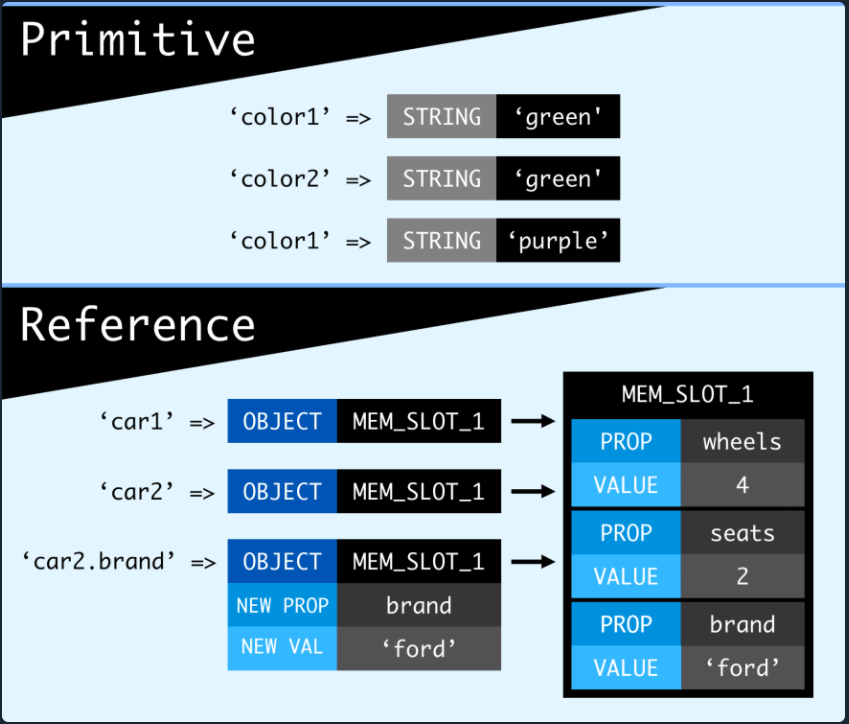
color1 is assigned the string value ‘green’, which means the variable color1 is essentially the same as just a string ‘green’. When we use color1 to assign a value to color2, it would’ve been the same as if we literally assigned it a string value. So when we reassign color1’s value, it has absolutely no impact on color2. Both values were always just saving strings, they had no lasting bonds between them. This is not the case with reference types. Look:
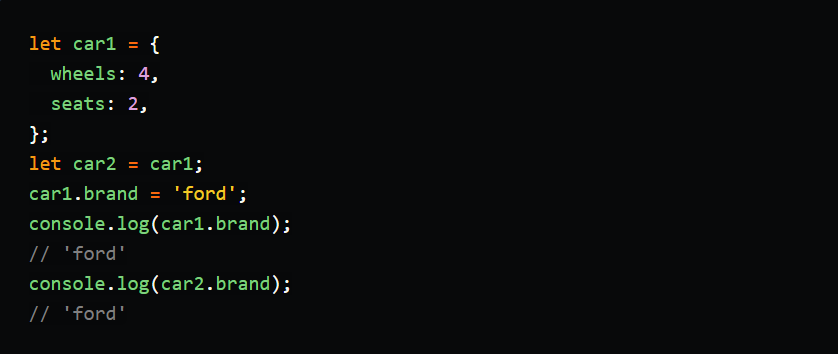
We never assigned car2 a brand property, yet it has one. Despite the situations looking the same as our primitive example, the behavior is the opposite. That’s because car1 was never assigned the value of the object, only the reference to it. So if you change car1, that will alter the same spot in memory that car2 is looking at.
Solving the reference problem
By adding that brand property, we permanently altered the original object. That is called a mutation, and it’s not great when we accidentally do it to more than our intended target. To get around this, we just have to create a new reference to a new object. That way, each variable will point to its own object and not have any overlap. The most common approach is to use Object.assign or the spread operator. For brevity, let’s use a spread:

]]>Note : Objects are mutable, meaning they can change (unless you *freeze* them.) Primitive types are immutable i.e you can’t actually mutate the number 1 into 2, you just replace the value. Meaning we didn’t change our ‘green’ string, we just straight up replaced it with a new string, ‘purple’.