


What Is “thisâ€, After All? — A Look at JavaScript this Keyword
 2023 19 April •
  7 min read


What is this all about? This doesn’t even make any sense… Where is this coming from? — Everyone asked these questions to themselves at some point in their lives, so let’s settle the argument and demystify this once and for all. If you haven’t figured it out yet, this story is going to be about the dreaded this keyword in JavaScript.
First, let’s define what this is.
The “this†keyword in JavaScript refers to the object it belongs to.
Open up your console and write “thisâ€. In this case “this†alone in itself refers to the global object. The global object in a browser is the window itself.
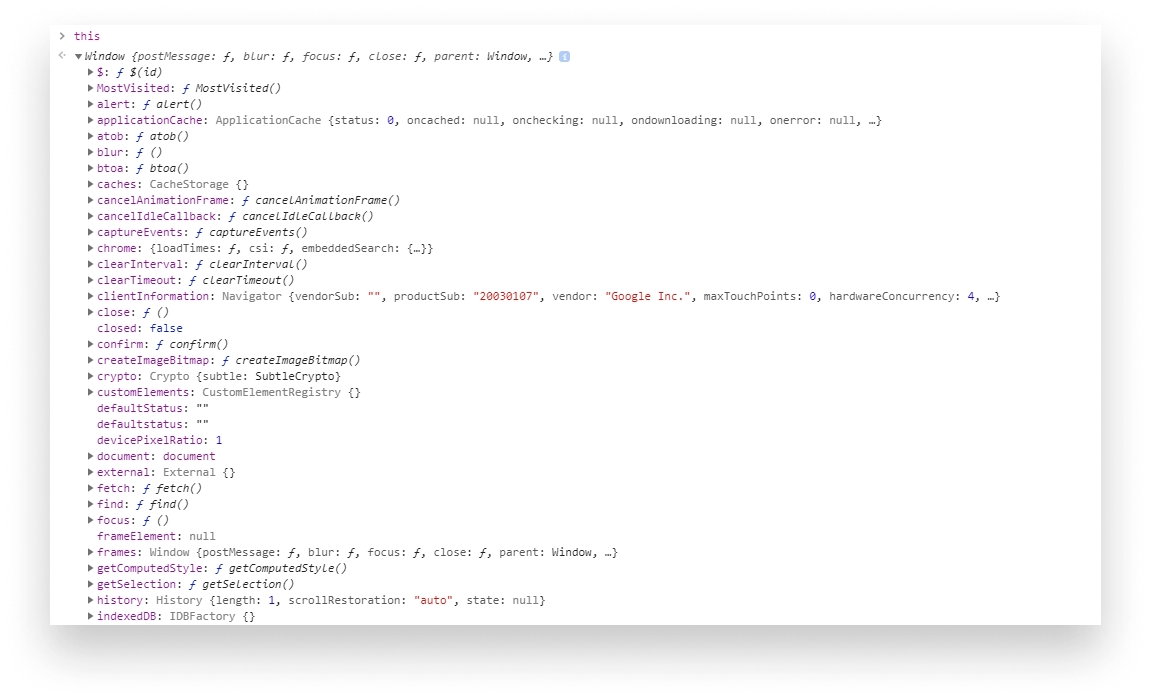

First Example
Now, what if we have our own object? What do you think the output will be in the following case?
const user = {
    name: 'Heisenberg',
    occupation: 'entrepreneur',
    sayMyName() {
        console.log(this.name);
    }
};

const sayMyName = user.sayMyName;

sayMyName();If you guessed “Heisenbergâ€, you were wrong. You would actually get an empty string. But why is that? What would happen if you were to just call user.sayMyName() right away? — it would log out Heisenberg. Wait… WHAT??? 😨 Let’s start with the latter before I manage to confuse you even more.
We said that the keyword refers to the object it belongs to. When we call user.sayMyName(), this will point to the user object, hence when we call this.name, sure enough we get back “Heisenbergâ€. So what happens when we assign user.sayMyName to a new variable like we did in the example above? — Simply put, user.sayMyName becomes a plain function, completely unrelated to the user object. Try to copy the example above to your DevTools and instead of calling sayMyName() write console.log(user.sayMyName) to log out the function itself. You would get back the exact function we defined in the user object, however this time, the parent object of the function becomes the window. And by the alignment of the stars, we do have a name property on the window, but by default, it’s value reads “â€â€Šâ€” an empty string. If we were to change this.name to this.userName, we would get undefined, because there’s no window.userName by default.
So we know we don’t get back the expected output because we are referring to the wrong object. Okay, that’s cool, but how do we fix it? Well, you simply bind the context, which you can do with the bind method. Change line:9 to the following:
const sayMyName = user.sayMyName.bind(user);Bind expects a parameter that sets the this keyword to the provided value’s context. In this case, we want to bind the context to the user object so we pass “userâ€.
What if we want to use the function in a callback? — Same as before, we only need to bind the context, like we did before and pass the extracted function as a callback:
document.getElementById('say-my-name').addEventListener('click', sayMyName);Let’s see two more examples. By now, it’s starting to become suspicious whether it will give back the expected value or not. In any case, you’re sitting in an interview and the interviewer writes down a coding exercise on the whiteboard with an evil smile when you suddenly get the question you are anticipating — “What do you think the output will be for the following?â€
const shape = {
    radius: 10,
    diameter() {
        return this.radius * 2;
    },
    perimeter: () => 2 * Math.PI * this.radius
};

shape.diameter();
shape.perimeter();
Of course, they can’t expect you to calculate all this in your head right? — You’re thinking… There must be a catch. There is! Let’s break it down.
Second Example
First we call shape.diameter, everything seems to be fine, we return the object’s radius * 2. Nothing fancy is going here, we get back 20. Next we call shape.perimeter, we get back NaN. 🤦â€â™‚ï¸ Comparing the two methods, it must have something to do with the way they are written, and you are right. The second one is an arrow function. Arrow functions don’t bind their own context, rather they are referring to the enclosing scope in which the object is defined, which is again, the window and window.radius is evaluated to undefined, so the above function evaluates to 2 * 3.14 * undefined which in return, gives us NaN.
Note that for one-liners in arrow function, we can omit the return keyword, the above example is equivalent to this:
perimeter: () => {
    return 2 * Math.PI * this.radius;
};
 Remove ads
Third Example
Let’s see a last one, this time going back to the very first example with a little twist, because why not. Imagine you’re investigating a bug and you suspect that the root cause is related to a piece of code where you have an object with a method, and you also have an enclosing inner function inside said method for some reason. You quickly realize that this is not what it’s supposed to be. You want this to work, you want this to point to your object, but again nothing seems to work, you get an empty string. Seems like it is pointing to the window once more. Can’t we just delete window to solve all our problems?
const user = {
    name: 'Heisenberg',
    occupation: 'entrepreneur',
    sayMyName() {
        const closure = function() {
            console.log(this.name);
        };

        return closure();
    }
};

const sayMyName = user.sayMyName;

sayMyName();Just like for the previous one, you have a great idea!💡 Bind the user object to the assigned function!
const sayMyName = user.sayMyName.bind(user);But you are still getting "â€. Unfortunately, that’s only half of the equation and to understand why, we need to pick it apart. If we are logging out sayMyName again, we get the body of the function which returns the inner function at line:9. If we insert console.log(closure) to line:8, we see that we get back the closure’s body with the console.log inside.
We know that we are getting back an empty string because this is pointing to the window object, so we must bind the right context to closure, right? That’s right. So you go ahead and return closure.bind(this) instead. But this time, you are getting back the body of the function 🤔. That’s because bind only does the binding, but doesn’t actually call the function, which we need. So you say we only need to do either
return closure.bind(this)();or
user.sayMyName()();As you probably already guessed, this is kind of a workaround and looks hacky and is not really the proper solution. We have another method that can be used to call a specific function with a given context. It’s the call method. By changing the return to return closure.call(this), we tell JavaScript to call the function with the given context passed as a parameter. So that leaves us with the final solution being:
const user = {
    name: 'Heisenberg',
    occupation: 'entrepreneur',
    sayMyName() {
        const closure = function() {
  	    console.log(this.name);
        };

  	return closure.call(this)
    }
};

const sayMyName = user.sayMyName.bind(user);

sayMyName();We first bind the user object to our function assignment on line:13 and inside sayMyName we also have to use call on the closure function to call it with the proper context.
As you can see, this works according to some rules which after you start to understand, everything else will make more sense… hopefully.
Things to Keep in Mind:
- By default
thisrefers to the global object, which is thewindowif we are in a browser - When we use
thisinside another object, it refers to the object it belongs to - When
thisis used inside an arrow function, it refers to the parent object - If we use a function call with
bindorcall,thiswill refer to the context passed as the first parameter to these methods
(bindwill only bind the context whilecallwill call the function as well.)


Rocket Launch Your Career
Speed up your learning progress with our mentorship program. Join as a mentee to unlock the full potential of Webtips and get a personalized learning experience by experts to master the following frontend technologies:


Courses


Recommended

PubSub in JavaScript: Intro to Design Patterns
2021 13 July • 19 min read
Understanding Bind, Call and Apply in JavaScript
2024 09 February • 5 min read
Why Do We Need to Care About Accessibility?
2021 18 January • 7 min read