excel
44748 Topics
Operations Dashboard in Excel
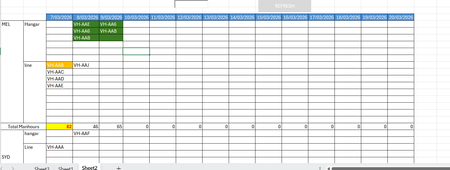
Ok, so I have been tasked to build an operational dashboard for an airline maintenance planning and tracking. I have a dataset downloaded from our ERP system that lists down the aircraft tails, the workorder number, tasks in each workorder, manhours for each task, city, site(hangar or line) and the start date and end dates. There are codes that are assigned for each category of workorder, whether it is a C-Check, Line or transit. In the current scenario, we use a flight operations tracking software that gives us a hangar forecast, but then we have to get the dataset (as mentioned above) and then build a report daily to show the tails assigned for each port and then the total manhours. The report looks something similar to what you see below. Now, instead of doing it daily manually, I want to automate the process. So far, I have been able to sum the total manhours for the day, get the tails assigned for each port and location, and achieve some sort of conditional formatting to distinguish between different types of checks - green for heavy, yellow for transit and so on. What I have been unable to achieve is the aircraft is scheduled for two days grounding in the hangar, then the cells on both days should align together. As you can see in the image above, VH-AA6 has maintenance on the 8th and 9th of March, but the cells are not aligned. I tried to find a difference between the start and end date and create a helper column to assign a priority, but it didn't work. I have spent countless hours on Chatgpt to come up with a solution, but all efforts went in vague. I have seen a similar excel sheet elsewhere, but I couldn't extract the formulas or the logic since it was heavily protected. In the end I want to add a search bar and a to find a Rego/ Tail by typing in the search field and highlight in the sheet quickly. The main aim is the cell alignment for the consecutive dates. So lets say AA6 is occupying D2 on Day 8, then on the Day9 AA6 should pop up in E2. Any other aircraft on the Day9 with a day's grounding may appear in E1, or next available empty cell.172Views0likes9Comments
Power Query - merge based on compensation - issue with trailing decimals
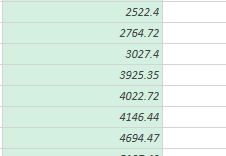
I want to merge info together in Power Query based on Compensation. One table has a number listed as 2764.72 and the other has 2764.72000000003. How do I get rid of the trailing digits. both tabs have the format listed a 1.2.34Views0likes1Comment
Looking for use cases of function TYPE
What do you use the TYPE function for? I’m not looking for a general explanation of what the TYPE function can do—I already know that. For example, why do you use the TYPE function instead of functions like ISTEXT, ISERROR, etc.? Or, how do you interpret the result of the TYPE function?45Views0likes1Comment
Conditional Formatting Duplicates in Two Columns
Hello, I have a spreadsheet where I track calls my office receives. I have a table that includes the date and name for each call. Sometimes calls are entered in the spreadsheet multiple times. I would like to create a conditional formatting formula that will flag if a name is entered twice in one day. Is there a way to highlight cells that are duplicated in two rows of a table? Thank you!60Views0likes4CommentsExcel focus issues
I've been using Excel since 3.0, and currently use the MSO 365. incarnation Beginning some time within the past year, I have had a recurring problem with Excel failing to maintain focus after editing a cell. When this happens, the mouse and arrow keys will not move the focus and text cannot be selected. Clicking to a different sheet (or to a different workbook) and then back will sometimes correct the problem, but sometimes all instances of Excel must be closed. The workbooks involved are only moderately complex. And no, Scroll Lock is not on. Has anyone else had this problem?7.1KViews0likes6Comments
Python in Excel - Missing from desktop Excel but exist in web Excel
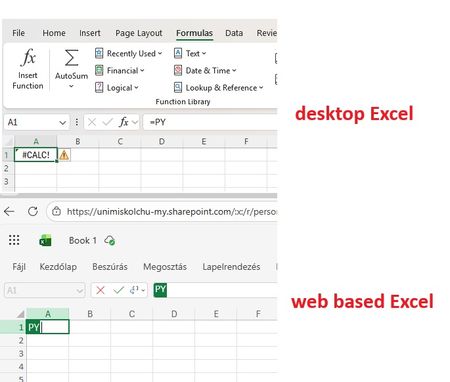
Good Morning! Yes, again this topic :-( When I join to a professional forum I also search for the topic I having a problem with. Found a lot of similar questions but I could not find a post with a solution. Maybe I was not enough attentive and patient but I did not. Well, we are a University in Hungary, and we have Microsoft 365 A1, A3 and A5 licenses. I attahced a screenshot which shows: in the desktop Excel I got #CALC! error msg when I type =PY and press TAB. But it works in Excel on the Web version. So the root of the problem cannot be the license, right? Of course I saw this article about "Python in Excel availability": https://support.microsoft.com/en-us/office/python-in-excel-availability-781383e6-86b9-4156-84fb-93e786f7cab0 Our licenses are based on user, not device so no, it cannot be that the computer is a device with shared license: My Excel version is on: So the version and the channel are also OK. (OK?) I am also a Global Adminisitrator in our tenant, so I could check if the Connected experiences and Optional connected experiences and all related possibilities are disabled or not: no, it is not disabled. On "Microsoft 365 Apps admin center" : https://config.office.com/ ... I did not find any policies which controls those options so in "Policies for all users" policy I modified all these settings from "Not configured" to "Configured" and "Enabled". In my Excel the Trust center related settings looks like this: Of course my Office package up to date, I ran the Update Office and Update License command from Excel. Did not help. I went also to https://admin.microsoft.com site if I can find any related setting, but did not. I also tried to Sign out and Sign back in Excel - did not help. Finally, as our computers are in Hybrid environment (so our users are logging in inti on-prem AD, and their properties are synchronised to Azure) I have cerated a Group Policy object (I am also a Domain Admin), which also allows connected and optional experiences for all domain users: I should not mention: did not help :-( I have checked if the GPO is applied or not by running GPRESULT /R, it applied, it is in the registry. But despite all the settings so far - nothing helped. The Python in Excel feature in desktop Excel do not want to work. But it does in web based Excel. I would be very happy to receive any ideas from anyone. Or if U say I should go to official Microsoft support, then I go. Have a nice day! Regards, Andras /sorry for the very detailed case description, but maybe easier and quicker if I "aswer" all usual questions in advance/57Views0likes1Comment
Correlation Study with Filters
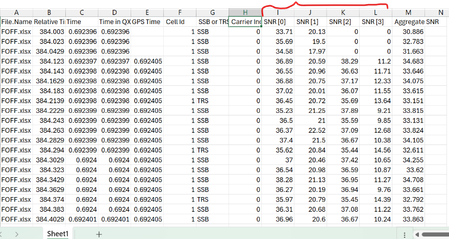
Dear Experts , I have a data like below( Attached worksheet) And want study the correlation between SNR[0~3], there will be 6 combinations as below:- I want make like this but with Filters/Slices for the "File.Name" & "SSB or TRS" & "Carrier Index", different colors for different Carrier Index(0 &1) Thanks & Regards Anupam Shrivastava69Views0likes1CommentData Formatting
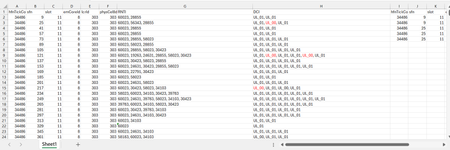
Dear Experts, I have a Data like below :- Each row can have 1 or more RNTIs( seperated by ",") and their DCI( UL_01 or UL_00), I want to put them in a format like in Col - I~P gave examples for the 1st two entries. Attached worksheet. Thanks & Regards Anupam ShrivastavaSolved157Views0likes5Comments
Allow removal of "Copilot Suggestions" from right-click menu
I have been using Excel for decades and CONSTANTLY use the right-click menu for quick access to basic functions (e.g., "Insert"). Ever since "Copilot Suggestions" was added to the drop-down list, it always throws me off due to its placement. I have Microsoft 365 on Windows 11 Pro. I have searched for ways to remove this from appearing there and the result said "go to File > Options > Copilot and uncheck the 'Enable Copilot' box". However, when I attempt to do that, there is NO "Copilot" option available! PLEASE allow removal of "Copilot Suggestions" from the right-click menu OR at least the option to move it to the bottom (so it isn't in the way of things used ALL the time). I realize that Copilot is a great resource for many users, but I am confident in my Excel skills and in my ability to research/learn new skills the "old school" way, so I have little use for this feature now and would prefer to hide it.620Views6likes6Comments