announcement
137 TopicsNew Microsoft Certified: SQL AI Developer Associate Certification
AI is transforming how data-driven applications are built, and SQL professionals are at the center of this new era. Whether you're a database developer, administrator, analyst, or architect, your SQL expertise is more critical than ever. With the rise of AI, quality data and secure, optimized queries are foundational to building intelligent, scalable solutions. We’re introducing the Microsoft Certified: SQL AI Developer Associate Certification to help you validate your ability to integrate AI capabilities directly into SQL-based solutions without needing to move your data, learn entirely new platforms, or move away from the T-SQL skills you already use every day. To earn this new Certification, you need to pass Exam DP‑800: Developing AI‑Enabled Database Solutions, currently in beta. Is this the right Certification for you? The Microsoft Certified: SQL AI Developer Associate Certification is designed for SQL professionals who build and maintain SQL-based applications and who want to integrate AI capabilities directly into their data solutions. As you collaborate closely with application developers, database administrators, architects, AI engineers, and DevSecOps teams, skills validated by this certification support the delivery of scalable, secure, and high-performance AI‑enabled applications. This Certification demonstrates your ability to: Design and build database solutions using structured and semi-structured data. Use AI-assisted tools to accelerate SQL development and database management. Secure, optimize, and deploy enterprise-grade SQL solutions. Implement vectors, embeddings, and retrieval-augmented generation (RAG) patterns within SQL database architectures. As a candidate for this Certification, you should have experience writing T-SQL, developing databases on Microsoft SQL platforms, and working with continuous integration and continuous deployment (CI/CD) workflows in GitHub. We also recommend familiarity with AI concepts, such as embeddings, vectors, and models, in addition to AI-assisted development tools. Skills measured by the exam include: Applying advanced T-SQL techniques for AI-ready database solutions. Building vector and semantic search experiences directly in SQL. Implementing RAG workflows to ground large language model (LLM) outputs and reduce hallucinations. Integrating LLMs into SQL-based applications without migrating data. Designing secure, compliant, and scalable AI-enabled data solutions. Exposing SQL data through APIs by using Data API builder. Building and monitoring data APIs by using Data API builder and event-driven change patterns. These capabilities power use cases like semantic and hybrid search, chatbots, personalized recommendations, fraud detection, and predictive analytics. Ready to prove your skills? The first 300 candidates can save 80% Take advantage of the discounted beta exam offer. The first 300 people who take Exam DP-800 (beta) on or before April 3, 2026, can get 80% off. To receive the discount, when you register for the exam and are prompted for payment, use code DP800Belzoni. This is not a private access code. The seats are offered on a first-come, first-served basis. As noted, you must take the exam on or before April 3, 2026. Please note that this discount is not available in Turkey, Pakistan, India, or China. How to prepare Get ready to take Exam DP-800 (beta): Review the Exam DP-800 (beta) exam page for details. The Exam DP-800 study guide explores key topics covered in the exam. Work through the self-paced skilling Plan on Microsoft Learn: Become a SQL AI Developer: Prepare for Certification Exam DP-800. Connect with Microsoft Training Services Partners in your area for in-person offerings. Need other preparation ideas? Check out Just How Does One Prepare for Beta Exams? Ready to get started? Remember, the number of spots is limited to the first 300 candidates taking Exam DP-800 (beta) on or before April 3, 2026. Beta exam rescoring begins when the exam goes live, with final results released approximately 10 days later. For more details, read Creating high-quality exams: The path from beta to live. Stay tuned for general availability of this Certification in May 2026. Additional information You can take Certification exams online, from your home or office. Learn what to expect in Online proctored exams: What to expect and how to prepare. For more cloud and AI Certification updates, read our recent blog post, The AI job boom is here. Are you ready to showcase your skills? Get involved: Help shape future Microsoft Credentials. Join our Microsoft Worldwide Learning SME Group for Credentials on LinkedIn for beta exam alerts and opportunities to help shape future Microsoft learning and assessments. Explore Microsoft Credentials on AI Skills Navigator.10KViews6likes4Comments
New AI-900 Lab Simulations
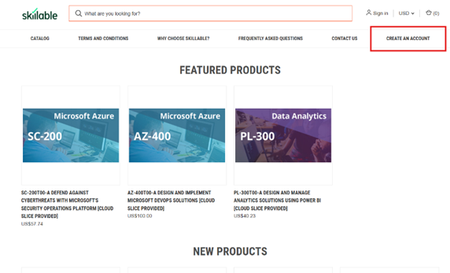
We’re excited to announce the launch of new AI-900 lab simulations, designed to help educators deliver more interactive, scalable, and learner-friendly AI experiences. As part of Microsoft Learn for Educators (MSLE), eligible educators can access lab seats to provision Azure-based labs for students—supporting interactive learning and skills validation in a guided, low-risk environment. Important Institutions that are part of MSLE receive free lab seats. Individual educators with MSLE receive discounted lab seats. Learn more about eligibility and program options in the MSLE Program Overview. For details on purchasing traditional lab seats, see the section below or visit the MSLE Lab FAQ. __________________________________________________________________________________________________________________________________________________________________ Understanding Simulation-Based Labs Simulation-based labs and traditional labs both help learners apply theory in practice—but they do so in different ways. Understanding these differences helps educators set expectations, guide students effectively, and maximize learning outcomes. This post outlines: What simulation-based labs are How they differ from traditional labs What Is a Simulation-Based Lab? A simulation-based lab is a software-driven, interactive environment that mirrors real-world scenarios using digital models. Instead of working with physical equipment or live cloud resources, learners interact with virtual tools that respond dynamically to their decisions. Simulation-based labs typically include: Step-by-step guidance and prompts Real-time, automated feedback Built-in hints and checkpoints A safe, repeatable environment for experimentation Because simulations are standardized and risk-free, learners can focus on understanding concepts, practicing workflows, and building confidence—without worrying about misconfigurations or resource constraints. Key Differences: Traditional Labs vs. Simulation-Based Labs Aspect Traditional Lab Simulation-based Lab Accessibility Limited by location and time Accessible anytime online Feedback Instructor-dependent Immediate digital feedback Repetitions Limited by time or materials Unlimited repeat practice Consistency Varies by student level Standardized experience for all learners Simulation-based labs have a similar interface as traditional labs, as both are hosted in the same environment. For more information about simulation-based labs and tips on how to navigate them, please refer to the attached document. If you have additional questions, post them in Connect and Ask Questions and a member of the MSLE Team will be happy to assist. ____________________________________________________________________________________________________________ Purchasing Traditional Lab Seats (For Individual MSLE Educators) If you’re an individual educator and would like to purchase discounted traditional lab seats, follow the steps below: Visit the Skillable Marketplace and select Create an Account. 2. Choose Click to access the Account Request Form. 3. Complete the form and select Microsoft Learn for Educators (MSLE) as your affiliation. 4. Submit your request for approval. Once approved, you’ll be able to purchase discounted lab seats for your students.New Certification for machine learning operations (MLOps) engineers
Do your co-workers rely on you to deploy, operationalize, and maintain machine learning and generative AI solutions in production? Are you working at the intersection of data science, DevOps, and generative AI? If so, the Microsoft Certified: Machine Learning Operations (MLOps) Engineer Associate Certification is designed for you. This Certification validates your ability to operationalize not only traditional machine learning but also generative AI solutions on Azure, reflecting how AI roles have evolved from model experimentation to enterprise-scale AI operations. To earn this Certification, you need to pass Exam AI-300: Operationalizing Machine Learning and Generative AI solutions, currently in beta. Key skills validated by this Certification To earn the MLOps engineer Certification, you must demonstrate your ability to: Design and implement secure, scalable MLOps infrastructure. Automate resource provisioning and deployments by using GitHub Actions, Bicep, and Azure CLI. Orchestrate training, manage model registration and versioning, and monitor production models. Deploy and operationalize generative AI solutions by using Microsoft Foundry. Implement quality assurance, observability, and safety evaluations for generative AI systems. Optimize retrieval-augmented generation (RAG) pipelines and fine-tuned models for performance, accuracy, and cost efficiency. This Certification replaces the Microsoft Certified: Azure Data Scientist Associate Certification (Exam DP-100), which is retiring on June 1, 2026, and reflects the evolution of AI in the enterprise. Exam DP-100 focused on validating your ability to design and implement data science solutions, including data exploration, model training, evaluation, and deployment. Exam AI-300 expands the scope significantly. It retains training and evaluation but places much stronger emphasis on validating your knowledge and experience in automation, infrastructure as code (IaC), continuous integration and continuous deployment (CI/CD), lifecycle governance, observability, drift detection, cost control, and the operationalization of generative AI systems. For more details on the retirement of Exam DP-100, and the latest cloud and AI Certification updates, read our recent blog post, The AI job boom is here. Are you ready to showcase your skills? Skill area Exam AI-300 (new) Exam DP-100 (old) MLOps infrastructure Full CI/CD, IaC (Bicep, Azure CLI), GitHub Actions Basic workspace and compute setup Model lifecycle management Core focus, including registration, versioning, rollout/rollback, monitoring Full lifecycle from training to deployment GenAIOps infrastructure End-to-end lifecycle, including security, automation, and model management with Foundry Basic generative AI setup and experimentation QA and observability Generative AI evaluation, tracing, safety metrics, drift detection, cost monitoring Model evaluation and responsible AI principles Generative AI performance optimization RAG optimization, embedding model selection and tuning, advanced fine-tuning, synthetic data management Basic prompt engineering and fine-tuning Ready to prove your skills? Take advantage of the discounted beta exam offer. The first 300 people who take Exam AI-300 (beta) on or before April 2, 2026, can get 80% off market price. To receive the discount, when you register for the exam and are prompted for payment, use code AI300Meridian. This is not a private access code. The seats are offered on a first-come, first-served basis. As noted, you must take the exam on or before April 2, 2026. Please note that this discount is not available in Turkey, Pakistan, India, or China. Get ready to take Exam AI-300 (beta): Review the Exam AI-300 (beta) exam page for details. The Exam AI-300 study guide explores key topics covered in the exam. Want even more in-depth instructor-led training? We’re creating new instructor-led training that will be released in late March 2026. Connect with Microsoft Training Services Partners in your area for in-person offerings. Need other preparation ideas? Check out Just How Does One Prepare for Beta Exams? You can take certification exams online, from home or the office. Learn what to expect in Online proctored exams: What to expect and how to prepare. The rescore process starts on the day an exam goes live, and final scores for beta exams are released approximately 10 days after that. For details on the timing of beta exam rescoring and results, check out Creating high-quality exams: The path from beta to live. Ready to get started? Remember, only the first 300 candidates can get 80% off Exam AI-300 (beta) with code AI300Meridian on or before April 2, 2026. Stay tuned for general availability of this Certification in May 2026. Learn more about Microsoft Credentials. Related announcements We recently migrated our subject matter expert (SME) database to LinkedIn. To be notified of beta exam availability or opportunities to help with the development of exam, assessment, or learning content, sign up today for the Microsoft Worldwide Learning SME Group for Credentials.11KViews2likes21CommentsMicrosoft Tech Community Release Notes – 26.01
We’re excited to share the latest updates to the Microsoft Tech Community! This release focuses on improving User Group management, along with a collection of behind‑the‑scenes updates and bug fixes designed to make everyday interactions on the platform smoother and more reliable. As always, thank you for your continued feedback — it plays a key role in shaping these improvements. Group Hub Metadata Improvements We’ve continued investing in User Group experiences, starting with improvements to the metadata that helps define and organize Group Hubs. Group owners can now provide additional contextual information about their groups, making it easier for members to understand the purpose, location, and scope of a community. These enhancements also lay the groundwork for future discoverability and filtering improvements across the platform. What’s new: Expanded Group Hub metadata fields Improved consistency in how group information is captured Foundation for future enhancements to group discovery and management Behind‑the‑Scenes Improvements While some updates are immediately visible, many of the improvements in this release focus on reliability, usability, and polish across the platform. Highlighted Bug Fixes Images in replies now open full screen Users can once again click images in replies and view them in a full‑screen experience, making it easier to review shared screenshots and visual content. Inbox access issues resolved We fixed an issue where some users experienced difficulty accessing their inbox, improving reliability for notifications and private messages. Additional Improvements In addition to the fixes above, this release includes: Multiple accessibility improvements across key experiences Performance and stability enhancements Various UI and usability refinements based on community feedback These updates may not always be visible, but they play an important role in improving day‑to‑day interactions on the Microsoft Tech Community.281Views2likes3Comments
Call for Volunteers – Focus Group for New AI-900 Simulation
We’re excited to invite you to help shape the future of the AI-900: Microsoft Azure AI Fundamentals course. We’re seeking volunteers to test the new AI-900 simulation lab environment and share feedback on content alignment, student readiness, usability, and how simulated labs compare to traditional live, hands-on labs. If you’re interested in participating in a live virtual focus group, please complete this Microsoft Form. We’ll collect your name, institution, and institution email so we can follow up. A member of our team will reach out soon with next steps. Thank you for your continued support of the Microsoft Learn for Educators community. Your feedback plays a critical role in improving learning experiences for educators and students alike.77Views2likes1Comment
Stopcode 0x7B inaccessible boot device
I tried to boot my Dell Optiplex 3080 MT installed with Windows 11 pro from USB stick bootable to ESET SysRescue, it seem the PC did not liked it and display stopcode 0xB7 and its windows tsrt up repair did not help to fix it, I can manage to boot the PC from other device the SSD which is installed with windows 11 but not from the Windows 11 installed in the NVMe M2 neither from HDD which also has win 11 installed. The partitions on the SSD read MBR and the partitions on the NNVME M2 and HDD read GPT, is it possible that the USB stick has changed the setting to read the DSSD partition MBR What shall I do? I feel that BIOS changes may be required. Any help will be very much appreciated.Solved172Views0likes1CommentMissed today's community call? Access the recording here!
If you were not able to attend today's MSLE Community Call, you can access the recording here: https://techcommunity.microsoft.com/t5/s/gxcuf89792/attachments/gxcuf89792/microsoft-learn-for-educators-events/217/1/Microsoft%20Learn%20for%20Educators%20January%20Community%20Call-20260129_100145-Meeting%20Recording.mp4 Keep an eye on our events page for the date of our next call. We hope to see you there!52Views1like0CommentsJoin us for the MSLE Community Call TODAY!
Don't miss today's community call! Date: Thursday, January 29, 2026 Time: 10:00 - 11:00 AM PDT (Pacific Daylight Time) Agenda: 2025 MSLE recap MSLE Faculty Spotlight What's coming Q&A with Community Managers You can access the call details using this link: January MSLE Community Call OR From the MSLE Community overview page select "Events" and then select "Microsoft Learn for Educator Events". Select "January MSLE Community Call" and from there you will find the Microsoft Teams link for today's call. What are MSLE Community Calls? Each MSLE Community Call provides a unique experience to learn about topics that impact you or your students and highlights the amazing work of the MSLE Community. You'll hear from rotating presenters including members of the MSLE Program Team, other groups at Microsoft, and fellow MSLE educators. All Community Calls are delivered in English with live captions available. All sessions are recorded.56Views1like0CommentsMark your calendar for the next MSLE Community Call!
Upcoming MSLE Community Call January 29th Don't miss our January MSLE community call! Be sure to add it to your calendar using the steps below! Date: Thursday, January 29, 2026 Time: 10:00 - 11:00 AM PDT (Pacific Daylight Time) Agenda: 2025 MSLE recap MSLE course and lab updates Academic Research webinar series You can access the call using this link: January MSLE Community Call OR From the MSLE Community overview page select "Events" and then select "Microsoft Learn for Educator Events". Select "January MSLE Community Call" and from there you can add the event to your calendar. Select "Attending" or "Interested" to receive notifications and updates regarding the event. What are MSLE Community Calls? Each MSLE Community Call provides a unique experience to learn about topics that impact you or your students and highlights the amazing work of the MSLE Community. You'll hear from rotating presenters including members of the MSLE Program Team, other groups at Microsoft, and fellow MSLE educators. All Community Calls are delivered in English with live captions available. All sessions are recorded.102Views1like1Comment