



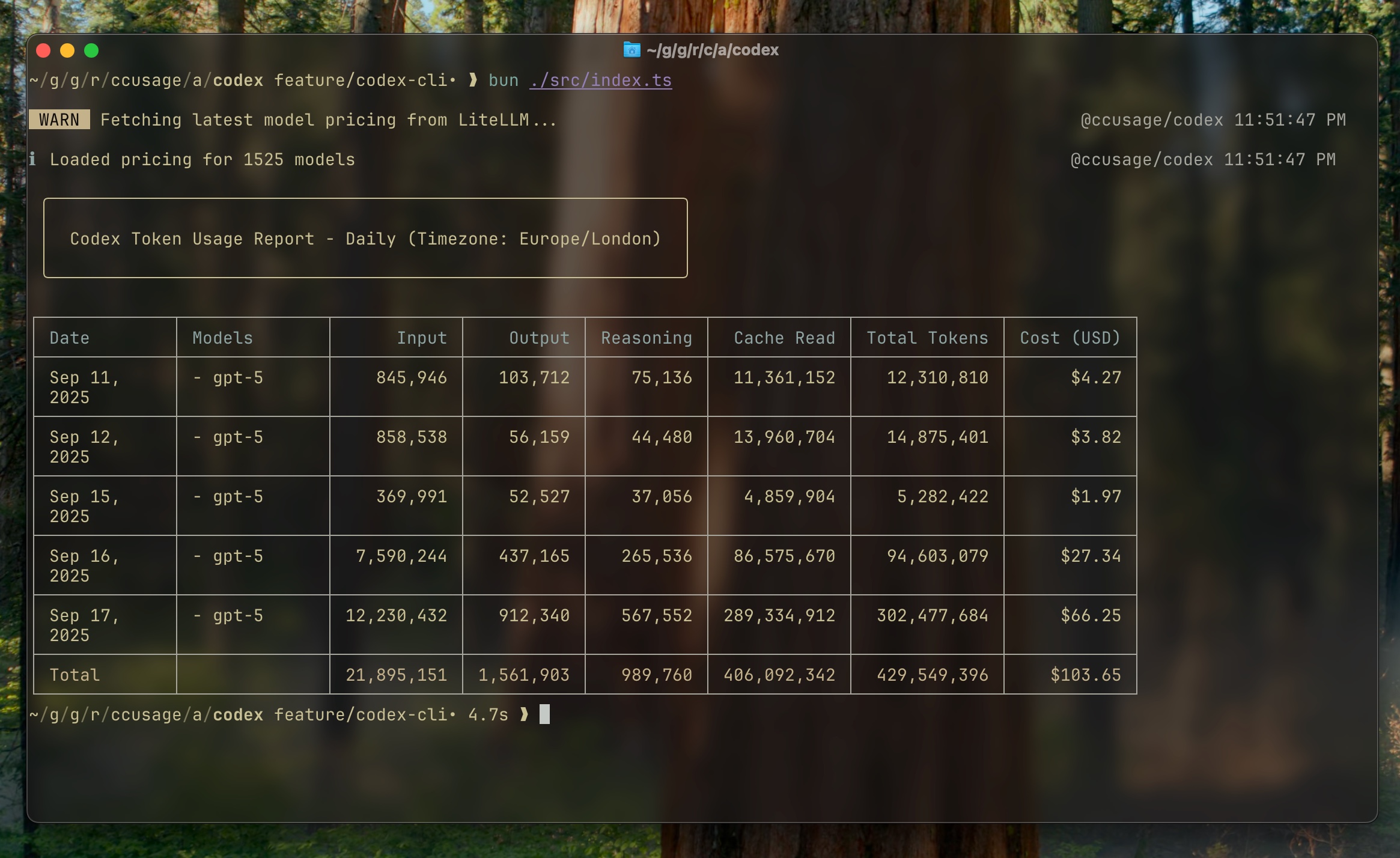
Analyze OpenAI Codex CLI usage logs with the same reporting experience as
ccusage.
⚠️ Beta: The Codex CLI support is experimental. Expect breaking changes until the upstream Codex tooling stabilizes.
# Recommended - always include @latest
npx @ccusage/codex@latest --help
bunx @ccusage/codex@latest --help  # ⚠️ MUST include @latest with bunx

# Alternative package runners
pnpm dlx @ccusage/codex
pnpx @ccusage/codex

# Using deno (with security flags)
deno run -E -R=$HOME/.codex/ -S=homedir -N='raw.githubusercontent.com:443' npm:@ccusage/codex@latest --help
⚠️ Critical for bunx users: Bun 1.2.x's bunx prioritizes binaries matching the package name suffix when given a scoped package. For@ccusage/codex, it looks for acodexbinary in PATH first. If you have an existingcodexcommand installed (e.g., GitHub Copilot's codex), that will be executed instead. Always usebunx @ccusage/codex@latestwith the version tag to force bunx to fetch and run the correct package.
Since npx @ccusage/codex@latest is quite long to type repeatedly, we strongly recommend setting up a shell alias:
# bash/zsh: alias ccusage-codex='bunx @ccusage/codex@latest'
# fish:     alias ccusage-codex 'bunx @ccusage/codex@latest'

# Then simply run:
ccusage-codex daily
ccusage-codex monthly --json
💡 The CLI looks for Codex session JSONL files under
CODEX_HOME(defaults to~/.codex).
# Daily usage grouped by date (default command)
npx @ccusage/codex@latest daily

# Date range filtering
npx @ccusage/codex@latest daily --since 20250911 --until 20250917

# JSON output for scripting
npx @ccusage/codex@latest daily --json

# Monthly usage grouped by month
npx @ccusage/codex@latest monthly

# Monthly JSON report for integrations
npx @ccusage/codex@latest monthly --json

# Session-level detailed report
npx @ccusage/codex@latest sessions
Useful environment variables:
CODEX_HOME– override the root directory that contains Codex session foldersLOG_LEVEL– controla consola log verbosity (0 silent … 5 trace)
ℹ️ The CLI now relies on the model metadata recorded in each turn_context. Sessions emitted during early September 2025 that lack this metadata are skipped to avoid mispricing. Newer builds of the Codex CLI restore the model field, and aliases such as gpt-5-codex automatically resolve to the correct LiteLLM pricing entry.
📦 For legacy JSONL files that never emitted turn_context metadata, the CLI falls back to treating the tokens as gpt-5 so that usage still appears in reports (pricing is therefore approximate for those sessions). In JSON output you will also see "isFallback": true on those model entries.
- 📊 Responsive terminal tables shared with the
ccusageCLI - 💵 Offline-first pricing cache with automatic LiteLLM refresh when needed
- 🤖 Per-model token and cost aggregation, including cached token accounting
- 📅 Daily and monthly rollups with identical CLI options
- 📄 JSON output for further processing or scripting
For detailed guides and examples, visit ccusage.com/guide/codex.
Check out ccusage: The Claude Code cost scorecard that went viral

MIT © @ryoppippi