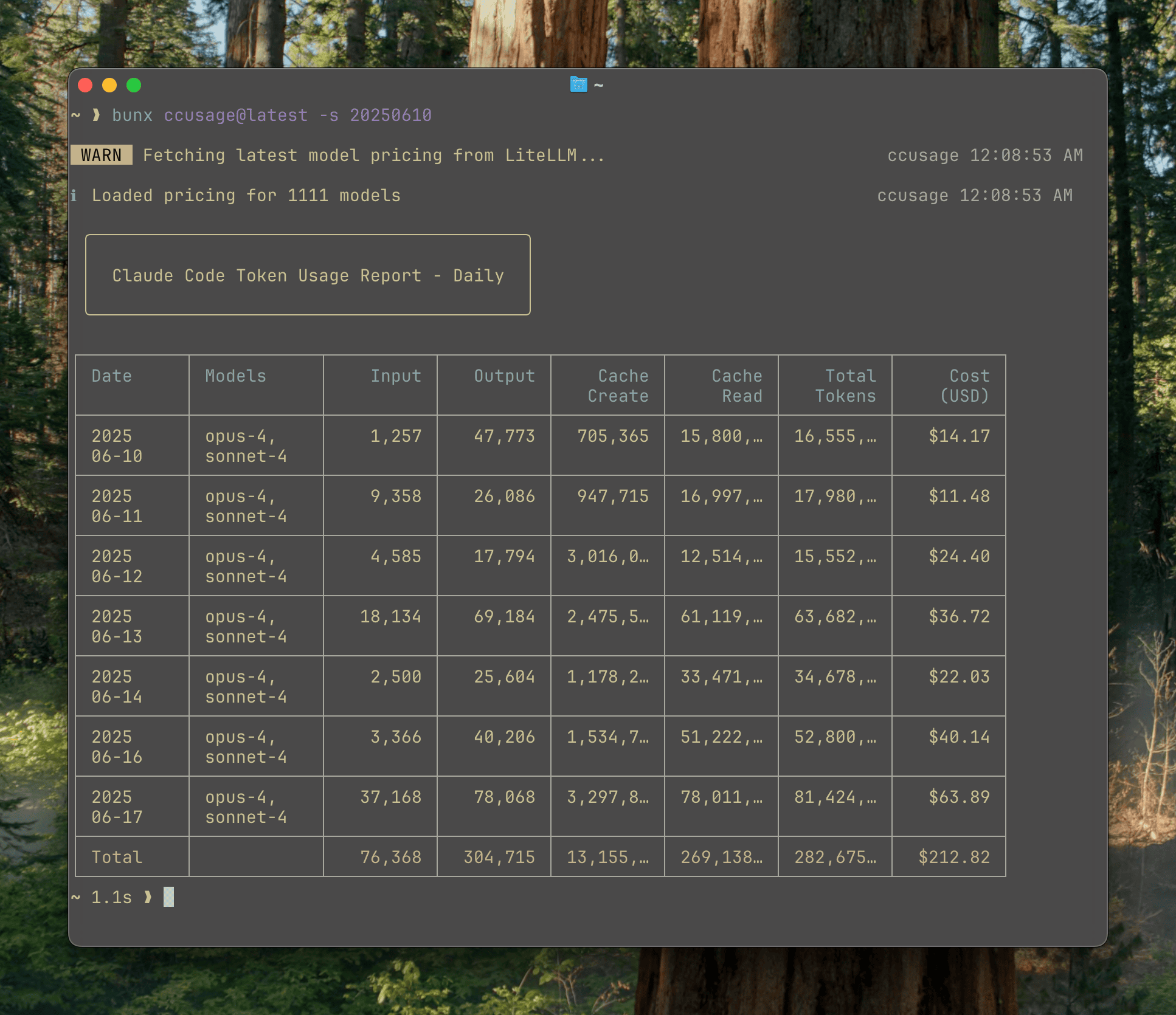
Analyze your Claude Code token usage and costs from local JSONL files — incredibly fast and informative!
This fork adds powerful new capabilities to ccusage:
- Centralized Usage Tracking: Aggregate token usage across multiple machines via our hosted server at
soothaa.pythonanywhere.com - Server Commands: Use
--serverflag with daily/monthly/blocks commands to view aggregated data from all your machines - Automatic Synchronization: Live monitoring automatically syncs data to server every 30 seconds
- Session Expiration: Server automatically archives completed sessions (5-hour blocks) for historical tracking
- Privacy First: Your data is identified only by a random GUID stored in
~/.ccusage-guid
- New
backfillCommand: Upload all your historical usage data to the server - Multi-Machine Aggregation: Combine usage data from different computers
- Progress Tracking: Visual progress bar during upload
- Dry Run Mode: Test what would be uploaded with
--dry-run
- Complete Token Counts: All displays now include cache creation and cache read tokens
- Accurate Monitoring: Live monitoring shows true token usage including massive cache tokens
- Project-Level Breakdown: See token usage broken down by project in live monitoring
- Token Type Details: Detailed breakdown showing Input/Output/Cache Create/Cache Read for each project
- Real-Time Updates: Live dashboard updates every second with current usage
- Burn Rate Projections: See token consumption rate and cost projections
- Multi-Project Support: Track multiple Claude projects simultaneously
- Responsive Display: Automatically adjusts to terminal width
- New
syncCommand: Submit token usage once and exit - perfect for automation - System Services: Ready-to-use service files for automatic synchronization:
- Linux: systemd service + timer for running every 5 minutes
- macOS: launchd plist for background sync on schedule
- Silent Operation:
--quietflag suppresses output for cron/service usage - No Manual Monitoring: Set it and forget it - your usage data syncs automatically
- Beautiful Web UI: Access your usage dashboard at
https://soothaa.pythonanywhere.com/{YOUR_GUID} - Real-Time Statistics: View total tokens, costs, active hosts, and projects
- 7-Day Chart: Visual representation of your token usage over the past week
- Token Breakdown: See Input/Output/Cache Create/Cache Read tokens for each project
- Auto-Refresh: Dashboard updates every 30 seconds with latest data
- Dark Theme: Easy on the eyes with gradient styling
- Mobile Responsive: Works perfectly on all device sizes
Thanks to ccusage's incredibly small bundle size (), you can run it directly without installation:
# Using bunx (recommended for speed)
bunx ccusage

# Using npx
npx ccusage@latest

# Using deno (with security flags)
deno run -E -R=$HOME/.claude/projects/ -S=homedir -N='raw.githubusercontent.com:443' npm:ccusage@latest
💡 Tip: We recommend using
bunxinstead ofnpxfor a massive speed improvement!
Since ccusage has such a small bundle size, installation is entirely optional:
npm install -g ccusageDownload pre-built binaries from Releases:
- Linux x64
- macOS x64
- macOS ARM64
# Basic usage
ccusage          # Show daily report (default)
ccusage daily    # Daily token usage and costs
ccusage monthly  # Monthly aggregated report
ccusage session  # Usage by conversation session
ccusage blocks   # 5-hour billing windows

# Live monitoring
ccusage blocks --live         # Real-time usage dashboard
ccusage blocks-monitor # Continuous monitoring with server syncOur hosted server at soothaa.pythonanywhere.com provides centralized tracking across all your machines.
-
Find your GUID:
cat ~/.ccusage-guid -
Visit your personal dashboard:
https://soothaa.pythonanywhere.com/{YOUR_GUID}
# View aggregated data from all your machines
ccusage daily --server      # Combined daily usage
ccusage monthly --server    # Combined monthly usage
ccusage blocks --server     # Combined billing blocks

# Upload your historical data to the server
ccusage backfill --server
ccusage backfill --server --dry-run  # Preview what would be uploaded
ccusage backfill --server --verbose  # See detailed progress

# Live monitoring with automatic server sync
ccusage blocks-monitor      # Syncs every 30 seconds

# Background sync (NEW!)
ccusage sync               # Submit current usage once and exit
ccusage sync --quiet # Silent mode for cron/servicesSet up automatic synchronization that runs every 5 minutes:
macOS:
# Download and extract the binary
tar -xzf ccusage-macos-arm64.tar.gz

# Run the installer script
./install-macos-service.sh
Linux:
# Install service files
sudo cp system-services/ccusage-sync.* /etc/systemd/user/
systemctl --user enable --now ccusage-sync.timer
See system-services/README.md for detailed instructions.
- Your data is identified only by a random GUID (no personal information)
- The GUID is stored locally in
~/.ccusage-guid - Server URL defaults to
https://soothaa.pythonanywhere.com - Override with:
export CCUSAGE_SERVER_URL=https://your-server.com
# Date filtering
ccusage daily --since 20250525 --until 20250530

# Output formats
ccusage daily --json              # JSON output
ccusage daily --breakdown         # Per-model cost breakdown

# Cost calculation modes
ccusage daily --mode calculate    # Always calculate from tokens
ccusage daily --mode display      # Use pre-calculated costs
ccusage daily --mode auto # Smart mode (default)- 📊 Daily Report: View token usage and costs aggregated by date
- 📅 Monthly Report: View token usage and costs aggregated by month
- 💬 Session Report: View usage grouped by conversation sessions
- ⏰ 5-Hour Blocks Report: Track usage within Claude's billing windows with active block monitoring
- 📈 Live Monitoring: Real-time dashboard showing active session progress, token burn rate, and cost projections
- 🌐 Multi-Host Support: Aggregate usage data across multiple machines via our hosted server
- 🎨 Web Dashboard: Beautiful web UI at
soothaa.pythonanywhere.com/{GUID}with real-time updates - 📤 Historical Backfill: Upload existing local data to server for cross-machine aggregation
- 🔄 Automated Sync: Background synchronization with system service support
- 🤖 Model Tracking: See which Claude models you're using (Opus, Sonnet, etc.)
- 📊 Model Breakdown: View per-model cost breakdown with
--breakdownflag - 📁 Multi-Directory Support: Automatically finds Claude data in both
~/.claudeand~/.config/claude - 🎨 Beautiful Output: Colorful table-formatted display with automatic responsive layout
- 📋 Project-Level Tracking: See token usage broken down by individual projects
- 💰 Cost Tracking: Shows costs in USD for each day/month/session
- 🔄 Cache Token Support: Tracks and displays all token types including cache tokens
- 🌐 Automatic Server Sync: Live monitoring syncs to server every 30 seconds
- 🔌 MCP Integration: Built-in Model Context Protocol server for integration with other tools
- 🚀 Ultra-Small Bundle: Unlike other CLI tools, we pay extreme attention to bundle size - incredibly small even without minification!
Full documentation is available at ccusage.com
Check out these 47 Claude Code ProTips from Greg Baugues.