# Build a Slack app in less than 10 minutes! Welcome to the Slack app tutorial: **PythOnBoardingBot**. This tutorial serves as a walkthrough guide and example of the types of Slack apps you can build with Slack's Python SDK, python-slackclient. We'll cover all the basic steps you'll need to have a fully functioning app. ## What is PythOnBoardingBot? PythOnBoardingBot is designed to greet new users on your team and introduce them to some nifty features in Slack. When a user first joins a team it'll send you a message with the following tasks that you must complete: - Pin a message to the channel. - React to a message. As you complete each task you'll see the message update with a green checkmark. 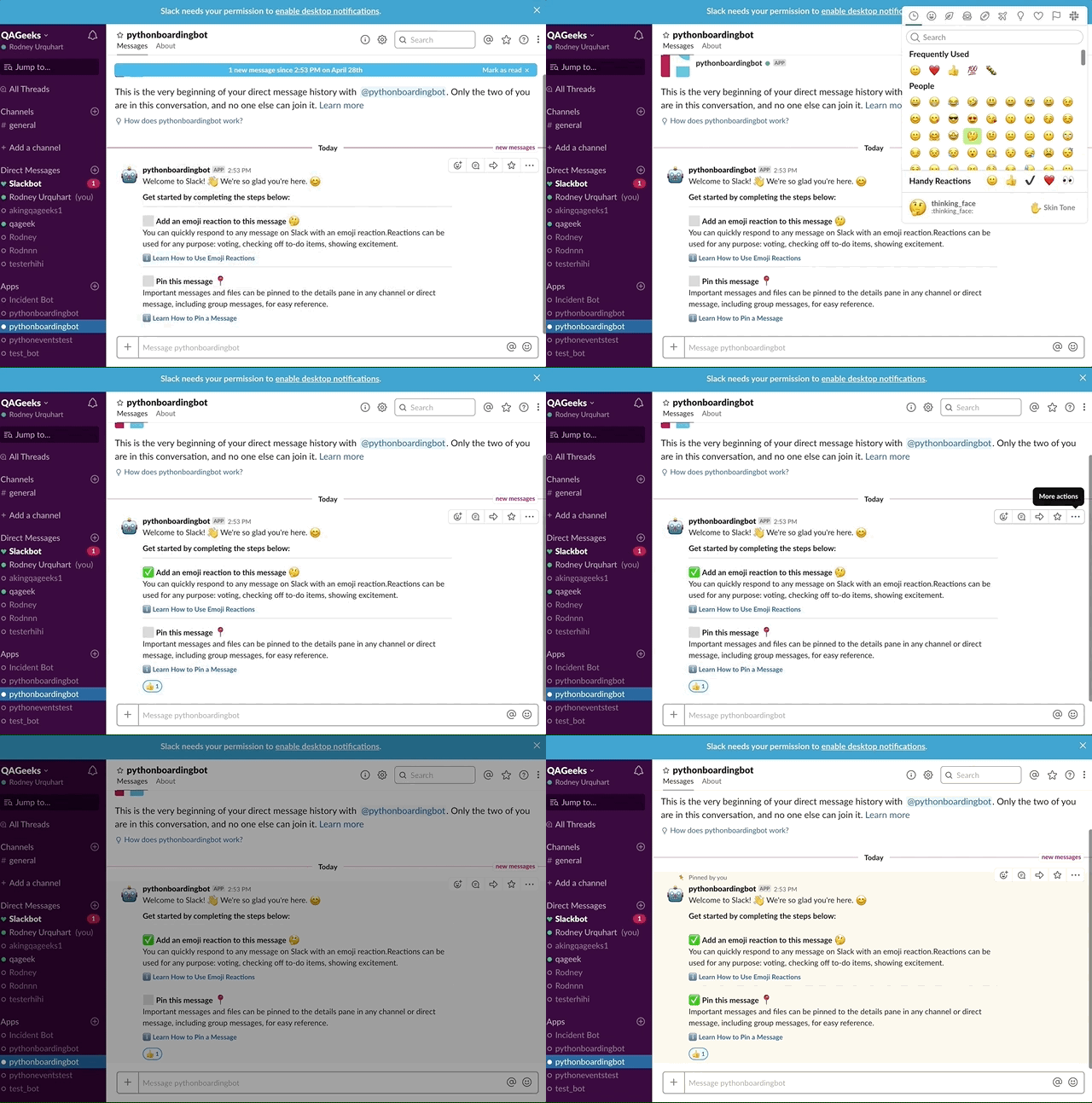 ## What you'll need before you get started: 1. A Slack team. Before anything else you'll need a Slack team. You can [Sign into an existing Slack workspace](https://get.slack.help/hc/en-us/articles/212681477-Sign-in-to-Slack) or you can [create a new Slack workspace](https://get.slack.help/hc/en-us/articles/206845317-Create-a-Slack-workspace) to test your app first. 2. A terminal with Python 3.6+ installed. Check your installation by running the following command in your terminal: ``` $ python3 --version -> Python 3.6.7 ``` You'll need to install Python 3.6 if you receive the following error: ``` -> bash: python3: command not found ``` Note: You should probably use pyenv to install Python 3. See [pyenv](https://github.com/pyenv/pyenv#installation) and [pyenv-install](https://github.com/pyenv/pyenv-installer) for details. Create a new project folder and a virtual environment. ``` $ mkdir PythOnBoardingBot && cd PythOnBoardingBot $ python3 -m venv env/ $ source env/bin/activate ``` 3. A text editor of your choice. Open up your new project folder "PythOnBoardingBot" in your text editor. ## Table of contents - [01 - Creating the Slack app](/tutorial/01-creating-the-slack-app.md) - [02 - Building a message](/tutorial/02-building-a-message.md) - [03 - Responding to Slack events](/tutorial/03-responding-to-slack-events.md) - [04 - Running the app](/tutorial/04-running-the-app.md) ## Coming up next - Add tests to your app. - Add starring a message as an onboarding task. - Run this app on [Glitch](https://glitch.com/). - Creating a Slack "MessageBuilder" object. This would aid in the creation of complex messages. - Running this app from the command line with [`$ click_`](https://click.palletsprojects.com/en/7.x/). - How to run this app on multiple teams. ## Credits This tutorial app was originally built by @karishay . Thank you! :bow: