Currently, there's an issue with both the Table with Inline Edit Row and Table with Inline Edit Column components. I'm assuming the same issue is affecting both of them, so I'm creating a single issue.
Steps to reproduce issue with Inline Edit Row:
- Navigate to the Table with Inline Edit Row component
- Click one of the Edit buttons
Expected results: input fields display in the row and Confirm/Cancel buttons display below the row on the right side.
Actual results: the input fields display, but the Confirm/Cancel buttons don't
Steps to reproduce issue with Inline Edit Column:
- Navigate to the Table with Inline Edit Column component
- Hover over a table cell until you see an edit icon display for one, then click inside that table cell
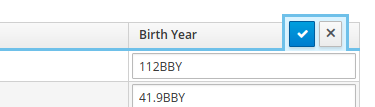
Expected results: The column should display input fields for all table cells, and there should be Confirm and Cancel (see example below—I grabbed this from the original PR).
Actual results: the input fields and Confirm/Cancel buttons don't display
Currently, there's an issue with both the Table with Inline Edit Row and Table with Inline Edit Column components. I'm assuming the same issue is affecting both of them, so I'm creating a single issue.
Steps to reproduce issue with Inline Edit Row:
Expected results: input fields display in the row and Confirm/Cancel buttons display below the row on the right side.
Actual results: the input fields display, but the Confirm/Cancel buttons don't
Steps to reproduce issue with Inline Edit Column:
Expected results: The column should display input fields for all table cells, and there should be Confirm and Cancel (see example below—I grabbed this from the original PR).
Actual results: the input fields and Confirm/Cancel buttons don't display