Repository navigation
Python Language Server uses too much RAM / Memory #2594
Description
Activity
- changed the title
[-]Python Language Server uses wayyyy too much RAM / Memory[/-][+]Python Language Server uses too much RAM / Memory[/+]on Sep 14, 2018 I have the same issue with VS Code version 1.27.2
Cause to VS Code not responding...
Reacted by Brian Blaylock and Alexey IsmailovSame here and unlike #2553, I have jedi disabled.
Reacted by QoTSame here.
I use vscode as git editor and also as mergetool.
My git config:# .gitconfig [core] editor = code --wait [difftool "vscode"] cmd = code --wait --diff $LOCAL $REMOTE keepBackup = false trustExitCode = true [merge] tool = vscode conflictstyle = diff3 [mergetool "vscode"] cmd = code --wait $MERGED keepBackup = false trustExitCode = trueAfter each merge conflict fixed in vscode, the server seems to not release the used RAM.
The python extension is using nearly all my memory on my desktop computer, too. Task Manager says memory is eaten up by
Microsoft.Python.LanguageServerI have same issue on Linux Mint 18.3 with VS Code Version: 1.27.2 and extension 2018.8.0. After some time it uses all the RAM and starts flooding swap.
Reacted by Brian Blaylock and Pablo AguiarFor those of you bumping up against this, a reminder that setting
"python.jediEnabled": truein your settings will switch you back to Jedi and off the language server.Reacted by Pablo Aguiar34 remaining items
David (@hmnd) - it does, it is simply not currently public (i.e. not listed in package.json). There are some development settings that rarely matter to regular users.
Mikhail Arkhipov (@MikhailArkhipov) Looks like ram usage remains incredibly high but it doesn't grow as quickly as before...
Mikhail Arkhipov (@MikhailArkhipov) doesn't help. I'm tried to restart VS Code after added this flag, but now it started to consume all resources again:
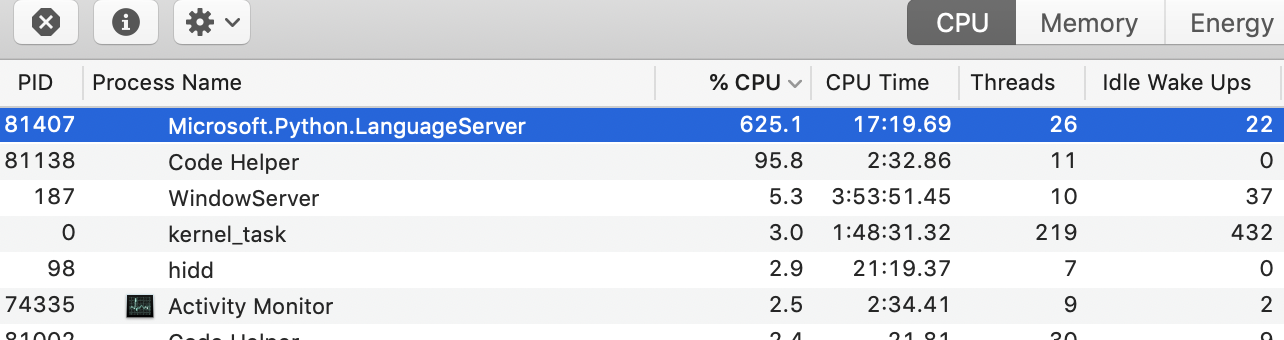
If I kill process I'm getting this error on
Outputtab:[Info - 3:47:40 PM] Connection to server got closed. Server will restart. [Error - 3:47:40 PM] Request textDocument/documentSymbol failed. Error: Connection got disposed. at Object.dispose (/Users/xen/.vscode/extensions/ms-python.python-2018.8.0/node_modules/vscode-jsonrpc/lib/main.js:825:25) at Object.dispose (/Users/xen/.vscode/extensions/ms-python.python-2018.8.0/node_modules/vscode-languageclient/lib/client.js:57:35) at LanguageClient.handleConnectionClosed (/Users/xen/.vscode/extensions/ms-python.python-2018.8.0/node_modules/vscode-languageclient/lib/client.js:2036:42) at LanguageClient.handleConnectionClosed (/Users/xen/.vscode/extensions/ms-python.python-2018.8.0/node_modules/vscode-languageclient/lib/main.js:127:15) at closeHandler (/Users/xen/.vscode/extensions/ms-python.python-2018.8.0/node_modules/vscode-languageclient/lib/client.js:2023:18) at CallbackList.invoke (/Users/xen/.vscode/extensions/ms-python.python-2018.8.0/node_modules/vscode-jsonrpc/lib/events.js:71:39) at Emitter.fire (/Users/xen/.vscode/extensions/ms-python.python-2018.8.0/node_modules/vscode-jsonrpc/lib/events.js:135:36) at closeHandler (/Users/xen/.vscode/extensions/ms-python.python-2018.8.0/node_modules/vscode-jsonrpc/lib/main.js:221:26) at CallbackList.invoke (/Users/xen/.vscode/extensions/ms-python.python-2018.8.0/node_modules/vscode-jsonrpc/lib/events.js:71:39) at Emitter.fire (/Users/xen/.vscode/extensions/ms-python.python-2018.8.0/node_modules/vscode-jsonrpc/lib/events.js:135:36) at StreamMessageReader.AbstractMessageReader.fireClose (/Users/xen/.vscode/extensions/ms-python.python-2018.8.0/node_modules/vscode-jsonrpc/lib/messageReader.js:135:27) at Socket.<anonymous> (/Users/xen/.vscode/extensions/ms-python.python-2018.8.0/node_modules/vscode-jsonrpc/lib/messageReader.js:188:62) at emitOne (events.js:121:20) at Socket.emit (events.js:211:7) at Pipe._handle.close [as _onclose] (net.js:554:12) Initializing for /Users/xen/.local/share/virtualenvs/notify-1dEpo5ac/bin/pythonUpd. In status line also shown spinning arrows circle with text "Analyzing workspace, 14 items remaining..."
Mikhail Arkhipov (@MikhailArkhipov), thanks for your message.
I tried with
"python.analysis.watchSearchPaths": falseas you instructed but the behaviour persists, memory usage keeps increasing.Maybe worth to mention, I'm running with only 8G of RAM and I don't know if memory usage stops increasing at some point because the system runs out of memory if I don't quit VSCode.
This is the output of
grep python ~/.config/Code/User/settings.json:"python.linting.enabled": true, "python.linting.lintOnSave": true, "python.linting.pylintEnabled": false, "python.linting.pylintCategorySeverity.convention": "Hint", "python.linting.pylintCategorySeverity.warning": "Error", "python.analysis.watchSearchPaths": false, "python.linting.flake8Enabled": true,
After re-downloading language server, I see the following in the output panel:
Starting Microsoft Python language server.
Initializing for /.../.pyenv/versions/thefuck-370/bin/python
##########Linting Output - flake8##########
##########Linting Output - flake8##########
[Error - 3:10:43 PM] System.InvalidOperationException: Collection was modified; enumeration operation may not execute.
   at System.Collections.Generic.HashSet`1.Enumerator.MoveNext()
   at System.Linq.Enumerable.SelectEnumerableIterator`2.MoveNext()
   at System.Linq.Enumerable.OfTypeIterator[TResult](IEnumerable source)+MoveNext()
   at System.Collections.Generic.List`1.AddEnumerable(IEnumerable`1 enumerable)
   at System.Collections.Generic.List`1.InsertRange(Int32 index, IEnumerable`1 collection)
   at Microsoft.PythonTools.Analysis.PythonAnalyzer.GetEntriesThatImportModule(String moduleName, Boolean includeUnresolved)
   at Microsoft.Python.LanguageServer.Implementation.Server.OnDocumentChangeProcessingCompleteAsync(IDocument doc, VersionCookie vc, Boolean enqueueForAnalysis, AnalysisPriority priority, IDisposable disposeWhenEnqueued)
I hope this helps. I'm still looking forward to a chance (aka free time) to test the development build, as Brett Cannon (@brettcannon) suggested. I'll do so ASAP.
Thank you all for your time and support! 👍
Most probably roots to
microsoft/python-language-server#193
microsoft/python-language-server#173Same on macOS 10.14 (18A391), VSCode 1.27.2 and vscode-python 2018.8.0. It used 22GB of RAM on my machine xD
Noj Vek (@nojvek) tadly (@tadly) @SynneK1337 Pablo Aguiar (@scorphus) Mikhail Kashkin (@xen) David (@hmnd) Kyra (@heyakyra) Ahter Sonmez (@ahter) Brian Blaylock (@blaylockbk) Jerome Phillot (@JPhillot)
We believe this issue has been resolved.
We just released the latest version of the Python Extension, please update to this new version 2018.9.0 and give it a go.Reacted by Mikhail KashkinLooks like it's fixed for me Don Jayamanne (@DonJayamanne)
Reacted by Don JayamanneI tried and its works. Thank you very much for this changes and for your amazing work.
Reacted by Brian BlaylockThanks. Y’all so 😎.
I’m just curious what the technical issue was that caused such a collosal memory conquest?
Reacted by Brian BlaylockNoj Vek (@nojvek) If I remember correctly it was from the language server constantly re-processing modules as they changed but not freeing the memory from the old analyses.
- locked as resolved and limited conversation to collaborators
on Oct 10, 2018


Environment data
VS Code version: Version 1.27.0 (1.27.0)
Extension version (available under the Extensions sidebar): 2018.8.0
OS and version: Mac Snow Leopard
Python version (& distribution if applicable, e.g. Anaconda): Python2
Honestly there should just be a command that generates this
Actual behavior
Machine crawls to a halt. Using Python's language server using 30GB+ happens after a couple of hours of use.
Expected behavior
Sonic like universe. FAST!
Steps to reproduce: