Repository navigation
Python analysis engine terminated due to stack overflow #2108

Description
Activity
This should be fixed with microsoft/PTVS#4477. If you delete analysis folder, new build will be downloaded.
Doesn't look like it. I removed the analysis folder in the extension and after reloading VS Code it went about and downloaded the Python Language Server again (this is painfully slow by the way).
Starting the analysis engine.
Downloading https://pvsc.blob.core.windows.net/python-analysis/Python-Analysis-VSCode-linux-x64.0.1.0.nupkg... complete.
Verifying download... valid.
Unpacking archive... done.
[Info  - 8:13:33 AM] Created Microsoft.PythonTools.Interpreter.Ast.AstPythonInterpreter instance from Microsoft.PythonTools.Interpreter.Ast.AstPythonInterpreterFactory
##########Linting Output - flake8##########
Initializing for /home/daenney/.local/share/virtualenvs/gimme-IW0Pxo7A/bin/python
Loading files from /home/daenney/Development/personal/gimme
Process is terminating due to StackOverflowException.
[Info  - 8:13:40 AM] Connection to server got closed. Server will restart.
[Info  - 8:13:40 AM] Created Microsoft.PythonTools.Interpreter.Ast.AstPythonInterpreter instance from Microsoft.PythonTools.Interpreter.Ast.AstPythonInterpreterFactory
Initializing for /home/daenney/.local/share/virtualenvs/gimme-IW0Pxo7A/bin/python
Loading files from /home/daenney/Development/personal/gimme
Process is terminating due to StackOverflowException.
[Info  - 8:13:42 AM] Connection to server got closed. Server will restart.
[Info  - 8:13:43 AM] Created Microsoft.PythonTools.Interpreter.Ast.AstPythonInterpreter instance from Microsoft.PythonTools.Interpreter.Ast.AstPythonInterpreterFactory
Initializing for /home/daenney/.local/share/virtualenvs/gimme-IW0Pxo7A/bin/python
Loading files from /home/daenney/Development/personal/gimme
Process is terminating due to StackOverflowException.
[Info  - 8:13:45 AM] Connection to server got closed. Server will restart.
[Info  - 8:13:46 AM] Created Microsoft.PythonTools.Interpreter.Ast.AstPythonInterpreter instance from Microsoft.PythonTools.Interpreter.Ast.AstPythonInterpreterFactory
Initializing for /home/daenney/.local/share/virtualenvs/gimme-IW0Pxo7A/bin/python
Loading files from /home/daenney/Development/personal/gimme
Process is terminating due to StackOverflowException.
[Info  - 8:13:48 AM] Connection to server got closed. Server will restart.
[Info  - 8:13:48 AM] Created Microsoft.PythonTools.Interpreter.Ast.AstPythonInterpreter instance from Microsoft.PythonTools.Interpreter.Ast.AstPythonInterpreterFactory
Initializing for /home/daenney/.local/share/virtualenvs/gimme-IW0Pxo7A/bin/python
Loading files from /home/daenney/Development/,personal/gimme
Process is terminating due to StackOverflowException.
[Error - 8:13:50 AM] Connection to server got closed. Server will not be restarted.
I'm guessing some artifact still needs to get updated?
Daenney (@daenney) if the status bar started downloading the language server again then there isn't any other artifact (at worst you need to restart VS Code).
Any chance you have sample code in your project that triggers this problem which you can share with us?
I am experiencing the same on a large (25k) line python3 file which also has imports of other similarly massive files (and some unresolved imports as well). I could see the rapidly rising memory usage of the language server process until it crashed and is restarted.
Pankaj Pandey (@pankajp) - can you try insider's build?
This was fixed a while ago. Closing.
I still have staackoverflow. Is this a different issue?
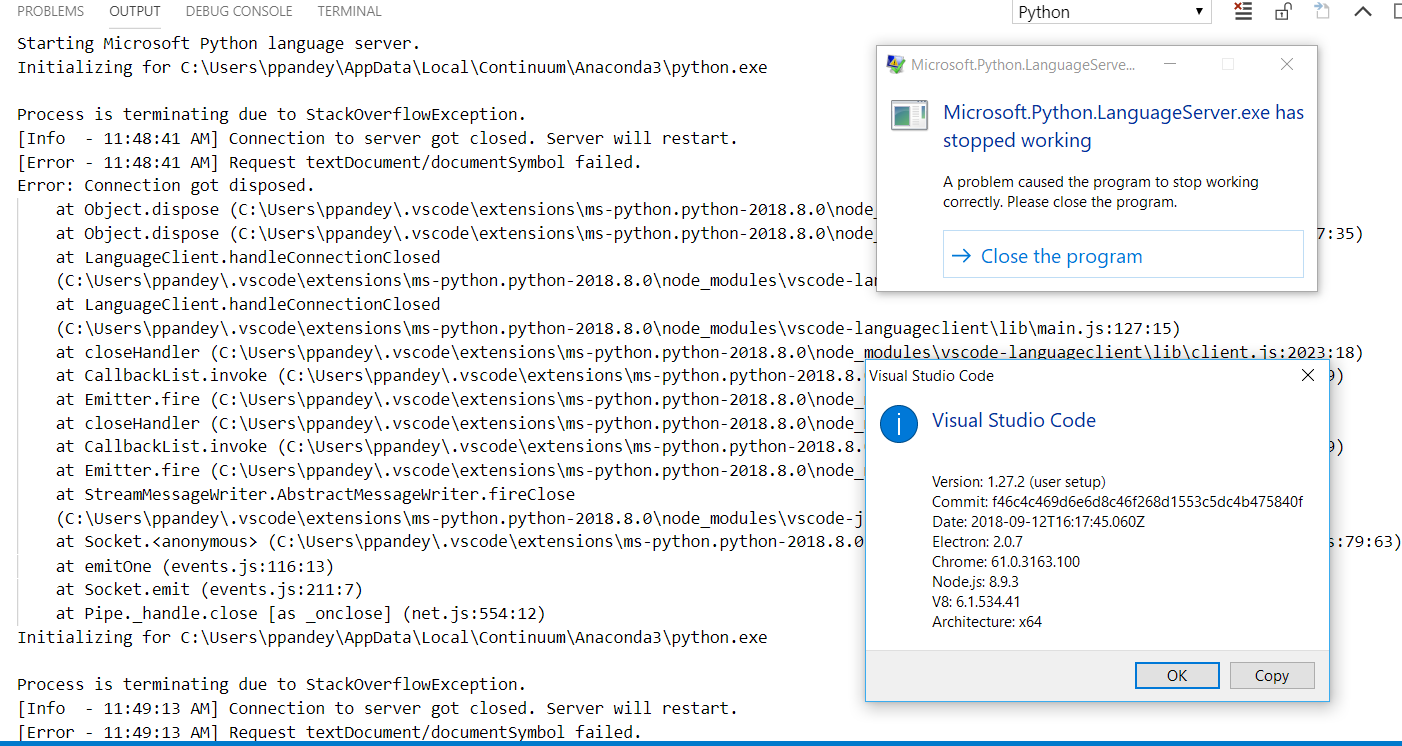
followed by:

Pankaj Pandey (@pankajp) it might be the same. Once our next release comes out if it comes up again then please open a new issue.
- locked as resolved and limited conversation to collaborators
on Oct 23, 2018


Environment data
Actual behavior
Extremely high CPU usage and no completions. Eventually an error is shown by VS Code informing me the server has crashed too many times and won't be restarted.
Expected behavior
Provide working completions while not launching my laptop into orbit.
Steps to reproduce:
Logs
Output for
Pythonin theOutputpanel (View→Output, change the drop-down the upper-right of theOutputpanel toPython)Output from
Consoleunder theDeveloper Toolspanel (toggle Developer Tools on underHelp)