Michael Daw (@michaeldaw) commented on Sat Jan 12 2019
I'm not a python expert, so I hope this is the an appropriate place to comment on this issue.
Environment data
- VS Code version: 1.31.0-insider
- Extension version (available under the Extensions sidebar): 2018.12.1
- OS and version: Windows 10.0.17763.253
- Python version (& distribution if applicable, e.g. Anaconda): 2.7.11
- Type of virtual environment used: Not virtual, but using Python provided by Autodesk Maya
Expected behaviour
When using the Python Language Server for auto-completion, intellisense should be provided for built-in modules (eg: os, json, binascii, etc).
Actual behaviour
Intellisense is not shown for many (but not all) built-in modules. Examples of modules that don't have intellisense are os, json, and collections. Other do show intellisense, like binascii.
Pylint reports "unresolved import" for the 'missing' modules. However, scripts containing these modules run normally.
When using the Jedi auto-completion system, all these modules have the expected intellisesnse.
If scripts
Steps to reproduce:
I'm using Python distributed as part of Autodesk Maya. I've set up "python.pythonPath" and "python.autoComplete.extraPath" so that auto complete is working for my own modules and for the modules provided by Maya.
- Create a python file in VS Code with the line "import os".
- Attempt to us the os module in the file.
- No intellisense appears. Pylint reports the modules as unresolved.
- Switch to Jedi auto-complete. Reload VS Code.
- Intellisense shows up for os module; Pylint no longer reports an error.
Logs
Output window doesn't mention anything other than the initialization message and pylint "rating".
Again, I'm not an expert, but from what I can tell, the Jedi auto-complete comes from modules that are stored in a zip file called python27.zip that resides in the same folder as the python executable (called 'mayapy.exe'). I wonder if the Jedi system is capable of extracting intellisense from modules stored in this archive while the Python Language Server is not.
In the image below, the module binascii has intellisense, but os, json, collections, and gzip were not able to be resolved.

Don Jayamanne (@DonJayamanne) commented on Mon Jan 14 2019
- Please could you ensure Jedi is disabled, then reload VS Code
- Replicate the above issue
- Copy and past the contents of your
Python output panel into this issue.
- Go into the command
View: Toggle Panel
- Select the
Output tab
- From the dropdown select
Python
Michael Daw (@michaeldaw) commented on Wed Jan 16 2019
Don Jayamanne (@DonJayamanne) thanks for getting back to me.
I followed the steps you outlined. The issue I described is now happening again. It doesn't look there is anything pertinent in the Python output log. Here is it's contents:
Starting Microsoft Python language server.
##########Linting Output - pylint##########
Your code has been rated at 10.00/10 (previous run: 10.00/10, +0.00)
Microsoft Python Language Server version 0.1.75.0
Initializing for C:/Program Files/Autodesk/Maya2018/bin/mayapy.exe
##########Linting Output - pylint##########
Your code has been rated at 10.00/10 (previous run: 10.00/10, +0.00)
##########Linting Output - pylint##########
Your code has been rated at 10.00/10 (previous run: 10.00/10, +0.00)

Pylint still shows the imports I mentioned as being unresolved:
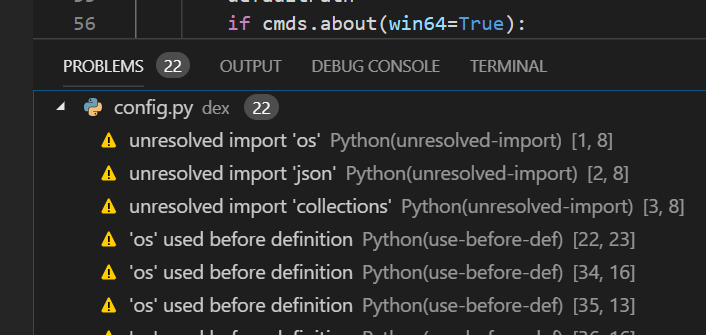
Don Jayamanne (@DonJayamanne) commented on Mon Feb 04 2019
Michael Daw (@michaeldaw) Please could you test this once again with the latest version of the extension. This will ensure you are using the latest version of the Language Server as well.
Michael Daw (@michaeldaw) commented on Mon Feb 04 2019
I'll do so as soon as I can. Thanks.
Michael Daw (@michaeldaw) commented on Tue Feb 05 2019
I'm currently on the latest version. 2019.1.0.
Should I bring this up on the Python Language Server repo?


Michael Daw (@michaeldaw) commented on Sat Jan 12 2019
I'm not a python expert, so I hope this is the an appropriate place to comment on this issue.
Environment data
Expected behaviour
When using the Python Language Server for auto-completion, intellisense should be provided for built-in modules (eg: os, json, binascii, etc).
Actual behaviour
Intellisense is not shown for many (but not all) built-in modules. Examples of modules that don't have intellisense are os, json, and collections. Other do show intellisense, like binascii.
Pylint reports "unresolved import" for the 'missing' modules. However, scripts containing these modules run normally.
When using the Jedi auto-completion system, all these modules have the expected intellisesnse.
If scripts
Steps to reproduce:
I'm using Python distributed as part of Autodesk Maya. I've set up "python.pythonPath" and "python.autoComplete.extraPath" so that auto complete is working for my own modules and for the modules provided by Maya.
Logs
Output window doesn't mention anything other than the initialization message and pylint "rating".
Again, I'm not an expert, but from what I can tell, the Jedi auto-complete comes from modules that are stored in a zip file called python27.zip that resides in the same folder as the python executable (called 'mayapy.exe'). I wonder if the Jedi system is capable of extracting intellisense from modules stored in this archive while the Python Language Server is not.
In the image below, the module binascii has intellisense, but os, json, collections, and gzip were not able to be resolved.
Don Jayamanne (@DonJayamanne) commented on Mon Jan 14 2019
Pythonoutput panel into this issue.View: Toggle PanelOutputtabPythonMichael Daw (@michaeldaw) commented on Wed Jan 16 2019
Don Jayamanne (@DonJayamanne) thanks for getting back to me.
I followed the steps you outlined. The issue I described is now happening again. It doesn't look there is anything pertinent in the Python output log. Here is it's contents:
Starting Microsoft Python language server.
##########Linting Output - pylint##########
Your code has been rated at 10.00/10 (previous run: 10.00/10, +0.00)
Microsoft Python Language Server version 0.1.75.0
Initializing for C:/Program Files/Autodesk/Maya2018/bin/mayapy.exe
##########Linting Output - pylint##########
Your code has been rated at 10.00/10 (previous run: 10.00/10, +0.00)
##########Linting Output - pylint##########
Your code has been rated at 10.00/10 (previous run: 10.00/10, +0.00)

Pylint still shows the imports I mentioned as being unresolved:

Don Jayamanne (@DonJayamanne) commented on Mon Feb 04 2019
Michael Daw (@michaeldaw) Please could you test this once again with the latest version of the extension. This will ensure you are using the latest version of the Language Server as well.
Michael Daw (@michaeldaw) commented on Mon Feb 04 2019
I'll do so as soon as I can. Thanks.
Michael Daw (@michaeldaw) commented on Tue Feb 05 2019
I'm currently on the latest version. 2019.1.0.
Should I bring this up on the Python Language Server repo?