
A fork of M5Stack's StackChan firmware. Three differences from upstream:
- No cloud. The Chinese endpoints (
xiaozhi.me,api.tenclass.net) are gone. The device works with no internet at all. - USB is the network. It enumerates as a CDC-NCM adapter and listens on
192.168.7.1:8081; the host connects to it. Nothing to discover or configure. - A live voice agent — Gemini Live over that link, with the robot's head, face and camera as tools.
Upstream's README follows below.
Hardware: an M5Stack CoreS3 on a Stack-chan servo base. Toolchain: ESP-IDF v5.5.5
— make esp32 looks for it in $IDF_PATH, then ../esp-idf, then ~/esp/esp-idf.
# 0a. One-time: fetch the vendored components and the xiaozhi-esp32 fork. They are
#     gitignored, so a fresh clone has none of them and the build fails without this.
python3 firmware/fetch_repos.py

# 0b. One-time: the Python venv every wasm/ script expects at ./wasm/.venv
#    (pyaudio needs portaudio: `brew install portaudio` on macOS)
python3 -m venv wasm/.venv && wasm/.venv/bin/pip install -r wasm/requirements.txt

# 1. Build and flash. TWO physical button actions are required, both unavoidable:
#    hold RST ~3s until GREEN (download mode) BEFORE flashing, and a SHORT press
#    after. esptool can write flash on its own but cannot start the app -- see
#    firmware/DEBUGGING.md 3. Never hardcode the port; it varies between boots
#    of the same device (cu.usbmodem101 and cu.usbmodem1101 both observed).
cd firmware && source "${IDF_PATH:-$HOME/esp/esp-idf}/export.sh" && idf.py build
cd build && python -m esptool --chip esp32s3 -p "$(ls /dev/cu.usbmodem* | head -1)" \
    -b 460800 --before default_reset --after no_reset write_flash "@flash_args"

# 2. Is it alive?  (safe to poll at any time, even mid-conversation)
curl -s http://192.168.7.1:8081/debug | python3 -m json.tool

# 3. Talk to it
cp .env .env.local && $EDITOR .env.local        # add GEMINI_API_KEY
./wasm/.venv/bin/python wasm/clients/gemini_live.py
Over WiFi instead of the cable, once CONFIG_STACKCHAN_WIFI_ENABLE is set: /debug
reports the address it got as wifi_ip, and every command above works against it —
the server binds INADDR_ANY, so there is no second protocol and nothing to enable.
./wasm/.venv/bin/python wasm/clients/gemini_live.py --host 192.168.1.56Then tap its face for a voice session, or the camera button (bottom-right) for voice + 1 fps video. One client at a time — the device hangs up on the previous one.
If anything misbehaves, read firmware/DEBUGGING.md first. It is the playbook: what each USB PID means, where the logs are, and a symptom-to-cause table for the traps that each cost real flash cycles.
Eleven tools: move and read its head, change its face, take a photo, play a sound, set and list and cancel reminders, report its own battery/volume/brightness/uptime, and adjust volume and brightness. Petting and shaking are reported to the agent, so it can react to being touched. Camera streaming is gated on the device's own voice detection, so a quiet room costs nothing.
AGENT.md |
The constitution. Lives outside this repo and is not published; ARCHITECTURE.md carries the parts you need |
| firmware/DEBUGGING.md | Hardware playbook: PIDs, flashing, log locations, symptom table |
| ARCHITECTURE.md | How the WASM sandbox and the USB transport work |
| firmware/AVATAR.md | How the face is drawn, and how to replace it |
| TESTING.md | Test layout and the QA harness |
| tools/facelab/ | Render the real avatar natively — iterate on the face without flashing |
wasm/clients/gemini_live.py |
The voice agent |
firmware/examples/ |
jingle.py, say.py, deliver_joke.py — worked examples of driving the device |
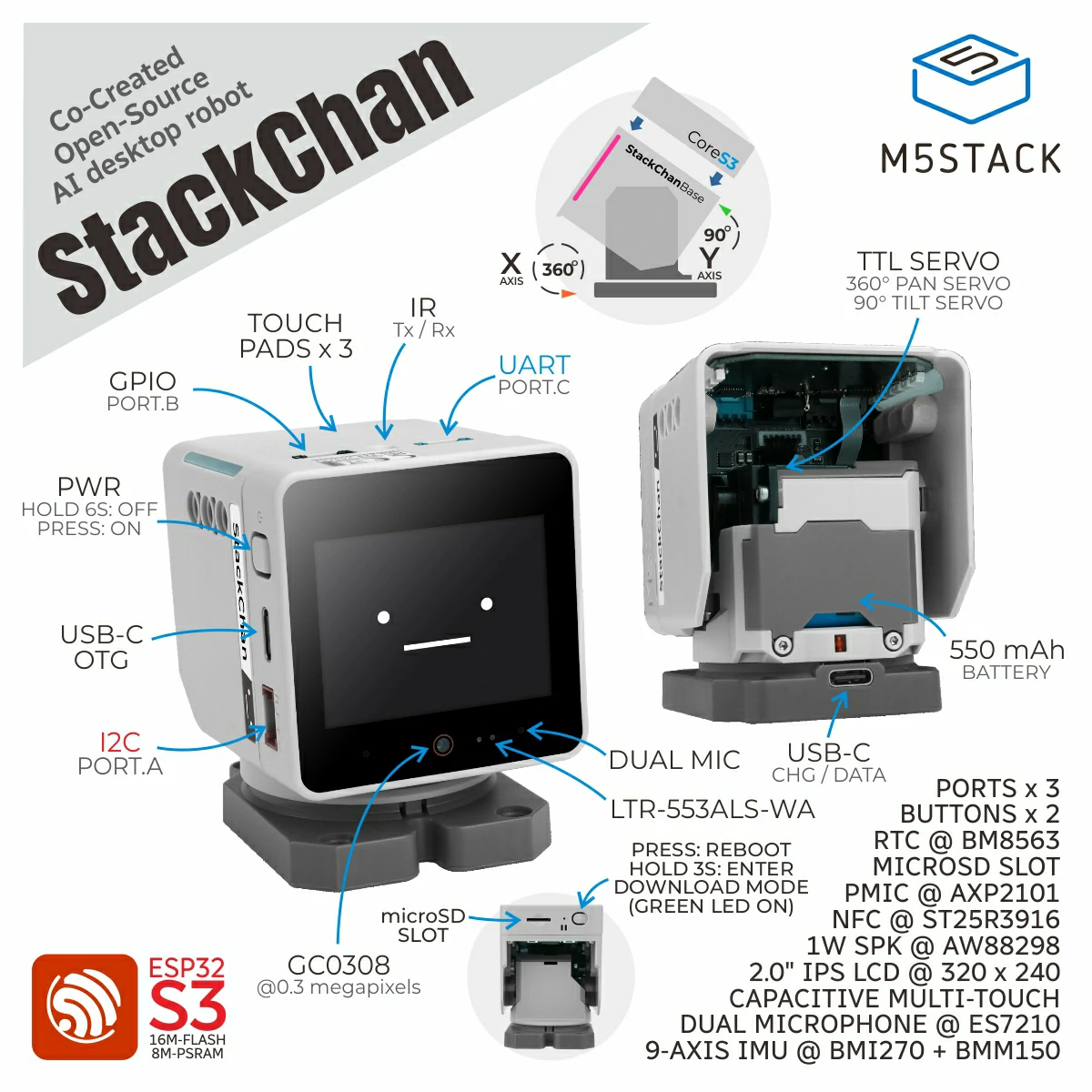
Here are StackChan related open-source resources, including source code of the StackChan firmware, remote controller firmware, mobile app (iOS and Android), and server.
Update of this repo could be a little late than the released firmware and mobile app.

StackChan is a super kawaii AI desktop robot co-created by M5Stack and the user community. It uses the M5Stack flagship IoT development kit CoreS3 as its main controller, powered by an ESP32-S3 SoC featuring a 240 MHz dual-core processor, with 16MB Flash and 8MB PSRAM onboard, and supporting Wi-Fi and BLE. The main unit also integrates a 2.0-inch capacitive touch display with a high-strength glass cover, a 0.3 MP camera, a proximity & ambient light sensor, a 9-axis IMU (accelerometer + gyroscope + magnetometer), a microSD card slot, a 1W speaker, dual microphones, and power/reset buttons.
The robot body, connected to the main unit, includes a USB-C interface for power and data, a 550 mAh battery, two feedback servos (360-degree continuous rotation on the horizontal axis and 90-degree movement on the vertical axis), two rows totaling 12 RGB LEDs, infrared transmitter and receiver, a three-zone touch panel, and a full-featured NFC module.
The factory firmware is feature-rich, including an AI Agent, lively and expressive animations, ESP-NOW wireless remote control, and online app downloads. It can connect to a mobile app for video viewing, remote avatar control, and more, and also supports online updates (OTA). The product also supports programming via Arduino, UiFlow2, and other methods, and can connect to various expansion units in the M5Stack ecosystem, making it easy to implement a wide range of custom functions.
⚠️ Do not forcibly rotate any movable parts connected to the motors by hand when you are unsure whether the motors are powered and under control, as this may cause hardware damage.
-
Purchase link: M5Stack Official Store | 淘宝 Taobao
-
Board support package: https://github.com/m5stack/StackChan-BSP
Thank you to the contributors of the StackChan community, especially:
 |
 |
|---|---|
| @stack_chan | @mongonta555 |
| Shinya Ishikawa | Takao Akaki |