Repository navigation
Option to remove "sourcesContent" from generated source map file? #956
Description
Activity
For correct source map work, it should contain one of two fields:
sourcesContentfield with original source code content.sourcesfield that will be used by the browser to download the original source code for source map remapping.
So, both ways will provide the original source code, and i don't understand how do you want to use it without these fields.
Probably you should disable source map completely
I know. I do not have any problem with
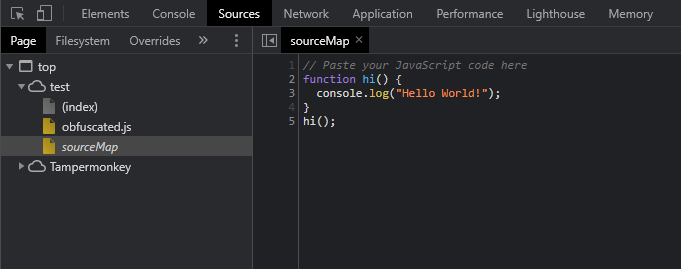
sources. Just want to removesourcesContent.The scenario is that my source file is in separate directory, which I do not upload. The dev tools may suggest me the line number in case of any log or error, which I can view from source file. However as dev tools can not access source file, the browser can not convert obfuscated code to normal code. But with
sourcesContent, the browser does not need source file to convert obfuscated code to normal code. It can just read normal code frommapfile.Hopefully, I am able to explain my scenario.
@umairkhan-dev try to replace all
sourcesContentstrings with random data.Before:
{
  "version": 3,
  "sources": [
    "sourceMap"
  ],
  "names": [
    "hi",
    "console"
  ],
  "mappings": "ohRACA,SAASA,EAAT,E,+05CACEC,OAAA,C,yCAAA,E,mDAAA,C,4yHAEFD,EAAA,G",
  "sourcesContent": [
    "// Paste your JavaScript code here\nfunction hi() {\n  console.log(\"Hello World!\");\n}\nhi();"
  ]
}
After:
{
   "version": 3,
   "sources": [
      "sourceMap"
   ],
   "names": [
      "hi",
      "console"
   ],
   "mappings": "0tFACA,SAASA,EAAT,E,6ngBACEC,OAAA,C,gFAAA,E,sFAAA,C,8tKAEFD,EAAA",
   "sourcesContent": [
      "// uu9p6 se6i kqkxw0eb51 1wfl 3mtz\n3csyckp4 q2() {\n  odmmfs0.71f(\"a2l6u lsx8x!\");\n}\nxl();"
   ]
}
My code:
const randomLetter = () => Math.random().toString(36).substr(2, 1); const map = {...}; // Just copied sourcemap file content map.sourcesContent = map.sourcesContent.map(row => row.replace(/\w/ig, randomLetter));Reacted by Umair KhanI'm not sure the best way to fix this.
Right now all source code is placed into thesourcesContentfield ofsource map.I can add a new option
sourceMapSourcesModewith 2 values:sourcesContent- default, current behaviour. When enabled addssourcesfield with fake source namedsourceMapand addssourcesContentfield with the original source codesources- When enabled - only addssourcesfield with source description of original source code file
Reacted by Umair KhanI can add a new option
sourceMapSourcesModewith 2 values:* `sourcesContent` - default, current behaviour. When enabled adds `sources` field with fake source named `sourceMap` and adds `sourcesContent` field with the original source code * `sources` - When enabled - only adds `sources` field with source description of original source code file@sanex3339 May I suggest:
javascript-obfuscator .source/js --output js --source-map true --source-map-include-sources falsesourceMapIncludeSourcesType:
booleanDefault:true⚠️ This option forcibly enablessourceMapoption.Whether you want to include the contents of source files in the source map as
sourcesContentproperty or not.Okay, I didn't think that you can just remove
sourcesContentfield@da411d Yup, For the time being, I am manually removing / deleting
sourcesContentproperty frommapfile.I personally prefer my variant with
sourceMapSourcesModeoption. Will implement it this week.Reacted by Umair KhanReacted by Umair Khan and Manzhula DavydReleased as
2.17.0.
For CLI use the new option--source-map-sources-mode sources
When using NodeJS API whensourceMapSourcesModeoption hassourcesvalue,inputFileNameoption is requiredReacted by Umair KhanFeel free to ask about the new option here or create a new issue.
Reacted by Umair Khan


Hi, I am obfuscating JS code using javascript-obfuscator CLI with
source mapenabled. The generatedmapfile containssourcesContentwhich in turn contains all the source of obfuscated code. Is there an option to tell javascript-obfuscator not to include source content inmapfile.The CLI command I am using.
Thanks.