



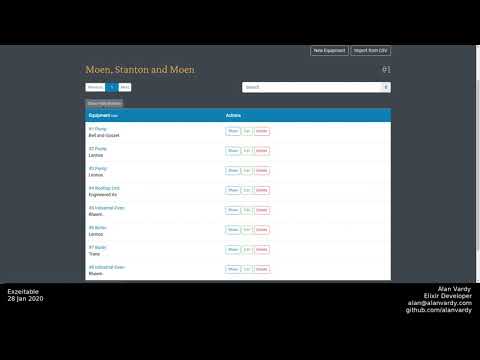
Dynamic searchable, sortable datatable that takes a database query and a module, and makes the magic happen. Uses Phoenix Liveview and Postgres. Bootstrap friendly and easily configured for other CSS frameworks.
Documentation can be found at https://hexdocs.pm/exzeitable.
This package requires a Postgres database and Phoenix.
The package can be installed by adding exzeitable and Phoenix Live View to your list of dependencies in mix.exs:
def deps do
  [
    {:exzeitable, "~> 0.3.2"},
    {:phoenix_live_view, "~> 0.7"},
    {:floki, ">= 0.0.0", only: :test}
  ]
end
Please see Phoenix Live View's installation instructions.
Search requires the pg_trgm extension for Postgres.
Create a new migration
mix ecto.gen.migration add_pg_trgmAnd add the following code to your migration file
  def up do
    execute("CREATE EXTENSION pg_trgm")
  end

  def down do
    execute("DROP EXTENSION pg_trgm")
  end
Then migrate
mix ecto.migrateAdd the boilerplate to a new module.
defmodule YourAppWeb.Live.File do
  @moduledoc "User's File table"
  alias YourAppWeb.Router.Helpers, as: Routes
  import Ecto.Query

  use Exzeitable,
    # Required
    repo: YourApp.Repo,
    routes: Routes,
    path: :file_path,
    action_buttons: [:show, :edit, :custom_button]
    query: from(f in File)
    fields: [
      image: [virtual: true],
      title: [hidden: true],
      description: [hidden: true],
      category: [hidden: true],
      filesize: [hidden: true, function: true, search: false],
      inserted_at: [hidden: true, function: true, label: "Created"],
      updated_at: [hidden: true, function: true, label: "Updated"]
    ],

    # Optional
    debounce: 300

  # The callback that renders your table
  def render(assigns), do: ~L"<%= build_table(assigns) %>"

  # Field functions, called when virtual: true or function: true
  def image(socket, file) do
    img_tag(file.url, class: "w-100")
    |> link(to: Routes.file_path(socket, :show, file))
  end

  # Or heck, lets make another button!
  def super_cool_custom_action(socket, item, csrf_token) do
    link "SUPER AWESOME", to: Routes.super_cool_path(socket, :custom_action, item), "data-confirm": "Are you sure?", csrf_token: csrf_token
  end

  def filesize, do: ...
  def inserted_at, do: ...
  def updated_at, do: ...
Options can be added to either your module (as seen above), or in the template (As seen below) or both.
If an option is defined in both the template option will replace the module option. The only exception is :fields which must be specified in the module.
repoThe module for your repository. Example:YourApp.ReporoutesYour route module. Example:YourAppWeb.Router.HelperspathThe base path for your resource. Example::site_pathqueryA Ecto.Query struct, the part before you give it to the Repo. Example:from(s in Site, preload: [:users
Under the fields key, you can define a keyword list of atoms with keyword values. The map holds the options for that field.
fields