Commit Comments
In the past, maybe 100 years ago, I worked at a company where the diff of each commit was emailed to the developers. If anyone had a comment or question,…
In the past, maybe 100 years ago, I worked at a company where the diff of each commit was emailed to the developers. If anyone had a comment or question, they’d “reply-all” and top-post their remark. Efficient, but oh so messy. Especially as the threads grew.
Enter: commit comments. We saw the Django Book and instantly knew this was the best (and coolest) solution.
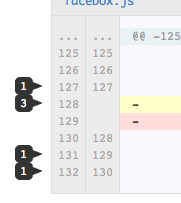
Leave a comment at the bottom of any commit, or on a single line. Up to you. Comments show up in your feed and each repository has its own comment feed.
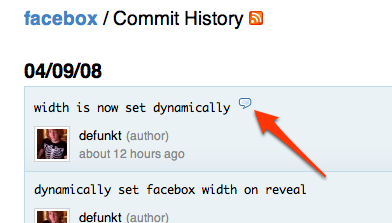
On the commits log or the source browser, commits that have been commented on will be marked with a comment bubble.
Try it on the Facebox commit and have fun.
Written by

Related posts

GitHub availability report: April 2026
In April, we experienced 10 incidents that resulted in degraded performance across GitHub services.

GitHub Copilot individual plans: Introducing flex allotments in Pro and Pro+, and a new Max plan
Starting June 1, our lineup of individual plans will update based on your feedback.

Why age assurance laws matter for developers
Youth safety requirements are moving down the tech stack to operating systems and app stores—raising new questions for open source developers.