
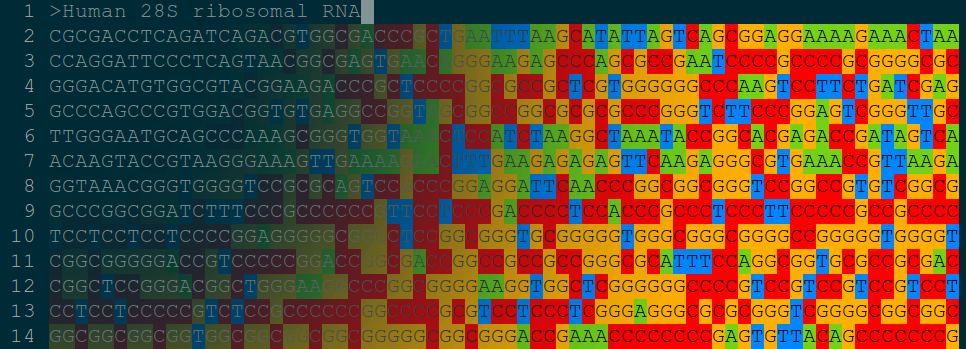
This is the Visual Studio Code support for bioSyntax, which is a syntax highlighting tool for computational biology to bring you intuitively close to your data.
Support in vim, less, sublime3, visual studio code & gedit for .sam, .flagstat, .vcf, .fasta, .fastq, .faidx, .clustal, .pdb, .gtf, .bed files & more.
bioSyntax integrates seamlessly with your text editor, recognizing data-type by the file extension.
To gain the most insight from your data, read our brief bioSyntax Manual.
- Open
Extensions(Ctrl+Shift+Xfor Windows and⇧+⌘+Xfor Mac) - Search
bioSyntax - Click
Install - In most cases, when you open a support file, the theme will be switched to
bioSyntax. However, if it doesn't change, you can manually change your theme tobioSyntax(Ctrl+KCtrl+Tfor Windows and⌘+K⌘+Tfor Mac).
A lot of users mentioned that there's a side effect from bioSyntax for VS Code that it overrides users' choice of themes. Now a new fix is available (see changelog):
-
Locate the settings for bioSyntax by clicking:
- Extensions
- bioSyntax (Manage)
- Extension Settings

-
Change the value of
BioSyntax.nonBioThemeto the name of the theme that you want to use for all other file types (for example,Monokai)
-
Restart VS Code to make the changes effective.


As described here, VS Code currently does not provide direct support for background styling in its themes. But the developers think they might add this feature in the future. So here, I use TypeScript to implement the background highlight for fasta, fastq, clustal and sam files, but there will be a delay when rendering the colors. After the VS Code team provides official support I will update the plugin.
Dev Team: Artem Babaian | Anicet Ebou | Alyssa Fegen | Jeffrey Kam | Gherman Novakovskiy | Li Yao | Jasper Wong
Contact us: info[AT]biosyntax.org
A hackseq17 Initiative.