
-
psuedo-class : A pseudo-class is used to define a special state of an element. For example, it can be used to: Style an element when a user mouses over it. Style visited and unvisited links differently.
Example: hover,link,visited
-
CDN: A content delivery network (CDN) is a group of geographically distributed servers that speed up the delivery of web content by bringing it closer to where users are. Ex: cloudfare
-
Hoisting: JavaScript Hoisting refers to the process whereby the interpreter appears to move the declaration of functions, variables or classes to the top of their scope, prior to execution of the code.
Hoisting allows functions to be safely used in code before they are declared.
- function is hoisted with whole body
- var is hoisted with undefined value
- let and const are hoisted but in a different way >> The variable is said to be in a "temporal dead zone" (TDZ) from the start of the block until the declaration has completed.
- Function expressions and class expressions are not hoisted.
-
Event loop: An event loop is something that pulls stuff out of the queue and places it onto the function execution stack whenever the function stack becomes empty. callbackque--setTimeOut jobQueue -- promise thenables --> executes before callback queue
Event loop checks b/w callstack and queue , if callstack is empty and queue has elements then it pop from queue and push in callstack
-
Event delegation: The idea is that if we have a lot of elements handled in a similar way, then instead of assigning a handler to each of them – we put a single handler on their common ancestor.
-
Event bubbling (by default on event handler) : When an event happens on an element, it first runs the handlers on it, then on its parent, then all the way up on other ancestors.
- event.stopPropagation() stops the move upwards, but on the current element all other handlers will run.
- stopImmediatePropagation() To stop the bubbling and prevent handlers on the current element from running,. After it no other handlers exec
-
Event capturing : Opposite of bubbling. Can be enabled by
elem.addEventListener(..., {capture: true}) -
Closures: A closure is the combination of a function bundled together (enclosed) with references to its surrounding state (the lexical environment). In other words, a closure gives you access to an outer function's scope from an inner function
function makeAdder(x) {
return function(y) {
    return x + y;
};
}

var add5 = makeAdder(5);
console.log(add5(2));  // 7
-
Debouncing: Debounce function limits the execution of a function call and waits for a certain amount of time before running it again.
-
Throttling: Throttling is a technique in which, no matter how many times the user fires the event, the attached function will be executed only once in a given time interval.
-
Currying: Currying is a transformation of a function such it that takes one argument at a time and returns a new function expecting the next argument. It is a conversion of functions from callable as f(a,b,c)into callable as f(a)(b)(c).
-
First Class functions: Functions are treated as values – that you can assign a function into a variable, pass it around etc.
-
Higher Order functions: Functions that work on other functions, meaning that they take one or more functions as an argument and can also return a function.
-
map vs foreach : foreach does not return any value whereas map return new array
-
compose : compose take function and evaluate function where one fn out become input of other fn (right to left)
js const compose = (...fns)=>val=>fns.reduceRight((prev,fn)=>fn(prev),val) -
pipe : evaluate from left to right
js const pipe = (...fns)=>val=>fns.reduce((prev,fn)=>fn(prev),val) -
Promise: The Promise object represents the eventual completion (or failure) of an asynchronous operation and its resulting value.
-
async/await : Syntactical Sugar of Promise which makes promise code cleaner.
-
ECMA : ECMAScript is the standard that JavaScript programming language uses. ECMAScript provides the specification on how JavaScript programming language should work.(TC-39 is the commitee handelling it)
JavaScript ES6 (also known as ECMAScript 2015 or ECMAScript 6) is the newer version of JavaScript that was introduced in 2015.
-
Babel : It is a transpiler which is used to convert ES6+ code to backward comaptible version of js so that it can be used with current and old browser environment.
- It transforms syntax (let a ="xyz") and
- Polyfills to support functionality (like includes)
-
Webpack: Its a Module bundler which is use to bundle all modules in single file> Its main function is to create dependency graph so that it can be injected in proper order
-
Package.json : dependecies and ^ ,~ version:
- ^ : backwards-compatible new functionality also old functionality operational,bug fix Ex: if dependency is 3.4.2 it supports for 3..(means on npm install if 3.5.0 is available then it will update it not 4.0.0)
- **~ :** bug fix Ex: if dependency is 3.4.2 it supports for 3.4.*(means on npm install if 3.4.2 is available then it will update it not 3.5.0)
- Defer vs Async:
- defer:
- download scripts in background> but executes once dom is loaded(but before DOMContentLoaded event),
- if there are more than 1 scripts then execution order is maintained
- defer is ignore if script tag does not have src attribute
- async:
- download scripts in background > but executes immediately
- if there are more than 1 scripts then any script can load first i.e order is not maintained -async is ignore if script tag does not have src attribute
- defer:
-
Resource Hinting:
-
preload – load content that's required for the intial render
-
prefetch - load content that may be needed to render the next page
-
preconnect - establish a server connection without loading a specific resource yet. Handshake with domain is done before hand only.
More Ref: https://nitropack.io/blog/post/resource-hints-performance-optimization
-


-
Eslint: JavaScript, being a dynamic and loosely-typed language, is especially prone to developer error. ESLint is a linter which helps to improve the code quality and fix bugs beforehand itself to avoid it from coming at runtime. It also helps to avoid hard to debug issues in future
ESLint displays warning or error message when: - We use a variable without declaring it - We re-declare the variable - We try to change constant value - We add un-necessary parenthesis - When we use wrong syntax
-
NPM vs NPX:
NPM:- Manages package/ can't run the package directly
- run installed packages via scripts in package.json
- takes space as it install package locally or globally
NPX:
- node package execute
- execute package directly
- can run package without installation remotely / also mentioned in package.json
- save space as it is not installed globally or locally it directly runs it
-
Code splitting(lazy load): Usually webpack bundle all files into one and load into app. Bundle increases as files increases so need to split the bundle and load only when files are needed to improve app performance.
-
Using dynamic import we can do code splitting . Ex: import { add } from './math';
-
React.lazy takes a function that must call a dynamic import(). This must return a Promise which resolves to a module with a default export containing a React component. Ex:
js const Home = React.lazy(() => import("./components/home")); -
We use suspense enclosing lazy component to show some loader or text to UI until the component is loaded Ex:
<Suspense fallback="Loader"><Home></>
- Controlled vs Uncontrolled form input:
-
Uncontrolled: traditional html input>> use to get value using ref (ex in case of form submit) ex:
<input type="text" ref = {this.input}/> -
Controlled : In controlled component the form input element’s values and mutations are totally driven by event handlers and the value of the input element is always inferred from the state. so Ui and data are in sync ex:
<input type="text" value={this.state.name} onchange={this.changeName}/> -
Why they are required?
Unlike other MVC frameworks, React inclines more towards a View Library. That’s why React is more flexible as well as opinionated and provides both a model-view approach with controlled components and an only view approach using uncontrolled components. While other frameworks like Angular or VueJs provide only Model-View two-way binding approach to the same use case, React provides two distinctively flexible solutions. It depends on the use cases about how and where one would use any of those. -
Which one to use when?
- For large app where all inputs are shared across app> controlled
- For small app where no more runtime changes are required> uncontrolled
-
- The lifecycle of an HTML page has three important events:
- DOMContentLoaded –(it waits for scripts before them to load except async and document.createElement('script') ) the browser fully loaded HTML, and the DOM tree is built, but external resources like pictures
<img>and stylesheets may not yet have loaded. - load – not only HTML is loaded, but also all the external resources: images, styles etc.
- unload – the user leaves the page
- onbeforeunload - If a visitor initiated navigation away from the page or tries to close the window, the beforeunload handler asks for additional confirmation.If we cancel the event, the browser may ask the visitor if they are sure.
- DOMContentLoaded –(it waits for scripts before them to load except async and document.createElement('script') ) the browser fully loaded HTML, and the DOM tree is built, but external resources like pictures
-
There are cases when we are not sure whether the document is ready or not. We’d like our function to execute when the DOM is loaded, be it now or later.
The document.readyState property tells us about the current loading state.
There are 3 possible values:
- "loading" – the document is loading.
- "interactive" – the document was fully read.
- "complete" – the document was fully read and all resources (like images) are loaded too.
-
onload : check if element with src attribute is loaded
-
onerror : check if element with src attribute is has some error on loading
-
What is Browserslist?
Browserslist is a tool that allows specifying which browsers should be supported in your frontend app by specifying "queries" in a config file. Usage: By using browserslist, transpilers/bundlers know what browsers you want to support, so they can "group" browsers in different categories and generate separate bundles.Example: 0.2%: All browsers that have at least 0.2% of global market share not dead: Exclude browsers without official support in the last 24 months not ie
<= 11:Exclude IE 11 and older versions not op_mini all: Exclude Opera Mini
-
REDUX ACTIONS: -- They are plan JS objects -- They are synchronous -- Actions tells store that there is a change (Pass packet of information to store)
Ex:
{type:"ADD_CHANGE",payload:data} -
REDUCER: -- Reducer are pure JavaScript functions -- Reducer takes current state and action as input and return new state and then store updates the new state -- Reducers are responsible for particular state in the store -- All reducers are called when an action is dispatched
-
STORE: Provider take store as props and its main function is to provide store to all components
-
REDUX-THUNK: Thunk are functions which are used to delay a functionality -- to make action asynchronous we wrap it by thunk function Ex: Before thunk action creator looks like:
fetchApi(){
  return {type:"ADD_CHANGE",payload:data}
}
After thunk:
fetchApi(){
    return(dispatch)=>{
    dispatch({type:"ADD_CHANGE",payload:data})
    }
}
When an action is dispatched it goes to thunk, thunk sees what action creator has returned , if an object is returned it passes it to store directly, if a function is returned then passes dispatch as a parameter and calls that function
- ALGORITHM:
- MERGE SORT: Divide n conquer ALGORITHM
- find mid
- divide input into two parts first 0 to mid(left) and second mid+1 to length(right)
- sort both and merge again
- repeat process
- mergeSort(left)
- mergeSort(right)
- merge (left,right,orginalArr): check at i index for left and j index for right which is smaller and fill at k index of orginal
- MERGE SORT: Divide n conquer ALGORITHM
- Rest vs Spread operator:
SPREAD: Takes iterable and spread it (ex:
var abc = [1,2,3]>>[...abc]>[1,2,3]) REST: function call if we do not know no. of arguments(ex:func(...args)) // ...args is an array
- Shallow vs Deep copy
- SHALLOW COPY: Copied values still connected to original variable.
- for array> spread operator, Array.from,slice do shallow copy
- for object> Object.assign, spread operator
- Same memory is allocated to copied>> It copies non primitive containing primitives values ex:
now in person object, name is not changed but address will be changedlet person = { "name":"vipul", "address":{ "city":"gkp", } } let copied = Object.assign({},person); copied.name = "test"; copied.address.city="noida"
- DEEP COPY: All copied values are disconnected from original variable
- Json.parse,JSON.stringfy do deep copy
- Different memory is allocated to copied>> It copies non primitive containing non primitive/primitives values ex:
now in person object, nothing will be changedlet person = { "name":"vipul", "address":{ "city":"gkp", } } let copied = JSON.parse(JSON.stringfy(person)); copied.name = "test"; copied.address.city="noida"
- SHALLOW COPY: Copied values still connected to original variable.
-
Pure component
- It implements shouldComponentUpdate with shallow props and state.
- If prev state and props are not changed then component will not re-render
- In class component it can be done by extending React.PureComponent
- In Function component it can be done by wrapping component with React.Memo
- Component lifecycle>(in order which they are called)
-
MOUNTING: When new instance created or inserted in DOM constructor static getDerivedStateFromProps>>if initial state depends on props, cannot use this inside it, return null or object updating state, called on every rerender render componentDidMount
-
UPDATING: When state and props are updated static getDerivedStateFromProps, shouldComponentUpdate(nextState,nextProps)>> tells if component should rerender or not, render getSnapshotBeforeUpdate(prevProps, prevState)>>It enables your component to capture some information from the DOM (e.g. scroll position) before it is potentially changed. componentDidUpdate(prevProps, prevState, snapshot)>> it receive snapshot from above method
-
UNMOUNTING: when component is removed from DOM
- componentwillunmount
-
ERROR: when there is error in component
- static getDerivedStateFromError> show fallback UI in case of error>> return state componentDidCatch>> logs error information
-
- React fragment: It let us group children elements without adding any extra node in DOM >> Ex:
<><h1></h1></>
- ErrorBoundry>
- handle error in constructor,render,lifecycle
- Handle error in production build not on local
- Do not handle error in event handler
- static getDerivedStateFromError or componentDidCatch is used to get error state
- useCallback: It is a hook which return memoized version of function that changes if one of the dependency changes (It caches whole function)[refrential inequality]
- useMemo: It caches the result from the function >> if dependency does not changes it will not change
Common use cases of useMemo:
- When you want to make a slow function wrap inside useMemo so that doesn't re-compute every single time you render your component and it only computed when you acually need the value from that function since the inputs actually change
- Whenever you want to make sure the reference of an object or an array is exactly the same as it was the last time you rendered if none of the internal workings changed,you're gonna want to useMemo here to make sure that you only update the reference of that object whenever the actual contents of the object change instead of updating every single time you render
- Cookies:
- stores info max 4KB
- can be deleted by setting expiry date(document.cookie="name=vipul;expires="+new Date().toString())[accept only UTC date]// max-age can be used which uses time in seconds
- can be send to server on every http request
- use Secure for sending cookes over https(document.cookie="name=vipul;Secure")
- use HttpOnly when you do not want client to update the cookie (document.cookie="name=vipul;HttpOnly")
- path="/" make cookie accessible to provided path only
- Prototypal inheritance:
- In JavaScript, objects have a special hidden property [[Prototype]] that is either null or references another object. That object is called “a prototype”.
- When we read a property from object, and it’s missing, JavaScript automatically takes it from the prototype.
- there can be only one _proto
- we can read proto but cannot update
-
Object.defineProperty(object,value or symbol, descriptor)
- Descriptor are value, enumerable, writable,configurable
- By default enumerable, writable,configurable are false
- data descriptor : value, writable, enumerable, configurable
- accessor descriptor: get , set
- It cannot be both data descriptor and accessor descriptor
-
An enumerable property in JavaScript means that a property can be viewed if it is iterated using the for…in loop or Object.keys() method. All the properties which are created by simple assignment or property initializer are enumerable by default. Ex:
const student = {
    registration: '12342',
    name: 'Sandeep',
    age: 27,
};


// This sets the enumerable attribute
// of marks property to false

Object.defineProperty(student, 'marks', {
    value: 98,
    configurable: true,
    writable: false,
    enumerable: false,
});

console.log(student.propertyIsEnumerable('marks')); returns false;

// for Symbol.for("e") > Will not be visible in foreach n loop

for (const key in student){
    console.log(key)
} // registration name age>>>>>>>. marks will not be displayed as enumerable is set to false
-
The configurable attribute controls whether the property can be deleted from the object and whether its attributes (other than value and writable) can be changed.
-
When the writable property attribute is false, the property is said to be "non-writable". It cannot be reassigned.
-
The Object.freeze() static method freezes an object. Freezing an object prevents extensions and makes existing properties non-writable and non-configurable.
-
The Object.seal() static method seals an object. Sealing an object prevents extensions and makes existing properties non-configurable. Values of existing properties can still be changed as long as they are writable.
-
useDeferredValue(): this is useful when React needs to keep the old state value in the UI by applying the necessary UI changes while the new state value is being processed and then ready to be added to the UI. It is different than debounce and throttling as: - It can be interuptable unlike debounce and throttling which uses timeout - It can be executed quickly also based on the system unlike debounce and throttling which uses proper delay time
-
useTransition: It markes priority to code , the code in startTransiton is depriotized. Ex: In typehead, searching text UI is priority and calling API n displaying result is not priority
- A polyfill is a browser fallback, made in JavaScript, that allows functionality you expect to work in modern browsers to work in older browsers
- Different type of dependecies package.json
- dependencies: All of the dependencies your project uses (the external code that the project relies on) are listed here
- devDependencies: Packages which are only needed during development, and aren't needed in production.
- peer dependecies: peerDependencies are for plugins, libraries that require a "host" library to perform their function, but may have been written at a time before the latest version of the host was released.
-
this: value of this always depends on how it is called; this keyword simply points to an object to which it is bound.
- The this keyword, when used in a function, binds that function to a context object
- There are four kinds of bindings:
- default binding: global or window
- implicit binding: call by .
- explicit binding: call,apply and bind
- constructor call binding: object created with new are are bound to this
Ex:
let obj = {
    functionA(){
        console.log(this);
    }

    functionB(){
        functionC(){
            console.log(this)
        }
        return functionC();
    }
}
-
obj.functionA()------- will give ans as obj object as it is called by obj itself; let test = obj.functionA;test();--------- will global object as it is called directly -
obj.functionB();--------- will global object as it is called directly
If we create object using new keyword then it always points to that object; ex:
function funcA(){
    return this;
}

var myfun = new funcA();
console.log(myfun) // returns function funcA(){}-
Arrow vs Normal function:
- Arrow function are not hoisted;
- this is binded by previously value of this: Ex:
const obj = {
    someMethod: () => {
        return this;
    }
}

let test = obj.someMethod;
console.log(test()) // points to global (as this means window object)
console.log(obj) // points to global(as this means window object)
-
es6 features
- Let & Const
- Arrow function
- Template liteteral >
My name is ${firstName} ${lastName} - Default parameter > function(height = 100, width = 50)
- Object literal
- Rest & spread operators
- Destructing Assignment > let {name, age} = person;
- Class, Module, Promises, Iterators e.t.c
- INLINE VS BLOCK vs INLINE-BLOCK:
-
Inline elements consume only the 𝗿𝗲𝗾𝘂𝗶𝗿𝗲𝗱 𝘄𝗶𝗱𝘁𝗵 and 𝗱𝗼 𝗻𝗼𝘁 𝗵𝗮𝘃𝗲 𝘁𝗼𝗽 𝗮𝗻𝗱 𝗯𝗼𝘁𝘁𝗼𝗺 𝗺𝗮𝗿𝗴𝗶𝗻𝘀. Thus, these elements 𝗱𝗼 𝗻𝗼𝘁 𝘀𝘁𝗮𝗿𝘁 𝗳𝗿𝗼𝗺 𝗮 𝗻𝗲𝘄 𝗹𝗶𝗻𝗲. 𝗘𝘅𝗮𝗺𝗽𝗹𝗲𝘀 -
<𝙨𝙥𝙖𝙣>, <𝙖>, <𝙡𝙖𝙗𝙚𝙡>, <𝙗𝙧> -
Block elements consume the 𝗳𝘂𝗹𝗹 𝗮𝘃𝗮𝗶𝗹𝗮𝗯𝗹𝗲 𝘄𝗶𝗱𝘁𝗵 and 𝗵𝗮𝘃𝗲 𝘁𝗼𝗽 𝗮𝗻𝗱 𝗯𝗼𝘁𝘁𝗼𝗺 𝗺𝗮𝗿𝗴𝗶𝗻𝘀. Since top and bottom margins are present, block elements always start from a 𝗻𝗲𝘄 𝗹𝗶𝗻𝗲. 𝗘𝘅𝗮𝗺𝗽𝗹𝗲𝘀 -
<𝙙𝙞𝙫>, <𝙥>, <𝙝𝙚𝙖𝙙𝙚𝙧>, <𝙛𝙤𝙤𝙩𝙚𝙧> -
Inline Block can have margin padding height and will always be in same line
-
-
Thunk vs Saga :
-
Thunk:
- Less boilerplate code.
- Easy to understand as compared to redux-saga
- Action creators may hold too much async logic
- uses callbacks which may lead to situations like‘callback hell’ in some cases.
-
Saga:
- More boilerplate code
- Difficult to understand as there are multiple concepts to learn like generator
- Action creators stay pure
- Saga works like a separate thread or a background process that is solely responsible for making your side effects or API calls unlike redux-thunk
-
- DOM vs Virtual DOM vs Shadow DOM vs BOM
-
DOM:
- DOM is an API for HTML or XML documents and it creates a logical structure which can be accessed and manipulated.
- It is an object-based representation of the HTML elements.
- The browser converts the code into a tree-like structure that is made into javascript and compiled by the HTML and CSS compilers.
-
Virtual DOM:
- Virtual DOM, in simple terms, is nothing but the complete and full representation of an actual DOM.
- Since any changes to the DOM causes the page to re-render more often than not, Virtual DOM primarily attempts to avoid any unnecessary and expensive changes to the DOM.
- This is achieved by grouping changes and doing a single re-render instead of several small ones.
- A copy of the DOM is saved in the memory and is used to compare any changes being done anywhere in the DOM, it’s compared to find differences. Thus, only those parts of the application are re-rendered which are updated instead of re-rendering the entire DOM.
- VueJS and ReactJS both use Virtual DOM.
-
Shadow DOM:
-
Shadow DOM, on the other hand, relates mostly to the concept of encapsulation. It is a tool that allows developers to overcome DOM encapsulation.
-
It refers to the browser’s potential to add a subtree of DOM elements into the rendering of a document, but not into the DOM tree of the main document.
-
Thus, it isolates the DOM and ensures that the DOM of a component is a separate element that won’t appear in a global DOM. ex:
this.attachShadow({mode: 'open'});-- open means you can manipulate shadow domExample:
element.shadowRoot
-
-
BOM: Browser object model The BOM consists of the objects navigator, history, screen, location and document which are children of window
-
-
CSS position:
- STATIC (default): normal flow>> cannot change top bottom left right;
- RELATIVE: remain in normal document flow >> almost same as static but can change top bottom left right. Changes position respect to its original position.
- ABSOLUTE : remove from normal document flow >> by default if we give top bottom left right it will be as per body, if parent position is set to other than static then absolute then top bottom left right it will be as per the parent.
- FIXED: remove from normal document flow >>by default if we give top bottom left right it will be always as per HTML. If we scroll then also its postion is fixed
- STICKY: almost same as relative but if we scroll it and as per top bottom left right it becomes fixed.
- pixel: fixed width as given
- % : relative to parent
- vh/vw: relative to screen present
- rem : relative to root font size
- em: relative to parent font size
- boxsizing: (default: content-box)
border-box: Include padding and border in the element's total width and height
-
DOM MANIPULATION:
- .append() : append element as well as string
- .appendChild() : append only element
- .innerText : only display text visible in UI
- .textContent : display whole text on the element(irrespective if display none or block) with space as wee see in dom but surrounding invisible tags
Reference: https://builtin.com/software-engineering-perspectives/innerhtml-vs-innertext
-
add data-test1-test2 attribute in element then we can get it by element.dataset.test1Test2 (it removes "data-" part and convert rest to camelCase)
- useRef: Persist value b/w renders, do not render on value change and also can be used with DOM manipulation
-
Resize Observer: It reacts to changes in size of any of the observed elements, independent of what caused the change. It provides access to the new size of the observed elements too.
var element = document.getElementbyId("test");
var ro = new ResizeObserver(entries => {
    for (let entry of entries) {
    const cr = entry.contentRect;
    console.log('Element:', entry.target);
    console.log(`Element size: ${cr.width}px x ${cr.height}px`);
    console.log(`Element padding: ${cr.top}px ; ${cr.left}px`);
}
});
ro.observe(element);
-
Intersection observer: An Intersection Observer is a browser API that provides a way to observe the visibility and position of a DOM element relative to the containing root element or view
var element = document.getElementbyId("test");
var ro = new IntersectionObserver(entries => {
    for (let entry of entries) {
    const cr =  entry.isIntersecting; // this tells that element is visible or not
    console.log('Element:', entry.target);
}
});
ro.observe(element);
Usage:
- Lazy loading
- Infinite Scrolling
- visibility
-
MutationObserver: The MutationObserver interface provides the ability to watch for changes being made to the DOM tree.
- Observe childlist
- Observe attibutes
- Observes text inside element
- Can observe more element by setting subtree=1
-
useState vs useReducer: useState uses useReducer underhood...so we can use useReducer inplace of useState any time;
-
useReducer takes reducer fn and initial state and returns new state and dispatch ex:
const [state,dispatch] = useReducer(reducerFn,initialState)and reducerFn takes current state and action and return new state
- Pure Functions:
- For the same input return same output
- It depends only on input and not any external value;
- input should be immutable
- It cannot change any external value
CSR VS SSR
-
Client side rendering -- user requests a website -> server sends HTML file with JavaScript link -> Browser downloads HTML -> Browser downloads CSS and JavaScript -> Browser executes framework / library -> browser loads the website.
-
Server side rendering -- user requests a website -> server sends ready HTML files -> Browser renders HTML but it's not interactive Browser downloads JS -> Browser executes JS -> Website is fully interactive.
Pros and Cons of SSR
- Enables pages to load faster which improves user experience.
- Improved SEO
- Ideal for sites which serves only static content
- Less / no JS dependency
- Optimal when user has slow internet connection
- Bottlenecking is one of the disadvantages of SSR. When the server has a lot of visitors or the site is large, it can create substantial slowdowns while the page gets rendered.
- reloads entire page upon every single navigation
- Server costs will be high to provide higher performance
- HTML is downloaded everytime user visits new page
Pros and Cons of CSR
- Renders faster after initial page load
- Places lesser load on server
- Rich site interaction
- Offers quick navigation in the website
-
Slower initial page load
-
hinders SEO if it's not properly implemented
-
Relies on external libraries and framework
-
Pre Rendering There are two forms of pre-rendering: Static Generation and Server-side Rendering. The difference is in when it generates the HTML for a page. Static Generation is the pre-rendering method that generates the HTML at build time(stores at CDN). The pre-rendered HTML is then reused on each request. Server-side Rendering is the pre-rendering method that generates the HTML on each request.
- getBoundingClientRect: The getBoundingClientRect() method returns the size of an element and its position relative to the viewport. It returns left, top, right, bottom, x, y, width, height.
- forwardRef: React forwardRef is a method that allows parent components pass down (i.e., “forward”) refs to their children
- webAPI APIs that are built into the browser and provide native features that can also be used in a web app. Provide an interface for websites and client applications to have data access.
- Doctype:
The
<!DOCTYPE html>(syntax for HTML5) declaration is used to inform a website visitor's browser that the document being rendered is an HTML document
- Semantic tags:
Semantic HTML or semantic markup is HTML that introduces meaning to the web page rather than just presentation.
Ex:
<header><footer><main><nav>
-
Security attacks on frontend:
-
Clickjacking: Clickjacking, also known as a “UI redress attack”, is when an attacker uses multiple transparent or opaque layers to trick a user into clicking on a button or link on another page when they were intending to click on the top level page.
Prevention:- X-Frame-Options HTTP header with value same origin
- "Content-Security-Policy", "frame-ancestors 'self';"
-
Cross Site Scripting (XSS): XSS attacks occur when an attacker uses a web application to send malicious code, generally in the form of a browser side script, to a different end user
Prevention: To prevent this attack in pure JS, let’s write a custom function that looks out for special characters such as'<' , '>' and '&'
String.prototype.escape = function() { var tagsToReplace = { '&': '&', '<': '<', '>': '>' }; return this.replace(/[&<>]/g, function(tag) { return tagsToReplace[tag] || tag; }); };
- Cross Site Request Forgery (CSRF):
Cross-Site Request Forgery (CSRF) is an attack that forces an end user to execute unwanted actions on a web application in which they’re currently authenticated.
With a little help of social engineering (such as sending a link via email or chat), an attacker may trick the users of a web application into executing actions of the attacker’s choosing.
Prevention: - Random Tokens
- Same site in cookies
-
-
Portals Portals provide a first-class way to render children into a DOM node that exists outside the DOM hierarchy of the parent component.
ReactDOM.createPortal(child, container)
-
Generators: Regular functions return only one, single value (or nothing).
Generators can return (“yield”) multiple values, one after another, on-demand. They work great with iterables, allowing to create data streams with ease.
Ex:
function* generateSequence() {
yield 1;
yield 2;
return 3;
}

// "generator function" creates "generator object"
let generator = generateSequence();
console.log(generator.next()) // // {value: 1, done: false}
console.log(generator.next()) // // {value: 2, done: false}
console.log(generator.next()) // // {value: 3, done: false}
console.log(generator.next()) // // {value: undefined, done: true}
-
PropTypes: PropTypes are a mechanism to ensure that components use the correct data type and pass the right data, and that components use the right type of props, and that receiving components receive the right type of props.
Ex:
classOrFunctionName.propTypes = {
name: PropTypes.string
};
Synthetic Event: The synthetic event is a cross-browser wrapper of the browser's native event.
Handling events with react have some syntactic differences from handling events on DOM. These are:
- React events are named as camelCase instead of lowercase.
- With JSX, a function is passed as the event handler instead of a string.
Event declaration in plain HTML:
<button onclick="showMessage()">
       Hello JavaTpoint
</button>
Event declaration in React:
 <button onClick={showMessage}>
      Hello JavaTpoint
</button>- In react, we cannot return false to prevent the default behavior. We must call preventDefault event explicitly to prevent the default behavior.
-
CSS Specifity: If one element have different attributes and have different values for them they work as:
-
inline> id> class> tag
```html <div id="id", class="class" style="color:black"> Hi</div> ```- 0 1 0 0 >> order of specificity
    color: red
} ```

- 0 0 1 0 >> order of specificity
.class{
    color: green
}

- 0 0 0 1 >> order of specificity
div{
    color: blue
}

- for inline it is 1 0 0 0 >> order of specificity

- if we do h1.header then 0 0 1 1 >> order of specificity then "Hi" will be displayed in black color bcz of specificity of CSS
but if we use !important with any property then it will override all properties
- Why reducers are pure function?
-
Redux takes a given state (object) and passes it to each reducer in a loop. And it expects a brand new object from the reducer if there are any changes. And it also expects to get the old object back if there are no changes.
-
Redux simply checks whether the old object is the same as the new object by comparing the memory locations of the two objects. So if you mutate the old object’s property inside a reducer, the “new state” and the “old state” will both point to the same object. Hence Redux thinks nothing has changed! So this won’t work.
-
-
Weakest set and weakest map:
Normally js can store object as a key but only one time. ex:
let a ={}
let b = {num:2}

let c = {}
c[a] = "a";
c[b] = "b";

so console.log(c) // will print only b obj...it remembers only last obj.
-
So Map was introduced to store multiple object as a key
let mapval = new Map();
mapval.set(a);
mapval.set(b)
But in this the object set as key are not garbage collected so we use weakmap;
-
Set can store any primitive value but weakset can only store objects these are also usedd to garbage collect object
-
Rendering concept: https://prateeksurana.me/blog/future-of-rendering-in-react/
- Feature detection is trying to verify if a feature exists. For example, if the user’s browser supports the geolocation APIs. EX: if(navigator.geolocation){}
- Feature inference is if A exists we can assume B will exist too. Ex: If navigator.geolocation exists then assume it is a modern browser or it has local storage
- UA String is the string that helps you identify which browser is used by the user. Ex: navigator.userAgent
-
Attribute vs property:
Attribute:
- It is for html
- Ex:
<input id="test"/>// here id is an attribute - Not case sensitive
- on changing attribute, property changes
- it only have string values
Property:
- It is for DOM
- Ex: input.id // here id is property
- case sensitive
- on changing property, attribute does not changes
- it can have string, object,etc like in input.style
data- attribute is changed into dataset property Ex:
<input data-test/>is changed to dataset.Test
-
Core Web Vitals:
- Loading performance – It shows how fast content appears on the screen.
- Responsiveness – It shows how fast a page responds to user input.
- Visual stability – It relates to whether the content on a page moves around on the screen while loading.
LCP(Largest contentful Paint): Time to load largest element on Above the fold content of the page.
- Largest means in terms of element size not file size
- It works per page
- Good if time < 2.5s
How to improve LCP:
- Use CDN
- try not to use slideshow and large images
- try to load font with font-display: swap
- use defer/async for scripts
- html,js,css minify
- preloading resources
Time to First Byte (TTFB): Time when user make an http request and recieve first data byte from server.
Time to Interactive (TTI): Measure of the time when page starts loading to page become interactive
First Input Delay (FID): It is a measure of time when user interact with application and browser process that event Ex: link click, button click etc good if time is
<100msCumulative Layout Shift (CLS):
- It measure the layout such that if user is going to click on something and page layout changes
- good if value is < 0.1
How to improve CLS:
- Fix assets dimensions
- do not inject dynamic js
- add new element below the fold
- Reflow vs Repaint:
-
Reflow:
- The Reflow happens when the changes made to the elements affects the layout of a portion of the page or the whole page.
- The Reflow of an element will cause the subsequent reflow of all the child and ancestor elements in the DOM.
-
Repaint: the process where the browser starts giving the right appearance to the elements that were placed in the Rendered Tree such as background colours or font-sizes.
-
- Web Accessibility: https://ialabs.ie/what-is-the-difference-between-wcag-a-aa-and-aaa/
-
React Fiber: React Fiber is the new reconciliation algorithm in React 16. You’ve most likely heard of the virtualDOM from React 15. It’s the old reconciler algorithm (also known as the Stack Reconciler) because it uses stack internally(synchronous).
The main goals of the Fiber reconciler are incremental rendering, better or smoother rendering of UI animations and gestures, and responsiveness of the user interactions. The reconciler also allows you to divide the work into multiple chunks and divide the rendering work over multiple frames. It also adds the ability to define the priority for each unit of work and pause, reuse, and abort the work.
A fiber(lowercase ‘f’) is a simple JavaScript object. It represents the React element or a node of the DOM tree. It’s a unit of work. In comparison, Fiber is the React Fiber reconciler.
React Fiber divides the update into units of works. It can assign the priority to each unit of work, and has the ability to pause, reuse, or abort the unit of work if not needed. React Fiber divides the work into multiple units of work, which is fiber.
It generates two tree one is the current tree that is rendered on the UI currently and second is the work in progress tree on which work is done with begin work function.
Fiber uses requestAnimationFrame for higher priority updates and requestIdleCallback for lower priority updates. So, while scheduling a work, Fiber checks the priority of the current update and the deadline.
It happens in two phases:
- Render phase where reconciliation process happens and nothing is render to UI yet. It is asynchronous. Work is done in this phase like dom changes, state changes
- Commit phase where after all work is completed it renders on the UI. It is synchronous.
-
Canvas vs SVG
Canvas SVG Pixel based (Dynamic .png) Shape based Single HTML element Multiple graphical elements, which become part of the DOM Modified through script only Modified through script and CSS Event model/user interaction is granular (x,y) Event model/user interaction is abstracted (rect, path) Performance is better with smaller surface, a larger number of objects (>10k), or bothPerformance is better with smaller number of objects (<10k), a larger surface, or bothFor more read SVG vs Canvas
-
Normal function vs Arrow function:
- Syntax
- arguments keyword not found
- no prototype
- cannot be used with new keyword
- cannot be used as generator function
- not hoisted
- Does not have this of its own, inherit from parents context
-
Null vs undefined:
- null is an assigned value. It means nothing.
- undefined typically means a variable has been declared but not defined yet.
- null and undefined are falsy values.
- null and undefined are both primitives. However there is an open bug in JS which shows typeof null = object.
- null !== undefined but null == undefined.
- if passed undefined in a function with default parameter it returns with default parameter while null uses null value only
-
Why react hooks cannot used in conditions: React hooks are called in the same order each time a component renders.
-
The useImperativeHandle Hook allows us to expose a value, state, or function inside a child component to the parent component through ref. Example: Modal in child component and button to open in parent component. Logic for modal open in child so expose this fn using "useImperativeHandle" to parent and also parent will not rerender parent and only re-render child.
-
React fires both useEffect and useLayoutEffect after performing the DOM updates, useLayoutEffect is called before the browser paints those updates for users to see, synchronously, while useEffect is called after the browser paints those updates, asynchronously. Therefore, the browser cannot paint any browser updates until useLayoutEffect runs.
useEffect: DOM updates => Browser paints the update for users to see => useEffect is run => another DOM update => Broswer paints the second update for user to see
useLayoutEffect: DOM updates => useLayoutEffect is run =>another DOM update => Broswer paints the overall update for user to see.
-
How React works?
 const App=()=>{
    return(
        <div>
        App Component
        </div>
    )
 }
-
React developers create either function-based or class-based React Components, that return JSX.
-
Babel transpiles JSX to React.createElement(type,props,children) Ex:
js React.createElement('div',null,"App Component") -
React.createElement is converted into object Ex:
      $$typeof: Symbol(react.element)
      key: null
      props: {children:"App Component"}
      ref: null
      type: "div"
      ```
-
React creates necessary React Components Instances at run-time, and they return React Elements.
-
ReactDOM renders the virtual DOM, that consists of React Elements.
-
-
React Component: React Component is either a function or an ES6 class - nothing more, nothing less. You manage the state, handle events and implement other custom logic here. It never renders anything to the screen. Instead, you create its instance to do that.
-
React Component Instance: You may have an instance of the React Component only at run time. Also, you may have multiple instances, each with its own properties and local state. It happens when you use React Component more than once.
-
React Element is what React Component Instance returns at run-time. It's a plain JavaScript object that completely describes a DOM node. Multiple React Elements together form a virtual DOM, a tree-like structure that describes the UI of your React app.
-
The Critical Rendering Path are the steps the browser goes through to convert the HTML, CSS, and JavaScript into pixels on the screen. The critical rendering path includes the Document Object Model (DOM), CSS Object Model (CSSOM), render tree and layout.
The DOM is created as the HTML is parsed. The HTML may request JavaScript that might alter the DOM. The HTML includes or makes requests for styles, which builds the CSSOM.
The browser engine combines the two to create the Render Tree. display:none is omitted in render tree. Layout determines the size and location of everything on the page. Once layout is determined, pixels are painted to the screen.
-
Load Images file asynchrnously:
- Use loading="lazy"
-
Load JS file asynchrnously:
- Use async/defer
-
Load CSS file asynchronously:
- use media tag
html <link rel="stylesheet" href="style.css" media="print" onload="this.media=all">By default css is render blocking but using media="print" it thinks it is not important and priority is less
- use media tag
- React Design Patterns:
-
Compound components are a pattern in which multiple components work together to have a shared state and handle logic together, they are called compound components.
Example: components like the<select>and<option>elements in HTML,Tabs. -
Render Props Pattern: It refers to a technique for sharing code between React components using a prop whose value is a function. Ex: React router,Formik
-
HOC
-
Custom Hooks
-
- Tree Shaking: The process of eliminating dead code before adding it to our bundle, is called tree-shaking.
- Only modules defined with the ES2015 module syntax (import and export) can be tree-shaken.
- In Webpack 4 and 5, tree shaking is done in mode=production
-
Web Workers allow scripts to run in the background in separate threads to prevent scripts from blocking one another on the main thread. They have no access to DOM. They communicate with main thread using .postMessage and recieve message with .onmessage
const worker = new Worker('worker.js');
Example: compress image site where compression occurs in background -
A service worker acts as a network proxy between an app, the browser, and the server, allowing scripts to run even in the event when the network goes offline. It is a type of web workers. -They can cache results
- Works in offline mode
- Send push notifications
- Follow same origin policy
- CSS vs CSS-in-JS:
-
CSS:
-
Advantage:
- Easy to use
- High performance
- Preprocessor Support
- SEO Support
-
Disadvantage:
- Overriding Issue
- Several CSS levels
- Browser support
- Naming Issue
-
-
CSS-in-JS: handle the style overriding issues in CSS. Ex: Style components, JSS
-
Advantage:
- No Overriding Issue
- Automatic generate browser specific extensions like -webkit,-moz
- Portability
-
Disadvantage:
- Learning curve
- No Preprocessor Support
- Performance Issue
- Cache Issue
-
-
-
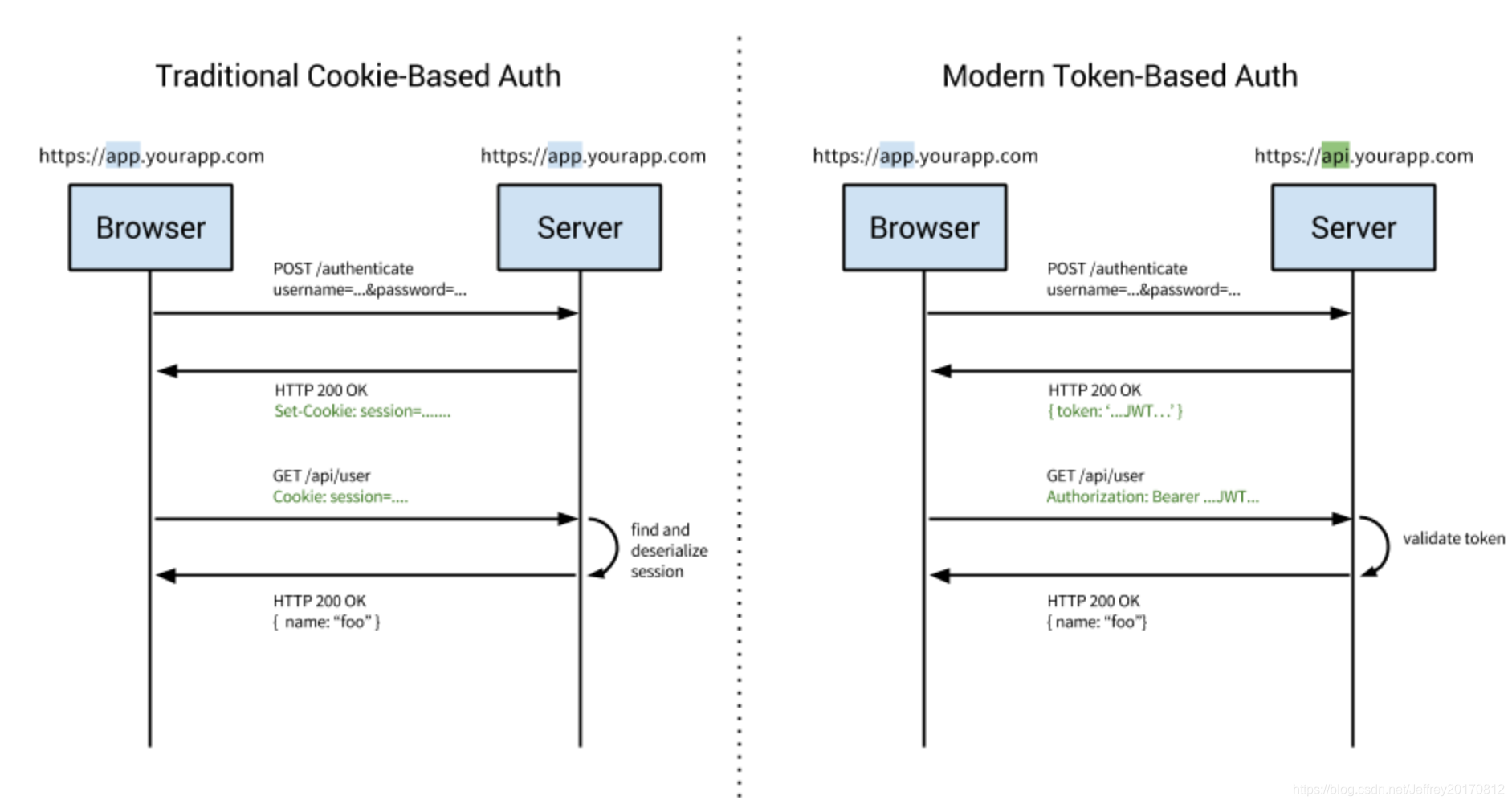
Cookie vs. Token Authentication:
-
Cookie-Based Authentication : Cookie-based authentication is stateful. This means that an authentication record or session must be kept both server and client-side. The server needs to keep track of active sessions in a database, while on the front-end a cookie is created that holds a session identifier, thus the name cookie based authentication. It works only in the same domain.
- User enters their login credentials.
- Server verifies the credentials are correct and creates a session which is then stored in a database.
- A cookie with the session ID is placed in the users browser.
- On subsequent requests, the session ID is verified against the database and if valid the request processed.
- Once a user logs out of the app, the session is destroyed both client-side and server-side.
-
Token-Based Authentication : Token-based authentication has gained prevalence over the last few years due to the rise of single page applications, web APIs, and the Internet of Things (IoT). When we talk about authentication with tokens, we generally talk about authentication with JSON Web Tokens (JWTs).
Token-based authentication is stateless. The server does not keep a record of which users are logged in or which JWTs have been issued. Instead, every request to the server is accompanied by a token which the server uses to verify the authenticity of the request. The token is generally sent as an addition Authorization header in the form of Bearer {JWT}, but can additionally be sent in the body of a POST request or even as a query parameter.- User enters their login credentials.
- Server verifies the credentials are correct and returns a signed token.
- This token is stored client-side, most commonly in local storage - but can be stored in session storage or a cookie as well.
- Subsequent requests to the server include this token as an additional Authorization header or through one of the other methods mentioned above.
- The server decodes the JWT and if the token is valid, processes the request.
- Once a user logs out, the token is destroyed client-side, no interaction with the server is necessary.
Advantages of Token-Based Authentication: Stateless, Scalable, and Decoupled, Cross Domain, Performance, Mobile ready.
Disadvantages of Token-Based Authentication: Jwt size, storing as in local storage exposed to XSS attack n for storing in cookies exposed for CSRF attack. -
- Magic Numbers: A number in your code that appears arbitrary. All magic numbers should all be replaced with calculations or constants
-
Some Important points:
- Imports are also hoisted
- exporting a variable return a constant so you cannot change the output value, to change it export an object then access and change it.
- In Promises .finally() does not recieve any arguments and neither it returns anything
- a parameter with a default value is optional, such a parameter is not included in the length of the function.
- all parameters following the parameter with a default value are also optional. Therefore, they are also not included in the length property of the function.
- …spread operator and Object.assign ignore the prototype when cloning
- instanceof operator only works with objects and does not work with primitives
- Promise.resolve and resolve function work the same way for plain values. Both returns fulfilled promises.
- Promise.resolve and resolve functions work differently when a promise is passed as an argument. Promise.resolve returns the same promise passed as an argument when resolve works in some strange way.
- resolve returns pending promise for any promised values regardless of their state. And may change the returned promise’s state in some async way.
-
Error handling in Javascript: There are three types of error: - Syntax Errors: Syntax errors, also called parsing errors, occur at compile time. Ex: missing brackets,etc - Runtime Errors: Runtime errors, also called exceptions, occur during execution (after compilation/interpretation). Ex: Calling a method that does not exists - Logical Errors: Logic errors can be the most difficult type of errors to track down. These errors are not the result of a syntax or runtime error. Instead, they occur when you make a mistake in the logic that drives your script and you do not get the result you expected. You cannot catch these errors.
- try...catch...finally Statement: You can catch programmer-generated and runtime exceptions, but you cannot catch JavaScript syntax errors. They can catch synchronous code errors. To check for asynchronous code, use promises or aync await.
-
A stacking context is a group of elements that have a common parent and move up and down the z axis together. The z-index of elements inside of a stacking context are always relative to the parent's current order in its own stacking context.
-
z-index works if position is other than static. For flex no need to set positions.
-
og(open graph) tags are used to configure how our website looks when shared on social media.
<meta property="og:title" content="Colby Fayock - A UX Designer & Front-end Developer Blog" /> <meta property="og:type" content="website" /> <meta property="og:image" content="/static/website-social-card-44070c4a901df708aa1563ac4bbe595a.jpg" /> <meta property="og:url" content="https://www.colbyfayock.com" />