Hexlet tests and linter status:
Brain Games is a console application project that offers 5 math games: 1. "Evenness Check" game. You have to correctly answer the question: "Is a number even?" 2. "Calculator" game. You have to calculate a problem with two numbers. 3. "GCD" game. You have to find the greatest common divisor of two numbers. 4. "Arithmetic Progression" game. You have to find the missing number in the progression. 5. "Is a Number Prime?" game. You have to correctly answer the question: "Is a Number Prime?" Each game asks three questions. If you answer correctly, move on to the next one; if you answer incorrectly, the game ends. Python version 3.12 or higher prompt version 0.4.1 or higher [for development] ruff version 0.14.1 or higher 3. Usage (available commands) brain-even — "Evenness Check" game. brain-calc — "Calculator" game. brain-progression — "Arithmetic Progression" game. brain-prime — "Is a Number Prime?" game. 4. Installation and launch 1. Clone the repository and navigate to the project folder git clone < url of repository>
cd hexlet-code 2. (Recommended) Create and activate a virtual environment python -m venv venv
source venv/bin/activate # Linux/macOS\S cripts\a ctivate # Windows 4. Launch any game, for example 1. Clone the repository and navigate to the project folder git clone < url of repository>
cd hexlet-code 2. Install uv if it is not already installed curl -LsSf https://astral.sh/uv/install.sh | sh # Windows/Linux/macOS/WSL 3. Create a virtual environment 4. In the root of the project, run the installation 5. Launch any game, for example 5. Installing for development # pip# uv# pip# uvExample of installing a package, launching the brain-even game, victory and defeat
Example of launching the brain-calc game, victory and defeat
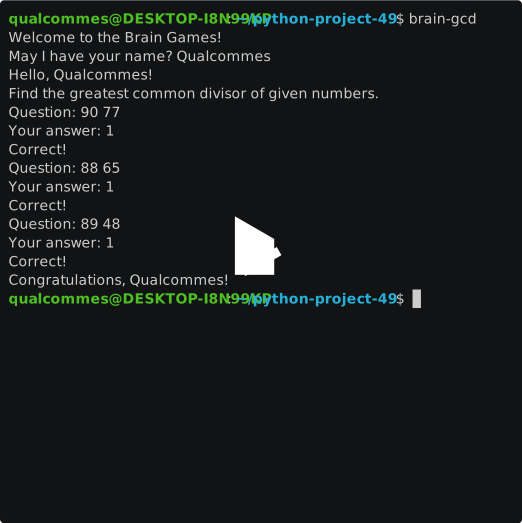
Example of launching the brain-gcd game, victory and defeat
Example of launching the brain-progression game, victory and defeat
Example of launching the brain-prime game, victory and defeat