Prerequisites
Steps to reproduce
Using for example PowerShell 7.3.0-preview.5 on Windows 10 21H1.
With PowerShell 7.1.4 it don't work, because it needs the file and directory coloring.
Input then Get-ChildItem | Out-GridView on the PowerShell in a directory with subdirectories and *-.exe-files.
Expected behavior
That a directory called "Downloads" is in the Out-GridView shown as "Downloads".
And that an executable called "program.exe" is in the Out-GridView shown as "program.exe".
Actual behavior
The directory called "Downloads" is in the Out-GridView shown as "[44;1mDownloads[0m".
And the executable called "program.exe" is in the Out-GridView shown as "[32;1mprogram.exe[0m".
Error details
Environment data
PS D:\> $PSVersionTable

Name                           Value
----                           -----
PSVersion                      7.3.0-preview.5
PSEdition                      Core
GitCommitId                    7.3.0-preview.5
OS                             Microsoft Windows 10.0.19043
Platform                       Win32NT
PSCompatibleVersions           {1.0, 2.0, 3.0, 4.0…}
PSRemotingProtocolVersion      2.3
SerializationVersion           1.1.0.1
WSManStackVersion              3.0

PS D:\>
Visuals
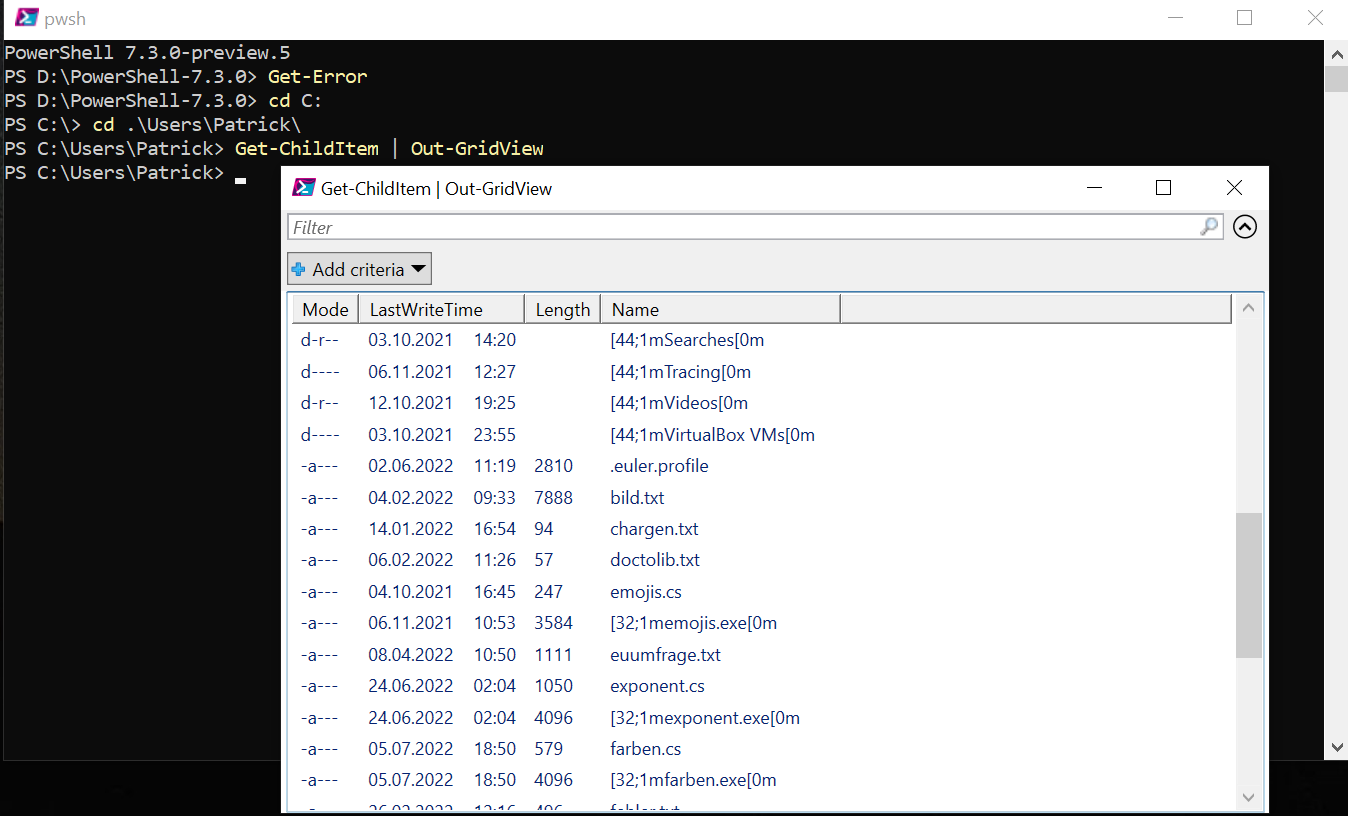

Prerequisites
Steps to reproduce
Using for example PowerShell 7.3.0-preview.5 on Windows 10 21H1.
With PowerShell 7.1.4 it don't work, because it needs the file and directory coloring.
Input then
Get-ChildItem | Out-GridViewon the PowerShell in a directory with subdirectories and *-.exe-files.Expected behavior
Actual behavior
Error details
there is no errorEnvironment data
Visuals