A self-hosted library management and reading platform for ebooks, PDFs, audiobooks, and comics.





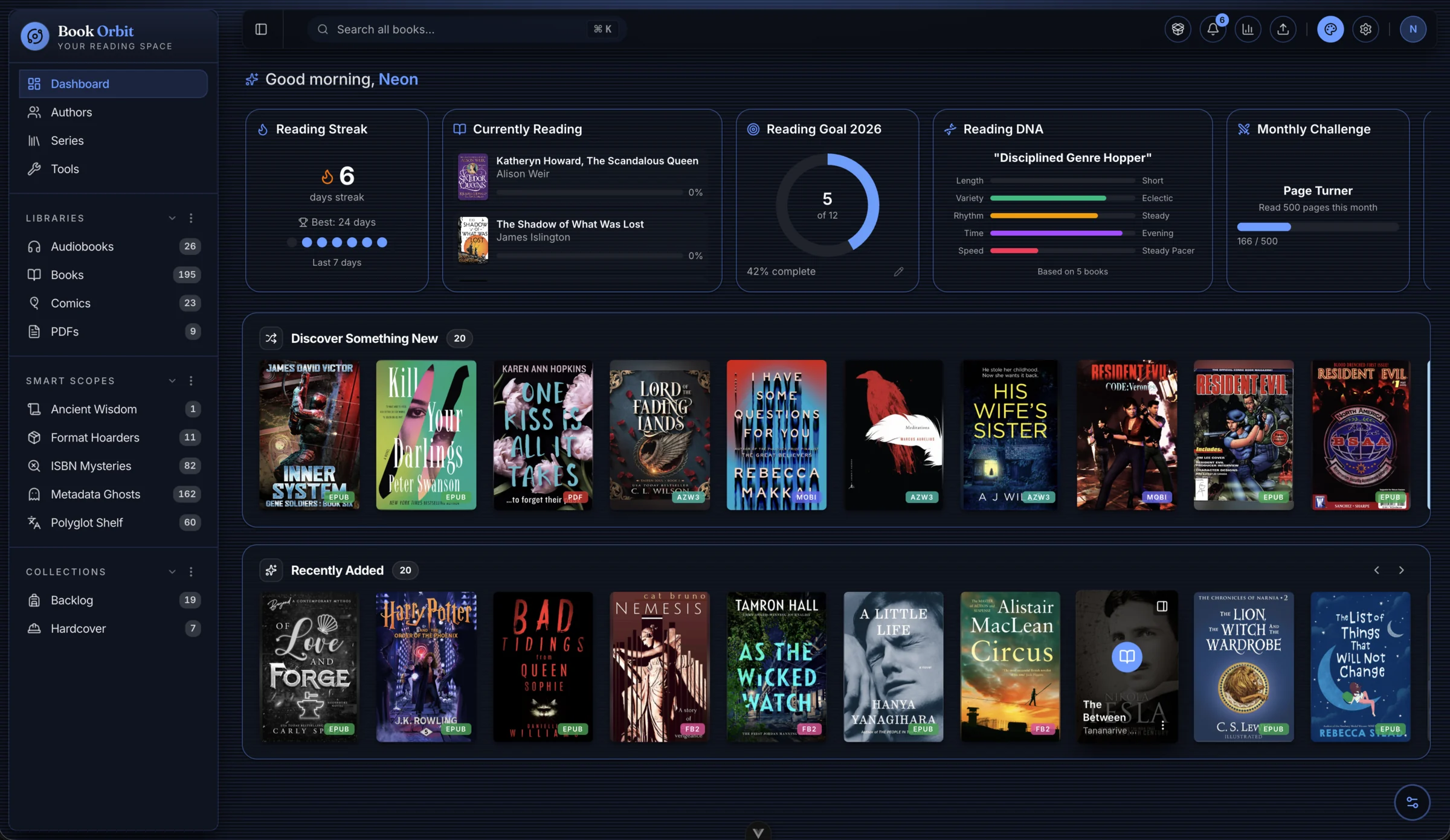
BookOrbit is a self-hosted digital library and reading platform. Organize and read your books, sync seamlessly with Kobo and KOReader devices, enrich your collection with metadata from multiple providers, and support multiple users with OIDC/SSO authentication and detailed reading statistics. Built-in features include OPDS support, customizable dashboard widgets, Send-to-Kindle delivery, and Smart Scopes for dynamic rule-based shelves and filters - all running on infrastructure you control.
Built-in readers - no plugins or extra installs required:
| Reader | Formats |
|---|---|
| eBook | EPUB, KEPUB, MOBI, AZW3, AZW, FB2 |
| Comics | CBZ, CBR, CB7 |
| Audiobook | M4B, MP3, M4A, OPUS, OGG, FLAC |
Multiple libraries: Per-library folders, scan rules, format priorities, metadata config, and file-write settings.
Metadata from 9 providers: Google Books, Amazon, Goodreads, Hardcover, Open Library, iTunes, Audible, AudNexus, and ComicVine - with field-level rules.
Collections and Smart Scopes: Curated lists and rule-based saved filters in the sidebar.
Kobo and KOReader sync: Auto-push books to Kobo; two-way reading progress sync via KOReader over OPDS.
OPDS, email delivery, and Book Dock: OPDS for compatible apps, Send-to-Kindle via email, browser drag-and-drop uploads, and a configurable drop folder for automated ingestion.
Multi-user with multi-provider OIDC/SSO: Granular per-user permissions, isolated reading data, and simultaneous support for Authentik, Keycloak, Authelia, etc.
Reading statistics: Daily reading time, heatmap, streaks, pace, goal tracking, and library health dashboard.
Explore BookOrbit instantly, no installation or account required.
Note: The demo includes a sample library of public domain books. Some features are limited in the public demo, self-hosting BookOrbit provides the full experience.
mkdir bookorbit && cd bookorbit
mkdir -p books data/app data/postgres
curl -fsSLo .env https://raw.githubusercontent.com/bookorbit/bookorbit/main/.env.example
curl -fsSLo docker-compose.yml https://raw.githubusercontent.com/bookorbit/bookorbit/main/docker-compose.yml
Edit .env and set these required values:
APP_URL=http://your-server-ip:3000   # the URL you'll open in your browser
BOOKS_HOST_PATH=./books              # folder on your server where your book files live

POSTGRES_PASSWORD=         # database password           - openssl rand -hex 24
JWT_SECRET=                # signs login tokens          - openssl rand -hex 32
SETUP_BOOTSTRAP_TOKEN=     # one-time setup wizard token - openssl rand -hex 16
Optional: Book Dock drop folder
To automatically ingest books placed in a folder (for example, a NAS share or a folder managed by another tool), set BOOK_DROP_HOST_PATH in .env:
BOOK_DROP_HOST_PATH=/mnt/nas/book-dropAny ebook file copied or moved into that folder is automatically picked up and processed by Book Dock. The container-internal path it maps to is shown in Settings - Book Dock. Subdirectories are supported. Covers are stored in a covers/ subdirectory inside the drop folder. Files are removed from the drop folder when finalized into a library.
If BOOK_DROP_HOST_PATH is not set, the drop folder defaults to ./data/app/book-dock inside the app data volume.
Then start:
docker compose up -dOpen http://your-server-ip:3000 and complete setup using your SETUP_BOOTSTRAP_TOKEN.
For the full installation guide including reverse proxy setup, file permissions on NAS, external databases, and environment variable reference, see bookorbit.app/installation.
Full documentation is at bookorbit.app - covering libraries, metadata, readers, Kobo sync, OPDS, users and permissions, OIDC setup, and more.
For local development, see docs/DEVELOPMENT.md. To contribute, see docs/CONTRIBUTING.md for the full workflow: branch naming, test expectations, PR checklist, and commit format.
- Questions and discussion: GitHub Discussions
- Bug reports: GitHub Issues
- Feature requests: GitHub Issues
BookOrbit is licensed under the GNU Affero General Public License v3.0.