forked from itwanger/toBeBetterJavaer
-
Notifications
You must be signed in to change notification settings - Fork 0
Expand file tree
/
Copy pathcompletable-future.md
More file actions
728 lines (557 loc) · 23.8 KB
/
Copy pathcompletable-future.md
File metadata and controls
728 lines (557 loc) · 23.8 KB
1
2
3
4
5
6
7
8
9
10
11
12
13
14
15
16
17
18
19
20
21
22
23
24
25
26
27
28
29
30
31
32
33
34
35
36
37
38
39
40
41
42
43
44
45
46
47
48
49
50
51
52
53
54
55
56
57
58
59
60
61
62
63
64
65
66
67
68
69
70
71
72
73
74
75
76
77
78
79
80
81
82
83
84
85
86
87
88
89
90
91
92
93
94
95
96
97
98
99
100
101
102
103
104
105
106
107
108
109
110
111
112
113
114
115
116
117
118
119
120
121
122
123
124
125
126
127
128
129
130
131
132
133
134
135
136
137
138
139
140
141
142
143
144
145
146
147
148
149
150
151
152
153
154
155
156
157
158
159
160
161
162
163
164
165
166
167
168
169
170
171
172
173
174
175
176
177
178
179
180
181
182
183
184
185
186
187
188
189
190
191
192
193
194
195
196
197
198
199
200
201
202
203
204
205
206
207
208
209
210
211
212
213
214
215
216
217
218
219
220
221
222
223
224
225
226
227
228
229
230
231
232
233
234
235
236
237
238
239
240
241
242
243
244
245
246
247
248
249
250
251
252
253
254
255
256
257
258
259
260
261
262
263
264
265
266
267
268
269
270
271
272
273
274
275
276
277
278
279
280
281
282
283
284
285
286
287
288
289
290
291
292
293
294
295
296
297
298
299
300
301
302
303
304
305
306
307
308
309
310
311
312
313
314
315
316
317
318
319
320
321
322
323
324
325
326
327
328
329
330
331
332
333
334
335
336
337
338
339
340
341
342
343
344
345
346
347
348
349
350
351
352
353
354
355
356
357
358
359
360
361
362
363
364
365
366
367
368
369
370
371
372
373
374
375
376
377
378
379
380
381
382
383
384
385
386
387
388
389
390
391
392
393
394
395
396
397
398
399
400
401
402
403
404
405
406
407
408
409
410
411
412
413
414
415
416
417
418
419
420
421
422
423
424
425
426
427
428
429
430
431
432
433
434
435
436
437
438
439
440
441
442
443
444
445
446
447
448
449
450
451
452
453
454
455
456
457
458
459
460
461
462
463
464
465
466
467
468
469
470
471
472
473
474
475
476
477
478
479
480
481
482
483
484
485
486
487
488
489
490
491
492
493
494
495
496
497
498
499
500
501
502
503
504
505
506
507
508
509
510
511
512
513
514
515
516
517
518
519
520
521
522
523
524
525
526
527
528
529
530
531
532
533
534
535
536
537
538
539
540
541
542
543
544
545
546
547
548
549
550
551
552
553
554
555
556
557
558
559
560
561
562
563
564
565
566
567
568
569
570
571
572
573
574
575
576
577
578
579
580
581
582
583
584
585
586
587
588
589
590
591
592
593
594
595
596
597
598
599
600
601
602
603
604
605
606
607
608
609
610
611
612
613
614
615
616
617
618
619
620
621
622
623
624
625
626
627
628
629
630
631
632
633
634
635
636
637
638
639
640
641
642
643
644
645
646
647
648
649
650
651
652
653
654
655
656
657
658
659
660
661
662
663
664
665
666
667
668
669
670
671
672
673
674
675
676
677
678
679
680
681
682
683
684
685
686
687
688
689
690
691
692
693
694
695
696
697
698
699
700
701
702
703
704
705
706
707
708
709
710
711
712
713
714
715
716
717
718
719
720
721
722
723
724
725
726
727
728
---
title: 奇淫巧技,异步编程 CompletableFuture 是真的优雅
shortTitle: CompletableFuture
description: CompletableFuture是jdk1.8引入的实现类。扩展了Future和CompletionStage,是一个可以在任务完成阶段触发一些操作Future。简单的来讲就是可以实现异步回调。
author: binron
category:
- Java核心
tag:
- Java并发编程
head:
- - meta
- name: keywords
content: Java,并发编程,多线程,Thread,CompletableFuture
---
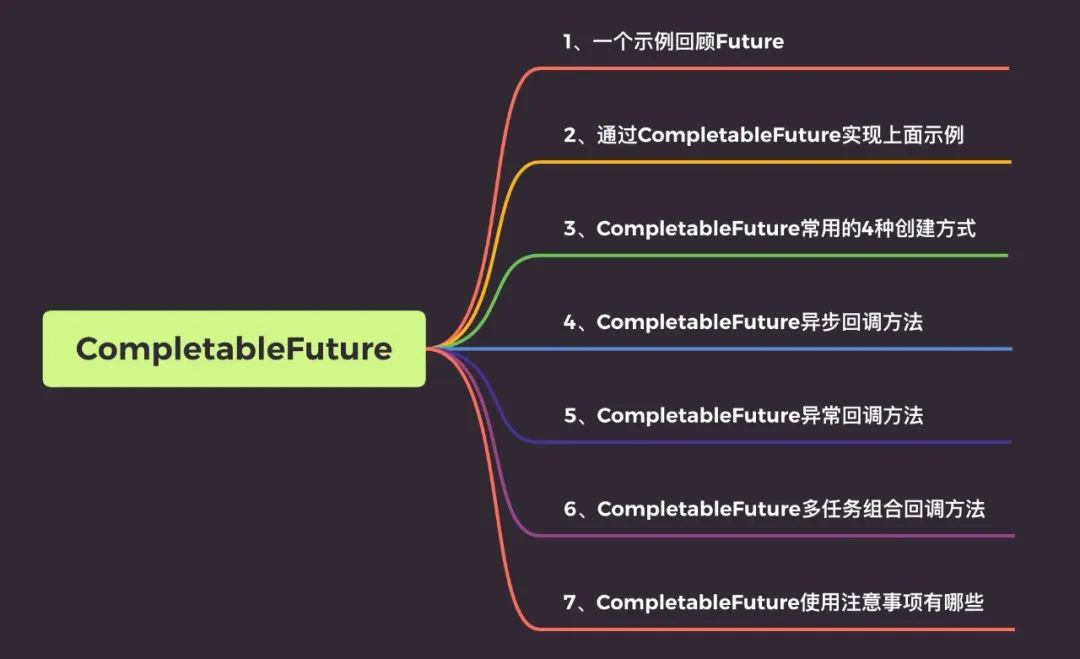
## 一个示例回顾 Future
在一些业务场景我们需要使用多线程异步执行任务,加快任务执行速度。
JDK5 新增了`Future`接口,用于描述一个异步计算的结果。
虽然 Future 以及相关使用方法提供了异步执行任务的能力,但是对于结果的获取却是很不方便,我们必须使用`Future.get()`的方式阻塞调用线程,或者使用轮询方式判断 `Future.isDone` 任务是否结束,再获取结果。
这两种处理方式都不是很优雅,相关代码如下:
```java
@Test
public void testFuture() throws ExecutionException, InterruptedException {
ExecutorService executorService = Executors.newFixedThreadPool(5);
Future<String> future = executorService.submit(() -> {
Thread.sleep(2000);
return "hello";
});
System.out.println(future.get());
System.out.println("end");
}
```
与此同时,Future 无法解决多个异步任务相互依赖的场景,简单点说就是,主线程需要等待子线程任务执行完毕之后在进行执行,这个时候你可能想到了 「[CountDownLatch](https://javabetter.cn/thread/CountDownLatch.html#countdownlatch)」,没错确实可以解决,代码如下。
这里定义两个 Future,第一个通过用户 id 获取用户信息,第二个通过商品 id 获取商品信息。
```java
@Test
public void testCountDownLatch() throws InterruptedException, ExecutionException {
ExecutorService executorService = Executors.newFixedThreadPool(5);
CountDownLatch downLatch = new CountDownLatch(2);
long startTime = System.currentTimeMillis();
Future<String> userFuture = executorService.submit(() -> {
//模拟查询商品耗时500毫秒
Thread.sleep(500);
downLatch.countDown();
return "用户A";
});
Future<String> goodsFuture = executorService.submit(() -> {
//模拟查询商品耗时500毫秒
Thread.sleep(400);
downLatch.countDown();
return "商品A";
});
downLatch.await();
//模拟主程序耗时时间
Thread.sleep(600);
System.out.println("获取用户信息:" + userFuture.get());
System.out.println("获取商品信息:" + goodsFuture.get());
System.out.println("总共用时" + (System.currentTimeMillis() - startTime) + "ms");
}
```
**「运行结果」**
```
获取用户信息:用户A
获取商品信息:商品A
总共用时1110ms
```
从运行结果可以看出结果都已经获取,而且如果我们不用异步操作,执行时间应该是:500+400+600 = 1500,用异步操作后实际只用 1110。
但是 Java8 以后我不再认为这是一种优雅的解决方式,接下来来了解下 CompletableFuture 的使用。
## 通过 CompletableFuture 实现上面示例
```java
@Test
public void testCompletableInfo() throws InterruptedException, ExecutionException {
long startTime = System.currentTimeMillis();
//调用用户服务获取用户基本信息
CompletableFuture<String> userFuture = CompletableFuture.supplyAsync(() ->
//模拟查询商品耗时500毫秒
{
try {
Thread.sleep(500);
} catch (InterruptedException e) {
e.printStackTrace();
}
return "用户A";
});
//调用商品服务获取商品基本信息
CompletableFuture<String> goodsFuture = CompletableFuture.supplyAsync(() ->
//模拟查询商品耗时500毫秒
{
try {
Thread.sleep(400);
} catch (InterruptedException e) {
e.printStackTrace();
}
return "商品A";
});
System.out.println("获取用户信息:" + userFuture.get());
System.out.println("获取商品信息:" + goodsFuture.get());
//模拟主程序耗时时间
Thread.sleep(600);
System.out.println("总共用时" + (System.currentTimeMillis() - startTime) + "ms");
}
```
运行结果
```
获取用户信息:用户A
获取商品信息:商品A
总共用时1112ms
```
通过 CompletableFuture 可以很轻松的实现 CountDownLatch 的功能,你以为这就结束了,远远不止,CompletableFuture 比这要强多了。
**比如可以实现**:任务 1 执行完了再执行任务 2,甚至任务 1 执行的结果,作为任务 2 的入参数等等强大功能,下面就来学学 CompletableFuture 的 API。
## CompletableFuture 创建方式
### 1、常用的 4 种创建方式
CompletableFuture 源码中有四个静态方法用来执行异步任务
```java
public static <U> CompletableFuture<U> supplyAsync(Supplier<U> supplier){..}
public static <U> CompletableFuture<U> supplyAsync(Supplier<U> supplier,Executor executor){..}
public static CompletableFuture<Void> runAsync(Runnable runnable){..}
public static CompletableFuture<Void> runAsync(Runnable runnable,Executor executor){..}
```
一般我们用上面的静态方法来创建 CompletableFuture,这里也解释下他们的区别:
- **「supplyAsync」**执行任务,支持返回值。
- **「runAsync」**执行任务,没有返回值。
#### ①、「supplyAsync 方法」
```java
//使用默认内置线程池ForkJoinPool.commonPool(),根据supplier构建执行任务
public static <U> CompletableFuture<U> supplyAsync(Supplier<U> supplier)
//自定义线程,根据supplier构建执行任务
public static <U> CompletableFuture<U> supplyAsync(Supplier<U> supplier, Executor executor)
```
#### ②、「runAsync 方法」
```java
//使用默认内置线程池ForkJoinPool.commonPool(),根据runnable构建执行任务
public static CompletableFuture<Void> runAsync(Runnable runnable)
//自定义线程,根据runnable构建执行任务
public static CompletableFuture<Void> runAsync(Runnable runnable, Executor executor)
```
### 2、结果获取的 4 种方式
对于结果的获取 CompltableFuture 类提供了四种方式
```java
//方式一
public T get()
//方式二
public T get(long timeout, TimeUnit unit)
//方式三
public T getNow(T valueIfAbsent)
//方式四
public T join()
```
说明:
- **「get()和 get(long timeout, TimeUnit unit)」** => 在 Future 中就已经提供了,后者提供超时处理,如果在指定时间内未获取结果将抛出超时异常
- **「getNow」** => 立即获取结果不阻塞,结果计算已完成将返回结果或计算过程中的异常,如果未计算完成将返回设定的 valueIfAbsent 值
- **「join」** => 方法里不会抛出异常
`示例`:
```java
@Test
public void testCompletableGet() throws InterruptedException, ExecutionException {
CompletableFuture<String> cp1 = CompletableFuture.supplyAsync(() -> {
try {
Thread.sleep(1000);
} catch (InterruptedException e) {
e.printStackTrace();
}
return "商品A";
});
// getNow方法测试
System.out.println(cp1.getNow("商品B"));
//join方法测试
CompletableFuture<Integer> cp2 = CompletableFuture.supplyAsync((() -> 1 / 0));
System.out.println(cp2.join());
System.out.println("-----------------------------------------------------");
//get方法测试
CompletableFuture<Integer> cp3 = CompletableFuture.supplyAsync((() -> 1 / 0));
System.out.println(cp3.get());
}
```
**「运行结果」**:
- 第一个执行结果为 **「商品 B」**,因为要先睡上 1 秒结果不能立即获取
- join 方法获取结果方法里不会抛异常,但是执行结果会抛异常,抛出的异常为 CompletionException
- get 方法获取结果方法里将抛出异常,执行结果抛出的异常为 ExecutionException
## 异步回调方法
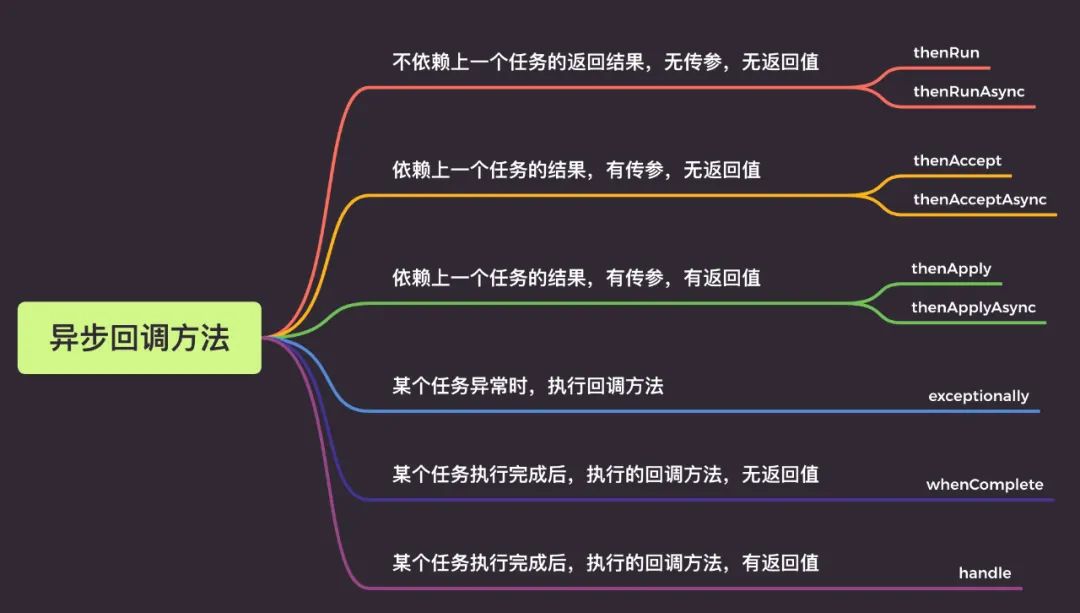
### 1、thenRun/thenRunAsync
通俗点讲就是,**「做完第一个任务后,再做第二个任务,第二个任务也没有返回值」**。
示例
```java
@Test
public void testCompletableThenRunAsync() throws InterruptedException, ExecutionException {
long startTime = System.currentTimeMillis();
CompletableFuture<Void> cp1 = CompletableFuture.runAsync(() -> {
try {
//执行任务A
Thread.sleep(600);
} catch (InterruptedException e) {
e.printStackTrace();
}
});
CompletableFuture<Void> cp2 = cp1.thenRun(() -> {
try {
//执行任务B
Thread.sleep(400);
} catch (InterruptedException e) {
e.printStackTrace();
}
});
// get方法测试
System.out.println(cp2.get());
//模拟主程序耗时时间
Thread.sleep(600);
System.out.println("总共用时" + (System.currentTimeMillis() - startTime) + "ms");
}
//运行结果
/**
* null
* 总共用时1610ms
*/
```
**「thenRun 和 thenRunAsync 有什么区别呢?」**
如果你执行第一个任务的时候,传入了一个自定义线程池:
- 调用 thenRun 方法执行第二个任务时,则第二个任务和第一个任务是共用同一个线程池。
- 调用 thenRunAsync 执行第二个任务时,则第一个任务使用的是你自己传入的线程池,第二个任务使用的是 ForkJoin 线程池。
`说明`: 后面介绍的 thenAccept 和 thenAcceptAsync,thenApply 和 thenApplyAsync 等,它们之间的区别也是这个。
### 2、thenAccept/thenAcceptAsync
第一个任务执行完成后,执行第二个回调方法任务,**会将该任务的执行结果,作为入参**,传递到回调方法中,但是回调方法是没有返回值的。
示例
```java
@Test
public void testCompletableThenAccept() throws ExecutionException, InterruptedException {
long startTime = System.currentTimeMillis();
CompletableFuture<String> cp1 = CompletableFuture.supplyAsync(() -> {
return "dev";
});
CompletableFuture<Void> cp2 = cp1.thenAccept((a) -> {
System.out.println("上一个任务的返回结果为: " + a);
});
cp2.get();
}
```
### 3、 thenApply/thenApplyAsync
表示第一个任务执行完成后,执行第二个回调方法任务,会将该任务的执行结果,作为入参,传递到回调方法中,并且回调方法是有返回值的。
```java
@Test
public void testCompletableThenApply() throws ExecutionException, InterruptedException {
CompletableFuture<String> cp1 = CompletableFuture.supplyAsync(() -> {
return "dev";
}).thenApply((a) -> {
if(Objects.equals(a,"dev")){
return "dev";
}
return "prod";
});
System.out.println("当前环境为:" + cp1.get());
//输出: 当前环境为:dev
}
```
## 异常回调
CompletableFuture 任务不论是正常完成还是出现异常,都会调用 **「whenComplete」** 这个回调函数。
- **「正常完成」**:whenComplete 返回结果和上级任务一致,异常为 null;
- **「出现异常」**:whenComplete 返回结果为 null,异常为上级任务的异常;
即调用 `get()`时,正常完成时就获取到结果,出现异常时就会抛出异常,需要你处理该异常。
### 1、只用 whenComplete
```java
@Test
public void testCompletableWhenComplete() throws ExecutionException, InterruptedException {
CompletableFuture<Double> future = CompletableFuture.supplyAsync(() -> {
if (Math.random() < 0.5) {
throw new RuntimeException("出错了");
}
System.out.println("正常结束");
return 0.11;
}).whenComplete((aDouble, throwable) -> {
if (aDouble == null) {
System.out.println("whenComplete aDouble is null");
} else {
System.out.println("whenComplete aDouble is " + aDouble);
}
if (throwable == null) {
System.out.println("whenComplete throwable is null");
} else {
System.out.println("whenComplete throwable is " + throwable.getMessage());
}
});
System.out.println("最终返回的结果 = " + future.get());
}
```
正常完成,没有异常时:
```
正常结束
whenComplete aDouble is 0.11
whenComplete throwable is null
最终返回的结果 = 0.11
```
出现异常时:`get()`会抛出异常
```java
whenComplete aDouble is null
whenComplete throwable is java.lang.RuntimeException: 出错了
java.util.concurrent.ExecutionException: java.lang.RuntimeException: 出错了
at java.util.concurrent.CompletableFuture.reportGet(CompletableFuture.java:357)
at java.util.concurrent.CompletableFuture.get(CompletableFuture.java:1895)
```
### 2、whenComplete + exceptionally 示例
```java
@Test
public void testWhenCompleteExceptionally() throws ExecutionException, InterruptedException {
CompletableFuture<Double> future = CompletableFuture.supplyAsync(() -> {
if (Math.random() < 0.5) {
throw new RuntimeException("出错了");
}
System.out.println("正常结束");
return 0.11;
}).whenComplete((aDouble, throwable) -> {
if (aDouble == null) {
System.out.println("whenComplete aDouble is null");
} else {
System.out.println("whenComplete aDouble is " + aDouble);
}
if (throwable == null) {
System.out.println("whenComplete throwable is null");
} else {
System.out.println("whenComplete throwable is " + throwable.getMessage());
}
}).exceptionally((throwable) -> {
System.out.println("exceptionally中异常:" + throwable.getMessage());
return 0.0;
});
System.out.println("最终返回的结果 = " + future.get());
}
```
当出现异常时,exceptionally 中会捕获该异常,给出默认返回值 0.0。
```java
whenComplete aDouble is null
whenComplete throwable is java.lang.RuntimeException: 出错了
exceptionally中异常:java.lang.RuntimeException: 出错了
最终返回的结果 = 0.0
```
## 多任务组合回调
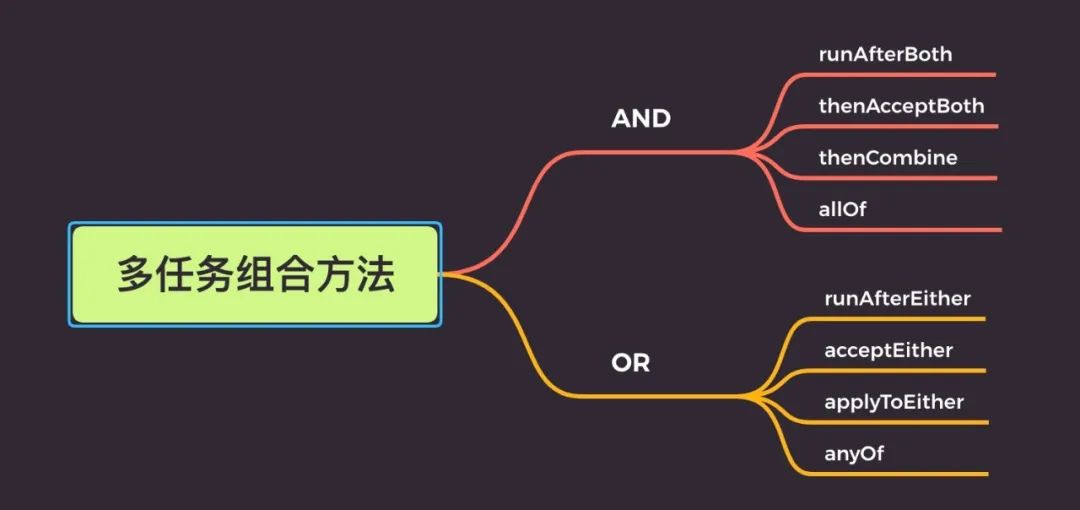
### 1、AND 组合关系
thenCombine / thenAcceptBoth / runAfterBoth 都表示:**「当任务一和任务二都完成再执行任务三」**。
区别在于:
- **「runAfterBoth」** 不会把执行结果当做方法入参,且没有返回值
- **「thenAcceptBoth」**: 会将两个任务的执行结果作为方法入参,传递到指定方法中,且无返回值
- **「thenCombine」**:会将两个任务的执行结果作为方法入参,传递到指定方法中,且有返回值
```java
@Test
public void testCompletableThenCombine() throws ExecutionException, InterruptedException {
//创建线程池
ExecutorService executorService = Executors.newFixedThreadPool(10);
//开启异步任务1
CompletableFuture<Integer> task = CompletableFuture.supplyAsync(() -> {
System.out.println("异步任务1,当前线程是:" + Thread.currentThread().getId());
int result = 1 + 1;
System.out.println("异步任务1结束");
return result;
}, executorService);
//开启异步任务2
CompletableFuture<Integer> task2 = CompletableFuture.supplyAsync(() -> {
System.out.println("异步任务2,当前线程是:" + Thread.currentThread().getId());
int result = 1 + 1;
System.out.println("异步任务2结束");
return result;
}, executorService);
//任务组合
CompletableFuture<Integer> task3 = task.thenCombineAsync(task2, (f1, f2) -> {
System.out.println("执行任务3,当前线程是:" + Thread.currentThread().getId());
System.out.println("任务1返回值:" + f1);
System.out.println("任务2返回值:" + f2);
return f1 + f2;
}, executorService);
Integer res = task3.get();
System.out.println("最终结果:" + res);
}
```
**「运行结果」**
```
异步任务1,当前线程是:17
异步任务1结束
异步任务2,当前线程是:18
异步任务2结束
执行任务3,当前线程是:19
任务1返回值:2
任务2返回值:2
最终结果:4
```
### 2、OR 组合关系
applyToEither / acceptEither / runAfterEither 都表示:**「两个任务,只要有一个任务完成,就执行任务三」**。
区别在于:
- **「runAfterEither」**:不会把执行结果当做方法入参,且没有返回值
- **「acceptEither」**: 会将已经执行完成的任务,作为方法入参,传递到指定方法中,且无返回值
- **「applyToEither」**:会将已经执行完成的任务,作为方法入参,传递到指定方法中,且有返回值
示例
```java
@Test
public void testCompletableEitherAsync() {
//创建线程池
ExecutorService executorService = Executors.newFixedThreadPool(10);
//开启异步任务1
CompletableFuture<Integer> task = CompletableFuture.supplyAsync(() -> {
System.out.println("异步任务1,当前线程是:" + Thread.currentThread().getId());
int result = 1 + 1;
System.out.println("异步任务1结束");
return result;
}, executorService);
//开启异步任务2
CompletableFuture<Integer> task2 = CompletableFuture.supplyAsync(() -> {
System.out.println("异步任务2,当前线程是:" + Thread.currentThread().getId());
int result = 1 + 2;
try {
Thread.sleep(3000);
} catch (InterruptedException e) {
e.printStackTrace();
}
System.out.println("异步任务2结束");
return result;
}, executorService);
//任务组合
task.acceptEitherAsync(task2, (res) -> {
System.out.println("执行任务3,当前线程是:" + Thread.currentThread().getId());
System.out.println("上一个任务的结果为:"+res);
}, executorService);
}
```
运行结果
```
//通过结果可以看出,异步任务2都没有执行结束,任务3获取的也是1的执行结果
异步任务1,当前线程是:17
异步任务1结束
异步任务2,当前线程是:18
执行任务3,当前线程是:19
上一个任务的结果为:2
```
注意
如果把上面的核心线程数改为 1 也就是
```java
ExecutorService executorService = Executors.newFixedThreadPool(1);
```
运行结果就是下面的了,会发现根本没有执行任务 3,显然是任务 3 直接被丢弃了。
```
异步任务1,当前线程是:17
异步任务1结束
异步任务2,当前线程是:17
```
### 3、多任务组合
- **「allOf」**:等待所有任务完成
- **「anyOf」**:只要有一个任务完成
示例
**allOf:等待所有任务完成**
```java
@Test
public void testCompletableAallOf() throws ExecutionException, InterruptedException {
//创建线程池
ExecutorService executorService = Executors.newFixedThreadPool(10);
//开启异步任务1
CompletableFuture<Integer> task = CompletableFuture.supplyAsync(() -> {
System.out.println("异步任务1,当前线程是:" + Thread.currentThread().getId());
int result = 1 + 1;
System.out.println("异步任务1结束");
return result;
}, executorService);
//开启异步任务2
CompletableFuture<Integer> task2 = CompletableFuture.supplyAsync(() -> {
System.out.println("异步任务2,当前线程是:" + Thread.currentThread().getId());
int result = 1 + 2;
try {
Thread.sleep(3000);
} catch (InterruptedException e) {
e.printStackTrace();
}
System.out.println("异步任务2结束");
return result;
}, executorService);
//开启异步任务3
CompletableFuture<Integer> task3 = CompletableFuture.supplyAsync(() -> {
System.out.println("异步任务3,当前线程是:" + Thread.currentThread().getId());
int result = 1 + 3;
try {
Thread.sleep(4000);
} catch (InterruptedException e) {
e.printStackTrace();
}
System.out.println("异步任务3结束");
return result;
}, executorService);
//任务组合
CompletableFuture<Void> allOf = CompletableFuture.allOf(task, task2, task3);
//等待所有任务完成
allOf.get();
//获取任务的返回结果
System.out.println("task结果为:" + task.get());
System.out.println("task2结果为:" + task2.get());
System.out.println("task3结果为:" + task3.get());
}
```
**anyOf: 只要有一个任务完成**
```java
@Test
public void testCompletableAnyOf() throws ExecutionException, InterruptedException {
//创建线程池
ExecutorService executorService = Executors.newFixedThreadPool(10);
//开启异步任务1
CompletableFuture<Integer> task = CompletableFuture.supplyAsync(() -> {
int result = 1 + 1;
return result;
}, executorService);
//开启异步任务2
CompletableFuture<Integer> task2 = CompletableFuture.supplyAsync(() -> {
int result = 1 + 2;
return result;
}, executorService);
//开启异步任务3
CompletableFuture<Integer> task3 = CompletableFuture.supplyAsync(() -> {
int result = 1 + 3;
return result;
}, executorService);
//任务组合
CompletableFuture<Object> anyOf = CompletableFuture.anyOf(task, task2, task3);
//只要有一个有任务完成
Object o = anyOf.get();
System.out.println("完成的任务的结果:" + o);
}
```
## CompletableFuture 使用有哪些注意点
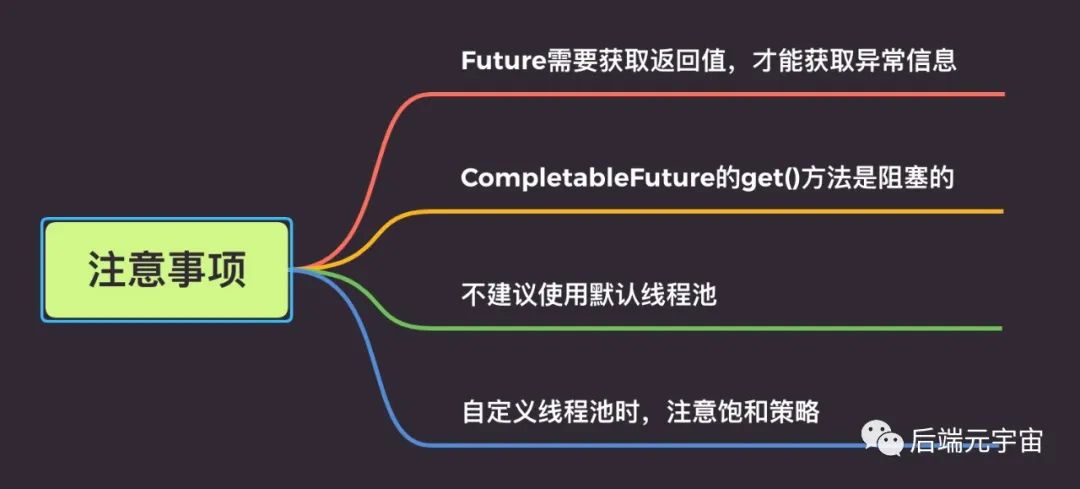
CompletableFuture 使我们的异步编程更加便利的、代码更加优雅的同时,我们也要关注下它,使用的一些注意点。
### 1、Future 需要获取返回值,才能获取异常信息
```java
@Test
public void testWhenCompleteExceptionally() {
CompletableFuture<Double> future = CompletableFuture.supplyAsync(() -> {
if (1 == 1) {
throw new RuntimeException("出错了");
}
return 0.11;
});
//如果不加 get()方法这一行,看不到异常信息
//future.get();
}
```
Future 需要获取返回值,才能获取到异常信息。如果不加 `get()/join()`方法,看不到异常信息。
小伙伴们使用的时候,注意一下哈,考虑是否加 try...catch...或者使用 exceptionally 方法。
### 2、CompletableFuture 的 get()方法是阻塞的
CompletableFuture 的 `get()`方法是阻塞的,如果使用它来获取异步调用的返回值,需要添加超时时间。
```java
//反例
CompletableFuture.get();
//正例
CompletableFuture.get(5, TimeUnit.SECONDS);
```
### 3、不建议使用默认线程池
CompletableFuture 代码中使用了默认的 **「ForkJoin 线程池」**, 处理的线程个数是电脑 **「CPU 核数-1」** 。在大量请求过来的时候,处理逻辑复杂的话,响应会很慢。一般建议使用自定义线程池,优化线程池配置参数。
### 4、自定义线程池时,注意饱和策略
CompletableFuture 的 `get()` 方法是阻塞的,我们一般建议使用 `future.get(5, TimeUnit.SECONDS)`。并且一般建议使用自定义线程池。
但是如果线程池拒绝策略是 DiscardPolicy 或者 DiscardOldestPolicy,当线程池饱和时,会直接丢弃任务,不会抛弃异常。因此建议,CompletableFuture 线程池策略最好使用 AbortPolicy,然后耗时的异步线程,做好线程池隔离哈。
### 感谢
- https://www.cnblogs.com/wtzbk/p/15953570.html
- https://www.cnblogs.com/cyan-orange/p/15339145.html
- https://www.cnblogs.com/ludongguoa/p/15316488.html
> 参考链接:[https://mp.weixin.qq.com/s/ipQLDlCc6a2BeYeEkwOwMg](https://mp.weixin.qq.com/s/ipQLDlCc6a2BeYeEkwOwMg),整理:沉默王二