Repository files navigation week1.day4.spaceInvadersMVP
Use command line to create a new project folder called spaceInvadersMVP
Navigate into the folder and create your required files (index.html, sketch.js)
Include a reference to p5.js in your index.html file
Feel free to include additional files according to your needs
Follow the plan you’ve made with your group!
Keep in mind this will be another MVP - it does NOT need to look perfect.
Remember:
Setup up a spaceship (perhaps a rectangle) near the bottom of canvas screen.
When the user presses the left or right arrow keys, the 'ship' should move in those directions. (HINT: check out keyIsDown() )
Create alien/enemy ships in the space above the spaceship.
When the user presses a particular key, projectiles should head from the spaceship and towards the direction of the alien ships.
When a projectile hits an alien ship, both the alien ship and the projectile should be removed from the canvas.
HINT: in the past, students have used the following tactic for detecting collision in p5.js:
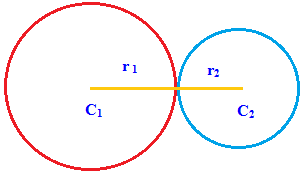
Using distance between the objects. By drawing circles and using the radius between both ship and bullet, you can calculate if the two have collided.
This is a MILESTONE project
Include the names of each member of your group as a comment at the top of the "sketch.js" file, along with the role each member played This project will NOT be graded. It is simply used to gauge how our students are doing during the SI. Check out this rubric for more details.
Extra Credit
Recreate classic enemy behavior:
The alien ships shoot back at random intervals
The alien ships should move left and right constantly (can move together as group)
The alien ships should also move downwards towards the spaceship at a slow, but constant pace
If any alien ship reaches the end of the canvas, the game should end
Create a button that allows the user to restart the game
Keep a running score
You can’t perform that action at this time.