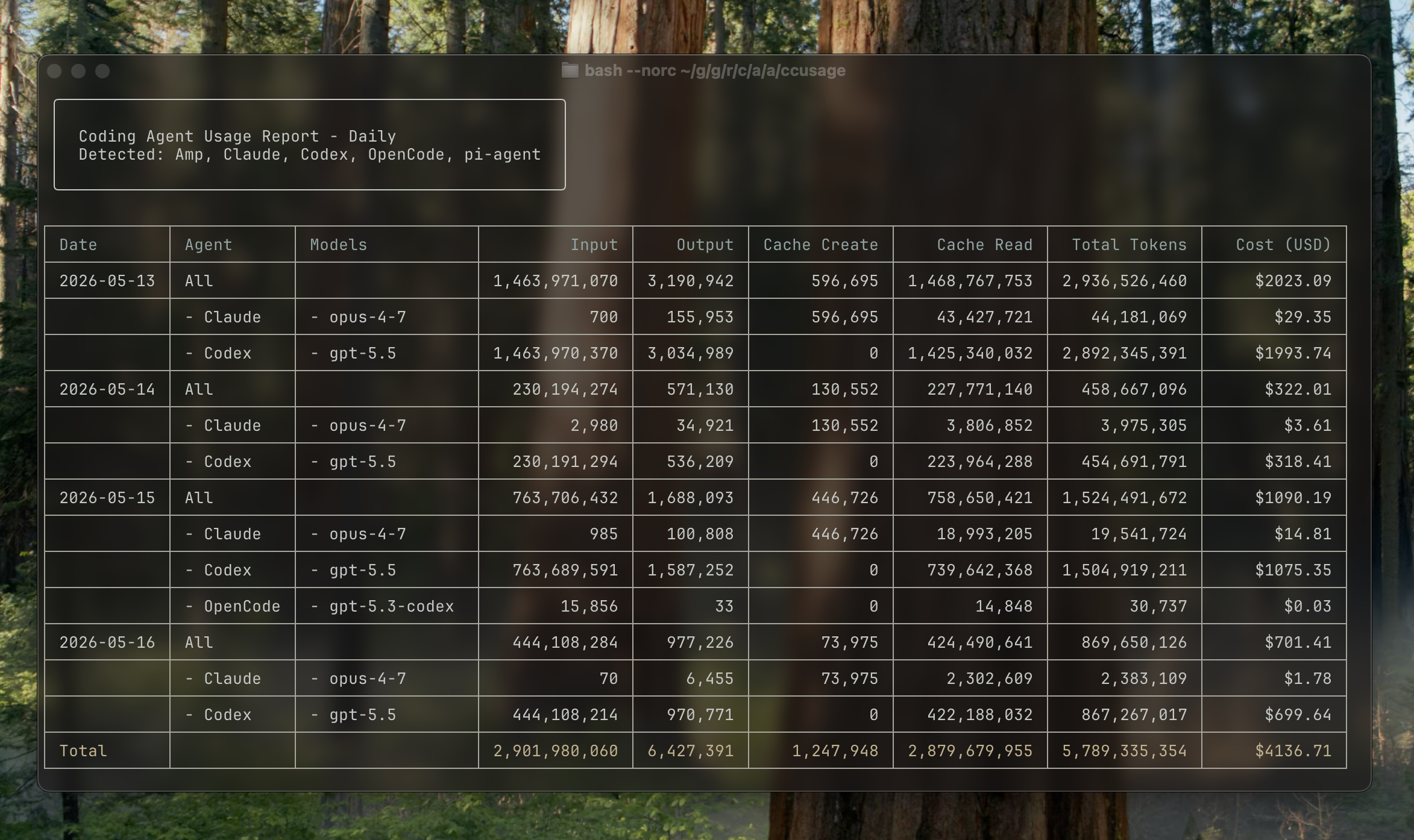
Analyze coding (agent) CLI token usage and costs from local data.



npx ccusage@latestccusage reads local usage data from coding agent CLIs and turns it into daily, weekly, monthly, and session reports.
| Source | Focused command example |
|---|---|
| Claude Code | ccusage claude daily |
| Codex | ccusage codex daily |
| OpenCode | ccusage opencode daily |
| Amp | ccusage amp daily |
| Droid | ccusage droid daily |
| Codebuff | ccusage codebuff daily |
| Hermes Agent | ccusage hermes daily |
| pi-agent | ccusage pi daily |
| Goose | ccusage goose daily |
| OpenClaw | ccusage openclaw daily |
| Kilo | ccusage kilo daily |
| Kimi | ccusage kimi daily |
| Qwen | ccusage qwen daily |
| GitHub Copilot CLI | ccusage copilot daily |
| Gemini CLI | ccusage gemini daily |
| Antigravity | ccusage antigravity daily |
| Grok Build CLI | ccusage grok daily |
| ZCode | ccusage zcode daily |
Use ccusage daily, ccusage weekly, ccusage monthly, or ccusage session to include every detected source in one report.
Supported platforms are Linux x64/ARM64 and macOS Intel/Apple Silicon. Native Windows packages are not supported; use a supported Linux environment inside WSL instead. npm runners select the matching prebuilt native package; no Rust build is performed during installation. Nix runs the native CLI without requiring Node or Bun.
You can run ccusage directly without a global installation:
# npm
npx ccusage@latest

# Nix
nix run github:ccusage/ccusage -- daily

# Alternative package runners
bunx ccusage
pnpm dlx ccusage
pnpx ccusage
bunx caches the downloaded package, so repeated runs are faster after the first launch.
# Basic usage
bunx ccusage          # Show all detected sources by day (default)
bunx ccusage daily    # All detected sources by day
bunx ccusage weekly   # All detected sources by week
bunx ccusage monthly  # All detected sources by month
bunx ccusage session  # All detected sources by session
bunx ccusage blocks   # Claude Code 5-hour billing windows
bunx ccusage statusline  # Claude Code status line for hooks (Beta)

# Source-focused reports and options
bunx ccusage claude daily --mode display
bunx ccusage codex daily --speed fast
bunx ccusage opencode weekly
bunx ccusage amp session
bunx ccusage droid daily
bunx ccusage codebuff daily
bunx ccusage hermes daily
bunx ccusage goose daily
bunx ccusage openclaw daily
bunx ccusage kilo daily
bunx ccusage kimi daily
bunx ccusage qwen daily
bunx ccusage copilot daily
bunx ccusage gemini daily
bunx ccusage antigravity daily
bunx ccusage grok daily
bunx ccusage zcode daily
bunx ccusage pi daily --pi-path /path/to/sessions
bunx ccusage pi daily --pi-path /path/to/sessions,/archive/pi/sessions

# Explicit unified report
bunx ccusage daily --all
bunx ccusage daily --sections daily,monthly,session --json
bunx ccusage daily --by-agent --json

# Filters and options
bunx ccusage daily --since 2026-04-25 --until 2026-05-16
bunx ccusage daily --last 1  # Today
bunx ccusage weekly --last 1  # This week
bunx ccusage monthly --last 1  # This month
bunx ccusage daily --json  # JSON output
bunx ccusage daily --no-cost  # Hide cost columns and JSON cost fields
bunx ccusage daily --timezone UTC  # Use UTC timezone

# Project analysis
bunx ccusage claude daily --instances  # Group Claude Code by project/instance
bunx ccusage claude daily --project myproject  # Filter to specific Claude project
bunx ccusage claude daily --instances --project myproject --json  # Combined usage

# Compact mode for screenshots/sharing
bunx ccusage --compact  # Force compact table mode
bunx ccusage monthly --compact # Compact monthly report- 📊 Daily Report: View token usage and costs aggregated by date
- 📅 Monthly Report: View token usage and costs aggregated by month
- 💬 Session Report: View usage grouped by conversation sessions
- 🤖 Unified CLI Reports: View Claude Code, Codex, OpenCode, Amp, Droid, Codebuff, Hermes Agent, pi-agent, Goose, OpenClaw, Kilo, Kimi, Qwen, GitHub Copilot CLI, Gemini CLI, Antigravity, Grok Build CLI, and ZCode usage from one CLI
- ⏰ 5-Hour Blocks Report: Track usage within Claude's billing windows with active block monitoring
- 🚀 Statusline Integration: Compact usage display for Claude Code status bar hooks (Beta)
- 🤖 Model Tracking: See which models are used across supported sources
- 📊 Model Breakdown: View per-model cost breakdown with
--breakdownflag - 📅 Date Filtering: Filter reports by date range using
--sinceand--until - ⏱️ Recent Periods: Jump to today, this week, or this month with
--last 1on any daily, weekly, or monthly report - 📁 Custom Paths: Support for custom local data directory locations
- 🎨 Beautiful Output: Colorful table-formatted display with automatic responsive layout
- 📱 Smart Tables: Automatic compact mode for narrow terminals (< 100 characters) with essential columns
- 📸 Compact Mode: Use
--compactflag to force compact table layout, perfect for screenshots and sharing - 📋 Enhanced Model Display: Model names shown as bulleted lists for better readability
- 📄 JSON Output: Export data in structured JSON format with
--json - 💰 Cost Tracking: Shows costs in USD for each day/month/session
- 🔒 Cost Hiding: Remove cost columns and JSON cost fields with
--no-cost - 🔄 Cache Token Support: Tracks and displays cache creation and cache read tokens separately
- 🌐 Offline Mode: Use pre-cached pricing data without network connectivity with
--offline - 🧩 Custom Pricing Overrides: Override token pricing per raw model name in
ccusage.jsonwithout rebuilding - 🏗️ Claude Instance Support: Group Claude Code usage by project with
--instancesand filter by specific projects - 🌍 Timezone Support: Configure timezone for date grouping with
--timezoneoption - ⚙️ Configuration Files: Set defaults with JSON configuration files, complete with IDE autocomplete and validation
Full documentation is available at ccusage.com
Further reading (Japanese): how ccusage began
Contributor setup
Install Nix with nix-command and flakes enabled and use sandboxed builds. The flake builds on x86_64-linux, aarch64-linux, and aarch64-darwin. Intel macOS npm packages are cross-built on Apple Silicon (nix build .#npm-darwin-x64); the locked nixpkgs no longer supports a native Intel Mac development shell. Native Windows is unsupported; Linux in WSL is supported.
git clone https://github.com/ccusage/ccusage.git
cd ccusage
nix develop # Optional pinned development shell
Run the following commands from the repository root; entering the shell is optional:
nix build .#ccusage .#docs .#npm-tarballs # Native CLI, docs, and tested host npm tarballs
nix build ".#checks.$(nix eval --impure --raw --expr builtins.currentSystem).js-typecheck"

# Hermetic Rust, Node, and performance-harness tests
system=$(nix eval --impure --raw --expr builtins.currentSystem)
nix build ".#checks.$system.ccusage-tests" \
  ".#checks.$system.node-tests" \
  ".#checks.$system.performance-harness"

nix flake check # Every flake check
nix fmt
A cold invocation may fetch locked sources, dependencies, and tools; sandboxed builds and tests do not install from registries. Offline reuse requires the necessary Nix closure to be present already.
Entering the shell, formatting, and generating schemas never install checkout dependencies. For editor tooling, explicitly run nix run .#js-install. It copies only Nix-managed node_modules, including the separate models.dev tool dependencies, into the current checkout offline after Nix has realized the dependency closure. Hermetic builds do not use checkout node_modules.
nix run .#docs-dev explicitly refreshes these dependencies and starts pinned VitePress; nix run .#docs-preview serves the immutable Nix-built site. For imperative Rust edit/run loops, run from the repository root:
nix develop --command cargo run --locked --manifest-path rust/Cargo.toml --bin ccusage -- codex daily --offline
nix develop --command cargo test --locked --manifest-path rust/Cargo.toml -p ccusage-core
These use the pinned shell and Cargo --locked, but local Cargo caches are not hermetic build outputs.
Dependency updates are separate networked maintenance: run nix develop --command pnpm install --lockfile-only --ignore-scripts, update the pnpmDeps hash in nix/javascript.nix, then run nix run .#js-install. Update standalone tool bun.lock files explicitly with the pinned Bun before running nix run .#generate-bun-nix; that generator does not install or re-resolve dependencies. See CONTRIBUTING.md for the complete procedure.
The flake exposes ccusage as its default package and app:
nix run github:ccusage/ccusage
nix run github:ccusage/ccusage -- codex daily --offline
nix build github:ccusage/ccusage
Builds and the development shell use the LiteLLM snapshot from the locked flake input instead of downloading pricing during compilation. Update generated files with pinned tools:
nix run .#generate-schema
nix run .#generate-models-dev-pricing

# Networked pricing input updates, then validation
nix flake update litellm
nix flake check

nix flake update models-dev
nix run .#generate-models-dev-pricing
nix flake checkNix builds and validates the exact npm tarballs that are published; publishing does not rebuild them or use a networked prepack fallback. npm-tarballs provides the launcher and the host-native package. The release workflow collects all four native targets plus the launcher.
GitHub runners, artifact transport, GitHub permissions, and registry credentials remain external networked infrastructure. The pinned tagpr and npm-publish apps do not supply credentials. GitHub OIDC publishing requires npm trusted-publisher configuration for every package, matching the repository and release workflow, plus id-token: write on the publishing job. See the contribution guide for release details.