

Agent Server handles checkpointing automatically
When using the Agent Server, you do not need to implement or configure checkpointers manually. The server handles all persistence infrastructure for you behind the scenes.
Why use checkpointers
Checkpointers are required for the following features:- Human-in-the-loop: Checkpointers facilitate human-in-the-loop workflows by allowing humans to inspect, interrupt, and approve graph steps. Checkpointers are needed for these workflows as the person has to be able to view the state of a graph at any point in time, and the graph has to be able to resume execution after the person has made any updates to the state. See Interrupts for examples.
- Memory: Checkpointers allow for “memory” between interactions. In the case of repeated human interactions (like conversations) any follow up messages can be sent to that thread, which will retain its memory of previous ones. See Add memory for information on how to add and manage conversation memory using checkpointers.
- Time travel: Checkpointers allow for “time travel”, allowing users to replay prior graph executions to review and / or debug specific graph steps. In addition, checkpointers make it possible to fork the graph state at arbitrary checkpoints to explore alternative trajectories.
- Fault-tolerance: Checkpointing provides fault-tolerance and error recovery: if one or more nodes fail at a given superstep, you can restart your graph from the last successful step.
- Pending writes: When a graph node fails mid-execution at a given super-step, LangGraph stores pending checkpoint writes from any other nodes that completed successfully at that super-step. When you resume graph execution from that super-step you don’t re-run the successful nodes.
Core concepts
Threads
A thread is a unique ID or thread identifier assigned to each checkpoint saved by a checkpointer. It contains the accumulated state of a sequence of runs. When a run is executed, the state of the underlying graph of the assistant will be persisted to the thread. When invoking a graph with a checkpointer, you must specify athread_id as part of the configurable portion of the config:
thread_id as the primary key for storing and retrieving checkpoints. Without it, the checkpointer cannot save state or resume execution after an interrupt, since the checkpointer uses thread_id to load the saved state.
Checkpoints
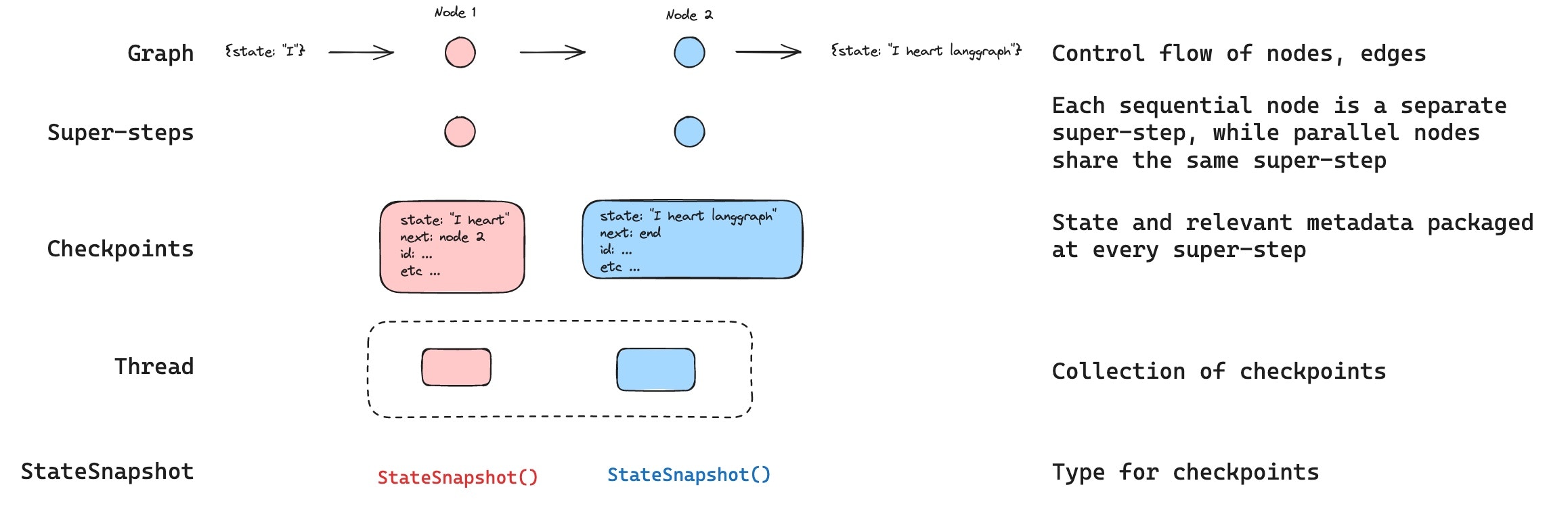
The state of a thread at a particular point in time is called a checkpoint. A checkpoint is a snapshot of the graph state saved at each super-step and is represented by aStateSnapshot object (see StateSnapshot fields for the full field reference).
Super-steps
LangGraph creates a checkpoint at each super-step boundary. A super-step is a single “tick” of the graph where all nodes scheduled for that step execute (potentially in parallel). For a sequential graph likeSTART -> A -> B -> END, there are separate super-steps for the input, node A, and node B — producing a checkpoint after each one. Understanding super-step boundaries is important for time travel, because you can only resume execution from a checkpoint (i.e., a super-step boundary).
In addition to super-step checkpoints, LangGraph also persists writes at the node (task) level. As each node within a super-step finishes, its outputs are written to the checkpointer’s checkpoint_writes table as task entries linked to the in-progress checkpoint. These per-task writes are what enable pending writes recovery: if another node in the same super-step fails, the successful nodes’ writes are already durable and don’t need to be re-run on resume. The full state snapshot is then committed once the super-step completes.
LangGraph also persists writes from individual node executions within a super-step. These writes are stored as tasks and used for fault tolerance: if another node in the same super-step fails, successful node writes do not need to be recomputed when you resume. These task writes are not full StateSnapshot checkpoints, so time travel resumes from full checkpoints at super-step boundaries.
Checkpoints are persisted and can be used to restore the state of a thread at a later time.
Let’s see what checkpoints are saved when a simple graph is invoked as follows:
- Empty checkpoint with
STARTas the next node to be executed - Checkpoint with the user input
{'foo': '', 'bar': []}andnode_aas the next node to be executed - Checkpoint with the outputs of
node_a{'foo': 'a', 'bar': ['a']}andnode_bas the next node to be executed - Checkpoint with the outputs of
node_b{'foo': 'b', 'bar': ['a', 'b']}and no next nodes to be executed
bar channel values contain outputs from both nodes because this example has a reducer for the bar channel.
Checkpoint namespace
Each checkpoint has acheckpoint_ns (checkpoint namespace) field that identifies which graph or subgraph it belongs to:
""(empty string): The checkpoint belongs to the parent (root) graph."node_name:uuid": The checkpoint belongs to a subgraph invoked as the given node. For nested subgraphs, namespaces are joined with|separators (e.g.,"outer_node:uuid|inner_node:uuid").
Get and update state
Get state
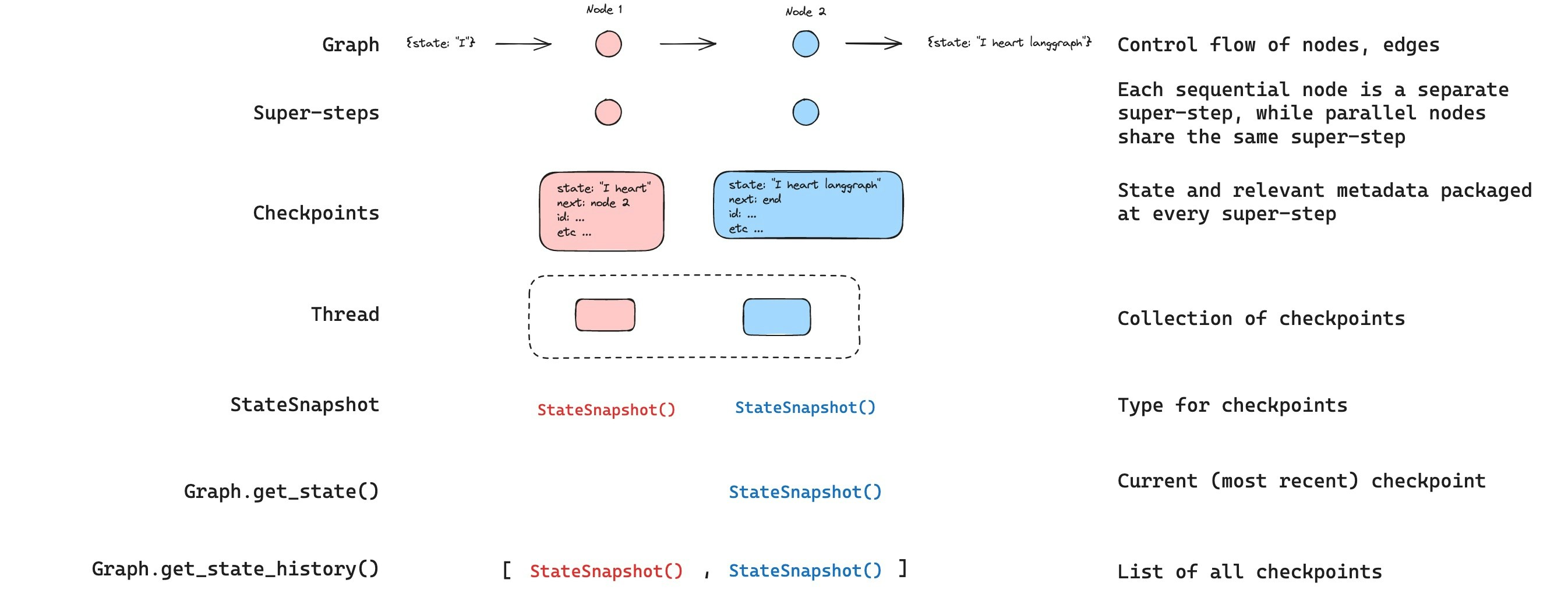
When interacting with the saved graph state, you must specify a thread identifier. You can view the latest state of the graph by callinggraph.get_state(config). This will return a StateSnapshot object that corresponds to the latest checkpoint associated with the thread ID provided in the config or a checkpoint associated with a checkpoint ID for the thread, if provided.
get_state will look like this:
StateSnapshot fields
Get state history
You can get the full history of the graph execution for a given thread by callinggraph.get_state_history(config). This will return a list of StateSnapshot objects associated with the thread ID provided in the config. Importantly, the checkpoints will be ordered chronologically with the most recent checkpoint / StateSnapshot being the first in the list.
get_state_history will look like this:
Find a specific checkpoint
You can filter the state history to find checkpoints matching specific criteria:Replay
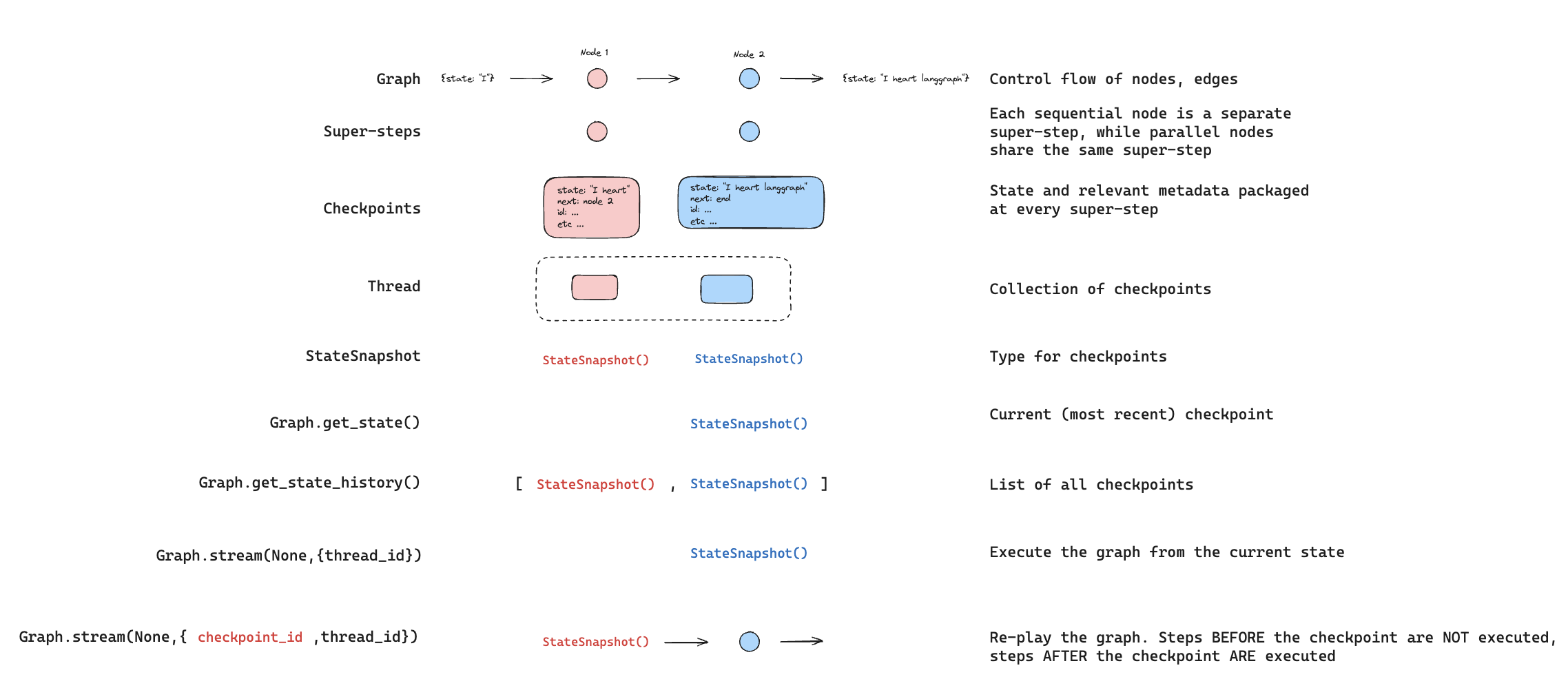
Replay re-executes steps from a prior checkpoint. Invoke the graph with a priorcheckpoint_id to re-run nodes after that checkpoint. Nodes before the checkpoint are skipped (their results are already saved). Nodes after the checkpoint re-execute, including any LLM calls, API requests, or interrupts — which are always re-triggered during replay.
See Time travel for full details and code examples on replaying past executions.
Update state
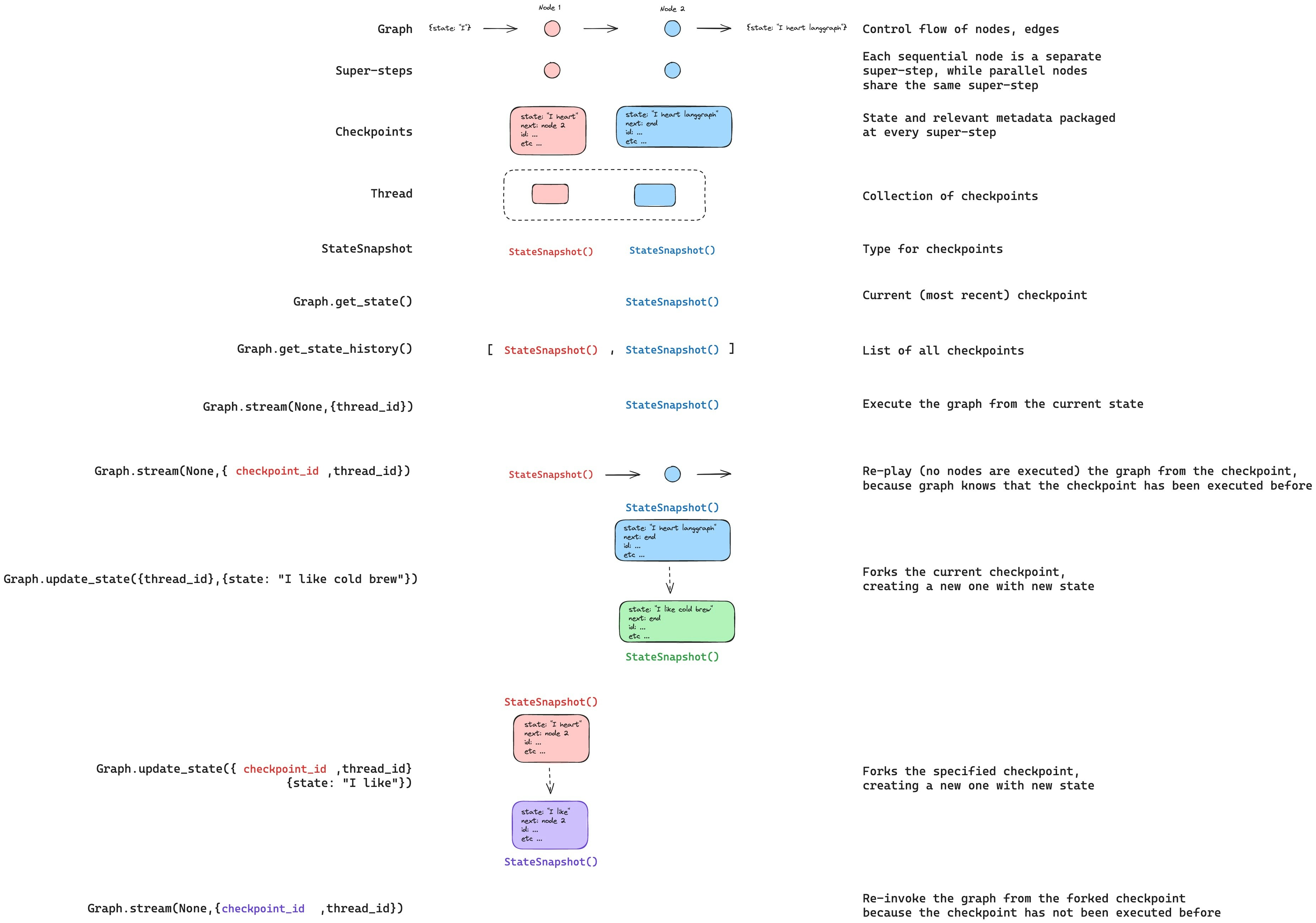
You can edit the graph state usingupdate_state. This creates a new checkpoint with the updated values — it does not modify the original checkpoint. The update is treated the same as a node update: values are passed through reducer functions when defined, so channels with reducers accumulate values rather than overwrite them.
You can optionally specify as_node to control which node the update is treated as coming from, which affects which node executes next. See Time travel: as_node for details.
Durability modes
LangGraph supports three durability modes that let you balance performance and data consistency. You can specify the durability mode when calling any graph execution method:"exit": LangGraph persists changes only when graph execution exits — successfully, with an error, or due to a human-in-the-loop interrupt. This provides the best performance for long-running graphs but means intermediate state is not saved, so you cannot recover from system failures (like process crashes) mid-execution."async": LangGraph persists changes asynchronously while the next step executes. This provides good performance and durability, but there is a small risk that LangGraph does not write checkpoints if the process crashes during execution."sync": LangGraph persists changes synchronously before the next step starts. This ensures that LangGraph writes every checkpoint before continuing execution, providing high durability at the cost of some performance overhead.
Optimize checkpoint storage
By default, LangGraph checkpoints write the full value of every state channel at each super-step. For long-running threads with large accumulations—such as multi-turn conversations—this can produce significant storage growth over time.DeltaChannel stores only incremental deltas instead of the full accumulated value, substantially reducing checkpoint size for append-heavy channels. See DeltaChannel for usage and the storage-vs-latency tradeoff.
Checkpointer libraries
Under the hood, checkpointing is powered by checkpointer objects that conform toBaseCheckpointSaver interface. LangGraph provides several checkpointer implementations, all implemented via standalone, installable libraries.
See checkpointer integrations for available providers.
langgraph-checkpoint: The base interface for checkpointer savers (BaseCheckpointSaver) and serialization/deserialization interface (SerializerProtocol). Includes in-memory checkpointer implementation (InMemorySaver) for experimentation. LangGraph comes withlanggraph-checkpointincluded.langgraph-checkpoint-sqlite: An implementation of LangGraph checkpointer that uses SQLite database (SqliteSaver/AsyncSqliteSaver). Ideal for experimentation and local workflows. Needs to be installed separately.langgraph-checkpoint-postgres: An advanced checkpointer that uses Postgres database (PostgresSaver/AsyncPostgresSaver), used in LangSmith. Ideal for using in production. Needs to be installed separately.langchain-azure-cosmosdb: An implementation of LangGraph checkpointer that uses Azure Cosmos DB for NoSQL (CosmosDBSaverSync/CosmosDBSaver). Ideal for using in production with Azure. Supports both sync and async operations, with Microsoft Entra ID authentication. Needs to be installed separately.
Checkpointer interface
Each checkpointer conforms toBaseCheckpointSaver interface and implements the following methods:
.put- Store a checkpoint with its configuration and metadata..put_writes- Store intermediate writes linked to a checkpoint (i.e. pending writes)..get_tuple- Fetch a checkpoint tuple using for a given configuration (thread_idandcheckpoint_id). This is used to populateStateSnapshotingraph.get_state()..list- List checkpoints that match a given configuration and filter criteria. This is used to populate state history ingraph.get_state_history()
.ainvoke, .astream, .abatch), asynchronous versions of the above methods will be used (.aput, .aput_writes, .aget_tuple, .alist).
For running your graph asynchronously, you can use
InMemorySaver, or async versions of Sqlite/Postgres checkpointers — AsyncSqliteSaver / AsyncPostgresSaver checkpointers.Serializer
When checkpointers save the graph state, they need to serialize the channel values in the state. This is done using serializer objects.langgraph_checkpoint defines protocol for implementing serializers provides a default implementation (JsonPlusSerializer) that handles a wide variety of types, including LangChain and LangGraph primitives, datetimes, enums and more.
Serialization with pickle
The default serializer, JsonPlusSerializer, uses ormsgpack and JSON under the hood, which is not suitable for all types of objects.
If you want to fallback to pickle for objects not currently supported by the msgpack encoder (such as Pandas dataframes),
you can use the pickle_fallback argument of the JsonPlusSerializer:
Encryption
Checkpointers can optionally encrypt all persisted state. To enable this, pass an instance ofEncryptedSerializer to the serde argument of any BaseCheckpointSaver implementation. The easiest way to create an encrypted serializer is via from_pycryptodome_aes, which reads the AES key from the LANGGRAPH_AES_KEY environment variable (or accepts a key argument):
LANGGRAPH_AES_KEY is present, so you only need to provide the environment variable. Other encryption schemes can be used by implementing CipherProtocol and supplying it to EncryptedSerializer.
Build a custom checkpointer
This section covers implementingBaseCheckpointSaver from scratch for a custom storage backend. If you already have a working checkpointer and only need to add delta channel support, jump to Delta channel support.
Overview
LangGraph’s persistence layer is built on two storage abstractions:- Checkpoints table — one row per superstep; stores the serialized graph state (
channel_values,channel_versions,versions_seen) and links to its parent checkpoint. - Writes table — one row per node output within a superstep; stores
(task_id, channel, value)tuples linked to a checkpoint.
put writes a checkpoint row; put_writes writes node-output rows; get_tuple reads both back into a CheckpointTuple.
Base contract
SubclassBaseCheckpointSaver and implement these five methods. All are required — a missing base method raises NotImplementedError at runtime.
put / aput
Store one checkpoint row. Return an updated config with the storedcheckpoint_id.
Key requirements:
- Serialize the checkpoint using
self.serde.dumps_typed(checkpoint)— this handles all LangGraph-native types including_DeltaSnapshotblobs used by delta channels. - Store
metadatain full — do not strip unknown keys. LangGraph adds new metadata fields (such ascounters_since_delta_snapshotfor delta channels) in minor releases; discarding them silently breaks features. - Store
config["configurable"].get("checkpoint_id")as the parent checkpoint ID soget_tuplecan populateparent_config.
put_writes / aput_writes
Store node-output rows for a single task within the current superstep. These rows are linked to the checkpoint by(thread_id, checkpoint_ns, checkpoint_id).
WRITES_IDX_MAP from langgraph.checkpoint.base. It maps special channels (__error__, __interrupt__, etc.) to reserved negative indices so they do not collide with regular write indices.
get_tuple / aget_tuple
Retrieve a checkpoint. The config may contain:- No
checkpoint_id— return the latest checkpoint for the thread + namespace. - A specific
checkpoint_id— return that exact checkpoint.
list / alist
Return checkpoints for a thread, newest first. Respectbefore (return only checkpoints older than that config’s checkpoint_id) and limit.
delete_thread / adelete_thread
Delete all checkpoints and writes for a thread. Both checkpoint rows and write rows must be deleted.Row key / index design
How you store and index checkpoints directly affects correctness and performance. Recommended schema (SQL):checkpoint_id is a ULID, it sorts lexicographically — larger values are newer. “Get latest” is ORDER BY checkpoint_id DESC LIMIT 1; “get by id” is an equality lookup on the primary key.
For non-SQL stores: the same principle applies. Whatever key scheme you use, direct lookup by (thread_id, checkpoint_ns, checkpoint_id) must be O(1) or close to it. Avoid designs where the only way to find a checkpoint by id is to scan all rows for a thread.
Serialization
Always useself.serde (inherited from BaseCheckpointSaver, defaults to JsonPlusSerializer) for checkpoints, writes, and metadata. Do not use pickle directly for metadata — it works, but JsonPlusSerializer produces human-readable output and handles versioning better.
JsonPlusSerializer handles all LangGraph-native types automatically:
_DeltaSnapshot— the sentinel blob used by delta channels (msgpack ext code 7)- Pydantic v2 models, dataclasses, numpy arrays, datetimes, enums, and more
_DeltaSnapshot from langgraph.checkpoint.serde.types.
Extended capabilities
These methods are optional but unlock additional Agent Server features. Implement them if your storage backend can support them efficiently.
Agent Server auto-detects which capabilities your checkpointer implements at startup and activates the corresponding features.
Delta channel support
DeltaChannel is in beta. The API and on-disk representation may change while the design stabilizes.
DeltaChannel is a reducer channel that stores only a sentinel (MISSING) in checkpoint blobs instead of the full channel value. State is reconstructed by replaying ancestor writes through the reducer. This makes checkpoint blobs O(1) per step instead of O(N) for channels like messages that accumulate over time.
What the runtime needs
When loading a checkpoint whose delta channels are absent fromchannel_values, LangGraph calls saver.get_delta_channel_history(config=config, channels=[...]). This returns, for each channel:
writes— all writes to that channel in the ancestor chain, oldest first, up to the nearest snapshot.seed(optional) — the stored_DeltaSnapshotblob at the nearest ancestor that has one; absent if the walk reaches the root without finding a snapshot.
channel.from_checkpoint(seed) and channel.replay_writes(writes) to reconstruct the live value.
Default implementation
BaseCheckpointSaver provides a default get_delta_channel_history that works with any correct get_tuple implementation:
get_tuple(cursor) is always called with a specific checkpoint_id (the parent’s id). If that lookup returns None, the walk stops immediately and every delta channel reconstructs as empty — silently, with no error. This is why the specific-id path in get_tuple must be correct.
Performance override
The default walk issues oneget_tuple call per ancestor checkpoint. For backends with good query support, override get_delta_channel_history (and its async twin) to retrieve the ancestor chain and writes in two queries:
Pruning with delta channels
DeltaChannel state is not self-contained in a single checkpoint — it depends on the ancestor write chain back to the nearest _DeltaSnapshot. If you implement prune or delete_for_runs, you must not delete write rows that a surviving checkpoint’s delta channels depend on.
Safe options:
- Walk before pruning — for each checkpoint you intend to keep, walk its ancestor chain and mark all write rows up to the nearest
_DeltaSnapshotas non-deletable. - Force a snapshot before pruning — rewrite
channel_values[ch] = _DeltaSnapshot(reconstructed_value)on the checkpoint you are keeping, then delete ancestors freely. - Skip pruning for delta-channel threads — the safest short-term option if you do not yet need pruning.
Copy thread with delta channels
When implementingcopy_thread, copy the complete ancestor chain — not just the head checkpoint. The target thread must have write rows going back to at least one _DeltaSnapshot for every delta channel, or those channels will reconstruct as empty after the copy.
Testing with the conformance suite
langgraph-checkpoint-conformance validates your implementation against the full contract, including delta channel history:
aget_delta_channel_history) and runs the relevant tests for each. Run it as part of your CI before shipping.
Connect these docs to Claude, VSCode, and more via MCP for real-time answers.