Join us at GDC Festival of Gaming 2026 for a deep dive into Visual Studio, GitHub Copilot, PowerToys, and the Windows tools that speed up your daily dev workflow. We’ll show how these tools work together to boost productivity and cut friction across your entire inner loop. Session Title: Windows Game Development with Visual Studio […]
The post Visual Studio at GDC Festival of Gaming 2026 appeared first on C++ Team Blog.
]]>Join us at GDC Festival of Gaming 2026 for a deep dive into Visual Studio, GitHub Copilot, PowerToys, and the Windows tools that speed up your daily dev workflow. We’ll show how these tools work together to boost productivity and cut friction across your entire inner loop.

Session Title: Windows Game Development with Visual Studio 2026 and GitHub Copilot
Session Info: Thursday, March 12, 10:10 am – 11:10 am Pacific Time | Room 2009, West Hall
Abstract: Developing games on Windows is faster when your tools work together. This session walks through an end-to-end game development workflow, from setting up a repeatable dev environment with Windows Terminal, WinGet, and GitHub Copilot, to reducing daily friction with PowerToys. Discover how integrated agents in Visual Studio accelerate build times, modernize compiler upgrades, and complement code editing with advanced C++ tools. From forking a GitHub project to running WinGet configurations and hitting F5 in Visual Studio, these experiences help you iterate faster and optimize smarter. Join us to see how Windows and Visual Studio deliver secure, manageable, and AI-driven workflows for modern game development.
We look forward to seeing you and chatting with you this year.
The post Visual Studio at GDC Festival of Gaming 2026 appeared first on C++ Team Blog.
]]>MSVC Build Tools v14.51 improves performance through a wide range of new optimizations.
The post C++ Performance Improvements in MSVC Build Tools v14.51 appeared first on C++ Team Blog.
]]>The Microsoft C++ team made big changes to optimization quality that we are proud to share with the release of Microsoft C++ (MSVC) Build Tools v14.51. We will use two benchmarks to illustrate the effect of these improvements compared to MSVC Build Tools v14.50.
Our first benchmark is SPEC CPU® 2017 which covers a spectrum of software and is recognized throughout the computing industry. It is often used to evaluate computer hardware, which we are not doing here. We are interested in performance for both x64 and arm64, but we will share only the relative performance between the two compiler versions. We evaluate the compiler’s performance in two configurations, the default build options that Microsoft Visual Studio (VS) arranges (primarily this means /O2 /GL) and a second one with Profile Guided Optimization (PGO) enabled. Overall, the two targets and two configurations means tracking four results: {x64, arm64} x {VS Defaults, PGO}. The table below shows the improvement of MSVC Build Tools v14.51 over v14.50. As the results include only the C and C++ benchmarks, but not the Fortran benchmarks, these results do not fully comply with SPEC CPU® 2017’s Run and Reporting rules and should be considered estimated:
| Suite | MSVC Config | x64 | Arm64 |
|---|---|---|---|
| SPECspeed® 2017_int_base (est.) | Peak (PGO) | 5.0% faster | 6.5% faster |
| SPECspeed® 2017_int_base (est.) | VS Defaults | 4.3% faster | 4.4% faster |
Note:
SPEC®, SPEC CPU®, and SPECspeed® are trademarks of the Standard Performance Evaluation Corporation (SPEC).Our second benchmark is CitySample, which is an Unreal Engine game demo. CitySample records statistics (min, max, average) about frame rate, game thread time, and render thread time. These values are measured in milliseconds and are noisier, so we present the min and max values taken over a series of ten runs on an Xbox Series X. The compiler and linker options were unchanged from CitySample’s defaults. Lower values are better.
| Compiler | FrameTime Range (ms) | RenderThreadTime range (ms) | GameThreadTime range (ms) |
|---|---|---|---|
| MSVC v14.44 | 34.40-34.49 | 8.17-8.53 | 17.68-18.29 |
| MSVC v14.50 | 34.37-34.49 | 8.00-8.39 | 17.44-18.18 |
| MSVC v14.51 | 34.30-34.35 | 7.73-7.95 | 17.34-18.03 |
You may have different benchmarks that matter to you and we would love to hear about them. If you have performance feedback about a real application, we accept suggestions and bug reports in our Developer Community.
With that context, let’s look at specific examples of the optimizations we delivered. Some of these began appearing in the 14.50 compiler, but all are present in 14.51.
New SSA Loop Optimizer
Broadly speaking, the compiler performs two classes of loop optimizations: those which modify the loop’s control-flow structure, such as unrolling, peeling, and unswitching, and those which modify data operations within the loop, such as hoisting invariants, strength reduction, and scalar replacement. In 14.50, we finished replacing the latter set of loop optimizations with new ones centered around Static Single Assignment (SSA) form. SSA is a representation that many compilers use because it simplifies writing compiler passes.
Replacing the loop optimizer was a very large project spanning several years, but was necessary for the following reasons:
- Testability: The legacy loop optimizer was implemented decades ago as one monolithic transformation, which made it difficult to understand, modify, debug, and test. The code for its sub-passes was not organized to allow running them individually.
- Throughput: It did not use SSA like other new MSVC optimizations. Instead, it recognized expressions textually based on their hashes. This older approach required recomputing various data structures and bit vectors, which often represented 3-5% of compilation time.
- Quality: Over the years, we had received a number of defect reports that were traced to the legacy loop optimizer. These required substantial time to fix and sometimes they had to be fixed in suboptimal ways because there was no better option. For example, sometimes a workaround was added to an earlier compiler transformation so that the legacy loop optimizer would never see an input that it found problematic.
- Completeness: The legacy loop optimizer was not able to handle certain loop forms. For example, it could handle loops that counted up but not down.
Given those limitations, the goals for the new loop optimizer were:
- Use SSA, like most modern compilers and other newer MSVC optimizations.
- Provide an extensible optimization framework such that new loop optimizations can be added easily later.
- Provide the ability to run individual subpasses and therefore the ability to test them separately.
The basic design is to process all loops, innermost to outermost, and perform transformations until a fixed point or a maximum number of iterations was reached. The transformations included only those that were present in the legacy loop optimizer; the replacement project was tricky enough without introducing the feature creep of new capabilities. With a focus on extensibility, new capabilities could be added after the project’s completion.
The main challenge was that the loop optimizer is one of the most complex and performance sensitive parts of the compiler. It impacts all loops and even some code outside of loops because of an address mode building sub-pass that operated on the entire function. With such significant impact on code structure, modifying the loop optimizer can uncover different and sometimes unexpected behavior downstream within the compiler. Couple that with the rigorous testing that MSVC undergoes, including thousands of regression tests, large real-world code projects, industry standard benchmarks, and Microsoft first-party software, and you have a situation that requires non-trivial debugging. Imagine a failure that exhibits only at runtime within a Windows driver.
An additional complication was that the replacement had to be done all at once. Although the individual sub-passes of the new loop optimizer were stood up and tested individually, the legacy one could be disabled only all at once. Therefore, even after the new one was completed, we still had the novel test scenario of the new one enabled with the old one disabled. The final effort to polish this scenario was significant, especially for performance tuning.
As of 14.50, the new loop optimizer was enabled for all targets. Enabling it resolved 23 unique compiler bugs ranging from crashes to silent bad code generation. The 5750 lines of new loop optimizer code, including 750 shared with other parts of the compiler, replaced 15,500 lines of legacy loop optimizer. As intended, so as to not further complicate the project, there were neither performance improvements nor regressions. Compilation throughput improved by 2.5%, which was expected.
New SLP Vectorizer
We also continued expanding our new SLP vectorization pass. SLP stands for superword-level parallelism and is sometimes called block-level vectorization. SLP packs similar independent scalar instructions together into a SIMD instruction. SLP normally is contrasted with loop vectorization in which a compiler vectorizes an entire loop body. With SLP, the vectorization can occur anywhere and does not need to be inside a loop. Here is an example on Arm64:
// Compile with /O2 /Qvec-report:2 and look for "block vectorized"
void slp(int* a, const int* b, const int* c) {
    // Order doesn't matter as long as there are no data dependencies
    // between these statements. If all loads happen before any store,
    // then there is no need to worry about pointer aliasing.

    const int a0 = b[0] + c[0];
    const int a2 = b[2] + c[2];
    const int a1 = b[1] + c[1];
    const int a3 = b[3] + c[3];

    a[0] = a0;
    a[2] = a2;
    a[1] = a1;
    a[3] = a3;
}
When vectorized, that produces this code:
    ldr    q17,[x1]
    ldr    q16,[x2]
    add    v16.4s,v17.4s,v16.4s
    str    q16,[x0]
MSVC has a legacy SLP vectorization pass that was implemented as part of its loop vectorizer. This was an expedient implementation choice at the time, allowing for easy reuse of vectorization infrastructure, but it did not make sense long-term. We implemented the new SLP vectorizer pass separately from the loop vectorizer by leveraging SSA utilities. Instead of setting an initial goal of replacing the old pass, we prioritized covering gaps in the old one because both passes can coexist. A long-term goal is to remove the old pass, but for now it continues to handle a few cases that the new one does not yet cover.
The new pass covers gaps related to vector sizes that are smaller or larger than the target width. Let’s explain the larger case first. For example, if the target architecture supported only 128-bit vectors, then when compiling for that target, MSVC internally could not represent a vector larger than 128 bits. SLP vectorization is more effective when acting on more values so it can be advantageous to permit temporarily creating oversized 256 or 512 bit vectors for a 128-bit target, then converting to 128-bit vectors later. As a specific example, MSVC initially could not represent an i32x8 vector on Arm64, but with that capability it can handle this example:
// Compile with /O2 /Qvec-report:2 and look for "block vectorized"
#include <cstdint>

void oversized(uint16_t* __restrict a, uint16_t* __restrict b) {
    a[0] = static_cast<uint32_t>(b[0]) * 0x7F123456 >> 2;
    a[2] = static_cast<uint32_t>(b[2]) * 0x7F123456 >> 2;
    a[1] = static_cast<uint32_t>(b[1]) * 0x7F123456 >> 2;
    a[4] = static_cast<uint32_t>(b[4]) * 0x7F123456 >> 2;
    a[3] = static_cast<uint32_t>(b[3]) * 0x7F123456 >> 2;
    a[6] = static_cast<uint32_t>(b[6]) * 0x7F123456 >> 2;
    a[7] = static_cast<uint32_t>(b[7]) * 0x7F123456 >> 2;
    a[5] = static_cast<uint32_t>(b[5]) * 0x7F123456 >> 2;
}
Which produces this Internal Representation (IR) within the compiler after SLP:
tv1.i16x8 = IV_VECT_DUP 0x7F123456
tv2.i16x8 = IV_VECT_LOAD b
tv3.i32x8 = IV_VECT_CONVERT tv2
tv4.i32x8 = IV_VECT_MUL tv3, tv1
tv5.i32x8 = IV_VECT_SHRIMM tv4, 0x2
tv6.i16x8 = IV_VECT_CONVERT tv5
            IV_VECT_STORE a, tv6
A new legalizer phase then turns this IR into real SIMD instructions supported by the target. Oversized vectors are enabled for Arm64. Other targets are works-in-progress.
Oversized vectors are needed to optimize select operations in SLP. Consider this example:
void oversized_select(int* __restrict a, const int* __restrict b) {
    a[0] = b[0] + b[5];
    a[1] = b[1] - b[4];
    a[2] = b[2] + b[7];
    a[3] = b[3] - b[6];
    a[4] = b[4] + b[1];
    a[5] = b[5] - b[0];
    a[6] = b[6] + b[3];
    a[7] = b[7] - b[2];
}
Without select optimization, the IR after SLP would look something like:
tv1.i32x8 = IV_VECT_LOAD b
tv2.i32x8 = IV_VECT_PERMUTE tv1, 5, 4, 7, 6, 1, 0, 3, 2
tv3.i32x8 = IV_VECT_ADD tv1, tv2
tv4.i32x8 = IV_VECT_SUB tv1, tv2
tv5.i32x8 = IV_VECT_SELECT tv3, tv4, 0, 1, 0, 1, 0, 1, 0, 1
            IV_VECT_STORE a, tv5
Notice that we compute an i32x8 addition and an i32x8 subtraction. As-is, the i32x8 addition would turn into two i32x4 additions, and the i32x8 subtraction would turn into two i32x4 subtractions. The final assembly would look like this:
    ldp         q18,q20,[x1]
    rev64       v17.4s,v20.4s
    rev64       v19.4s,v18.4s
    add         v16.4s,v18.4s,v17.4s
    sub         v17.4s,v18.4s,v17.4s
    ext8        v16.16b,v16.16b,v16.16b,#0xC
    trn2        v18.4s,v16.4s,v17.4s
    add         v16.4s,v20.4s,v19.4s
    sub         v17.4s,v20.4s,v19.4s
    ext8        v16.16b,v16.16b,v16.16b,#0xC
    trn2        v16.4s,v16.4s,v17.4s
    stp         q18,q16,[x0]
    ret
The extra addition, subtraction, and shuffle instructions add overhead to the vectorized code that doesn’t exist in the scalar code. However, if we carefully rearrange the values such that IV_VECT_SELECT becomes a no-op, we can eliminate one i32x4 addition and one i32x4 subtraction from the final binary.
tv1.i32x8 = IV_VECT_LOAD b
tv2.i32x8 = IV_VECT_PERMUTE b, 0, 2, 4, 6, 1, 3, 5, 7
tv3.i32x8 = IV_VECT_PERMUTE b, 5, 7, 1, 3, 4, 6, 0, 2
tv4.i32x8 = IV_VECT_ADD tv2, tv3
tv5.i32x8 = IV_VECT_SUB tv2, tv3
tv6.i32x8 = IV_VECT_SELECT tv4, tv5, 0, 0, 0, 0, 1, 1, 1, 1
tv7.i32x8 = IV_VECT_PERMUTE tv6, 0, 4, 1, 5, 2, 6, 3, 7
            IV_VECT_STORE a, tv7
This looks like more IR since there are now IV_VECT_PERMUTEs, but the final binary is actually smaller and faster:
    ldp         q20,q16,[x1]
    uzp2        v17.4s,v16.4s,v20.4s
    uzp1        v18.4s,v20.4s,v16.4s
    uzp2        v19.4s,v20.4s,v16.4s
    uzp1        v16.4s,v16.4s,v20.4s
    add         v18.4s,v18.4s,v17.4s
    sub         v16.4s,v19.4s,v16.4s
    zip1        v17.4s,v18.4s,v16.4s
    zip2        v16.4s,v18.4s,v16.4s
    stp         q17,q16,[x0]
    ret
Now back to the smaller case. Previously, SLP only considered vectorizing if the last instructions in a sequence (usually a sequence of stores) started at full vector width (it could then shrink as we find more instructions later). Complementing oversized vectors, SLP now also considers vectorizing at smaller sizes on x64. For example, this i16x4 load-shift-store is now vectorized:
#include <cstdint>

void test_halfvec_1(int16_t *s) {
    s[0] <<= 1;
    s[1] <<= 1;
    s[2] <<= 1;
    s[3] <<= 1;
}
movq xmm0, QWORD PTR [rcx]
psllw xmm0, 1
movq QWORD PTR [rcx], xmm0Additionally, SLP does a better job finding similar sequences of instructions on all targets. Consider this example:
#include <cstdint>

void test_halfvec_2(int16_t *s) {
    s[0] += 1; // this initial op prevented SLP vectorization

    // this block should be SLP vectorized even though it doesn't fill an entire vector
    s[1] <<= 1;
    s[2] <<= 1;
    s[3] <<= 1;
    s[4] <<= 1;

    s[5] += 1; // trailing op should not prevent SLP vectorization
}
Previously, SLP would try to vectorize the sequence made up of s[0], s[1], s[2], and s[3], fail, and, importantly, no longer consider those elements for future iterations of SLP. Now, SLP will try again with s[1], s[2], s[3], and s[4].
    movq    xmm0, QWORD PTR [rcx+2]
    inc WORD PTR [rcx]
    inc WORD PTR [rcx+10]
    psllw   xmm0, 1
    movq    QWORD PTR [rcx+2], xmm0
SROA Improvements
Scalar Replacement of Aggregates (SROA) is a classic compiler optimization that replaces fields of non-address-taken structs and classes with scalar variables. These scalar variables then become candidates for register allocation and all optimizations that apply to scalars including constant and copy propagation, dead code elimination, etc.
We made significant improvements to our SROA. One of the SROA steps is deciding which struct assignments to replace with field-by-field assignments. We call this step unpacking. Let’s look at many improvements to unpacking.
Assignments via Indirections
The most important improvement was to allow unpacking more struct assignments that involved indirection. Before the change was made, indirect struct assignments were unpacked only if the structs contained two floats or two doubles. Essentially the unpacking targeted the structs used for complex numbers. With this restriction removed, this example improves:
struct S {
    int i;
    int j;
    float f;
};

int test1(S* inS) {
   S localS = *inS;
   return localS.i;
}
Before recent changes we generated this code:
    sub     rsp, 24
    movsd   xmm0, QWORD PTR [rcx]
    movsd   QWORD PTR localS$[rsp], xmm0
    mov     eax, DWORD PTR localS$[rsp]
    add     rsp, 24
    ret     0
Now the unpacking and subsequent optimizations reduce it to:
    mov     eax, DWORD PTR [rcx]
    ret     0
Larger Structs
We increased our unpacking limit from 32 bytes to 64 bytes. Here is a simple example where this helps:
bool flag;

struct S {
    int i1;
    int i2;
    int i3;
    int i4;
    int i5;
    int i6;
    int i7;
    int i8;
    int i9;
};

int test2() {
   S localS1;
   S localS2;
   localS1.i1 = 1;
   localS2.i1 = 1;

   S localS3 = localS1;
   if (flag) localS3 = localS2;

   return localS3.i1;
}
When the limit on struct unpacking was 32 bytes, we generated this code for test2:
    sub     rsp, 136
    cmp     BYTE PTR ?flag@@3_NA, 0
    mov     DWORD PTR localS1$[rsp], 1
    movups  xmm1, XMMWORD PTR localS1$[rsp]
    mov     DWORD PTR localS2$[rsp], 1
    mov     eax, DWORD PTR localS2$[rsp]
    jne     SHORT $LN2@test2
    movd    eax, xmm1
$LN2@test2:
    add     rsp, 136
    ret     0
With limit increased to 64 bytes, struct unpacking and subsequent optimization reduces to:
    mov     eax, 1
    ret     0
Unions
Struct unpacking now handles unions when only one of the overlapping fields is used. For example:
bool flag;

struct S {
    int i1;
    int i2;
    int i3;
    int i4;
    int i5;
};

union U {
    float f;
    S s;
};

int test3() {
   U localU1;
   U localU2;

   float f1 = localU1.f;
   float f2 = localU2.f;

   localU1.s.i1 = 1;
   localU2.s.i1 = 1;

   U localU3 = localU1;
   if (flag) localU3 = localU2;

   return localU3.s.i1;
}
The float field of the union is used in the source code, but the assignments to f1 and f2 are dead and are eliminated prior to unpacking. Unpacking now identifies that because field f is unused, the rest of the union can be unpacked like a normal struct. Before, the emitted code was:
    sub     rsp, 56                                 ; 00000038H
    cmp     BYTE PTR ?flag@@3_NA, 0                 ; flag
    mov     DWORD PTR localU1$[rsp], 1
    movups  xmm0, XMMWORD PTR localU1$[rsp]
    mov     DWORD PTR localU2$[rsp], 1
    mov     eax, DWORD PTR localU2$[rsp]
    jne     SHORT $LN2@test3
    movd    eax, xmm0
$LN2@test3:
    add     rsp, 56                                 ; 00000038H
    ret     0
Now it is simplified to:
    mov     eax, 1
    ret     0
Relaxing Address Taken Restrictions
We were not unpacking struct assignments if either of the struct’s addresses were taken. Consider:
struct S {
    int i1;
    int i2;
};

int bar(S* s);

int foo() {
    S s1;
    S s2;

    s1.i1 = 5;
    s1.i2 = 6;
    s2 = s1;

    int result = s2.i1;

    bar(&s2);

    return result;
}
Before recent changes we did not unpack the s2 = s1 struct assignment because s2 was address-taken. We emitted this code:
    sub     rsp, 40
    mov     DWORD PTR s1$[rsp], 5
    mov     DWORD PTR s1$[rsp+4], 6
    mov     rcx, QWORD PTR s1$[rsp]
    mov     QWORD PTR s2$[rsp], rcx
    lea     rcx, QWORD PTR s2$[rsp]
    call    ?bar@@YAHPEAUS@@@Z
    mov     eax, 5
    add     rsp, 40
    ret     0
With improved unpacking we generate this code that avoids the struct copy:
    sub     rsp, 40
    lea     rcx, QWORD PTR s2$[rsp]
    mov     DWORD PTR s2$[rsp], 5
    mov     DWORD PTR s2$[rsp+4], 6
    call    ?bar@@YAHPEAUS@@@Z
    mov     eax, 5
    add     rsp, 40
    ret     0
Unpacking Struct Assignments with Casted Fields
We were not unpacking if a field was used as a different type via a cast. For example:
struct S {
    long long l1;
    long long l2;
};

void bar (int i);

long long foo(S *s1) {
    S s2 = *s1;
    bar((int)s2.l1);
    return s2.l1 + s2.l2;
}
Unpacking was not done because s2.l1 was used as both an int and as a long long. This restriction has been removed. The code emitted before was:
    push    rbx
    sub     rsp, 48
    movaps  XMMWORD PTR [rsp+32], xmm6
    movups  xmm6, XMMWORD PTR [rcx]
    movq    rbx, xmm6
    mov     ecx, ebx
    call    ?bar@@YAXH@Z
    psrldq  xmm6, 8
    movq    rax, xmm6
    movaps  xmm6, XMMWORD PTR [rsp+32]
    add     rax, rbx
    add     rsp, 48
    pop     rbx
    ret     0
Now we are able to get rid of the struct copy:
    mov     QWORD PTR [rsp+8], rbx
    push    rdi
    sub     rsp, 32
    mov     rdi, QWORD PTR [rcx]
    mov     rbx, QWORD PTR [rcx+8]
    mov     ecx, edi
    call    ?bar@@YAXH@Z
    lea     rax, QWORD PTR [rbx+rdi]
    mov     rbx, QWORD PTR [rsp+48]
    add     rsp, 32
    pop     rdi
    ret     0
Unpacking Struct Assignments with Source Struct at Non-Zero Offset
In this example, the source of the s2 = t.s struct assignment is a struct of type S that is enclosed at a non-zero offset in struct T:
struct S {
    int i;
    int j;
    int k;
};

struct T {
    int l;
    S s;
};

int foo(S* s1) {
    T t;
    t.s.i = 1;
    t.s.j = 2;
    t.s.k = 3;

    S s2 = t.s;
    *s1 = s2;

    return s1->i + s1->j + s1->k;
}
Unpacking for this case was previously not allowed and we generated this code:
    sub     rsp, 24
    mov     DWORD PTR t$[rsp+4], 1
    mov     DWORD PTR t$[rsp+8], 2
    movsd   xmm0, QWORD PTR t$[rsp+4]
    movsd   QWORD PTR [rcx], xmm0
    mov     DWORD PTR [rcx+8], 3
    mov     eax, DWORD PTR [rcx+8]
    add     eax, DWORD PTR [rcx+4]
    add     eax, DWORD PTR [rcx]
    add     rsp, 24
    ret     0
After allowing unpacking, we are able to eliminate the struct copy and do constant propagation that computes the result:
    mov     DWORD PTR [rcx], 1
    mov     eax, 6
    mov     DWORD PTR [rcx+4], 2
    mov     DWORD PTR [rcx+8], 3
    ret     0
Repacking Struct Assignments with Indirections
The dual of unpacking is packing. The above examples demonstrated unpacking, but sometimes unpacking does not result in code simplifications. To resolve that problem, we have a packing phase that may remove field-by-field assignments created by unpacking or that were present in the original source code. We improved packing to work when either the sources or targets were accessed indirectly via pointers. For example:
struct S {
    int i1;
    int i2;
    int i3;
    int i4;
};

void bar(S* s);

void foo(S* s1) {
    S s2;

    s2.i1 = s1->i1;
    s2.i2 = s1->i2;
    s2.i3 = s1->i3;
    s2.i4 = s1->i4;

    bar (&s2);
}
Before we generated this code:
    sub     rsp, 56
    mov     eax, DWORD PTR [rcx]
    mov     DWORD PTR s2$[rsp], eax
    mov     eax, DWORD PTR [rcx+4]
    mov     DWORD PTR s2$[rsp+4], eax
    mov     eax, DWORD PTR [rcx+8]
    mov     DWORD PTR s2$[rsp+8], eax
    mov     eax, DWORD PTR [rcx+12]
    lea     rcx, QWORD PTR s2$[rsp]
    mov     DWORD PTR s2$[rsp+12], eax
    call    ?bar@@YAXPEAUS@@@Z
    add     rsp, 56
    ret     0
Now we are able to repack (with /GS-) and generate this much smaller code:
    sub     rsp, 56
    movups  xmm0, XMMWORD PTR [rcx]
    lea     rcx, QWORD PTR s2$[rsp]
    movups  XMMWORD PTR s2$[rsp], xmm0
    call    ?bar@@YAXPEAUS@@@Z
    add     rsp, 56
    ret     0
We saw broad improvements from the above SROA improvements, including a 1.9% improvement in CitySample render thread time, a 1.27% improvement in CitySample game thread time, and better optimization of gsl::span.
Hoisting Vectorizer Pointer Overlap Checks
Vectorized loops sometimes contain pointer overlap checks that were inserted by the compiler to ensure correctness when loading from potentially aliased memory regions. If the runtime check detects pointer overlap, then scalar code is used, but if there is no overlap, then vector code is used. If these checks are inside an inner loop, then they can be costly. We added the capability to hoist inner-loop pointer overlap checks to the parent loop when legal. This hoist reduces per iteration overhead, improving the performance of vectorized loops.
Even for a single overlap check within an inner loop, the optimization must account for that check’s multiple dynamic instances across loop iterations. The hoisted check must cover all of these before the inner loop starts, either by computing them all or by conservatively testing a superset of the original ranges.
Logical to Bitwise OR
Due to the C++ language’s short-circuit evaluation rules, the logical OR expression A || B is in general translated as two conditional branches, with no actual OR instruction being emitted. An optimization is to avoid the branches by combining the truth values of A and B with an OR instruction. The catch is that the original expression’s correctness cannot depend on the short-circuiting behavior. For example, (a == 0 || (b/a > 5)), depends on short-circuiting to avoid a fault.
Consider:
return A || B;Without optimization, the compiler emits essentially:
temp = false;
if (A) {
    temp = true;
} else if (B) {  // not evaluated if A is true
    temp = true;
}
return temp;
But with optimization, the compiler emits:
return (A | B) != 0;Shift-CMP folding
For the following code snippet:
void foo(int input) {
    int a = input >> 3;

    if (a >= 1) {
        foo2();
    } else {
        foo3();
    }
}
The value of a is not used outside of the comparison, so we can fold it into the comparison by shifting the comparison by 3:
void foo(int input) {
    if (input >= 8) {
        foo2();
    } else {
        foo3();
    }
}
We cannot do this optimization for every comparison. For right shifts, we can do it only for ‘<‘ and ‘>=’, and for left shifts only for ‘>’ and ‘<=’.
Neon Codegen Improvement
Consider this snippet of C code:
uint32_t a0 = (pix1[0] - pix2[0]) + ((pix1[4] - pix2[4]) << 16);
uint32_t a1 = (pix1[1] - pix2[1]) + ((pix1[5] - pix2[5]) << 16);
uint32_t a2 = (pix1[2] - pix2[2]) + ((pix1[6] - pix2[6]) << 16);
uint32_t a3 = (pix1[3] - pix2[3]) + ((pix1[7] - pix2[7]) << 16);
On Arm64, we originally vectorized it with the following sequence of ARM NEON instructions:
    ldp         s16,s19,[x0]
    ushll       v18.8h,v16.8b,#0
    ldp         s17,s16,[x2]
    usubl       v16.8h,v19.8b,v16.8b
    ushll       v17.8h,v17.8b,#0
    shll        v16.4s,v16.4h,#0x10
    usubw       v16.4s,v16.4s,v17.4h
    uaddw       v18.4s,v16.4s,v18.4h
ARM NEON has instructions to simultaneously widen and extract the low or high half of a source vector register, then perform arithmetic. In this particular code snippet, we can combine the 8 scalar subtraction operations into a single USUBL instruction and then use the SHLL2 instruction on the high half of the result. The new NEON instruction sequence from this improvement is shorter and faster:
    ldr         d16,[x2]
    ldr         d17,[x0]
    usubl       v17.8h,v17.8b,v16.8b
    shll2       v16.4s,v17.8h,#0x10
    saddw       v18.4s,v16.4s,v17.4h
Unconditional Store Execution
Consider this example:
int test_1(int a, int i) {
    int mem[4]{0};

    if (mem[i] < a) {
        mem[i] = a;
    }

    return mem[0];
}
Normally, this would result in a conditional branch around a store, but with unconditional store execution, the compiler will instead emit a CMOV and an unconditionally executed store:
    cmovge  ecx, DWORD PTR [rdx]
    mov     DWORD PTR [rdx], ecx
In this specific case, the store only executes on some of the paths through
this function, not all paths, so the compiler must be careful to avoid
introducing bugs. The compiler will only consider applying the transformation
on memory that 1) the compiler can prove is not shared, which avoids
introducing a data race, and 2) was previously accessed by a dominating
instruction, such as the load in the if condition, which avoids introducing
an access violation on a path where there wasn’t already an access violation.
Unconditional store execution has been in the compiler for a while. The recent change was to keep the compiler’s dominance information up-to-date.
Improved AVX Optimization
We’ve recently made improvements to AVX optimization. Consider this example, which was reduced from layers of generic library code and eventually manifested into this pattern after lots of inlining.
// Compile with /O2 /arch:AVX

#include <immintrin.h>

__m256d test(double *a, double *b, double *c, double *d) {
    __m256d temp;

    temp.m256d_f64[0] = *a;
    temp.m256d_f64[1] = *b;
    temp.m256d_f64[2] = *c;
    temp.m256d_f64[3] = *d;

    return _mm256_movedup_pd(_mm256_permute2f128_pd(temp, temp, 0x20));
}
Originally, this would result in the following generated code
    vmovsd  xmm0, QWORD PTR [rcx]
    vmovsd  xmm1, QWORD PTR [rdx]
    vmovsd  QWORD PTR temp$[rbp], xmm0
    vmovsd  xmm0, QWORD PTR [r8]
    vmovsd  QWORD PTR temp$[rbp+8], xmm1
    vmovsd  xmm1, QWORD PTR [r9]
    vmovsd  QWORD PTR temp$[rbp+16], xmm0
    vmovsd  QWORD PTR temp$[rbp+24], xmm1
    vmovupd ymm0, YMMWORD PTR temp$[rbp]
    vperm2f128 ymm2, ymm0, ymm0, 32
    vmovddup ymm0, ymm2
There are two improvements here. First, the stack round trip (the store-load
sequence using temp$ as a buffer) is eliminated. Second, notice that the final
return value is just a broadcast of *a to all four lanes of the vector. By
tracking how vector values move across sequences of swizzle instructions, the
compiler is now able to recognize that fact. The final result for this example
is a single instruction:
vbroadcastsd ymm0, QWORD PTR [rcx]This optimization improved CitySample’s render thread time by 0.23ms on Xbox Series X.
Single and Limited Call Site Inlining
MSVC traditionally has taken a conservative approach to inlining, trying to be cautious of the code size increase and potentially build time increase that can occur with more aggressive approaches. There is a /Ob3 option to enable more aggressive inlining, but it is not enabled by default with /O2. We looked for strategic changes that would improve performance by default while not exploding code size or reducing build throughput.
The strategy that had the most positive performance impact with the least negative side effects was single call site inlining. The compiler uses whole program analysis (/GL) to inline a function if it is called in exactly one place. The code size difference is negligible because there is still a single instance of the function’s body, given that the original standalone function can be discarded. We implemented build throughput optimizations for cases where the increased inlining showed throughput regressions. At first, it may seem surprising that there could be throughput regressions without the overall code size changing. The inlining eliminates one function at the expense of making a different function larger, so it has potential to exacerbate any compiler algorithms that are non-linear with respect to function size.
By enabling single call site inlining, we generally improved performance with no code size impact and the build throughput penalty was less than 5%.
Later, we extended this idea to limited call site inlining, which covers functions that are called only a few times across the entire application. This approach needed to be more cautious about code size increase by factoring in the size of the functions. There was on average a 2% code size increase, but earlier throughput optimizations were sufficient to deal with it.
Branch Elimination
For many years we’ve had an optimization that transforms branches that execute a single, cheap, instruction into branchless code using instructions like “cmov”. This transformation can improve performance for unpredictable branches, and it’s important for algorithms like heapsort and binary-search.
We’ve enhanced MSVC to allow this optimization through more levels of nested conditions. In particular we now optimize common “heapification” routines. These usually have a branch that looks like the following:
  if (c < end && arr[c-1] < arr[c]) {
    c++;
  }
Previously, we would generate assembly like the following for the second branch above:
    mov   ecx, DWORD PTR [r9+r8*4]
    cmp   DWORD PTR [r9+r8*4-4], ecx
    jge   SHORT $LN4@downheap_p
    inc   edx
$LN4@downheap_p:
We now always perform the increment instruction but conditionally store the result:
    mov     r8d, DWORD PTR [r10+rcx*4-4]
    mov     edx, DWORD PTR [r10+rcx*4]
    cmp     r8d, edx
    lea     ecx, DWORD PTR [r9+1]
    cmovge  ecx, r9d
The compiler analyzes profitability of converting branches and consults profiling information when available.
Loop Unswitching
Unswitching hoists a condition from a loop, which can enable further optimization. For example:
for (int *p = arr; p < arr + N; ++p) {
     if (doWork) {
         rv += *p;
     }
}
Can be transformed into:
if (doWork) {
    for (int *p = arr; p < arr + N; ++p) {
        rv += *p;
    }
} else {
    for (int *p = arr; p < arr + N; ++p) {}
}
Which can be optimized into just:
if (doWork) {
    for (int *p = arr; p < arr + N; ++p) {
        rv += *p;
    }
}
The new change is that iterator loops are now unswitched. Consider:
for (auto it = arr.begin(); it != arr.end(); ++it) {
     if (doWork) {
         rv += *it;
     }
}
Which now can be transformed into:
if (doWork) {
    for (auto it = arr.begin(); it != arr.end(); ++it) {
         rv += *it;
    }
}
Memset and Memcpy improvements
We improved how we propagate memset values forward. Consider:
struct S {
    int a;
    int b;
    char data[0x100];
};

S s;

memset(&s, 0, sizeof(s));

s.a = 1;

// use s.b
The write to s.a writes to some of the same memory as the memset, which blocked the compiler from recognizing that the use of s.b could be replaced by the zero from the memset. With the recent changes, we are able to propagate memset values forward for fields that have not been changed, even if other fields have been.
Additionally, we made two improvements to our inline expansions of memsets and memcpy. The first improvement is to use overlapping copies for the trailing bits when the size of the copy is not a multiple of the available register size. For example, before we used this inline code:
    movups      xmm0,xmmword ptr [rdx]
    movups      xmmword ptr [rcx],xmm0
    movsd       xmm1,mmword ptr [rdx+10h]
    movsd       mmword ptr [rcx+10h],xmm1
    mov         eax,dword ptr [rdx+18h]
    mov         dword ptr [rcx+18h],eax
    movzx       eax,word ptr [rdx+1Ch]
    mov         word ptr [rcx+1Ch],ax
    movzx       eax,byte ptr [rdx+1Eh]
    mov         byte ptr [rcx+1Eh],al
But after we are able to use:
    movups      xmm0,xmmword ptr [rdx]
    movups      xmmword ptr [rcx],xmm0
    movups      xmm1,xmmword ptr [rdx+0Fh]
    movups      xmmword ptr [rcx+0Fh],xmm1  ; overlaps previous store
The second improvement is to use YMM registers directly in the expansion under /arch:AVX or higher. Previously, we would expand memset and memcpy using XMM copies, and then a later optimization had to merge them into YMM copies. The downside of the older approach was that if the expansion occurred within a loop, we’d end up with half as many bytes copied per iteration with twice the number of iterations. Expanding them directly as YMM copies permits fewer loop iterations and possibly removing the loop, if the number of iterations is one.
Before, the incomplete merging looked like:
    mov         ecx,4
label:
    lea         rdx,[rdx+80h]
    vmovups     ymm0,ymmword ptr [rax]
    vmovups     xmm1,xmmword ptr [rax+70h]
    lea         rax,[rax+80h]
    vmovups     ymmword ptr [rdx-80h],ymm0
    vmovups     ymm0,ymmword ptr [rax-60h]
    vmovups     ymmword ptr [rdx-60h],ymm0
    vmovups     ymm0,ymmword ptr [rax-40h]
    vmovups     ymmword ptr [rdx-40h],ymm0
    vmovups     xmm0,xmmword ptr [rax-20h]
    vmovups     xmmword ptr [rdx-20h],xmm0
    vmovups     xmmword ptr [rdx-10h],xmm1  ; incomplete YMM merging
    sub         rcx,1
    jne         label
After, direct expansion results in:
    mov         ecx,2  ; half as many iterations
label:
    lea         rdx,[rdx+100h]
    vmovups     ymm0,ymmword ptr [rax]
    vmovups     ymm1,ymmword ptr [rax+20h]
    lea         rax,[rax+100h]
    vmovups     ymmword ptr [rdx-100h],ymm0
    vmovups     ymm0,ymmword ptr [rax-0C0h]
    vmovups     ymmword ptr [rdx-0E0h],ymm1
    vmovups     ymm1,ymmword ptr [rax-0A0h]
    vmovups     ymmword ptr [rdx-0C0h],ymm0
    vmovups     ymm0,ymmword ptr [rax-80h]
    vmovups     ymmword ptr [rdx-0A0h],ymm1
    vmovups     ymm1,ymmword ptr [rax-60h]
    vmovups     ymmword ptr [rdx-80h],ymm0
    vmovups     ymm0,ymmword ptr [rax-40h]
    vmovups     ymmword ptr [rdx-60h],ymm1
    vmovups     ymm1,ymmword ptr [rax-20h]
    vmovups     ymmword ptr [rdx-40h],ymm0
    vmovups     ymmword ptr [rdx-20h],ymm1
    sub         rcx,1
    jne         label
Arm64 Bitwise Ops with Shifted Registers
The Arm64 instruction set has bitwise operations (AND, BIC, EON, EOR, ORN, ORR) that can take a shifted register as a source. Previously, we were not always taking advantage of this option and emitted two instructions where it could have emitted one. For example, instead of:
    ror     x8,x8,#5
    eor     x0,x8,x0
We now emit:
eor x0, x0, x1, ror 5Ternary Operator Optimization
We enhanced optimization for the C++ ternary operator in the following two cases. The first case had this form:
void foo(unsigned x, unsigned y) {
    unsigned a = x < 0x10000 ? 0 : 1;
    unsigned b = y < 0x10000 ? 0 : 1;

    if (a | b) {
        bar();
    }
}
The compiler used to emit:
    xor     r8d, r8d
    cmp     ecx, 65536
    mov     eax, r8d
    setae   al
    cmp     edx, 65536
    setae   r8b
    or      eax, r8d
    jne     void bar(void)
By combining x and y first, the compiler now emits:
    or      edi, esi
    cmp     edi, 65536
    jae     void bar(void)
The second case had this form:
void foo(int size) {
    if (!size) size = 1;
    bar(size ? size : 1);
}
Internally, the compiler transformed this into:
void foo(int size) {
    size = size ? size : 1;
    bar(size ? size : 1);
}
but the compiler was not removing the redundant check of size. The problem was that the compiler did not recognize that these expression patterns must be non-zero:
    x != 0 ? x : NonZeroExpression

    x == 0 ? NonZeroExpression : x
We implemented those simplifications and the redundant check is now removed.
Improved Copy Prop
Copy propagation eliminates unnecessary assignments. For example:
    a = ...;
    b = a;
    use(b);
Becomes:
    a = ...
    use(a);
The compiler frequently inserts copies during the process of optimization. Most of those copies are later optimized away, but they can be a hindrance to other optimizations in the meantime.
We recently expanded the copy propagation that we run during the SSA Optimizer to remove copies that cross control flow boundaries:
a = ...;
b = a;

if (x) {
    use(b);
}
Becomes:
a = ...;

if (x) {
    use(a);
}
Eliminating these additional copies earlier allows other optimizations to be more effective.
Loop Unrolling
Loop unrolling reduces loop overhead. It can lead to larger but faster code. In certain cases, loops can be unrolled completely, such that there is no longer any loop. We removed some constraints on complete unrolling, such as needing to be an innermost loop with a single (natural) exit. In other words, MSVC now can completely unroll loops with multiple exits (also known as breakout loops or search loops) or outer loops.
Conclusion
The Microsoft C++ team released many new optimizations in MSVC Build Tools v14.51. We will continue focusing on performance while developing 14.52. Many thanks to the compiler engineers who implemented the optimizations and drafted earlier versions of sections of this blog post, including Alex Wong, Aman Arora, Chris Pulido, Emily Bao, Eugene Rozenfeld, Matt Gardner, Sebastian Peryt, Swaroop Sridhar, and Terry Mahaffey.
MSVC Build Tools v14.51 is currently in preview and is available in Visual Studio 2026 Insiders. Try it out today and share your feedback on Visual Studio Developer Community.
The post C++ Performance Improvements in MSVC Build Tools v14.51 appeared first on C++ Team Blog.
]]>C++ code navigation and build system tooling play an important role in the developer inner-loop. Code navigation tooling provides a precise, semantic understanding of your codebase, while build system tooling helps you express build configurations and variants for reproducible builds. In the VS Code ecosystem, these powerful capabilities are available through our C/C++ and CMake […]
The post C++ symbol context and CMake build configuration awareness for GitHub Copilot in VS Code appeared first on C++ Team Blog.
]]>C++ code navigation and build system tooling play an important role in the developer inner-loop. Code navigation tooling provides a precise, semantic understanding of your codebase, while build system tooling helps you express build configurations and variants for reproducible builds. In the VS Code ecosystem, these powerful capabilities are available through our C/C++ and CMake Tools extensions.
With the latest updates to GitHub Copilot in VS Code, we’re bringing the same C++-specific intelligence directly into agent mode by surfacing key language and build system capabilities as tools the agent can invoke. The goal is simple: make AI-assisted C++ workflows more consistent and performant by grounding them in the same symbol and build context developers already use and trust.
 These tools are available through the new C/C++ DevTools extension, which ships as a part of the C/C++ extension pack for VS Code. To view the full documentation, please visit our C++ DevTools docs.
C++ code understanding tools
With the new C++ code understanding tools, agent mode now has access to rich C++ symbol context. Instead of relying solely on text search or file search, the agent can now reason about C++ code at the symbol level across your workspace, which it can leverage to intelligently perform code editing operations across a codebase.
The current tools available for Copilot Chat include:
- Get symbol definition – Retrieve detailed information about a C++ symbol, including where it is defined and its associated metadata
- Get symbol references – Find all references to a given symbol across the codebase
- Get symbol call hierarchy – Surface incoming and outgoing calls for a function to understand call patterns and dependencies
To enable these tools, select the Enable Cpp Code Editing Tools setting in your VS Code user settings.

Example use cases
Memory safety
Memory safety issues in C++ are rarely isolated to a single line of code. Safely modernizing or hardening code requires understanding where memory is allocated, who owns it, and how it flows through the system. With C++ code understanding tools, agent mode can reason about these questions using symbol-level context rather than text search alone. For example, in the following refactor, Copilot was able to quickly locate relevant symbol information and all references to the symbol to rapidly collect relevant context rather than manually searching through .cpp and .h files.

Dependency analysis
Before moving a component to a new library or changing an API surface, developers need to understand what components depend on it. Call hierarchies let Copilot analyze dependency chains and highlight potential ripple effects before changes are made. For example, Copilot is able to determine call hierarchies related to btDdvtBroadphase to determine the relevant calls to and from a given function.

CMake build and test configuration tools
In C++ development, every change must compile, link, and pass unit tests across the project’s active build configuration, not just look correct in the editor. CMake build and test configuration tools leverage the build configurations identified and provided by the CMake tools extension, so Copilot Chat seamlessly builds and tests your project using the exact configuration you already have selected in VS Code. By working with the same CMake Tools integration you use in the editor, Copilot avoids relying on ad-hoc command-line invocations and stays aligned with your chosen targets, presets, and build state. This enables the agent to perform end-to-end C++ workflows greater accuracy and reliability. The current tools available to Copilot Chat for build configuration include:
- Build with CMake: Build a CMake project using active configuration
- Run CTests: Run CTest tests using active test suite
- List Build Targets: List the available set of build targets for a CMake project
- List CTest tests: List the available set of tests for a CMake project
Example use cases
Fixing build errors
If a change to a codebase introduces a compiler or build error, Copilot can invoke the new CMake build tool using the active configuration, inspect the failure, and iterate on this fix until the project builds successfully with CMake.

Modify code to pass test suite
When a change is introduced to code, Copilot can run relevant tests and adjust the code until they pass, using the same test infrastructure developers rely on manually, ensuring that the code not only builds successfully but passes the test suite.


Tips for best results
- Be specific: Identify the exact symbol, file, or component you’re asking about (for example, “refactor the getConfig() function” rather than “make this faster”)
- Reference context: Ask Copilot Chat to consider specific files, functions, or modules when analyzing changes.
- Directly reference tools: Directly reference relevant tools using # in chat to ensure invocation.

- Use custom instructions: Set up custom instructions to guide Copilot Chat. See example custom instructions for improving C++ tools call rates documented here in the awesome-copilot repo.
- Leverage latest models: Use the latest AI models that support tool-calling for the most accurate code understanding and tool usage.
- Optimize tool performance: Only enable relevant tools to your development workflow to avoid context bloat.
Let us know your feedback!
We’re excited to continue improving these tools and other C++ integration points based on feedback, and we encourage you to try them out and let us know how they fit into your C++ workflows. Download the C/C++ DevTools extension and give it a try. Please file any issues or feedback in the appropriate repository. For CMake-related functionality: Issues · microsoft/vscode-cmake-tools and for C++-related functionality: Issues · microsoft/vscode-cpptools
The post C++ symbol context and CMake build configuration awareness for GitHub Copilot in VS Code appeared first on C++ Team Blog.
]]>Today we are releasing the first preview of the Microsoft C++ (MSVC) Build Tools version 14.51. This update, shipping in the latest Visual Studio 2026 version 18.4 Insiders release, introduces many C++23 conformance changes, bug fixes, and runtime performance improvements. Check out the release notes for an in-progress list of what’s new. Conformance improvements and […]
The post Microsoft C++ (MSVC) Build Tools v14.51 Preview Released: How to Opt In appeared first on C++ Team Blog.
]]>Today we are releasing the first preview of the Microsoft C++ (MSVC) Build Tools version 14.51. This update, shipping in the latest Visual Studio 2026 version 18.4 Insiders release, introduces many C++23 conformance changes, bug fixes, and runtime performance improvements. Check out the release notes for an in-progress list of what’s new. Conformance improvements and bug fixes will be detailed in an upcoming blog post and Insiders release notes in the near future.
We plan to ship more frequent, incremental MSVC Build Tools previews, just as we are shipping more frequent IDE updates. As a result, we have adjusted the process for enabling and using MSVC previews, and this post describes the new process.
We encourage you to explore MSVC previews to adapt to breaking changes and report issues early. MSVC previews do not receive servicing patches and thus should not be used in production environments.
How to opt in
Visual Studio 2026 has changed the process for opting in to MSVC Build Tools previews. Most Visual Studio updates will include fresh MSVC previews, bringing compiler changes to you far faster than ever before. These updates will occur more frequently in the Insiders channel. Soon, you will also be able to install MSVC previews from the Stable channel, though these will be less recent than the builds available in Insiders.
Installing MSVC previews
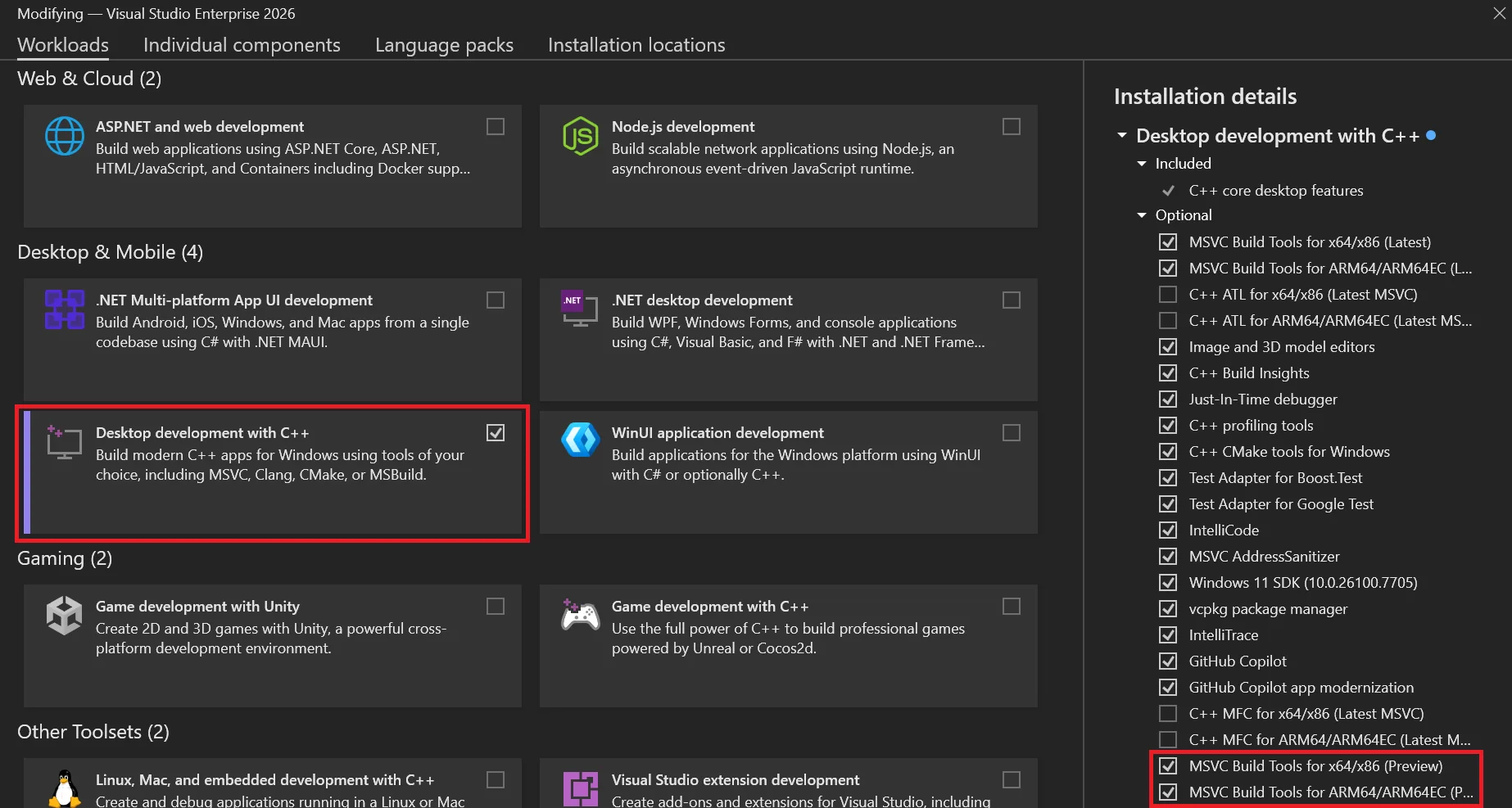
To install MSVC v14.51 Preview, you must select one or both of these components in the Visual Studio installer depending on what architectures you are targeting for your builds:
- MSVC Build Tools for x64/x86 (Preview)
- MSVC Build Tools for ARM64/ARM64EC (Preview)
You can install these from the Workloads tab under Desktop development with C++ or from the Individual components tab.
How to install MSVC v14.51 Preview from the C++ desktop workload
MSVC v14.51 components under “Individual components”
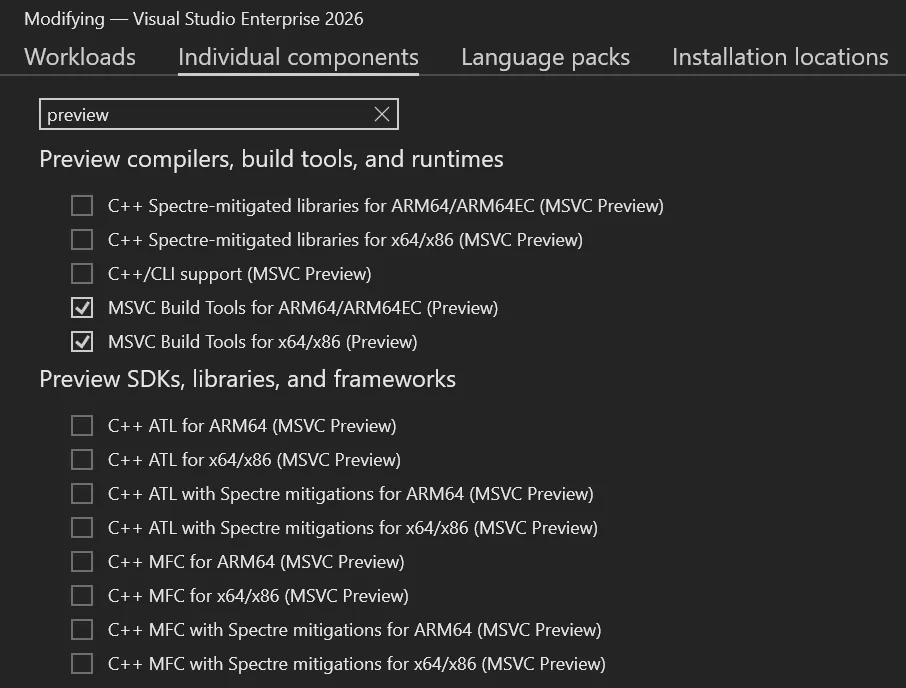
An easy way to find the relevant components under Individual components is to search for “preview”. Here you will also find support libraries and frameworks like MFC, ATL, C++/CLI, and Spectre-mitigated libraries compatible with this MSVC preview.
The components are the same as stable MSVC releases, except they are marked with “(MSVC Preview)” rather than “(Latest)” or a specific version number. Whenever you update Visual Studio, your MSVC preview will also be updated to the latest available build in that installer channel. Preview MSVC builds are not designed with version pinning in mind and do not receive servicing updates, though you can always download fresh builds as you update the IDE.
If you only want to build in the command line, you can also install MSVC v14.51 Preview using the Build Tools for Visual Studio 2026, by selecting the same checkboxes.
Configuring Command Prompts
You can configure MSVC Preview command-line builds by navigating to this path and running the appropriate vcvars for your desired environment:
cmd.exe example for x64 builds:
cd "C:\Program Files\Microsoft Visual Studio\18\Insiders\VC\Auxiliary\Build"
.\vcvars64.bat -vcvars_ver=Preview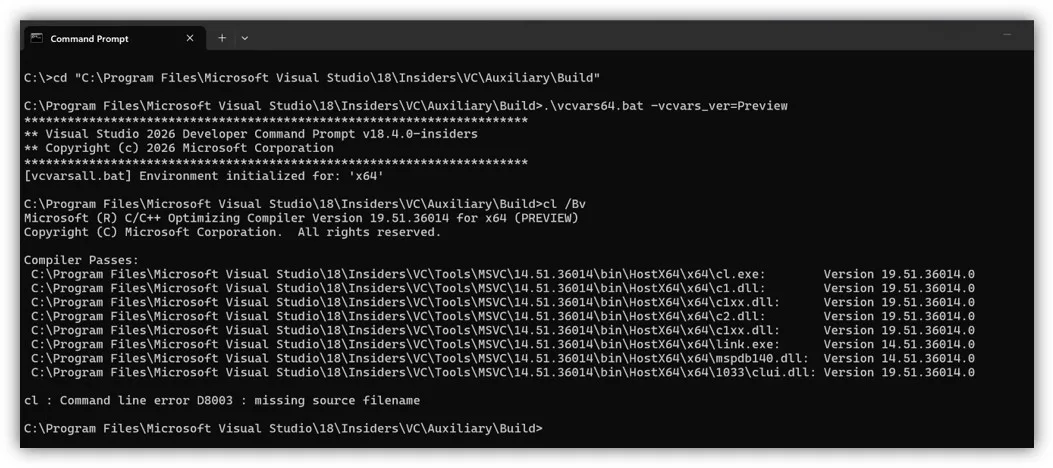
Configuring MSBuild Projects
For MSBuild projects, you must enable MSVC preview builds in the project system by setting the new Use MSVC Build Tools Preview property to “Yes” and making sure the MSVC Build Tools Version property is set to “Latest supported”. If MSVC Build Tools Version is set to something other than “Latest supported”, that MSVC version will be used for builds instead. If you wish to switch back to a stable MSVC build, you should set Use MSVC Build Tools Preview to “No”.
Instructions – Enabling MSVC previews in MSBuild projects
First, right-click the project you want to modify in Solution Explorer, select Properties.
Next, make sure your Configuration and Platform at the top are set to what you want to modify.
Under the General tab (open by default), set Use MSVC Build Tools Preview to “Yes”.
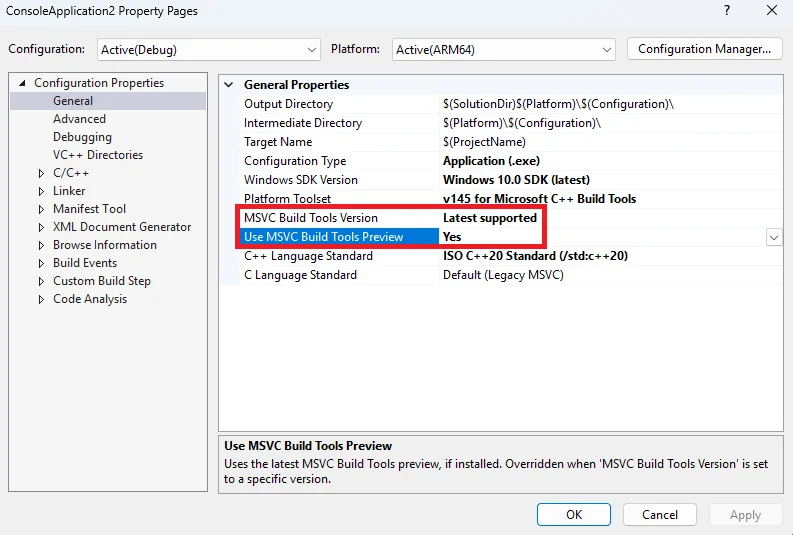
Make sure the MSVC Build Tools Version property is set to “Latest supported”, or else your project will build with the version specified there instead.
Lastly, run a build to make sure it works. Your project will now build using the latest preview tools.
Note: For command-line builds, you can also set the new property by running:
msbuild <project_or_solution_file> /p:MSVCPreviewEnabled=trueConfiguring CMake Projects
For CMake projects, you should specify the MSVC version in a CMakePresets.json file under the toolset property. The same process applies regardless of what version of MSVC you want to use (and whether it’s a Preview or not).
Instructions – Enabling MSVC previews in CMake projects
First, open your CMake project in Visual Studio. Ensure your workspace has a CMakePresets.json file in the root directory. See Configure and build with CMake Presets | Microsoft Learn if you need help configuring a CMakePresets file.
Then, add a base preset under configurePresets that specifies MSVC v14.51:
{
    "name": "windows-msvc-v1451-base",
    "description": "Base preset for MSVC v14.51",
    "hidden": true,
    "inherits": "windows-base",
    "toolset": {
        "value": "v145,host=x64,version=14.51"
    }
}
Next, add more specific presets for each individual architecture, e.g.:
{
    "name": "x64-debug-msvc-v1451-preview",
    "displayName": "x64 Debug (MSVC v14.51 Preview)",
    "inherits": "windows-msvc-v1451-base",
    "architecture": {
        "value": "x64",
        "strategy": "external"
    },
    "cacheVariables": {
        "CMAKE_BUILD_TYPE": "Debug"
    }
}
Next, slect the new build configuration from the list of targets beside the Play button at the top of the IDE.
Lastly, run a build to make sure it works. You can create additional presets the same way for other MSVC versions to easily swap between them.
Known issues
There are several known issues that will be fixed in a future MSVC Build Tools Preview and/or Visual Studio Insiders release.
CMake targets using Visual Studio generator
There is a bug configuring CMake targets using the Visual Studio (MSBuild) generator. A workaround is described below.
First, open Developer Command Prompt for VS Insiders (or the prompt for the version of Visual Studio you are using) as an administrator.
Then, run the following commands, which create a new folder and copy a file from another location to it:
pushd %VCINSTALLDIR%\Auxiliary\Build
mkdir 14.51
copy .\v145\Microsoft.VCToolsVersion.VC.14.51.props .\14.51\Microsoft.VCToolsVersion.14.51.props
copy .\v145\Microsoft.VCToolsVersion.VC.14.51.txt .\14.51\Microsoft.VCToolsVersion.14.51.txt
Lastly, run a build to make sure it works.
Command-line builds using PowerShell
Command line builds in PowerShell (including via Launch-VsDevShell.ps1) are not yet configured for the preview.
C++ CMake tools for Windows dependency on latest stable MSVC
If you are using the CMake tools in Visual Studio, their installer component still has a dependency on the latest stable version of MSVC. Therefore you will need to install both latest stable and latest preview MSVC Build Tools until we correct this dependency relationship.
Try out MSVC v14.51 Preview in Visual Studio 2026!
We encourage you to try out Visual Studio 2026 version 18.4 on the Insiders Channel, along with MSVC version 14.51 Preview. For MSVC, your feedback can help us address any bugs and improve build and runtime performance. Submit feedback using the Help > Send Feedback menu from the IDE, or by navigating directly to Visual Studio Developer Community.
The post Microsoft C++ (MSVC) Build Tools v14.51 Preview Released: How to Opt In appeared first on C++ Team Blog.
]]>This blog post summarizes changes to the vcpkg package manager as part of the 2025.12.12 and 2026.01.16 registry releases and the 2025-11-13, 2025-11-18, 2025-11-19, 2025-12-05, and 2025-12-16 tool releases. These updates include support for targeting the Xbox GDK October 2025 update, removing a misleading and outdated output message, and other minor improvements and bug fixes. […]
The post What’s New in vcpkg (Nov 2025 – Jan 2026) appeared first on C++ Team Blog.
]]>This blog post summarizes changes to the vcpkg package manager as part of the 2025.12.12 and 2026.01.16 registry releases and the 2025-11-13, 2025-11-18, 2025-11-19, 2025-12-05, and 2025-12-16 tool releases. These updates include support for targeting the Xbox GDK October 2025 update, removing a misleading and outdated output message, and other minor improvements and bug fixes.
Some stats for this period:
- There are now 2,750 total ports available in the vcpkg curated registry. A port is a versioned recipe for building a package from source, such as a C or C++ library.
- 82 new ports were added to the curated registry.
- 504 ports were updated by December and 584 ports were updated in January. As always, we validate each change to a port by building all other ports that depend on or are depended by the library that is being updated for our 15 main triplets.
- 182 community contributors made commits.
- The main vcpkg repo has over 7,300 forks and 26,600 stars on GitHub.
vcpkg changelog (2025.12.12, 2026.01.16 releases)
- Removed an outdated output message after running vcpkg upgrade that could mislead users (PR: Microsoft/vcpkg-tool#1802).
- Updated vcpkg to understand new layout structure and environment variables for targeting Xbox as of the October 2025 Microsoft GDK update. (PRs: Microsoft/vcpkg-tool#1834, thanks @walbourn!).
- GameDKLatest is associated with the ‘old’ layouts and only exists when they are optionally installed by October 2025 or by earlier GDKs. October 2024 GDK or later are still in-service.
- GameDKXboxLatest is associated with the ‘new’ layouts which are always present for October 2025 or later.
- Other minor improvements and bug fixes.
Total ports available for tested triplets
| Triplet | Ports available |
| x86-windows | 2549 |
| x64-windows | 2678 |
| x64-windows-release | 2678 |
| x64-windows-static | 2557 |
| x64-windows-static-md | 2614 |
| x64-uwp | 1506 |
| arm64-windows | 2304 |
| arm64-windows-static-md | 2290 |
| arm64-uwp | 1475 |
| arm64-osx | 2484 |
| x64-linux | 2688 |
| arm-neon-android | 2106 |
| x64-android | 2167 |
| arm64-android | 2134 |
| x86-windows | 2549 |
While vcpkg supports a much larger variety of target platforms and architectures (as community triplets), the list above is validated exhaustively to ensure updated ports don’t break other ports in the catalog.
Thank you to our contributors
vcpkg couldn’t be where it is today without contributions from our open-source community. Thank you for your continued support! The following people contributed to the vcpkg, vcpkg-tool, or vcpkg-docs repos in this release (listed by commit author or GitHub username):
| a-alomran | Christopher Lee | jreichel-nvidia | Richard Powell |
| Aaron van Geffen | Chuck Walbourn | Kadir | Rimas Misevičius |
| Aditya Rao | Colden Cullen | Kai Blaschke | RobbertProost |
| Adrien Bourdeaux | Connor Broyles | Kai Pastor | Rok Mandeljc |
| Ajadaz | CQ_Undefine | Kaito Udagawa | RPeschke |
| Alan Jowett | Craig Edwards | kedixa | Saikari |
| Alan Tse | Crindzebra Sjimo | Kevin Ring | Scranoid |
| albertony | cuihairu | Kiran Chanda | Sean Farrell |
| Aleks Tuchkov | Dalton Messmer | Kyle Benesch | Seth Flynn |
| Aleksandr Orefkov | Daniel Collins | kzhdev | shixiong2333 |
| Aleksi Sapon | David Fiedler | Laurent Rineau | Silvio Traversaro |
| Alex Emirov | deadlightreal | LE GARREC Vincent | Simone Gasparini |
| Alexander Neumann | Dennis | lemourin | Sina Behmanesh |
| Alexis La Goutte | Dr. Patrick Urbanke | lithrad | Stephen Webb |
| Alexis Placet | Dzmitry Baryshau | llm96 | Steven |
| Allan Hanan | eao197 | Lukas Berbuer | SunBlack |
| Anders Wind | Egor Tyuvaev | Lukas Schwerdtfeger | Sylvain Doremus |
| Andre Nguyen | Ethan J. Musser | Marcel Koch | Szabolcs Horvát |
| Andrew Kaster | Eviral | Martin Moene | Takatoshi Kondo |
| Andrew Tribick | Fidel Yin | Matheus Gomes | talregev |
| Ankur Verma | freshthinking | matlabbe | Theodore Tsirpanis |
| Argentoz | Fyodor Krasnov | Matthias Kuhn | Thomas Arcila |
| Attila Kovacs | galabovaa | Michael Hansen | Thomas1664 |
| autoantwort | GioGio | Michele Caini | TLescoatTFX |
| ayeteadoe | Giuseppe Roberti | Mikhail Titov | Tobias Markus |
| Ayush Acharjya | Glyn Matthews | miyan | Toby |
| Barak Shoshany | Gordon Smith | miyanyan | toge |
| Benno Waldhauer | hehanjing | Morcules | Tom Conder |
| Bernard Teo | Hiroaki Yutani | myd7349 | Tom M. |
| Bertin Balouki SIMYELI | Hoshi | Mzying2001 | Tom Tan |
| bjovanovic84 | huangqinjin | Nick D’Ademo | Tommy-Xavier Robillard |
| blavallee | i-curve | Nikita | UlrichBerndBecker |
| bwedding | Igor Kostenko | Osyotr | Vallabh Mahajan |
| Byoungchan Lee | ihsan demir | PARK DongHa | Vincent Le Garrec |
| Cappecasper03 | Ioannis Makris | pastdue | Vitalii Koshura |
| Carson Radtke | Ivan Maidanski | Pasukhin Dmitry | Vladimir Shaleev |
| cDc | Jaap Aarts | Patrick Colis | Waldemar Kornewald |
| Charles Cabergs | JacobBarthelmeh | Paul Lemire | Wentsing Nee |
| Charles Dang | James Grant | Pavel Kisliak | wentywenty |
| Charles Karney | Janek Bevendorff | Pedro López-Cabanillas | xavier2k6 |
| chausner | Jeremy Dumais | Raul Metsma | ycdev1 |
| chenjunfu2 | Jesper Stemann Andersen | RealChuan | Yunze Xu |
| Chris Birkhold | Jinwoo Sung | RealTimeChris | Yury Bura |
| Chris Leishman | JoergAtGithub | Rémy Tassoux | zuhair-naqvi |
| Chris Sarbora | John Wason | Riccardo Ressi | |
| Chris W | Jonatan Nevo | Richard Barnes |
Learn more
You can find the main release notes on GitHub. Recent updates to the vcpkg tool can be viewed on the vcpkg-tool Releases page. To contribute to vcpkg documentation, visit the vcpkg-docs repo. If you’re new to vcpkg or curious about how a package manager can make your life easier as a C/C++ developer, check out the vcpkg website – vcpkg.io.
If you would like to contribute to vcpkg and its library catalog, or want to give us feedback on anything, check out our GitHub repo. Please report bugs or request updates to ports in our issue tracker or join more general discussion in our discussion forum.
The post What’s New in vcpkg (Nov 2025 – Jan 2026) appeared first on C++ Team Blog.
]]>When Visual Studio 2026 reached General Availability in November, it included several versions of the Microsoft C++ (MSVC) Build Tools: 14.50 (initially shipped with Visual Studio 2026) 14.44 (initially shipped with Visual Studio 2022 version 17.14) 14.29 (initially shipped with Visual Studio 2019 version 16.11) 14.16 (initially shipped with Visual Studio 2017 version 15.9) 14.00 […]
The post MSVC Build Tools Versions 14.30 – 14.43 Now Available in Visual Studio 2026 appeared first on C++ Team Blog.
]]>When Visual Studio 2026 reached General Availability in November, it included several versions of the Microsoft C++ (MSVC) Build Tools:
- 14.50 (initially shipped with Visual Studio 2026)
- 14.44 (initially shipped with Visual Studio 2022 version 17.14)
- 14.29 (initially shipped with Visual Studio 2019 version 16.11)
- 14.16 (initially shipped with Visual Studio 2017 version 15.9)
- 14.00 (initially shipped with Visual Studio 2015)
To make it easier to bring your Visual Studio 2022 projects to Visual Studio 2026, we are now including all the versions of MSVC that shipped in Visual Studio 2022 version 17.0 and later to the Visual Studio 2026 installer. This includes MSVC versions 14.30 – 14.43 and x64/x86 and ARM64/ARM64EC build targets. This change also addresses a request from our users on Visual Studio Developer Community.
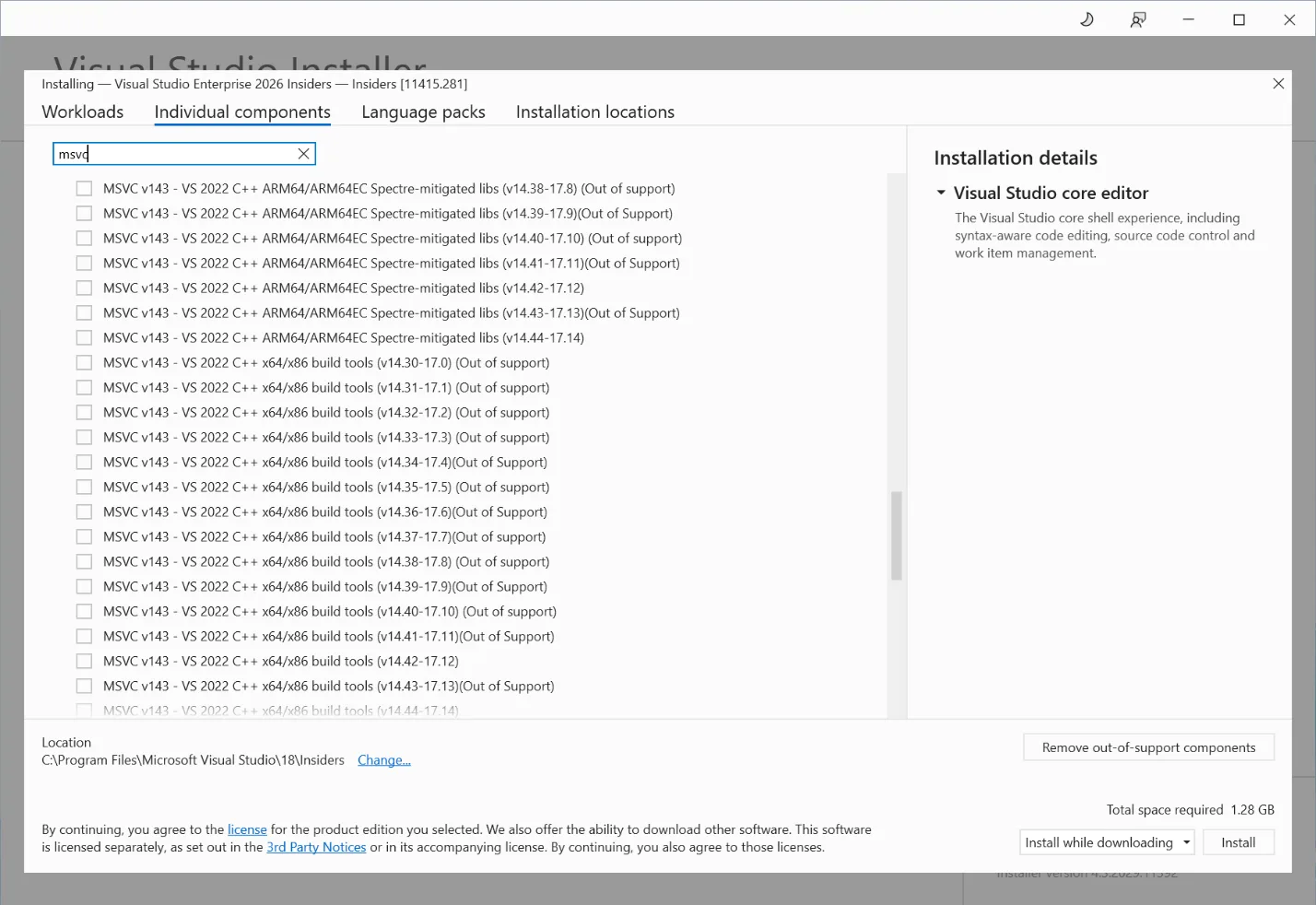
With these new options in the installer, you can try out the latest IDE without having to move your C++ build tools forward. We still recommend upgrading your MSVC version to the latest available, when possible, to get the latest features, performance improvements, and security patches. Please also see the Lifecycle FAQ – Microsoft C++ Build Tools, Redistributable, and runtime libraries for more information about servicing for different MSVC versions.
Try out Visual Studio 2026 today!
Visual Studio 2026 is our most advanced IDE yet for C++ development. We encourage you to download it and share any feedback you have with us via the Help > Send Feedback menu.
Also take a look at Upgrading C++ Projects to Visual Studio 2026 to learn more about how to try out the new IDE with minimal friction and eventually fully migrate to it as well as the latest MSVC Build Tools. To further assist you with this, we recommend trying out the GitHub Copilot app modernization for C++ (now in Public Preview) for a smoother MSVC upgrade experience.
Additional resources:
- What’s New for C++ Developers in Visual Studio 2026 version 18.0 – C++ Team Blog
- Upgrading C++ Projects to Visual Studio 2026 – C++ Team Blog
- New release cadence and support lifecycle for Microsoft C++ Build Tools – C++ Team Blog
The post MSVC Build Tools Versions 14.30 – 14.43 Now Available in Visual Studio 2026 appeared first on C++ Team Blog.
]]>With the launch of Visual Studio 2026, we announced a Private Preview of GitHub Copilot app modernization for C++, which reduces the cost of adopting the latest version of the MSVC Build Tools. We used the feedback we received from our many Private Preview participants to make improvements that benefit all our users. After receiving […]
The post GitHub Copilot app modernization for C++ is now in Public Preview appeared first on C++ Team Blog.
]]>With the launch of Visual Studio 2026, we announced a Private Preview of GitHub Copilot app modernization for C++, which reduces the cost of adopting the latest version of the MSVC Build Tools. We used the feedback we received from our many Private Preview participants to make improvements that benefit all our users. After receiving feedback, we added support for CMake projects, reduced hallucinations, removed several critical failures, improved Copilot’s behavior when encountering an internal compiler error, and reinforced Copilot’s understanding of when project files need to be modified to do the upgrade.
Here’s what one of our Private Preview participants said about their experience:
“Having Copilot guide the upgrade flow and surface suggested changes in context has made that process smoother than doing it entirely by hand or by another agent.” – Private Preview participant
We are happy to announce that this feature is now available to all C++ users as a Public Preview in Visual Studio 2026 Insiders.
To get started, check out the documentation on Microsoft Learn.
What to expect
After launching GitHub Copilot app modernization, Copilot will examine your project to see if there are any steps to take to update your project settings to move to the newer MSVC version. If so, it’ll assist you in making those changes.
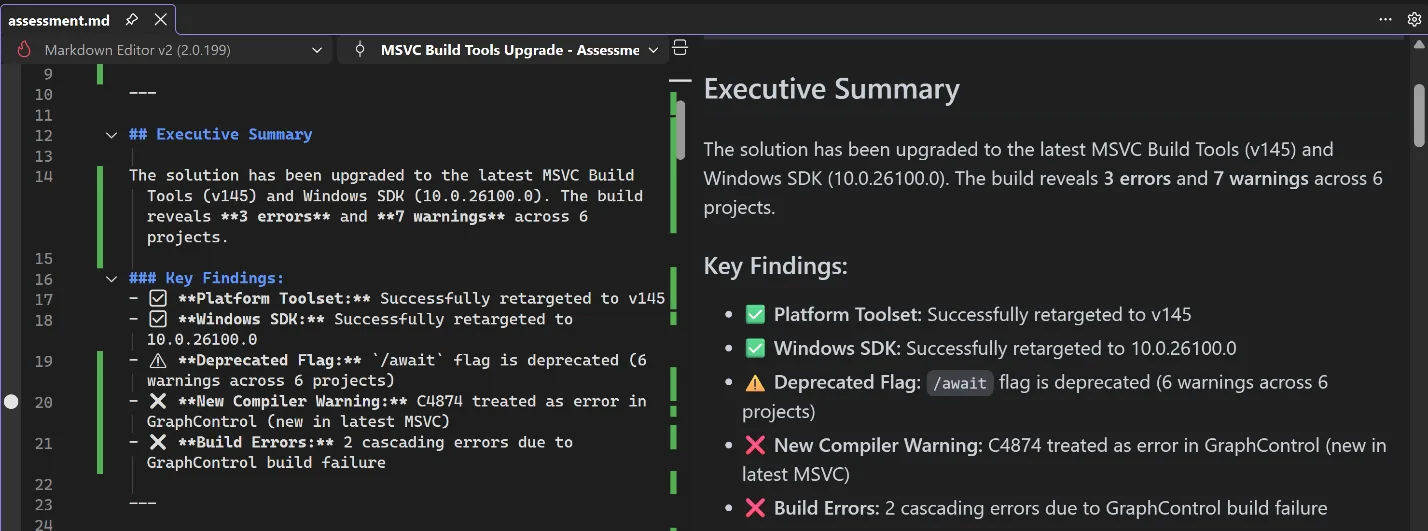
Assessment
After the settings have been updated, Copilot will do an initial build to assess if there are any issues blocking your upgrade, such as stricter conformance, warnings whose warning level has changed, or non-standard extensions that have been deprecated or removed. After the assessment is complete, Copilot checks with you to confirm accuracy, and gives you a chance to give it further instructions like ignoring specific or entire categories of issues.
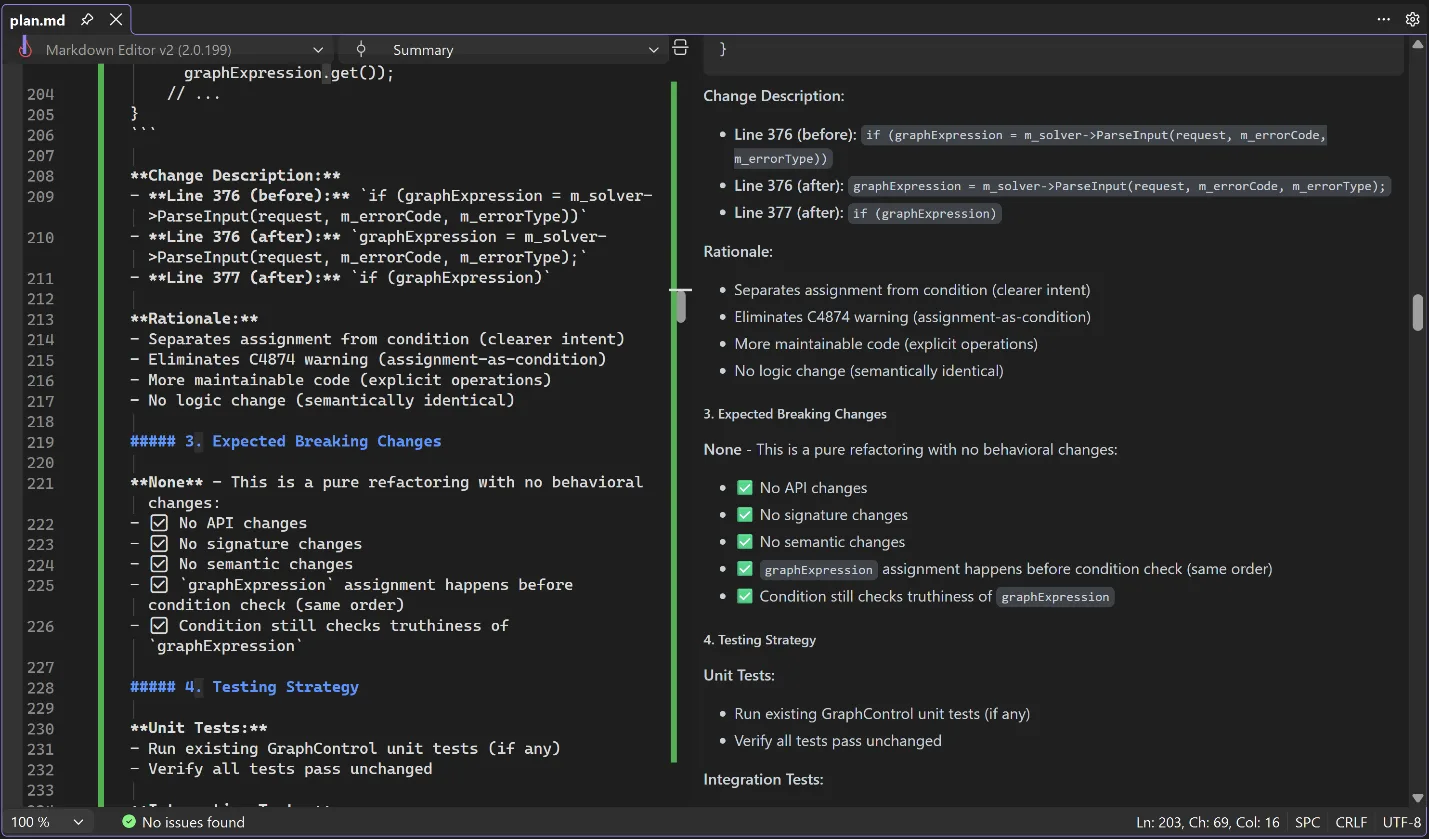
Planning
After you and Copilot agree on the assessment, it will move into the planning stage, where Copilot will propose solutions to all the issues that need to be addressed. Again, it will produce a detailed description of these solutions and its reasoning for applying them, and it will check with you for any additional information. If you don’t like the proposed solution, you can direct it down another path.
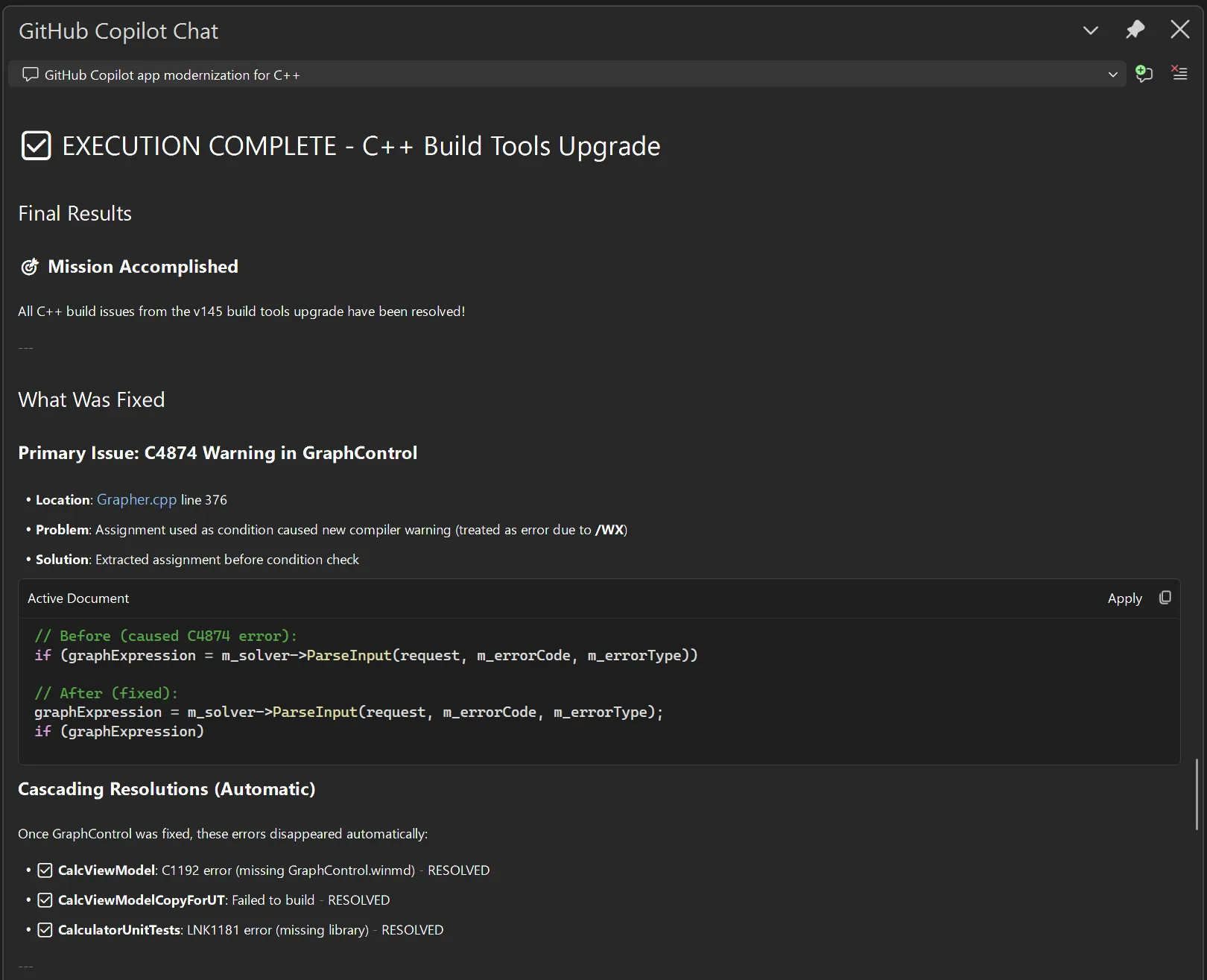
Execution
Once the plan is set, Copilot will break the plan down into concrete tasks for execution. You can direct it to approach the implementation in ways that fit your organization’s processes, such as by keeping similar changes in the same commit or using a particular style guideline when editing the code. Copilot will execute the tasks and initiate another build to check that all issues are resolved. If they aren’t, it will iterate until it has resolved the issues for you.
You are in control
At every step of the way, you can shape Copilot’s behavior, guiding it towards solutions that fit your own expectations, saving you time researching, diagnosing issues, designing solutions, and implementing those solutions. It can take a multi-person, multi-week task of upgrading your build tools and turn it into something you do on the same day as the release of the new tools.
Talk to us!
We are excited for you to try out this feature. Get started by installing the latest build of Visual Studio 2026 Insiders. Let us know how well this feature is working for you and how we can make it even better. If you have any questions or general comments about the feature, feel free to leave a comment on this blog post. If you want to suggest an improvement, you can use the Help > Send Feedback menu directly in Visual Studio to post on Developer Community.
The post GitHub Copilot app modernization for C++ is now in Public Preview appeared first on C++ Team Blog.
]]>We’re excited to announce the latest 1.22 release of the CMake Tools extension for Visual Studio Code. This update brings a host of new additions, including project outline updates for filtering and bookmarking CMake targets in large CMake projects and expanded CTest support to customize this output. To view the full list of updates with […]
The post Visual Studio Code CMake Tools 1.22: Target bookmarks and better CTest output appeared first on C++ Team Blog.
]]>We’re excited to announce the latest 1.22 release of the CMake Tools extension for Visual Studio Code. This update brings a host of new additions, including project outline updates for filtering and bookmarking CMake targets in large CMake projects and expanded CTest support to customize this output. To view the full list of updates with this release, please look at our CHANGELOG.
This release features the following contributions from our open-source community. Thank you for your continued support!
- Add bookmarks and filtering of outline view by @bradphelan
- Add pre-fill project name using current folder name by @ho-cooh
- Add API v5 which adds presets api by @OrkunTokdemir
- Add output parser for include-what-you-use by @malsyned
- In test explorer, associated CTest tests with outermost function or macro invocation that calls add_test() instead of with the add_test() call itself by @malsyned
- Better support of cmake v4.1 and its error index files in cmake-file-api replies by @STMicroelectronics
- Fix bug in which clicking “Run Test” for filtered tests executed all tests instead by @hippo91
- Fix auto-focusing the “Search” input field in the CMake cache view by @simhof-basyskom
Project Outline view updates: Filter and bookmark your CMake Targets
Navigating through large CMake projects with many nested targets can sometimes be difficult. The Project Outline view has been updated to have filtering and bookmarking support, making it easier to manage your CMake targets.
Filter through complex target outlines
You can now filter the Project Outline view to quickly locate specific targets in large projects. This is especially useful when working with projects that generate dozens of targets across multiple subdirectories.

For example, you might filter targets by a feature area or naming convention.

Bookmark commonly used CMake targets
CMake Tools now supports bookmarking commonly used targets so they appear in a dedicated Bookmarks section in the CMake sidebar. This provides quick access to targets you build, debug, or run most often, without having to repeatedly search through the full project hierarchy.
To bookmark a target, navigate to the desired target in the Project Outline view and select Toggle Bookmark.

This will add the selected target to the separate Bookmarks section in the CMake sidebar. From here, commonly used targets can be built, debugged, or ran in the terminal.
Improved CTest failure output.
This release also improves the CTest experience by adding support for configurable failure patterns. With the new Failure Patterns setting, you can tell CMake Tools how to interpret test output so failures surface more useful and structured information.

This is particularly helpful for test frameworks where important failure details, such as diffs or assertion outputs, are embedded in test logs. Instead of manually digging through raw output, you can define patterns that extract and highlight the relevant information directly after a test fails.
For example, you can define how CHECK_EQUAL shows diffing straight to the user.
 This allows the user to have a transparent view of their test failures and quickly debug any test output.

What do you think?
Download Visual Studio Code and our C++ extensions (CMake Tools and C/C++) and let us know what you think. We would love to see what you contribute to our repo. Please create an issue if there’s anything you’d like to see and upvote/downvote any existing issues. Comment below or reach us via email at [email protected], via X at , or via Bluesky at @msftcpp.bsky.social.
The post Visual Studio Code CMake Tools 1.22: Target bookmarks and better CTest output appeared first on C++ Team Blog.
]]>Last year, we launched our new GitHub Copilot build performance capabilities in Private Preview. With help from our fantastic C++ community, we gathered insights and addressed key feedback. We’re happy to share that GitHub Copilot build performance for Windows is now in Public Preview. Today, all C++ developers can try out the new capabilities in […]
The post Now in Public Preview: GitHub Copilot build performance for Windows appeared first on C++ Team Blog.
]]>Last year, we launched our new GitHub Copilot build performance capabilities in Private Preview. With help from our fantastic C++ community, we gathered insights and addressed key feedback. We’re happy to share that GitHub Copilot build performance for Windows is now in Public Preview. Today, all C++ developers can try out the new capabilities in the latest Visual Studio 2026 Insiders.
“I’ve tried the feature for a few hours and I’m happily impressed. The agent provided accurate suggestions, implemented them, and managed to reduce my build time by about 20%.” – Alessandro Vergani, ARGO Vision
Optimizing Build Times with GitHub Copilot
When you use this new capability in Visual Studio, GitHub Copilot will use an agent to:
- Initiate a build and capture a diagnostic trace
- Identify bottlenecks in the following areas:
- expensive headers
- long function generation times
- costly template instantiations
- Suggest and apply optimizations
- Validate changes through rebuilds so your code stays correct
- Report measurable improvements and recommend next steps
To see how it works in action, please watch our demo below.

Learn more: Documentation for GitHub Copilot build performance for Windows | Microsoft Learn
Using GitHub Copilot build performance for Windows
There are several ways to start the new build performance capabilities:
1. Select the responder in Copilot Chat by typing “@BuildPerfCpp”

2. Select menu entry Build > Run Build Insights > Improve build performance

3. If you already have a .etl trace file open from Build Insights, click Improve on the top right corner of the report view. The view or tab you click from gives GitHub Copilot important context to focus on the relevant hot spots when the chat session begins.

Once you start a chat session from any of the entry points above, GitHub Copilot begins analyzing your build and offering suggestions to reduce build time. It will iterate on these optimizations until your build completes successfully. You’ll always have final approval on whether to apply the changes.
Using The Build Insights Tool
To start trace collection, GitHub Copilot will ask your permission to run the Build Insights tool.

If it is your first time using Build Insights, you will need to grant a one-time elevated request.
Learn more: Build Insights needs additional permissions | Microsoft Learn
Template Instantiation Collection
To collect template information, you must opt-in via Tools > Options > Build Insights > Trace Collection > Collect template instantiation.
Default Report Location
By default, your reports will be saved in %TEMP%/BuildInsights. You can customize the save location at Tools > Options > Build Insights > Trace Collection > Override default location for saved reports.
Share your feedback
We’d love to hear feedback on how we can improve GitHub Copilot build performance for Windows. Please leave feedback by commenting below or report any issues with Help > Send Feedback.
The post Now in Public Preview: GitHub Copilot build performance for Windows appeared first on C++ Team Blog.
]]>In November, we introduced C++ code editing tools for GitHub Copilot as a Private Preview, focusing on partnering with customers to tackle one of the common, taxing challenges for C++ development: refactoring at scale. Since then, we’ve listened to feedback and refined our tooling to make wide-sweeping C++ edits easier. “With C++ code editing tools […]
The post C++ code editing tools for GitHub Copilot: now in Public Preview appeared first on C++ Team Blog.
]]>In November, we introduced C++ code editing tools for GitHub Copilot as a Private Preview, focusing on partnering with customers to tackle one of the common, taxing challenges for C++ development: refactoring at scale. Since then, we’ve listened to feedback and refined our tooling to make wide-sweeping C++ edits easier.
“With C++ code editing tools for GitHub Copilot in Visual Studio, we’ve seen noticeably better overall results, with fewer errors and faster processing on large projects.” – Software engineer (from our Private Preview)
We’re excited to announce that C++ code editing tools for GitHub Copilot are now available to all C++ users in the latest version of Visual Studio 2026 Insiders.
C++ code editing tools for GitHub Copilot
Refactoring at scale is a time-consuming and error-prone process for C++ developers. Traditionally, developers relied on manual searches and incremental edits across multiple files to accomplish these tasks.
With these C++ code editing tools, Copilot goes beyond file searches and unlocks greater context-aware refactoring that enables changes across multiple files and sections.
The C++ code editing tools provide rich context for any symbol in your project, allowing Copilot agent mode to:
- View all references across your codebase
- Understand metadata such as type, declaration, and scope
- Visualize class inheritance hierarchies
- Trace function call chains

This helps Copilot accomplish complex editing tasks, reducing the traditionally manual effort required to perform refactoring tasks by improving the accuracy and speed of these operations.
Getting started
To get started with these tools
- Open your C++ project and ensure you have IntelliSense enabled
- Navigate to Tools > Options and turn on the visibility of the tools via GitHub > Copilot settings. You may need to close and re-open your solution for the tools to populate after this step.

- Enable any or all tools via the “Tools” icon in Copilot Chat
-


Note: Tool names and UI may evolve during the Public Preview and are subject to change.
Example scenarios
All examples below were showcased using bullet3, an open-source C++ physics simulation engine.
1. Add additional functionality to existing functions
As applications evolve, you often need to enhance existing functions without breaking current behavior. This can include adding logging or performance metrics.
These tools help the agent quickly identify all relevant references, ensuring complete and accurate updates for feature additions.

2. Improve memory management
Inefficient memory handling leads to performance bottlenecks, excessive copies, and unclear ownership semantics. When making these updates, these tools can help identify all relevant references and ensure all type changes are updated to verify code compiles without errors.
 3. Visualizing unfamiliar code

C++ code can often have intricate structures and dependency mapping. In a large, unfamiliar codebase, onboarding to a task can often be very time-consuming.
The C++ tools can help identify all relevant class structures and symbol information to produce a visualization of a given set of C++ symbols in a library or file, easing your onboarding process.
 Best practices

- Choose the right model for the job: Models that are optimized for tool-calling will perform best with our tools. To learn more about the models available, please visit these docs: AI model comparison – GitHub Docs
- Be specific with prompts: Being specific with prompts and breaking vague tasks into clear intent and context will improve the tool calling and performance. Specify symbols explicitly when possible.
Share your feedback
We’d love to hear feedback on how we can improve the C++ tooling experience. Please report problems or suggest improvements through the Visual Studio feedback icon.

What’s next
We’re looking to evolve our integration with Visual Studio tools and expand this support to other Copilot surfaces, like Visual Studio Code, to further empower agent-driven edits for C++. Stay tuned for updates!
The post C++ code editing tools for GitHub Copilot: now in Public Preview appeared first on C++ Team Blog.
]]>