Proxy Design Pattern Explained with C++ Sample

Proxy design pattern is otherwise known as surrogate design pattern.It is used to control and manage access to an object.

following are the actors in a proxy pattern

1)Real subject implementing the subject interface
2)Proxysubject implementing the subject interface and control access to the realsubject then delegate calls to it

client will be using proxy class; proxy then delegates calls to realsubject class.

some of the applications of proxy pattern is

1) provide user authentication to an action defined in a class ;
users can define a proxy class and define the user validation logic there , then delegates call to real class if authentication succeeds.
2)If I want to make action in a class thread safe (if client needs thread safety) .Define a proxy class and write the thread safety logic in that class and delegate the call to real object .client will be using the proxy class.

class diagram is shown below

sample source code is below


// ProxyPatternSample.cpp : This file contains the 'main' function. Program execution begins and ends there.
//

#include "pch.h"
#include <iostream>
using namespace std;
class IBox
{
public:
	virtual void Open() = 0;
	virtual ~IBox() {};
};

class SimpleBox : public IBox
{
public:
	virtual void Open()
	{
		cout << "Opening te box";
	}
};


class ProxyBox : public IBox
{
public:
	ProxyBox(string sUserName, string sPwd):m_UserName(), m_Pwd(sPwd)
  
	{

	}

	virtual void Open()
	{
		if (iSAuthenticated()) {
			cout << "\nAuthentication Success";
			m_Box.Open();
		}
		else
			cout << "\nAuthentication Failure , You can't open the Box";
	}
private:
	bool iSAuthenticated()
	{
		bool bAuthenticated = false;
		//bAuthenticated = AUthenication logic here
		return bAuthenticated;

	}
private:
	string m_UserName;
	string m_Pwd;
	SimpleBox m_Box;
};

int main()
{
	IBox* box = new ProxyBox("Admin", "Test123");
	box->Open();
	delete box;
}

Sample source code implemented in vs 2017 is available in Git repository: download

Composite pattern explained with C++ samples

Composite pattern is a commonly used design pattern ; it can be used if we need to treat group of objects in the same way as a single object.In a composite patter we can maintain a tree like structure.

school-box

There are two types of objects composite objects and leaf object both is derived from same interface and it overrides the same operation.Some examples for composite pattern is given below

1) file system representation as folders(composite) and file(leaf)
2) Window contains sub windows (composite)and child controls(leaf)
3) Box(composite) and instruments(pencil,pen, rubber etc) in it.
4) Manager(composite) and subordinates(leaf).

I Will explain Box and instruments example

class diagram
composite

Decorator Pattern Explained with C++ sample

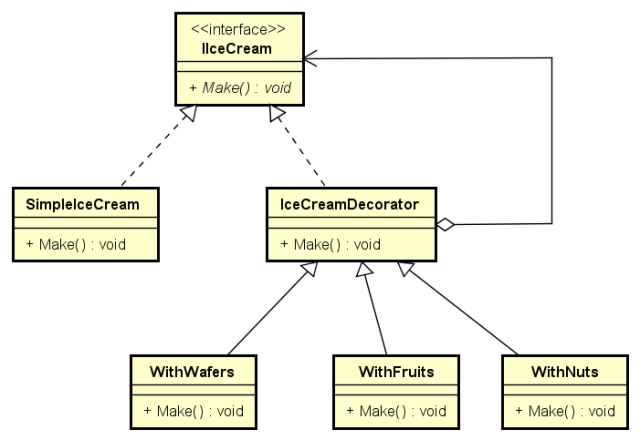
Decorator pattern means decorating an existing class by giving additional responsibility to it dynamically.

ice-cream
let’s take an example of an ice cream;we can decorate an ice cream with different adding like(fruits , nuts and wafers etc).

class diagram is shown below

decoratorpattern

sample source code is shown below

// DecoratorPattern.cpp : Defines the entry point for the console application.
//

#include "stdafx.h"
#include <iostream>

class IiceCream
{
public:
	virtual void Make() = 0;
	virtual ~IiceCream() { }

};

class SimpleIceCream: public IiceCream
{
public:
	virtual void Make() 
	{
		std::cout<<"\n milk + sugar +  Ice cream Powder";
	}


};

class IceCreamDecorator: public IiceCream
{

public:
	IceCreamDecorator(IiceCream& decorator):m_Decorator(decorator)
	{

	}

	virtual void Make() 
	{
		m_Decorator.Make();
	}
	private:
	IiceCream& m_Decorator;
};

class WithFruits : public IceCreamDecorator
{

public:
     WithFruits(IiceCream& decorator):IceCreamDecorator(decorator)
	 {

	 }
	 virtual void Make() 
	 {
		 IceCreamDecorator::Make();
		 std::cout<<" + Fruits";
	 }

};

class WithNuts : public IceCreamDecorator
{

public:
	WithNuts(IiceCream& decorator):IceCreamDecorator(decorator)
	{

	}

	virtual void Make() 
	{
		IceCreamDecorator::Make();
		std::cout<<" + Nuts";
	}

};

class WithWafers : public IceCreamDecorator
{

public:
	WithWafers(IiceCream& decorator):IceCreamDecorator(decorator)
	{

	}

	virtual void Make() 
	{
		IceCreamDecorator::Make();
		std::cout<<" + Wafers";
	}

};

int _tmain(int argc, _TCHAR* argv[])
{
	IiceCream* pIceCreamSimple = new SimpleIceCream();
	pIceCreamSimple->Make();

	IiceCream* pIceCreamFruits = new WithFruits(*pIceCreamSimple);
	pIceCreamFruits->Make();

	IiceCream* pIceCreamNuts   = new WithNuts(*pIceCreamFruits);
	pIceCreamNuts->Make();

	IiceCream* pIceCreamWafers = new WithWafers(*pIceCreamNuts);
	pIceCreamWafers->Make();

	delete pIceCreamSimple;
	delete pIceCreamFruits;
	delete pIceCreamNuts;
	delete pIceCreamWafers;

	return 0;
}

Source code using vs 2010 can be downloaded at:download

Iterator Pattern Using C++

I think you are familiar with STL iterators; using iterators it is very easy to navigate a container.

Iterator

If you have a custom container class you can also define iterator for it. The design strategy used for it
Comes under a design pattern called Iterator design pattern. Here I will share an example for iterator design pattern.

Suppose a file contains integers in each line; I need to write a container class which should read valid integers from this file and I need to write an iterator class for this container class.

// IteratorPatternDemo.cpp :
#include "stdafx.h"
#include <iosfwd>
#include <iostream>
#include <fstream>
#include <vector>
#include <string>
using namespace std;

class Container {

public:
	Container(istream& s):m_stream(s),m_nIndex(0)
	{
		FillData();
	}

	class iterator
	{
		const Container &sln;
		size_t m_Index;
	public:
		iterator(const Container &s): sln(s),m_Index(0)
		{

		}
		iterator(const Container &s, size_t nSize): sln(s),m_Index(nSize)
		{

		}
		iterator(const iterator& other):sln(other.sln),m_Index(other.m_Index)
		{


		}
		void operator++()
		{
			m_Index++;
		}

		void operator--()
		{
			m_Index++;
		}

		bool operator != (const iterator& other)
		{
			return m_Index != other.m_Index;
		}

		int operator *()
		{
			return sln.m_Elements[m_Index];
		}
	};

	iterator begin()
	{
		iterator it(*this);
		return it;
	}

	iterator end()
	{
		iterator it(*this, m_Elements.size());
		return it;
	}

private:
	void FillData()
	{
		//ifstream& in_stream = dynamic_cast<ifstream&>(m_stream);
		std::ifstream& in_stream = dynamic_cast<ifstream&>(m_stream);
		string line;		
		vector<string> list;
		while(std::getline(in_stream, line))
		{
			//in_stream >> line;
			list.push_back(line);
			TrimLeadingSpace(line);
			bool bValid = IsValidInteger(line);
			if(bValid)
				m_Elements.push_back(atoi(line.c_str()));
		}
		in_stream.close();

	}

	void TrimLeadingSpace(string& sNum)
	{
		const char* ws = " \t\n\r\f\v";
		sNum.erase(0, sNum.find_first_not_of(ws));
	}

	bool IsValidInteger(const string& sNum)
	{
		const int MAX_LIMIT = 1000000000;
		const int MIN_LIMIT = -1000000000;
		bool bflag = false; 
		auto startIt = sNum.begin();
		if(sNum[0] =='+' || (sNum[0] =='-'))
			startIt =  sNum.begin() +1;

		for(auto it = startIt;it!= sNum.end();++it)
		{
			bflag =true;
			char nChar = *it;
			if(!isdigit(nChar))
				return false;
		}

		int nNum        = atoi(sNum.c_str());
		bool bMaxCheck  = nNum<MAX_LIMIT &&  nNum>MIN_LIMIT;//limit check

		return ( bMaxCheck && bflag);

	}

	istream& m_stream;
	int m_nIndex;
	vector<int> m_Elements;

};


int _tmain(int argc, _TCHAR* argv[])
{
	std::ifstream file("H:\\Test.txt");
	Container sobj(file);
    
	//Usage of the iterator
	for (Container::iterator it = sobj.begin(); it != sobj.end(); ++it) {
		int x = *it;
		cout << x << endl;
	}

	return 0;
}

working Source code in VS 2010 can be downloaded at:Download

Protocol Layer Implementation Approach explained with C++ samples

Have you ever worked in any protocol development? I have been part of some protocol development; here I am sharing object oriented design strategy I followed. You can use this design as a Skeleton when you develop a new protocol.

For a protocol stack, data (packet) is flowing from top to bottom in Senders side and opposite in receiver’s side as shown below.

Protocol-Layer

We can use the layered approach when designing a protocol stack class; following class diagram shows the players involved in the design.

Protocol-Layer-Class-Diagram

Following table shows a short description about the classes involved in this design.

untitledprotocol-layer-desc

Code is shared below.

Layer.h

#pragma  once
#include <iostream>
#include "Packet.h"
#include <vector>
class CPacket;
using namespace std;
class ILayer
{
public:
	virtual void Send(CPacket&)       = 0;
	virtual void Recv(CPacket&)       = 0;
	virtual void Process(CPacket&)    = 0;
	virtual PROTOCOL_LAYER GetLayer() = 0;
	virtual void  GetHeader(vector<BYTE>& m_Data)  = 0;
	virtual void  GetBody(vector<BYTE>& m_Data)    = 0;
	virtual void  GetTrailer(vector<BYTE>& m_Data) = 0;
	

};

class ILayerHandler
{

public:
	virtual ILayer* GetLowerLayer(PROTOCOL_LAYER layer) = 0;
	virtual ILayer* GetUpperLayer(PROTOCOL_LAYER layer) = 0;

};

LayerImpl.h

#pragma  once
#include "Layer.h"
#include <cstring>
#include <iterator>
#include "ProtocolStack.h"
#include <iostream>
#include <string>

class AbstractLayer: public ILayer
{

public:
	AbstractLayer(ILayerHandler* pLayerhanler):m_pLayerhanler(pLayerhanler)
	{


	}

	virtual void Send(CPacket& packet) 
	{
		vector<BYTE> data;

		GetHeader(data);
		packet.AddHeader(data);

		data.clear();
		GetBody(data);
		packet.AddBody(data);

		data.clear();
		GetTrailer(data);
		packet.AddTrailer(data);

		Process(packet);

		if(m_pLayerhanler->GetLowerLayer(GetLayer()))
			m_pLayerhanler->GetLowerLayer(GetLayer())->Send(packet);
	}
		
	virtual void Recv(CPacket& packet){

		
		std::cout<<"\n "<< CProtocolStack::GetLayerName(GetLayer())<<" data is:";
		vector<BYTE> header;
		packet.ExtractHeader(header, GetLayer());
		packet.Print(header);

		vector<BYTE> body;
		packet.ExtractBody(body, GetLayer());
		packet.Print(body);

		vector<BYTE> trailer;
		packet.ExtractTrailer(trailer, GetLayer());
		packet.Print(trailer);

		if(m_pLayerhanler->GetUpperLayer(GetLayer()))
			m_pLayerhanler->GetUpperLayer(GetLayer())->Recv(packet);
	}

	virtual void Process(CPacket&)    = 0;
	virtual PROTOCOL_LAYER GetLayer() = 0;
	virtual void  GetHeader(vector<BYTE>& m_Data)  = 0;
	virtual void  GetBody(vector<BYTE>& m_Data)    = 0;
	virtual void  GetTrailer(vector<BYTE>& m_Data) = 0;

private:
	ILayerHandler* m_pLayerhanler;
};


class CApplicatioLayer : public AbstractLayer
{

public:
	CApplicatioLayer(ILayerHandler* pLayerhanler):AbstractLayer(pLayerhanler)
	{


	}	

	virtual void Process(CPacket& packet) override
	{
		cout<<"nProcessing packet";
	}


	virtual PROTOCOL_LAYER GetLayer() override
	{
		return APPLICATION_LAYER;
	}

	virtual void  GetHeader(vector<BYTE>& m_Data) override
	{
		std::string str = "APPLICATION-LAYER-HEADER";		
		std::copy(str.begin(), str.end(), std::back_inserter(m_Data));
	}

	virtual void  GetBody(vector<BYTE>& m_Data) override
	{
		std::string str = "APPLICATION-LAYER-BODY";		
		std::copy(str.begin(), str.end(), std::back_inserter(m_Data));
	}

	virtual void  GetTrailer(vector<BYTE>& m_Data) override
	{
		std::string str = "APPLICATION-LAYER-TRAILER";		
		std::copy(str.begin(), str.end(), std::back_inserter(m_Data));
	}
};

class CTransportLayer : public AbstractLayer
{
public:
	CTransportLayer(ILayerHandler* pLayerhanler):AbstractLayer(pLayerhanler)
	{


	}
	
	virtual void Process(CPacket& packet) override
	{
		cout<<"\nProcessing packet";
	}


	virtual PROTOCOL_LAYER GetLayer() override
	{
		return TRANSPORT_LAYER;
	}

	virtual void  GetHeader(vector<BYTE>& m_Data) override
	{
		std::string str = "TRANSPORT-LAYER-HEADER";		
		std::copy(str.begin(), str.end(), std::back_inserter(m_Data));
	}

	virtual void  GetBody(vector<BYTE>& m_Data) override
	{
		std::string str = "TRANSPORT-LAYER-BODY";		
		std::copy(str.begin(), str.end(), std::back_inserter(m_Data));
	}

	virtual void  GetTrailer(vector<BYTE>& m_Data) override
	{
		std::string str = "TRANSPORT-LAYER-TRAILER";		
		std::copy(str.begin(), str.end(), std::back_inserter(m_Data));
	}
	
};

class CNetworkLayer : public AbstractLayer
{

public:
	CNetworkLayer(ILayerHandler* pLayerhanler):AbstractLayer(pLayerhanler)
	{


	}
	
	virtual void Process(CPacket& packet) override
	{
		cout<<"\nProcessing packet";
	}


	virtual PROTOCOL_LAYER GetLayer() override
	{
		return NETWORK_LAYER;
	}

	virtual void  GetHeader(vector<BYTE>& m_Data) override
	{
		std::string str = "NETWORK-LAYER-HEADER";		
		std::copy(str.begin(), str.end(), std::back_inserter(m_Data));
	}

	virtual void  GetBody(vector<BYTE>& m_Data) override
	{
		std::string str = "NETWORK-LAYER-BODY";		
		std::copy(str.begin(), str.end(), std::back_inserter(m_Data));
	}

	virtual void  GetTrailer(vector<BYTE>& m_Data) override
	{
		std::string str = "NETWORK-LAYER-TRAILER";		
		std::copy(str.begin(), str.end(), std::back_inserter(m_Data));
	}

};


class CLinkLayer : public AbstractLayer
{

public:
	CLinkLayer(ILayerHandler* pLayerhanler):AbstractLayer(pLayerhanler)
	{


	}
	
	virtual void Process(CPacket& packet) override
	{

		cout<<"\nProcessing packet";
	}


	virtual PROTOCOL_LAYER GetLayer() override
	{
		return LINK_LAYER;
	}

	virtual void  GetHeader(vector<BYTE>& m_Data) override
	{
		std::string str = "LINK-LAYER-HEADER";		
		std::copy(str.begin(), str.end(), std::back_inserter(m_Data));
	}

	virtual void  GetBody(vector<BYTE>& m_Data) override
	{
		std::string str = "LINK-LAYER-BODY";		
		std::copy(str.begin(), str.end(), std::back_inserter(m_Data));
	}

	virtual void  GetTrailer(vector<BYTE>& m_Data) override
	{
		std::string str = "LINK-LAYER-TRAILER";		
		std::copy(str.begin(), str.end(), std::back_inserter(m_Data));
	}
};

class CPhysicalLayer : public AbstractLayer
{

public:
	CPhysicalLayer(ILayerHandler* pLayerhanler):AbstractLayer(pLayerhanler)
	{


	}
	
	virtual void Process(CPacket& packet) override
	{
		cout<<"nProcessing packet";
	}


	virtual PROTOCOL_LAYER GetLayer() override
	{
		return PHYSICAL_LAYER;
	}

	virtual void  GetHeader(vector<BYTE>& m_Data) override
	{
		std::string str = "PHYSICAL-LAYER-HEADER";		
		std::copy(str.begin(), str.end(), std::back_inserter(m_Data));
	}

	virtual void  GetBody(vector<BYTE>& m_Data) override
	{
		std::string str = "PHYSICAL-LAYER-BODY";		
		std::copy(str.begin(), str.end(), std::back_inserter(m_Data));
	}

	virtual void  GetTrailer(vector<BYTE>& m_Data) override
	{
		std::string str = "PHYSICAL-LAYER-TRAILER";		
		std::copy(str.begin(), str.end(), std::back_inserter(m_Data));
	}
};

Packet.h

#pragma  once
#include <vector>
using namespace std;
//#include "Layer.h"
enum PROTOCOL_LAYER;
//[ <Header_Information> ! <Body_Information> ! <Trailer_information> ]
class CPacket
{
public:
	CPacket();
	static char  LAYER_EXTRACTOR;
	static char  LAYER_DATA_EXTRACTOR;
	static size_t MAX_PACKET_LENGTH;	
	enum SECTION
	{
		HEADER =0,
		BODY,
		TRAILER
	};

	void AddHeader(vector<BYTE>& m_Data);
	void AddBody(vector<BYTE>& m_Data);
	void AddTrailer(vector<BYTE>& m_Data);

	void ExtractHeader(vector<BYTE>& m_Data, PROTOCOL_LAYER layer);
	void ExtractBody(vector<BYTE>& m_Data, PROTOCOL_LAYER layer);
	void ExtractTrailer(vector<BYTE>& m_Data, PROTOCOL_LAYER layer);
	size_t GetLength() { return m_nOffset; }
	void Split( vector<BYTE>& result, PROTOCOL_LAYER& layer, SECTION section );
	static void Print(vector<BYTE>& data);
	void Display();
private:

	vector<BYTE> m_Data;
	size_t m_nOffset;
};

Packet.cpp

#include "stdafx.h"
#include "Packet.h"
#include <algorithm>
#include <iostream>


char CPacket::LAYER_EXTRACTOR = '>';
char CPacket::LAYER_DATA_EXTRACTOR = '|';
size_t CPacket::MAX_PACKET_LENGTH = 1024;

void CPacket::Print( vector<BYTE>& data )
{
    std::cout<<"\n";
	for(int nIndex = 0; nIndex < data.size(); nIndex++)
	{
		std::cout<<data[nIndex];
	}

}

CPacket::CPacket():m_nOffset(0)
{
	m_Data.reserve(MAX_PACKET_LENGTH);
}

void CPacket::AddHeader( vector<BYTE>& Data )
{
	size_t index = m_nOffset, nDataIndex = 0;
	for (index = m_nOffset, nDataIndex = 0; nDataIndex < Data.size(); index++)
	{
		m_Data.push_back(Data[nDataIndex++]);
	}
	m_Data.push_back(LAYER_DATA_EXTRACTOR);
	m_nOffset = index+1;
}

void CPacket::AddBody( vector<BYTE>& Data )
{	
	size_t index = m_nOffset, nDataIndex = 0;
	for (index = m_nOffset, nDataIndex = 0; nDataIndex < Data.size(); index++)
	{
		m_Data.push_back(Data[nDataIndex++]);
	}
	m_Data.push_back(LAYER_DATA_EXTRACTOR);
	m_nOffset = index+1;
}

void CPacket::AddTrailer( vector<BYTE>& Data )
{
	size_t index = m_nOffset, nDataIndex = 0;
	for (index = m_nOffset, nDataIndex = 0; nDataIndex < Data.size(); index++)
	{
		m_Data.push_back(Data[nDataIndex++]);
	}
	m_Data.push_back(LAYER_DATA_EXTRACTOR);
	m_nOffset = index+1;
}

void CPacket::ExtractHeader( vector<BYTE>& m_Data, PROTOCOL_LAYER layer )
{
	Split(m_Data, layer, HEADER);
}

void CPacket::ExtractBody( vector<BYTE>& m_Data, PROTOCOL_LAYER layer )
{
    Split(m_Data, layer, BODY);
}

void CPacket::ExtractTrailer( vector<BYTE>& m_Data, PROTOCOL_LAYER layer )
{
    Split(m_Data, layer, TRAILER);
}

void CPacket::Split( vector<BYTE>& result, PROTOCOL_LAYER& layer, SECTION section )
{

	std::vector<std::vector<BYTE>> m_SplitteData;
	std::vector<BYTE>::iterator iter = m_Data.begin();
	std::vector<BYTE>::iterator statInex = iter;

	int ncount =0;
	int nDiv = (APPLICATION_LAYER - layer)*3+(section+1);
	while ((iter = std::find(iter,m_Data.end(), LAYER_DATA_EXTRACTOR)) != m_Data.end())
	{
		// Do something with iter
			
		ncount++;


		if(ncount%nDiv == 0){
			std::vector<BYTE> temp(statInex, iter);
			result =temp;
			break;
		}
		iter++;
		statInex = iter;
	}

}

void CPacket::Display()
{
	size_t nCount =0;
	std::cout<<"\n---------------------------------------------------------------\n";
	for (size_t nDataIndex = 0; nDataIndex < m_Data.size(); nDataIndex++)
	{
		if(m_Data[nDataIndex] == '|'){
			nCount++;
			if(nCount % 3 == 0)
				std::cout<<"\n";
		}
		
		std::cout<<m_Data[nDataIndex];
		
	}

	std::cout<<"\n---------------------------------------------------------------\n";
}

ProtocolStack.h

#pragma once
#include <vector>
#include "Layer.h"
class CProtocolStack: public ILayerHandler
{
public:
	CProtocolStack();
	~CProtocolStack();
	void Send (CPacket& packet);
	void Recv(CPacket& packet);
	ILayer* GetLowerLayer(PROTOCOL_LAYER layer);
	ILayer* GetUpperLayer(PROTOCOL_LAYER layer);
	ILayer* GetLayer(PROTOCOL_LAYER layer);
	void Display(CPacket& packet);
	static string GetLayerName(PROTOCOL_LAYER layer);
private:
	void CreateStack();
	std::vector<ILayer*> m_Layers;
};

ProtocolStack.cpp


#include "stdafx.h"
#include "ProtocolStack.h"
#include "LayerImpl.h"


CProtocolStack::CProtocolStack()
{
	CreateStack();

}


CProtocolStack::~CProtocolStack()
{
	for(auto it =m_Layers.begin(); it != m_Layers.end(); ++it)
	{
		ILayer* pLayer = *it;
		delete pLayer;
	}

	m_Layers.clear();

}

void CProtocolStack::CreateStack()
{
	ILayer* pLayer = new CPhysicalLayer(this);
	m_Layers.push_back(pLayer);

	pLayer = new CLinkLayer(this);
	m_Layers.push_back(pLayer);

	pLayer = new CNetworkLayer(this);
	m_Layers.push_back(pLayer);

	pLayer = new CTransportLayer(this);
	m_Layers.push_back(pLayer);

	pLayer = new CApplicatioLayer(this);
	m_Layers.push_back(pLayer);
}

void CProtocolStack::Send( CPacket& packet )
{
	GetLayer(APPLICATION_LAYER)->Send(packet);

}

void CProtocolStack::Recv( CPacket& packet )
{
	GetLayer(PHYSICAL_LAYER)->Recv(packet);
}

ILayer* CProtocolStack::GetLowerLayer( PROTOCOL_LAYER layer )
{
  ILayer* pLayer = NULL;
  switch(layer)
  {
  case PHYSICAL_LAYER:
	  break;
  default:
	  pLayer = m_Layers[layer-1];
	  break;
  }

  return pLayer;
}

ILayer* CProtocolStack::GetUpperLayer( PROTOCOL_LAYER layer )
{
	ILayer* pLayer = NULL;
	switch(layer)
	{
	case APPLICATION_LAYER:
		break;
	default:
		pLayer = m_Layers[layer+1];
		break;
	}

	return pLayer;
}

ILayer* CProtocolStack::GetLayer( PROTOCOL_LAYER layer )
{
	return m_Layers[layer];
}

std::string CProtocolStack::GetLayerName( PROTOCOL_LAYER layer )
{
	string sLayer;
	switch(layer)
	{		
		case PHYSICAL_LAYER:
			sLayer ="Physical Layer";
			break;
		case LINK_LAYER:
			sLayer ="Link Layer";
			break;
		case NETWORK_LAYER:
			sLayer ="Network Layer";
			break;
		case TRANSPORT_LAYER:
			sLayer ="Transport Layer";
			break;
		case APPLICATION_LAYER:
			sLayer ="Application Layer";
			break;
	}

	return sLayer;
}

void CProtocolStack::Display( CPacket& packet )
{
	packet.Display();
}

Source code using VS 2010 is available to download at:https://drive.google.com/open?id=0B9PG5yLW1qG4ZEdQUzRiUENiY1E

Visitor Pattern Using C++

Suppose I have complex data structure and I want to do some operation on it without modifying it; then Visitor pattern can be used.
This pattern follows open/closed principle (Source code should be closed for modification and open for extension).

Lets take an example; I have a model class to keep a computer containing sub classes (Mother Board,Keyboard,Ram,Mouse etc).
Suppose I want to write data in the model class to a file and console separately .Normally what we will do is we will write different export functions in Computer class (one to File , other to Console).Each time we need to write a function in Computer class to do a particular operation on it.This is against Open closed principle.

How we can do such operation without modifying Computer class; Answer is Visitor Pattern

Class diagram and sample source code is shown below.

// VisitorPattern.cpp : This file contains the 'main' function. Program execution begins and ends there.
//

#include "pch.h"
#include<string>
#include <fstream>
#include <iostream>
using namespace std;

class Ram;
class MotherBoard;
class KeyBoard;
class Mouse;
class Computer;


class IComputerVisitor
{
public:
	virtual ~IComputerVisitor() {}
	virtual void Visit(Ram& ram) = 0;
	virtual void Visit(MotherBoard& board) = 0;
	virtual void Visit(KeyBoard& kboard) = 0;
	virtual void Visit(Mouse& mouse) = 0;
	virtual void Visit(Computer& mouse) = 0;
};

class IVisitable
{
	virtual void Accept(IComputerVisitor* visitor) = 0;
};

class Ram : public IVisitable
{
public:
	Ram(const string& sName, int nCapacity):m_sName(sName),m_nCapacity(nCapacity)
	{

	}
public:
	
	string m_sName;
	int m_nCapacity;

	// Inherited via IVisitable
	virtual void Accept(IComputerVisitor * visitor) override
	{
		visitor->Visit(*this);
	}
};

class MotherBoard: public IVisitable
{
public:
	MotherBoard(const string& sName) :m_sName(sName)
	{

	}
public:
	// Inherited via IVisitable
	virtual void Accept(IComputerVisitor * visitor) override
	{
		visitor->Visit(*this);
	}

	string m_sName;
};

class KeyBoard : public IVisitable
{
public:
	KeyBoard(const string& sName) :m_sName(sName)
	{

	}
public:
	// Inherited via IVisitable
	virtual void Accept(IComputerVisitor * visitor) override
	{
		visitor->Visit(*this);
	}

	string m_sName;

};

class Mouse : public IVisitable
{
public:
	Mouse(const string& sName) :m_sName(sName)
	{

	}
public:
	// Inherited via IVisitable
	virtual void Accept(IComputerVisitor * visitor) override
	{
		visitor->Visit(*this);
	}

	string m_sName;
	int m_nWheels = 1;
};


class Computer : public IVisitable
{
public:
	Computer(const string& sName) :m_sName(sName)
	{
		m_Ram      = unique_ptr<Ram>(new Ram("KingSton", 8));
		m_MotherBoard      = unique_ptr<MotherBoard>(new MotherBoard("Giga Byte"));
		m_KeyBoard = unique_ptr<KeyBoard>(new KeyBoard("IBall"));
		m_Mouse    = unique_ptr<Mouse>(new Mouse("Logitech"));
	}
public:
	void Accept(IComputerVisitor* visitor)
	{
		visitor->Visit(*this);
		m_Ram->Accept(visitor);
		m_MotherBoard->Accept(visitor);
		m_KeyBoard->Accept(visitor);
		m_Mouse->Accept(visitor);
	}

	string m_sName;
private:
	std::unique_ptr<Ram> m_Ram;	
	std::unique_ptr<MotherBoard> m_MotherBoard;
	std::unique_ptr<KeyBoard> m_KeyBoard;
	std::unique_ptr<Mouse> m_Mouse;
};


class FileVisitor : public IComputerVisitor
{
public:
	FileVisitor(const string& sFile)
	{
		m_File.open(sFile.c_str(), ios::out | ios::trunc);
	}
	~FileVisitor()
	{
		m_File.close();
	}
	// Inherited via IComputervisitor
	virtual void Visit(Ram & ram) override
	{
		m_File << "\nRam company is:" << ram.m_sName;
		m_File << "\nRam Capacity is:" << ram.m_nCapacity;
	}

	// Inherited via IComputervisitor
	virtual void Visit(MotherBoard & mboard) override
	{
		m_File << "\nMotherBoard company is:" << mboard.m_sName;
	}

	// Inherited via IComputervisitor
	virtual void Visit(KeyBoard & kboard) override
	{
		m_File << "\nKeyBoard company is:" << kboard.m_sName;
	}

	// Inherited via IComputervisitor
	virtual void Visit(Mouse & mouse) override
	{
		m_File << "\nMouse company is:" << mouse.m_sName;
	}

	// Inherited via IComputervisitor
	virtual void Visit(Computer & compueter) override
	{
		m_File << "Computer name is:" << compueter.m_sName;
	}
private:
	ofstream m_File;
};

class ConsoleVisitor : public IComputerVisitor
{
public:
	// Inherited via IComputervisitor
	virtual void Visit(Ram & ram) override
	{
		cout << "\nRam company is:" << ram.m_sName;
		cout << "\nRam Capacity is:" << ram.m_nCapacity;
	}

	// Inherited via IComputervisitor
	virtual void Visit(MotherBoard & mboard) override
	{
		cout << "\nMotherBoard company is:" << mboard.m_sName;
	}

	// Inherited via IComputervisitor
	virtual void Visit(KeyBoard & kboard) override
	{
		cout << "\nKeyBoard company is:" << kboard.m_sName;
	}

	// Inherited via IComputervisitor
	virtual void Visit(Mouse & mouse) override
	{
		cout << "\nMouse company is:" << mouse.m_sName;
	}

	// Inherited via IComputervisitor
	virtual void Visit(Computer & compueter) override
	{
		cout << "Computer name is:" << compueter.m_sName;
	}
};

int main()
{
	std::unique_ptr<IComputerVisitor> pVisitorConsole = unique_ptr<ConsoleVisitor>(new ConsoleVisitor());  
	std::unique_ptr<IComputerVisitor> pVisitorFile    = unique_ptr<FileVisitor>(new FileVisitor("D:\\VisitLog.txt"));
	Computer computer("Intel");
	computer.Accept(pVisitorConsole.get());
	computer.Accept(pVisitorFile.get()); 
}


Above sample using Vs 2017 can be downloaded at:Download

Observer Pattern using C++

Observer pattern is very commonly used design pattern ; and it is used to notify objects if some changes happens in another object.

Here objects to be notified are called observers and the object where change happens is called subject.Observer pattern is otherwise know as publish subscriber pattern.In observer pattern observers needs to be registered to the subject and if some changes happens in subject it notifies observers.
Observer pattern avoid the polling of subject for changes.Observer pattern has a lot of applications in software word.for eg: Java event handling, QT signal-slot mechanisms etc are based on observer pattern.

so main players in observer pattern is

1) Subject
Central object where chnages or events happens; during this time it has to be notified.
Subject provides API to register for listeners and to notify listeners.
2)Observers
Objects to be notified upon changes or events happening subjects.

Suppose I am writing a File Monitoring application where I need to notify Listeners when some file changes happens in A directory.
File changes can be Adding a file,removing a file,updating a file,accessing a file etc.

class diagram is shown below

sample code is shown below

// ObserverPatternSample.cpp : This file contains the 'main' function. Program execution begins and ends there.
//

#include "pch.h"
#include 
#include
#include

using namespace std;
class IFileSystemListener
{
public:
	enum class  FILECHANGE
	{
		FILE_ADDED,
		FILE_REMOVED,
		FILE_UPDATED
	};

	virtual ~IFileSystemListener() {}
	virtual void OnFileChange(FILECHANGE type) = 0;

};

class FileSystemListener: public IFileSystemListener
{
public:
	
    void OnFileChange(IFileSystemListener::FILECHANGE type)
	{
		cout <OnFileChange(IFileSystemListener::FILECHANGE::FILE_ADDED);
		}
	}

	void OnFileRemove()
	{
		for (auto& listener : m_Listeners) {
			listener->OnFileChange(IFileSystemListener::FILECHANGE::FILE_REMOVED);
		}
	}

	void OnFileUpdate()
	{
		for (auto& listener : m_Listeners) {
			listener->OnFileChange(IFileSystemListener::FILECHANGE::FILE_UPDATED);
		}
	}

	void AddFileChangeListener(IFileSystemListener* listener)
	{
		m_Listeners.push_back(listener);
	}

	void RemoveChangeListener(IFileSystemListener* listener)
	{
	//	m_Listeners.erase(listener);
	}

private:
	vector m_Listeners;
	wstring m_sPath;

};
int main()
{
	/* Listener Objects */
	IFileSystemListener* pListener = new FileSystemListener();
	/*Creating FileSystem Monitor*/
	FileSystemMonitor monitor(L"D:\\Log");
	/*Registering File Chnage Listener*/
	monitor.AddFileChangeListener(pListener);

	//Explicittly calling file changes 
	monitor.OnFileAdd();
	monitor.OnFileRemove();

	delete pListener;
		
}


VS 2017 Source Code can be downloaded from:download

Adapter pattern using C++

I think you are familiar with adapters, We use adapters to connect two incompatible devices.In design pattern term, the same is it’s functionality.Using adapters we will convert interface of one class into another that the client expects.Adapter design pattern is also known as wrappers.

travel_plug_adapter

Let’s take an example, suppose we have database application with some database as it’s back end(say MYSQL or ORACLE) and we are using a library say ‘X’ for database operation
later after writing the application, we decided to change the library used for database operation,now we will use the library ‘Y’ for database operation.
Library ‘Y’ has different interfaces for Database operation.It will be difficult to change all calls for database operation from library ‘X’ to library ‘y’.
Adapter design pattern can be used is such situation.Here will keep the interface of library X as it is now.we will define an adapter for library ‘Y’ by using the calls of library ‘X’.

Steps can be summarized as follows.
1) Define an Interface by adding all the calls that library X uses in the application(Itarget).
2) Define the adapter class by implementing the interface Itarget and we will use the class Y inside this adapter class to implement each interface calls.
In other words we changed the calls of library Y to library X as application expects.

class diagram

adapterpattern

sample code

#include <iostream>
#include <string>
using namespace std;

class IDBConnection
{
public:
   virtual bool ConnectX(const string& sHost, const string& sDb, const string& sUserName, const string& sPassword) = 0;
   virtual bool CloseX() = 0;
   virtual bool ExecX(const string& sQuery) = 0;
};

class CDBConnectionX:public IDBConnection
{

public:
   CDBConnectionX();

   bool ConnectX(const string& sHost, const string& sDb, const string& sUserName, const string& sPassword){
      cout<<"\n Connecting database through lib X";
   }

   bool CloseX(){
      cout<<"\n Closing database through lib X";
   }

   bool ExecX(const string& sQuery){
      cout<<"\n Executing the database query through lib X";
   }

};

class CDBConnectionY
{
public:
   CDBConnectionY() {};
   bool ConnectY(const string& sHost, const string& sDb, const string& sUserName, const string& sPassword){
      cout<<"\n Connecting database through lib Y";
      return true;
   }

   bool CloseY(){
      cout<<"\n Closing database through lib Y";
      return true;
   }

   bool ExecY(const string& sQuery){
      cout<<"\n Executing the database query through lib Y";
      return true;
   }
};

class CDBConnectionAdapterY: public IDBConnection
{

public:
   CDBConnectionAdapterY():m_pDbConn(NULL) { m_pDbConn = new CDBConnectionY; }
   bool ConnectX(const string& sHost, const string& sDb, const string& sUserName, const string& sPassword){
      cout<<"\n Connecting database through adapter";       
      m_pDbConn->ConnectY(sHost, sDb, sUserName, sPassword);
      return true;
   }

   bool CloseX(){
      cout<<"\n Closing database through adapter";       
      m_pDbConn->CloseY();
      return true;
   }

   bool ExecX(const string& sQuery){
      cout<<"\n Executing the database query through adapter";       
      m_pDbConn->ExecY(sQuery);
      return true;
   }
private:
   CDBConnectionY* m_pDbConn;
};

void AdapterPatternTest()
{
   IDBConnection *pDbConnection = new CDBConnectionAdapterY();
   pDbConnection->ConnectX("localhost","root", "admin","pwd");
   pDbConnection->ExecX("Select * from user");
}

Singleton Design Pattern Using C++

Some times we need a single instance of an object through out the life of entire program in such situation we can use singleton design pattern.
Using singleton we restrict only single object of a class to be created and this object will be available in global scope.
There is a static get method in the singleton class to return the singleton object.following are the generalized class diagram.

In c++ when writing a singleton class please take care of following things.

1) Get method to return global singleton object.
2) Make constructor,copy constructor and assignment operator private or protected.
3) Take care of thread safety if any multi threaded scenario exists.

Example let’s take an example of a logger class for singleton pattern.

class Diagram

Logger.h

#ifndef CUSTOM_CLogger_H
#define CUSTOM_CLogger_H
#include <fstream>
#include <iostream>
#include <cstdarg>
#include <string>
using namespace std;
#define LOGGER CLogger::getLogger()
/**
 *   Singleton Logger Class.
 */
class CLogger
{
public:
    /**
     *   Logs a message
     *   @param sMessage message to be logged.
     */
    void Log(const std::string& sMessage);
    /**
     *   Variable Length Logger function
     *   @param format string for the message to be logged.
     */
    void Log( const char * format, ... );
        /**
     *   << overloaded function to Logs a message
     *   @param sMessage message to be logged.
     */
    CLogger& operator<<(const string& sMessage );
    /**
     *   Funtion to create the instance of logger class.
     *   @return singleton object of Clogger class..
     */
    static CLogger* getLogger();

    ~CLogger();
private:
    /**
     *    Default constructor for the Logger class.
     */
    CLogger();
    /**
     *   copy constructor for the Logger class.
     */
    CLogger( const CLogger&){};             // copy constructor is private
    /**
     *   assignment operator for the Logger class.
     */
    CLogger& operator=(const CLogger& ){ return *this;};  // assignment operator is private
    /**
     *   Log file name.
     **/
    static const std::string m_sFileName;
    /**
     *   Singleton logger class object pointer.
     **/
    static CLogger* m_pThis;
    /**
     *   Log file stream object.
     **/
    static ofstream m_Logfile;
};
#endif

Logger.cpp

#include "stdafx.h"
#include "Logger.h"
#include"Utilities.h"

const string CLogger::m_sFileName     = "LogFread.txt";

CLogger* CLogger:: m_pThis = NULL;
ofstream CLogger::m_Logfile;
CLogger::CLogger()
{

}

CLogger::~CLogger()
{
    if(m_pThis != NULL){
        m_Logfile.close();
    }
}
CLogger* CLogger::getLogger(){
    if(m_pThis == NULL){
        static CLogger logger;
        m_pThis = &logger;
        m_Logfile.open(m_sFileName.c_str(), ios::out | ios::app );
    }
    return m_pThis;
}

void CLogger::Log( const char * format, ... )
{
    char sMessage[256];
    va_list args;
    va_start (args, format);
    vsprintf_s (sMessage,format, args);
    m_Logfile <<"\n"<<Util::CurrentDateTime()<<":\t";
    m_Logfile << sMessage;
    va_end (args);
}

void CLogger::Log( const string& sMessage )
{
    m_Logfile <<"\n"<<Util::CurrentDateTime()<<":\t";
    m_Logfile << sMessage;
}

CLogger& CLogger::operator<<(const string& sMessage )
{
    m_Logfile <<"\n"<<Util::CurrentDateTime()<<":\t";
    m_Logfile << sMessage;
    return *this;
}

Factory Design Pattern in C++

Factory method design pattern is a creational design pattern in which creating an object is done using a factory method instead of calling a constructor.class diagram is as shown below

factory-demo

Here there is an inheritance hierarchy where there will be base class and number of derived classes.
There is a factory class to create objects in this class hierarchy.
factory method in the factory class has an argument to identify which is the object to be created.
Lets take an example.

class diagram
factory
Code

Factory.h

#pragma once
#include <string>
using namespace std;
void FactoryTest();
class IUiControl
{
public:
   IUiControl();
   IUiControl(const string& sLabel);
   virtual void Draw(int x, int y) = 0;
   void SetLabel(const string&sLabel);
   string GetLabel();
protected:
   string m_sLabel;
};

class CButton: public IUiControl
{
public:
   CButton();
   CButton(const string& sLabel);
   void Draw(int x, int y);
};

class CComboBox: public IUiControl
{
public:
   CComboBox();
   CComboBox(const string& sLabel);
   void Draw(int x, int y);
};

class CUIFactory
{
public:
   enum UI_TYPE
   {
      BUTTON = 1,
      COMBOBOX = 2
   } ;

IUiControl* GetUIControl(UI_TYPE type);

};

factory.cpp

#include <stdafx.h>
#include <Factory.h>
#include <iostream.h>

IUiControl::IUiControl( const string& sLabel ):m_sLabel(sLabel)
{

}

IUiControl::IUiControl():m_sLabel("")
{

}

std::string IUiControl::GetLabel()
{
   return m_sLabel;
}

void IUiControl::SetLabel( const string& sLabel )
{
   m_sLabel = sLabel;
}

CButton::CButton( const string& sLabel ):IUiControl(sLabel)
{

}

CButton::CButton():IUiControl("")
{

}

void CButton::Draw( int x, int y )
{
   cout<<"\n drawing button";
}

CComboBox::CComboBox( const string& sLabel ):IUiControl(sLabel)
{

}

CComboBox::CComboBox():IUiControl()
{

}

void CComboBox::Draw( int x, int y )
{
   cout<<"\n drawing CComboBox";
}

IUiControl* CUIFactory::GetUIControl(UI_TYPE type)
{
   IUiControl* pControl = NULL;
   switch(type)
   {
   case 1:
      pControl = new CButton();
      break;
   case 2:
      pControl = new CComboBox();
      break;
   }

   return pControl;
}

void FactoryTest()
{
   CUIFactory factory;
   CButton *pButton   = factory.GetUIControl(CUIFactory::BUTTON);

   pButton->SetLabel("OK");
   pButton->Draw(10,10);

   CComboBox* pComboBox = factory.GetUIControl(CUIFactory::COMBOBOX);
   pComboBox ->SetLabel("Labe");
   pComboBox ->Draw(100,100);
}