As mentioned in my Part 2 post from last week about Laracon US 2025, finally here’s Part 3 containing my summarized transcription of the speaker panel at the end of the second day that featured Taylor Otwell (Laravel), Adam Wathan (Tailwind CSS), Evan You (Vue), and Jeffrey Way (Laracasts). The panel isn't in the livestream recording of Day 2 since they turned off the cameras before the panel started, but because the speakers had some excellent points and takeaways for the audience, I thought it'd be too amiss to not share them with those who weren't able to attend the conference in-person.
The partial transcription below is my best effort at capturing everything that the speakers shared, but naturally I did miss some words here and there so it's not 100% complete. Speakers are indicated by their last names, starting with Aaron Francis who kicked it off as the moderator.
(Francis) What do you think are the most valuable skills [for developers]?
Way:
communication, perseverance
people need to hear you, just need to put yourself out there
75% of us are full of doubts
get out of your own way
Otwell:
read The Elements of Style
if you can communicate clearly [in writing] you can express yourself in code easily
have a willingness to take risks
Wathan:
writing a lot is not the important part, say what you want to say in as few words as possible
project management skills and how you work with your own stuff
learn how to break your own work into chunks
You:
writing is important outside of writing code
so many different types of mediums: blog posts, documentation, PRs, or review
what's the message you're trying to get to?
I find it helpful when I'm starting to work on a bigger idea, I try to write it in a way because it forces you to think about your process
I see a lot of devs nowadays, we fixate on the things we like, but I see a lot of people reject ideas outside of their comfort zone
I understand how React works, it helps me make Vue better
(Francis) How are you managing your day to day?
Way:
Laracasts has 7 people, we use Trello...it's perfect for my level
quick Telegram conversation [each day]... we evaluate, we're good
make a list of the top 2 things I want to get done today, if those are done, that's a successful day
I knock out the hardest things first
Otwell:
Laravel was famously zero meetings for many years
an hour of GitHub catching up on PRs, then I catch up on Slack, I might have to think about a Forge problem, or Nightwatch problem...
...I'm still kinda thinking about how best I want to tackle that
actually finishing things all the way through
I start each day through my to-do list in Todoist
if you need to have a hard conversation I would prefer doing that in the beginning of the day to get it out of the way
Wathan:
the most helpful thing I ever changed was batching decision-making about what was going on
someone finished something, I'd have to think about the next thing for them to do
we batch in two months, we make decisions 6 times a year... when everything's decided upfront we go for 2 months
the other super important practice, at the beginning of the week, deciding what I want to have done by the end of the week
sometimes the hardest thing is deciding what to do that week
You:
when I was working on Vue, I was doing it in a very no-strings-attached kind of way
no hand-holding or milestones
hack on things for a month or two, then ship this, that's the mode I was in before I started the company
now we have 15 people... a lot of these different parallel lines to take care of... [now] I'm like a product manager
in terms of handling personal tasks I still feel like I'm pretty bad at it
(Francis) How do you decide which ideas are worth pursuing?
Otwell:
from 2011, the first big chunk was me solving the problems we had, some driven by personal interest
if I was interested in background jobs or queueing I worked on Horizon
since COVID... I did Laravel Octane
the ideas are not coming to me [now] since it's more mature, a lot has been done
in terms of picking ideas in general, some people [developers] pick a side project that they think is great, but no one uses it
[asking] are people doing this thing?
Way:
ask people what they're interested in
nobody wants to say that's a really bad idea
if I charge $20 for this would you use it? usually no...
you have to be suspicious about these things
Wathan:
The MOM Test [there's a book with this title]
ask people questions about their previous behavior
there needs to be evidence that they've done the thing you want to do
you'll get more honest feedback
You:
the criteria is always "do I want this myself"
the example is the Composition API, a lot of people hated it so much
solving a problem that I am seeing in code
Way:
- trust your gut
Wathan:
- the only things that succeed are the things I'm most excited about in the beginning when I create them
(Francis) Is there anything you want to leave this room of developers with?
Wathan:
be willing to dig through a mountain of shit with a shovel to get the right answer for something, there's a shocking amount of topics and problems, there's like 2 people who care enough to go through it at all
[example] for so long that's what the WCAG formula says so your eyes must be wrong
now we have this APCA color contrast that's coming out and going to change the status quo and have a better way of doing it
Tailwind was born because I was working on a side project, everyone [who saw it] was asking what kind of CSS is this you're writing?
[was thinking] maybe I should create something... now it seems like everyone uses it
Start doing the thing you want to do
Notice what problem you have with the thing you're trying to do
Solve *that problem
Otwell:
even if you have something that never takes off, tinker around on ideas, hang out with friends
it increases your quality of life and makes your life more fun
I don't think Laravel is big enough [for a conference] but we took that step and now here we are
You:
I also can only work on things that I'm genuinely excited about
another point is there's no one size fits all
if you have to force yourself, you won't make it
Way:
continuously showing up and kicking the can
medium little screencasts have basically set me up for life
As promised in my previous Part 1 post from last week about Laracon US 2025, here's Part 2 with some of the key takeaways and other highlights that I got from each speaker's presentation from both days of the conference. But before I get ahead of myself, Laravel did officially post everything that they announced in their blog post "Everything We Announced at Laracon US 2025", which contains all of the main highlights related to the framework and cloud services.
Going in order of presentation, below were my takeaways and highlights from each speaker:
Day 1 (Tuesday 7/29)
- Laracon US 2025 Day 1 recorded livestream
Aaron Francis (Laravel developer & course instructor) - You Can Just Do Things
The biggest thing that Francis mentioned in his opening speech was that he became the MC of Laracon US (although I have no idea how long he's been the MC of Laracon) simply because he took the initiative to ask Taylor Otwell by sending a message to the effect of "Hey I want to do it, I want to be the MC of Laracon" and apparently Otwell responded with "Cool, you're in!" Which aptly goes to demonstrate the age-old point of "you miss 100% of the shots you don't take"!
Francis ended his speech by encouraging the audience "whatever it is that you want to do (starting a blog, a side project, etc), just start".
Nuno Maduro (Laravel Core Team & creator of Pest) - Pest 4
Since Maduro's presentation was heavily code-focused in showing how to write unit tests for an application, I'd recommend watching it on the recorded livestream (which has timestamps provided so you can easily jump to it). Throughout his presentation, he showed that Pest 4 is extremely capable and flexible as a testing framework.
Pest 4 is an E2E browser testing framework for PHP that's powered by Playwright, and Maduro demoed its basic capabilities but also covered features in version 4 such as "smoke testing" which allows you to test every route in your app by using such methods as $response->assertNoJavaScriptErrors() (which can go beyond reporting just 200 status codes), and assertNoConsoleLogs(), which can be used to find console.log() statements.
But the new standout feature in version 4 that Maduro demonstrated was Visual Testing, where Pest can take screenshots of your application and compare successive screenshots to a baseline one, so that you can identify any visual changes affected by CSS, and even compare screens against specific viewports! Maduro blew away the audience by also showing the "--parallel" command-line option, which as you would expect, allows it to run in parallel, and another "--shard" option which allows it to run in shards. Using the "parallel" option, Maduro compared a Pest 4 run which completed in just 1.97 seconds, against a Laravel Dusk run which completed in 10 seconds!
TJ Miller (Principal Engineer @ Geocodio and author of Prism PHP) - Prism & AI
Miller had a similarly code-focused presentation demoing Prism for PHP to show off how AI can be used within PHP applications for specific tasks like test case generation (for unit testing), image generation, and even audio generation, and that it was remarkably easy to create chat UIs with Prism, and it can also be used to save prompt results to an AI model which can then be saved to a database.
Some of the more unexpected and very cool tasks that he mentioned Prism being able to handle were ones such as "Analyze this screenshot and create a GitHub issue" and "Extract all tasks, requirements, and deadlines from this document", and using Prism to generate images of 3D scenes, which could then show any text in a very integrated way within the scene, such as on a virtual billboard. I'd highly suggest watching the recorded livestream to see what it was capable of in generating these images!
Miller showed the audience part of his AI prompt to create a scene, to demo Prism PHP’s image generation capabilities:

From the above prompt, Miller showed the resulting image generated by Prism PHP:

Mary Perry (Web & Data Integrations @ Manifold Digital) - Design Patterns in Laravel
Perry provided an excellent review of how the Laravel framework internally uses many design patterns, including Singleton, Factory, Facade, Inversion of Control, Builder, Iterator, Strategy, Command, and Observer.
It was especially helpful to see where these design patterns are used within Laravel, such as Builder which is used in Laravel's Bootstrap module for Kernel, Pipeline, and Middleware, that the DatabaseSessionHandler is an example of a singleton, and the Aggregator pattern works with Iterator to provide access to elements of an aggregate object.
Thiery Laverdure (Founder of Space Studio & creator of LiteBase) - You Should Reinvent The Wheel
Laverdure had an excellent presentation of a simple yet complicated problem - how can you still use SQLite (a local flat-file database) when you have a distributed app? As he mentioned, every part of your application does need access to the same SQLite instance. But from this simple question, he addressed how he overcame that problem while working on it during COVID, and finally implemented LiteBase using his own Litebase Query Transfer Protocol which he also created, and provided a solution to the problem of SQLite not being distributable.
Litebase hasn't been released yet but you can apply now for access on its website.
Chris Morrell (CEO & CTO of InterNACHI) - Advanced Eloquent Relations
Morrell's presentation was a review of what's possible in the latest version of the Eloquent ORM, and that it now supports both lazy loading and eager loading for working with data sets of varying sizes. It's also now very easy to load all related data with just one hasMany or hasNear query, and also easy to create a dynamic relationship between words and letters using hasLetter.
John Drexler (Partner & Product Manager @ Thunk) - Building the High Trust Environment
Drexler's biggest immediate point for the audience was in saying "your biggest problems are not technical but...are about trust and communication" and provided an excellent short list of recommended action items:
Show your work (early and often)
Have something to show, every week, no matter what
It is your responsibility to make your value obvious and incontrovertible
Build vertically, not horizontally (full-stack vertical slices) (frontend tests, validation, frontend, controllers, backend tests, controller logic)
Communication: is a skill, is the transmission of a message, is not talking when no one is listening, is not assigning an issue, is not posting a doc
Treat communication as a skill
Ask for feedback (most important that he mentioned)
Taylor Otwell (Founder/CEO @ Laravel), Joe Tannenbaum (Senior SWE @ Laravel), Ashley Hindle (AI Engineer @ Laravel), David Hill (Head of Design @ Laravel), James Brooks (Forge Team Lead @ Laravel), Joe Dixon (Cloud Team Lead @ Laravel) - Opening Keynote
Otwell opened the keynote by pointing to Laravel.com's new Changelog available at https://laravel.com/docs/changelog, which as you'd expect lists of all the framework's recent changes, and on a related note, also dropped that he "still sees every line of code added to the framework"!
Tannenbaum briefly covered the "broadcasting" module (php artisan install:broadcasting) which can automatically set up variables in your .env file and provides useEcho hooks for React and Vue on public, presence, and private channels, and useStream hooks for consuming streams on the client side. New packages called Wayfinder and Ranger are also now available - Wayfinder can introspect your routes and allow you to inject types into TypeScript for front-end introspection, while Ranger can walk your app and generate models from schemas.
Hindle briefly covered Laravel Boost, an AI coding starter kit which provides guidelines to control AI the way that you want to.
Hill notably mentioned that Laravel currently has a design team of 6 people working on Laravel Cloud and on other services.
Otwell returned to this stage at this point to introduce new lower pricing on events in Nightwatch, and the launch of a Slack integration for Nightwatch so that it can announce events to channels.
Brooks announced the new updates to Laravel Forge (which was internally known as "Forge 2.0") and now has an all-new design implemented in Vue 3, TypeScript, and Inertia. Now users need only one account whether you're an individual, or also part of a team or company, through the new organizational roles called Circles. Also newly added to Forge is a Notification Center that organizes all notifications together.
Otwell returned to the stage to announce that the former Sandbox plan in Laravel Cloud is now called "Starter" and offers a custom domain for everyone at a newly reduced price of $5-$6/month, down from the previous price of $25-$30/month. There is also no more "per hour" pricing but just "per month" starting on August 12, 2025. Lastly, Otwell mentioned production-ready MySQL is available right inside Laravel Cloud for $6/month, and that he's aiming to provide all in-house infrastructure that sits right next to your application.
Dixon closed the keynote by mentioning that Laravel Cloud has now completely done away with the previous modal approach on the website and migrated to a whole-page approach without modals, it can pull in avatars from GitHub to identify organizations, there's a search filter for organizations as a “quality of life” feature, there are now links to deployment and your GitHub repo (which are both synchronized so you only need to clone, which will auto-sync your Git pushes), and that there are also managed queue clusters, including Autoscaling and Threshold options.
Day 2 (Wednesday 7/30)
- Laracon US 2025 Day 2 recorded livestream
Evan You (creator of Vue.js) - Vue retrospective & roadmap updates
You provided a lot of interesting statistics and tidbits on the Vue project since its beginning:
Vue to date:
10k+ commits
500+ releases
2M+ users worldwide
~7M weekly npm downloads
1B+ monthly CDN requests on JSDelivr
Vue 3 growth has been 67% YOY (year over year). There is currently no Vue 4 release on the horizon. Vue's current focus is on: DX (developer experience), stability, and internal improvements.
Coming up in version 3.6 of Vue: reactivity refactor (alien signals) + Vapor mode (an alternative SFC compilation strategy for extreme performance). Vapor mode will be on the same level of performance with Solid and Svelte 5, will have a bundle size of 7kb, and will have only the Composition API (not the Options API).
Vite now has 32M weekly npm downloads, and finally just overtook Webpack this past week!
Alex Six (Senior Engineer @ Zillow) - Turbocharging Your Laravel Development With The Terminal
Six's presentation covered tmux, which as he mentioned solves a few different traditional problems that terminal windows have of: (1) being hard to find, (2) fragile and short-lived, and (3) not easily portable. In addition, tmux can be enhanced with more features through tmuxinator, smug, or sesh.
Six provides a tmux starter kit on his GitHub here: https://github.com/alexandersix/tmux-starter
Wade Wegener (Chief Ecosystem & Growth Officer @ DigitalOcean) - Laravel Meets AI With DigitalOcean
Wegener reported that today there are 3M+ active devs on DigitalOcean, 638K customers using DigitalOcean across 190 countries, and 17 DO datacenters around the world. Two years ago the company acquired PaperSpace to provide AI features on its platform, and now offers fully managed RAG solutions.
Dave Hicking (Agency Partnerships @ Laravel) - AI Will Not Replace You
Hicking provided a motivational and inspirational speech that empowered the room of developers in saying there's now "More software than ever before - every day, week, month. We can use AI to create vibe-coded prototypes, but humans still define outcomes. If anyone still feels left behind because of AI, it's not too late, this is the Pets.com era [where anything is possible]. History will rhyme [repeat itself], but now we can use AI to solve interesting problems that we otherwise wouldn't be able to. For all of its benefits, AI cannot generate taste, so embrace your own humanity and create."
It was short, but a powerful reminder that AI is still just a tool, and that it's never too late to learn.
Zuzana Kunckova (Founder of Larabelles) - Writing Resilient Code
Kunckova provided a recorded video message on the virtues of resilient code that's "designed to withstand, recover from, and adapt to unexpected circumstances without crashing or behaving unpredictably" and included an excellent short list of key things to remember:
Input validation and sanitization
Error handling
Monitoring and logging (should be helpful and let you debug, have alerts in place)
Error recovery (needs to be able to retry connections and not lose data)
Handling third-party downtime (show cached content and retry connection)
Graceful degradation (users should not be logged out if something essential breaks) (if JS doesn't load, make sure you display a fallback)
Test edge cases
Anticipate failure and breaks
Dave Kiss (Developer Community Lead @ Mux) - Turning A Next.js Video App Into A Laravel Starter Kit
Kiss demonstrated the Laravel application that was running at their sponsor expo table, where conference attendees could record 3-second clips of themselves in front of a camera and then share via social media. It was an insightful look into using different APIs (MediaRecorder in the browser), Mux's webhooks for receiving video data, and Laravel Inertia and Wayfinder.
Mux has a public repo on GitHub that contains the code at https://github.com/muxinc/guestbook, which can used from Laravel using the command:
Laravel new my-guestbook --using=muxinc/guestbook
Leah Thompson (Marketing Engineer @ Laravel) - Making It Feel Right: UI That Connects
Thompson started by attesting to being the person behind the redesigned website for Laracon US 2025 and in fact, further clarified that she started at Laravel earlier this year in March 2025.
Her 5-step formula for creating interfaces that connect:
spacing and padding
fonts
layering
fun element, something weird
animation and interaction (Rombo for animation)
Colin DeCarlo (Crew Chief @ Vehikl) - AI And You: Understanding, Watching, And Embracing
DeCarlo provided an in-depth look at how AI models are actually measured through benchmarks such as SWE-Bench Verified, Aider Polyglot, and HumanEval (the "OG"). While Aider PolyGlot is quickly becoming a go-to by learning from 225 Exercism code challenges and uses code that we use everyday (such as precise minimal code modifications), there is no best model, and models are generally best in class (might be good at editing code but struggle in general knowledge).
AI models can offer 3 different modes, which DeCarlo mentioned having these particular use cases and prompts:
Ask - explore and explain - i.e. "What contracts does invoiceBatch process on?"
Edit - precise, file-scoped changes to specific files
Agent - multi-file, autonomous refactoring and generation - i.e. "Migrate authentication to Laravel Sanctum"
Tom Crary (President/COO @ Laravel) - The Best Team Money Can Buy
Crary (formerly at Pond5, which was acquired by Shutterstock) mentioned being a first-time speaker at any Laracon, but while he may very well have been nervous on stage, it certainly didn't show once he jumped into his presentation.
Crary mentioned meeting with Taylor Otwell in November 2023 and hearing Otwell's vision for Laravel through managed cloud services, and how creating culture was the key objective at the time, in fact reinforcing that "culture eats strategy for breakfast". Laravel as a company very quickly expanded in 2024 with its first hire in March 2024 being Andre Valentin to create Laravel's "focus teams". Joe Dixon, Jess Archer, James Brooks, Dires Vints, Mohamed Said, Mior Khairuddin, and Christoph Rumpel were all hired right around the same time in March 2024, after which the company aggressively hired until June 2024, expanding from 10 to 35 full-time. Chris Fidao (the first key engineering hire) also joined in March 2024, while 2 months later Justin Reasoner from WP Engine (cloud, infra, K8 experience) was brought on, and 1 month later Florian Beer (networking, monitoring, reliability engineering) joined. David Hill, Hank Taylor, Michael Ryan, Josh Cirre, and Calvin Schemanksi (from Ford Motor Design) were all brought on shortly after June 2024.
Crary reported that during Laracon US 2024 (held August 27-28 that year), Laravel had 35 employees, but today the company has 80 worldwide!
Caleb Porzio (creator of Laravel Livewire) - Livewire 4
Porzio reported upfront that version 4 of Livewire wasn't a rewrite and thus has no breaking changes, but now offers a lot of cool new things.
Some of those cool new things are that it can insert emoji into filenames (which has no useful advantage other than to just look cool), intercept requests (after a page changes, you can do something else, or cancel the request), and now has slots in modals and components. But probably the coolest new thing from Livewire 4 that Porzio demoed was a new addition called Blaze that can be put in front of Blade components which does code folding to identify what doesn't change and render that at compile time, and thus can dramatically speed up things like a large data table. @island and @endisland directives can be used to isolate Blade templates to not re-render those, while @placeholder and @endplaceholder directives can be used for lazy loading. Using Blaze, Porzio showed how it reduced render time to being nearly as fast as using require or inline (30ms) while Blade components took 378ms to render, even when cached.
Rissa Jackson (freelance developer) - Is there any problem Git interactive rebase can't solve?
Jackson's short answer to this question was "yes", but she also took some time to show a few commands within Git such as reword, squash, and fixup to demonstrate how to rebase a Git branch.
Will King (Design Engineer @ Snowflake) - A Framework for Ambitious Projects
King started out by demoing a game that he'd created with Laravel, React, and Tailwind CSS, but towards the end of his presentation, he transitioned to a very inspirational speech containing these key points:
An ambitious project will help you in ways that you don't expect
Every expert starts as an explorer
Friction creates fulfillment
Don't leave success up to chance
You don't need to succeed to be successful
No one can be ambitious for you, get out there, start building and explore
You have to tell people exactly what you want to do and what you're good at
Hank Taylor & Sam Sappenfield (Marketing @ Laravel) - Laravel Community Update
Taylor and Sappenfield provided some very cool statistics and updates for the community:
since January 2025, there's been 760 PRs (on GitHub) to the Laravel framework + 800 PRs across all other packages and documentation
230K installs of the Laravel VS Code extension
Laravel Idea is now free for all PHPStorm users (https://laravel-idea.com/)
136/100/145K installs of React/Vue/Livewire (respectively)
+25% monthly downloads of Laravel since the last Laracon US (in August 2024)
PHP Fundamentals and Laravel Bootcamp are coming soon as courses on Laravel Learn at https://learn.laravel.com/. Meetups will be a new focus at Laravel with direct support from the company and already have their own webpage here: https://community.laravel.com/
Taylor Otwell (Founder/CEO @ Laravel), Adam Wathan (CEO & creator of Tailwind CSS), Jeffrey Way (Founder @ Laracasts), Evan You (creator of Vue.js) - OSS Panel / Closing
The closing panel was surprisingly long and insightful, so much so that I'm going to post it on its own Part 3 of my recap, coming soon!
]]>For a while I'd been wanting to attend a Laracon US conference (the premier national conference for the PHP framework Laravel) but couldn't see myself traveling to one in the past, so I was very excited when the 2025 event (held last week Tuesday and Wednesday 7/29-30) came to my local area of Denver, Colorado this year. I knew that I just couldn't pass up the opportunity to attend with some very well-known names on the list of speakers like Taylor Otwell (creator of the Laravel framework), Evan You (creator of Vue.js), Jeffrey Way (creator of Laracasts), and Aaron Francis (Laravel developer and course instructor), so I made the plans to attend.
Getting to see Evan You and Jeffrey Way had particular interest for me since I've used both Vue.js and Laracasts (as a learning resource) for several years now, going back to 2018. Since I also first heard of Aaron Francis through the Small Bets community in 2023 (when he led a webinar called "Effortless Screencasting" about how to streamline screencasting including tips & tricks for video production), I've followed his articles and courses with great interest and he always conveys so much passion, excitement, and inspiration for what he does!

The conference was very well-attended at the Mission Ballroom located just outside of downtown Denver and seemed to almost fill the venue's capacity (which according to its website "provides flexible seating of 2,200 to 4,000 guests"), and in the office/retail building across from Mission Ballroom (shared with Left Hand Brewing), almost 30 sponsor companies had a table in a sponsor expo area for attendees to network and learn more about each company. In addition, folks from the Laravel company organized a "stamp card hunt" so that attendees could nab some free swag like a T-shirt and toy Lamborghini if they got enough "stamps" from expo tables for Laravel Cloud services and sponsor companies, respectively.
All of the companies sponsoring Laracon US 2025 that had a table at the sponsor expo included: Active Logic, Cloudflare, CodeRabbit, Curotec, DigitalOcean, Geocodio, Givebutter, JetBrains, Kirschbaum, LaraCopilot, Loop, Modern Mcguire, MongoDB, Mux, Neon, Packagist, Prompt Health, Resend, Sentry, Statamic, Storyblok, Tighten, TinyMCE, Valkey, Vehikl, Vonage, and WorkOS.

The range of speakers included folks from the Laravel company (founder/CEO Taylor Otwell, along with their Head of Design David Hill, Forge Team Lead James Brooks, Cloud Team Lead Joe Dixon, Agency Partnerships Manager Dave Hicking, Marketing Engineer Leah Thompson, President/COO Tom Crary, and Marketing folks Hank Taylor and Sam Sappenfield), other prominent figures from both sponsor and non-sponsor companies, and individuals that were simply part of the community, which helped to make Laracon feel like a true community event for everyone passionate about the Laravel framework. Laravel developer (and course instructor) Aaron Francis provided Tuesday morning's opening speech and acted as an MC and moderator for both days of the conference, and hit just the right vibe to make the conference feel casual, entertaining, and informative all at the same time. I most appreciated that Aaron Francis took a couple of minutes after every speaker finished their presentation to ask them one or two follow-up questions that perfectly recapped the presentation and reinforced a couple of takeaway points for the audience!
Some of the topics covered included Aaron Francis' excellent motivational opening speech empowering developers to create whatever it is that we want to build and to just start, to technical deep-dives on Pest 4, Eloquent ORM, Livewire 4, and Git rebase, to more high-level reviews of design patterns, team communication, and the larger Laravel community. Below was the full agenda of talks for this year (note: every speaker's individual and company name below has been linked appropriately to their own website or social media profile):
Day 1 (Tuesday 7/29):
Aaron Francis (Laravel developer & course instructor) - You Can Just Do Things
Nuno Maduro (Laravel Core Team & creator of Pest) - Pest 4
TJ Miller (Principal Engineer @ Geocodio and author of Prism PHP) - Prism & AI
Mary Perry (Web & Data Integrations @ Manifold Digital) - Design Patterns in Laravel
Thiery Laverdure (Founder of Space Studio & creator of LiteBase) - You Should Reinvent The Wheel
Chris Morrell (CEO & CTO of InterNACHI) - Advanced Eloquent Relations
John Drexler (Partner & Product Manager @ Thunk) - Building the High Trust Environment
Taylor Otwell (Founder/CEO @ Laravel), Joe Tannenbaum (Senior SWE @ Laravel), Ashley Hindle (AI Engineer @ Laravel), David Hill (Head of Design @ Laravel), James Brooks (Forge Team Lead @ Laravel), Joe Dixon (Cloud Team Lead @ Laravel) - Opening Keynote
Day 2 (Wednesday 7/30):
Evan You (creator of Vue.js) - Vue retrospective & roadmap updates
Alex Six (Senior Engineer @ Zillow) - Turbocharging Your Laravel Development With The Terminal
Wade Wegener (Chief Ecosystem & Growth Officer @ DigitalOcean) - Laravel Meets AI With DigitalOcean
Dave Hicking (Agency Partnerships @ Laravel) - AI Will Not Replace You
Zuzana Kunckova (Founder of Larabelles) - Writing Resilient Code
Dave Kiss (Developer Community Lead @ Mux) - Turning A Next.js Video App Into A Laravel Starter Kit
Leah Thompson (Marketing Engineer @ Laravel) - Making It Feel Right: UI That Connects
Colin DeCarlo (Crew Chief @ Vehikl) - AI And You: Understanding, Watching, And Embracing
Tom Crary (President/COO @ Laravel) - The Best Team Money Can Buy
Caleb Porzio (creator of Laravel Livewire) - Livewire 4
Rissa Jackson (freelance developer) - Is there any problem Git interactive rebase can't solve?
Will King (Design Engineer @ Snowflake) - A Framework for Ambitious Projects
Hank Taylor & Sam Sappenfield (Marketing @ Laravel) - Laravel Community Update
Taylor Otwell (Founder/CEO @ Laravel), Adam Wathan (CEO & creator of Tailwind CSS), Jeffrey Way (Founder @ Laracasts), Evan You (creator of Vue.js) - OSS Panel / Closing
After attending Laracon US 2025 last week, I came away extremely impressed by all of the folks behind Laravel and producing everything that goes into the framework, along with the incredible community around Laravel and how large and active it is. The excitement from other developers was also very palpable, as things like Laravel Cloud updates, Tailwind CSS, and Livewire 4 got a huge round of applause when they were mentioned. Over the course of both days, it became clear that the Laravel framework (including its ecosystem and community) is aiming to provide everything that you could possibly need to easily create, maintain, test, and deploy Laravel applications as easily as possible, and that there's also a conscious effort to streamline that process as much as possible. As someone who's been working with PHP since the beginning of my career in web development (circa 2017/2018), it invigorated my excitement in Laravel and seeing how it continues to evolve going into the future!
In my next follow-up post (which I'll be posting as soon as I can, within the next week), I'll provide some of the key takeaways and detailed notes that I wrote down for each speaker's presentation. In the meantime, anyone who missed attending in-person can catch up from the official Laracon US livestreams that were recorded for each day:
Laracon US 2025 Day 1 (recorded livestream)
Laracon US 2025 Day 2 (recorded livestream)

Debugging and profiling apps is something that's often overlooked in a developer workflow, especially since it's one of the more tedious and less exciting things to do, but it can be a crucial step to understanding a bug or performance issue. Xdebug in particular is the quintessential tool for debugging in PHP, and Webgrind provides an additional layer on top of it that allows you to view the results from Xdebug in your favorite browser.
Setting up the latest version of Xdebug (3 as of this writing) with the latest version of PHP (8.3 as of this writing) is relatively simple to do, and is already documented in various places online, but since it's possible to run into some installation quirks (in particular with Apache on Ubuntu Linux), this setup guide is provided here to cover those quirks with workarounds that I found.
Prerequisites: since this guide is completely focused on installing & setting up Xdebug 3 with PHP 8 (8.3.10 to be specific), I assume that you have enough familiarity with PHP to be able to follow along (and ideally will have it already installed, but if you don't, some info on that is provided in the next section below). I've verified that all of the steps in this guide will work on both Windows (with WSL) and a native Linux install of Ubuntu 22.04; there may or may not be any differences on macOS that I'm not aware of, since I don't use macOS.
Prerequisite: Installing PHP (and Apache if needed)
If you use Windows, I highly recommend using WSL for development. While it's possible to use WAMP or XAMPP, configuring these can be complicated for a beginner and adds unnecessary complexity. Using WSL instead is very straightforward, and is what this guide covers.
If you don't already have either PHP or Apache installed, both should be installed prior to installing Xdebug and Webgrind. You can check whether you have PHP already installed with the command "php -v", which will show the version of PHP that's installed (assuming that it is installed).
For PHP, LiquidWeb provides an excellent installation guide that's available here: https://www.liquidweb.com/help-docs/install-php-on-ubuntu/. Note that if you follow their guide, make sure to substitute "php8.3" for "php8.2" to make sure that you install the newer version.
For Apache, DigitalOcean provides an installation guide that covers the basics of what you need to know (although written for Ubuntu 22.04, it's applicable to any recent version of Ubuntu, and includes a drop-down to select a different Linux distribution if you don't have Ubuntu): https://www.digitalocean.com/community/tutorials/how-to-install-the-apache-web-server-on-ubuntu-22-04
Note that depending on your Linux installation, the "systemctl" command may not work, in which case you can use "service apache2 [status/start/stop/restart]".
Installing PHP Composer
Composer is PHP's dependency manager (comparable to npm or yarn for Node.js) which is a prerequisite for using Webgrind. Installation instructions for Composer can be found on its offical website here: https://getcomposer.org/doc/00-intro.md
Create a sample PHP file to verify PHP
Before configuring Xdebug, the first thing we should do is setting up a sample PHP file to verify that PHP is installed & working. We can do this using the below steps:
Let's create the new file PHP first:
$ sudo touch /var/www/html/index.php
Then we'll need to edit the new file. On most Linux systems, you can use "nano" as an editor, which is much easier to use than alternatives like vim. If you don't have "nano" installed, it can be installed with "apt install nano". Once "nano" is installed, then we can do this command next, to edit the new file:
$ sudo nano /var/www/html/index.php
Once in nano, add the below code, which just calls php's built-in phpinfo() function, which displays detailed info about your PHP installation:
 <?php
 phpinfo();
To save your changes and close the file, press Ctrl-X on the keyboard, followed by Y to confirm.
In your Web browser, go to http://localhost:80, where you'll see the result of the phpinfo() statement.
Xdebug Wizard
Xdebug happens to conveniently provide an installation wizard available here, which will give you customized installation & configuration instructions for your particular environment: https://xdebug.org/wizard
You'll have to give it the source output from phpinfo() in your browser (i.e. "View page source" in Chrome) that we just saw in the previous step, to get its customized instructions. Give it a try if you'd like, but it won't be needed for this guide.
Installing Xdebug
In the off chance that you might have xdebug already installed, we can find that out using the below command, which displays all of the PHP modules that are installed:
$ php --ini
Look carefully at the displayed list for anything that shows 20-xdebug.ini or 99-xdebug.ini. If you don't find either of these files, that means Xdebug is not currently installed, and we can install it with this simple command:
$ sudo apt install php-xdebug
After installation completes, you can run this command to verify that Xdebug got installed:
$ php --version
The results of this command should show Xdebug mentioned at the bottom, as it is here:
PHP 8.3.10 (cli) (built: Aug  2 2024 15:31:15) (NTS)
Copyright (c) The PHP Group
Zend Engine v4.3.10, Copyright (c) Zend Technologies
    with Zend OPcache v8.3.10, Copyright (c), by Zend Technologies
    with Xdebug v3.3.2, Copyright (c) 2002-2024, by Derick Rethans
Configuring Xdebug with an xdebug.ini
The next step is to create a new blank configuration file for Xdebug with this command:
$ sudo touch /etc/php/8.3/cli/conf.d/99-xdebug.ini
Or if you already had this file (whether it was 20-xdebug.ini or 99-xdebug.ini), you can skip the preceding step to create the file. We'll then need to edit the file in either case, which we can do with:
$ sudo nano /etc/php/8.3/cli/conf.d/99-xdebug.ini
In nano, paste the below contents exactly as-is. Remember to Ctrl-X to save & close after pasting, then Y to confirm. Many of the configuration options are documented on the Xdebug website here: https://xdebug.org/docs/profiler
zend_extension = xdebug
xdebug.client_host = 127.0.0.1
xdebug.log = /tmp/xdebug_remote.log
xdebug.remote_handler = dbgp
xdebug.mode = profile
xdebug.output_dir = /tmp/cachegrind
xdebug.profiler_output_name = cachegrind.out.%t.%R
xdebug.start_with_request = trigger
xdebug.trigger_value=StartProfile
The directory "/tmp/cachegrind" shown above is our intended profiling output directory, but won't exist yet. The four commands below will: (1) create it, (2) set full read-write-execute permissions on it, (3) allow the Apache server to write to it (Apache has a user known as "www-data"), and (4) restart Apache (can alternately use "sudo systemctl restart apache2.service" if "sudo service apache2 restart" doesn't work).
$ sudo mkdir /tmp/cachegrind
$ sudo chmod 777 /tmp/cachegrind
$ sudo chown www-data:www-data /tmp/cachegrind
$ sudo service apache2 restart
Configuring Apache for Ubuntu 20-24
One of Apache's less-documented quirks on Ubuntu Linux is that it will try to write temporary files directly to the /tmp directory, rather than our intended /tmp/cachegrind directory. To fix this issue, we just need to override Apache's PrivateTmp parameter by running this command:
$ sudo systemctl edit apache2
This command will bring up the file /etc/systemd/system/apache2.service.d, which we'll edit by adding these lines between the comments:
[Service]
PrivateTmp=false
Save and close the file, and then restart Apache with these commands:
$ sudo service apache2 restart
$ systemctl daemon-reload
Verifying our Xdebug installation
At this point, we can go back to our test PHP file and make sure that Xdebug is installed & working. We'll need to edit our previously-created PHP file:
$ sudo nano /var/www/html/index.php
And overwrite the previous code with a call to the xdebug_info() statement:
<?php
xdebug_info();
Refresh your browser on http://localhost:80 to see the new output. Any errors will be highlighted on the page - but there shouldn't be any.
Generating demo PHP code
We should change our test PHP file again to add some code that we can actually profile, before we try to profile anything. We can do that with something as simple as this to overwrite the current index.php file:
<!DOCTYPE html>
<html class="js" lang="en-US">
<head>
  <meta charset="UTF-8">
  <meta name="viewport" content="width=device-width, initial-scale=1.0">
  <link rel="profile" href="https://gmpg.org/xfn/11">
  <title>Test Site</title>
</head>
<body>
  <h1>Home</h1>
  <a href="about.php?XDEBUG_TRIGGER=StartProfile"><?= 'to About page'; ?></a>
</body>
</html>
Then we'll create & edit an about.php with the following HTML:
$ sudo touch /var/www/html/about.php
$ sudo nano /var/www/html/about.php
<!DOCTYPE html>
<html class="js" lang="en-US">
<head>
  <meta charset="UTF-8">
  <meta name="viewport" content="width=device-width, initial-scale=1.0">
  <link rel="profile" href="https://gmpg.org/xfn/11">
  <title>Test Site</title>
</head>
<body>
  <h1>About</h1>
  <a href="index.php?XDEBUG_TRIGGER=StartProfile"><?= 'to Home page'; ?></a>
</body>
</html>
Installing Webgrind
Webgrind is available directly from a GitHub repo, which allows you to install it with Git clone (or you can alternately visit https://github.com/jokkedk/webgrind, download the ZIP, and unzip the file with tar). You can install Webgrind into any directory, including your home directory (which I did on my own personal system):
$ cd ~
$ git clone https://github.com/jokkedk/webgrind.git
Running Webgrind
With Xdebug installed & working, we just need to 'cd' back over to the webgrind directory and start the server using Composer, which will run on port 8080 by default:
$ cd ~/webgrind
$ composer serve
Then in our browser, we'll just need to add a URL parameter for Xdebug to trigger by visiting http://localhost:80/index.php?XDEBUG_TRIGGER=StartProfile. Click between the About and Index pages a couple of times to generate a handful of profiler files.
In another browser tab, open http://localhost:8080 (which should still be running). You may need to click the "Update" button on this screen for it to see the profiler files, which are listed in the drop-down at the top-right.
At this point we're done and you can view the results from all the files that are generated!
Errors you might run into
If you see the error "[Log Files] File '/tmp/xdebug_remote.log' could not be opened" on the Xdebug info page, it just means that your Linux user is trying to write to a directory that it doesn't have permissions on, which can be fixed with the below two commands. You might need to alternate between Apache and your user, because Apache will also be trying to write to this file.
$ sudo chown www-data:www-data /tmp/xdebug_remote.log
$ sudo chown [user]:[user] /tmp/xdebug_remote.log
If you see the error "Trigger value for 'XDEBUG_TRIGGER' not found, falling back to 'XDEBUG_PROFILE'", a workaround is use to the GET parameter in the browser, as shown before:
Last week on Thursday and Friday 7/25-26, I attended DrupalCamp Colorado 2024 at the Auraria Campus in Denver, CO, a two-day conference focused on the Drupal CMS. One notable thing about DrupalCamp in Colorado is that it's a free event and open to all (once registered), thanks to multiple corporate sponsors that include Elevated Third and Aten Design Group, both of which are local agencies in Denver that work primarily in Drupal to provide website and web application development. While this was my first experience at DrupalCamp, I've attended other tech conferences in the past such as ElixirConf and UberConf (both back in 2019), so I had a general idea of what to expect going in.
While attending any conference can be an intimidating experience for a lot of people, and it certainly was for me, one of the biggest things I took away from my experience attending DrupalCamp was how open and welcoming everyone was, from the volunteers working at the registration table, to the variety of industry professionals that I met and spoke with, to the speakers, and even the corporate sponsors (i.e. Applura). It also felt very intimate since it wasn't a hugely-attended conference (I'd guess between 80-100 people?), which I really appreciated as it allowed for small-scale sessions that ranged from about 10 to 40 attendees. I was able to connect with quite a few individual people, and I suppose you never know who you're going to meet at a conference, but I can certainly say it stood out that everyone I met was super friendly and gave me an incredibly positive impression of the larger Drupal community as well.
One of my biggest goals going into DrupalCamp was to learn more about the Drupal CMS after working with it for the first time in a relatively recent role (I did Drupal site administration fairly heavily, built a small number of themes and modules, and developed a front-end application coupled to a headless Drupal back-end), and at the conference I was thankful to get a very good broad exposure to a variety of topics that included contributing to Drupal and some of the areas that need help on Drupal.org (the official community website), managed cloud hosting, management of digital projects, and using GitHub Actions with the CMS. Another thing that I wasn't expecting but was incredibly grateful for was the opportunity to be in an "open sharing" session where a variety of industry professionals spoke about their experience in the community and their takeaways from the conference up until that point (this was towards the end of the second day). It was insightful to hear about people's experiences in the industry and the community, and made me realize that despite its age of 23 years now, Drupal is still a very exciting technology with a lot of potential still in its tank, and that the community is very much alive and full of energy and lots of enthusiastic people!
I would absolutely attend next year's DrupalCamp Colorado based on my experience at this year's, and now I'm more excited than ever to get more involved in the community. And if, like me, you happen to be interested in learning Drupal (whether for the first time or to get deeper into it like I'm looking to do), I heard from folks at the conference that the best resources to learn Drupal are Drupalize.me (has a mix of free and paid content) and Acquia Academy (their Community platform is free).
]]>Headless CMSes have become increasingly popular lately in no small part thanks to the relatively recent rise of meta frameworks like Next.js (and Nuxt.js), Gatsby, and Astro which can all take over the front-end duties that a CMS would normally do. While Next.js with headless WordPress is very well-documented at this point because of their widespread adoption together, the Vue-based Nuxt.js with headless Drupal is a particular combo that seems to be less documented, particularly in their latest versions as of this writing (Nuxt 3 and Drupal 10), so in this post I'll provide a tutorial on how to set them up and begin using them together.
Prerequisites: I'm going to assume that you have working familiarity with HTML, CSS, JavaScript, and Node.js, know your OS (whether that's Windows, macOS, or Linux) well enough to be able to manually install software on it, and also know your way around using VS Code.
Setting up Drupal as an API
- Download & install Drupal 10 (https://www.drupal.org/download)
Note that the main prerequisites before installing Drupal include a web server (such as Apache or nginx) and MySQL (or equivalently MariaDB), so if you don't already have these installed, installation instructions can be found via Google. Once you have a web server and MySQL installed, installing Drupal is fairly straightforward and just involves entering the MySQL database and user account info, along with some of the site info. Side-note: in a pinch you can actually use PHP's built-in web server to serve up Drupal as well. But it's far better to use Apache or nginx.
- Once Drupal is installed, open your Web browser and load the Drupal site (for example http://localhost:80/), and login to access the site administration using the credentials you created during setup.
If the initial page on Drupal looks completely unstyled (i.e. the CSS doesn't seem to have any effect), go to Configuration > Performance and uncheck "Aggregate CSS files" and "Aggregate JavaScript files", then click on "Save configuration". (This has been an issue that has shown up in some recent versions of Drupal.)
- Modules in Drupal are the same concept as plugins in WordPress, which means that they can provide unique functionality and capability to a site, completely depending on the intent of the developer(s) who made them. Drupal provides a few modules "out of the box" that you have to enable to get functional support for creating your own REST API endpoints that can be consumed from an external front-end.
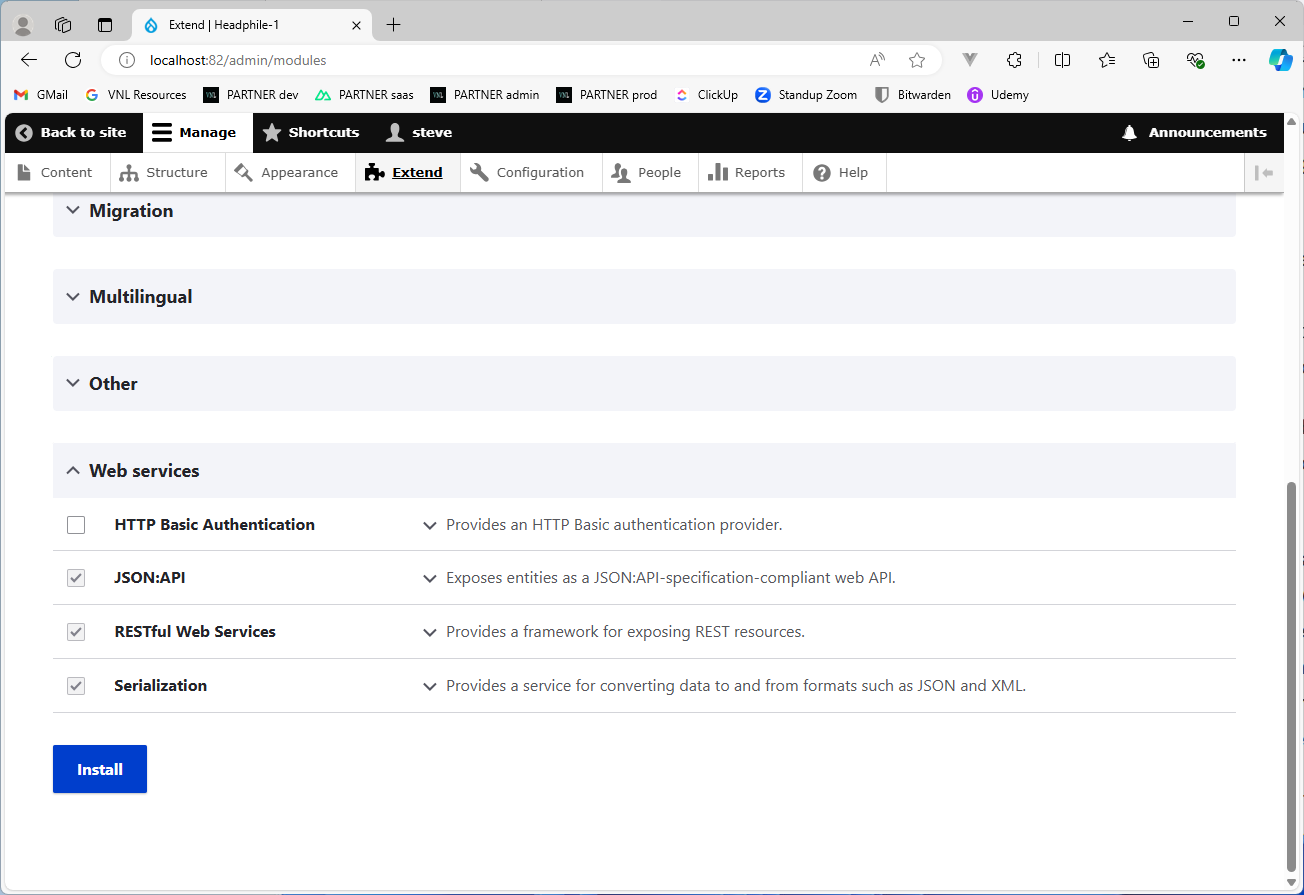
Once you're logged in, under the "Extend" menu, scroll down to "Web services" and enable "RESTful Web Services", "JSON:API", and "Serialization", then click Install. These three modules install support in Drupal to create your own REST API endpoints (and aren't installed by default, for whatever reason).
- In Drupal, normally views are used to create customized lists of content that you can place (almost) anywhere on the site, but in our instance we can create a view that will serve as our first API endpoint.
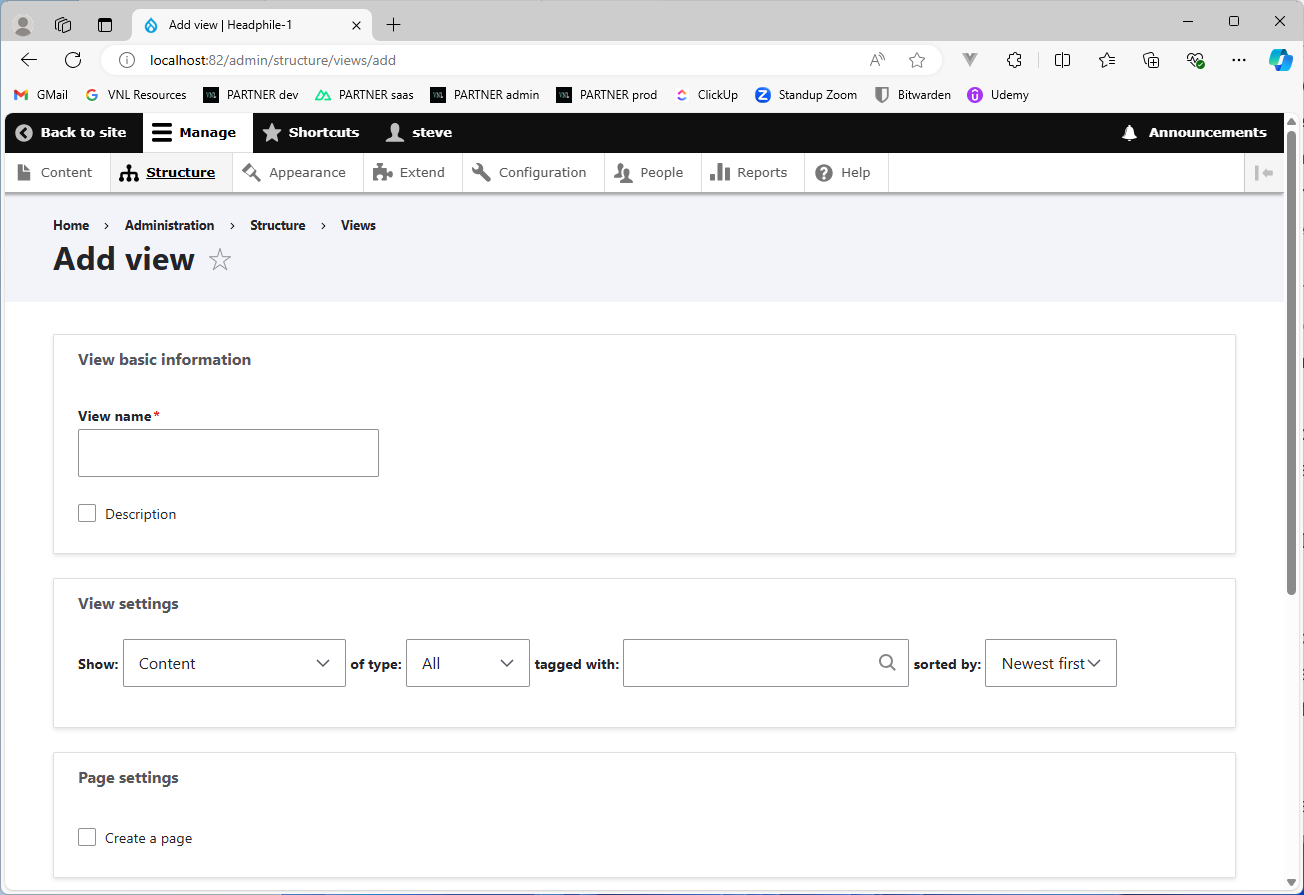
Under the Structure menu, click Views, then the "+ Add view" button. You can name the "View name" anything you want here, but "REST View" can be a good name to use. At the bottom, check the box for "Provide a REST export", enter "/api/content" into the input field (which will be the actual endpoint), then click "Save and edit". You can alternately enter "/api/articles" in the input field, or any other name, to denote a different type of content as desired.
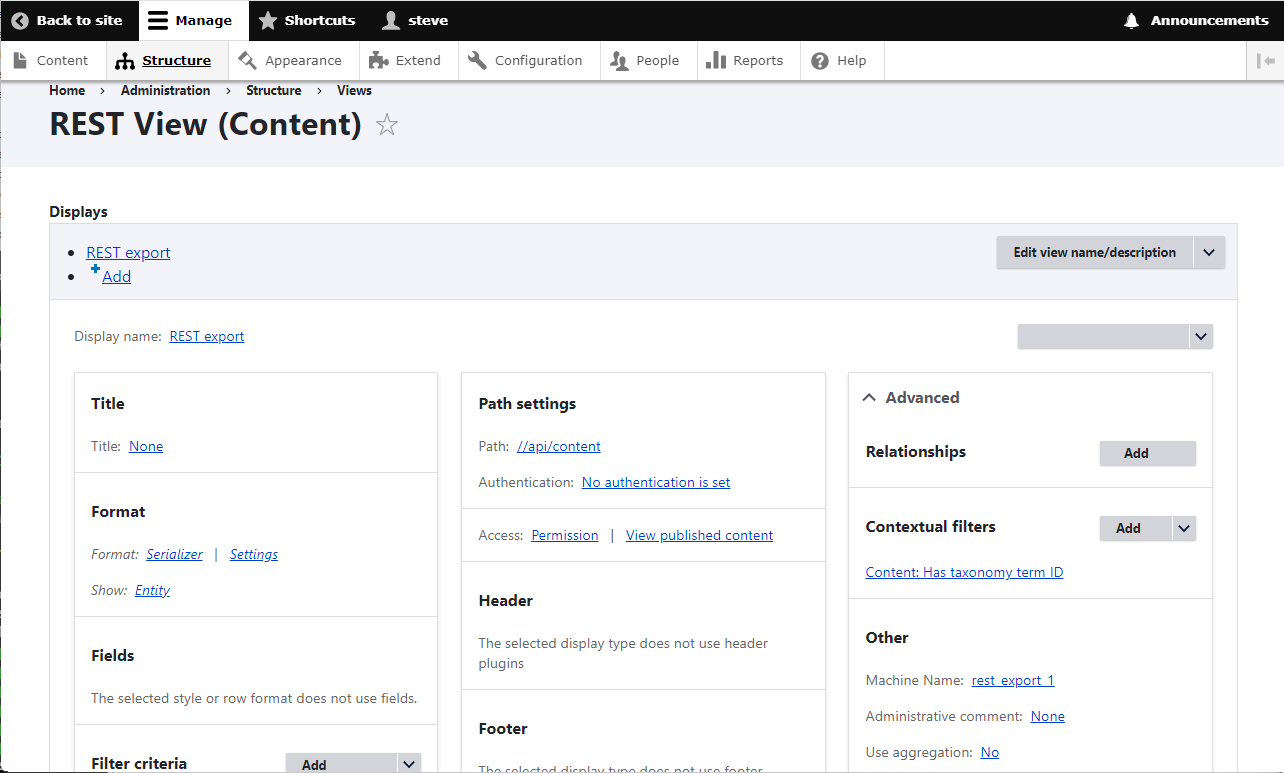
On the next screen, under Contextual filters (which is under Advanced, if you need to expand that), click Add, and you can add whatever you want to search by under this endpoint. In most circumstances, this will probably be the content ID, in which case you can enter "ID" in the search box and select the ID for Content. You can alternately use any of the other provided filters, including "Has taxonomy term ID" to use the IDs corresponding to any taxonomy terms entered in Drupal. If you want to alternately be able to use taxonomy terms by their name, you can download & install the Drupal module Views taxonomy term name into ID.
Adding content and configuring Drupal
- At this point, you might want to add some usable content that can be consumed from the Nuxt front-end. Under the top navigation, click Content -> "+ Add content" -> Article, and repeat this process a few times to add some content.
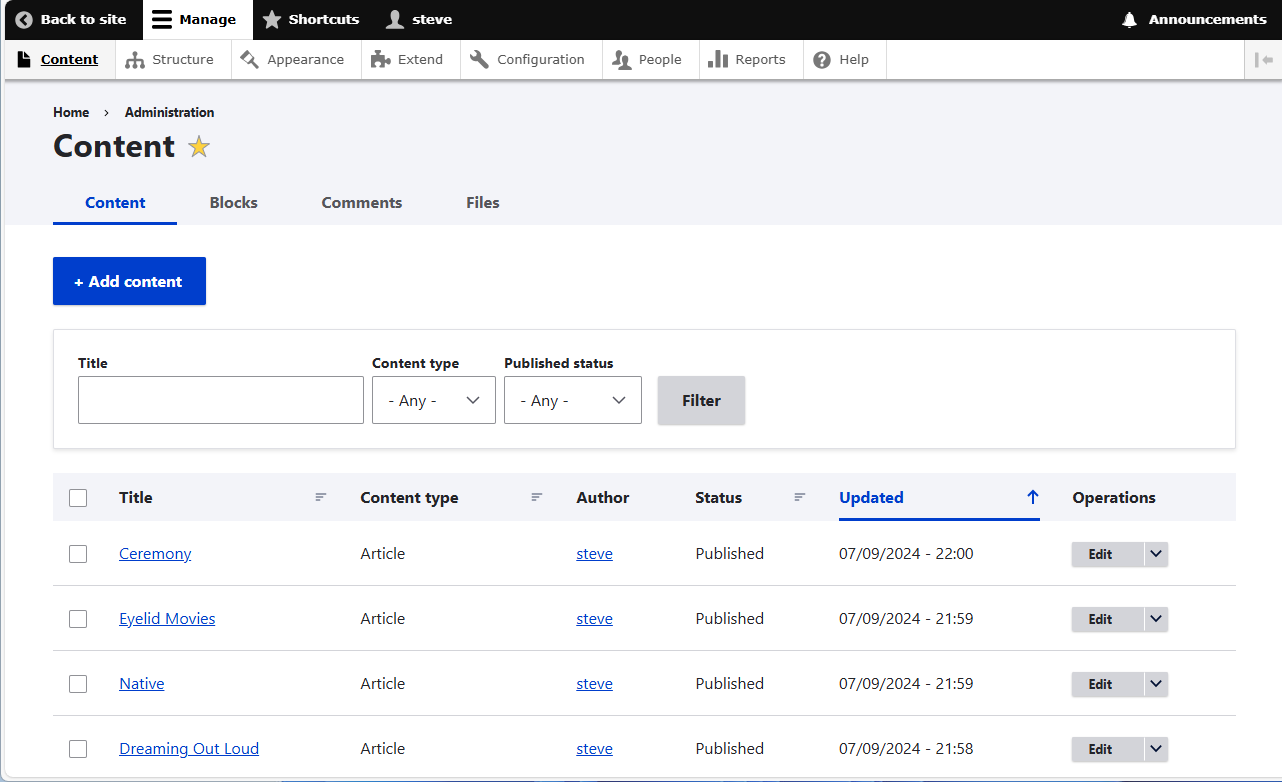
For the sake of simplicity, one example I used on my own demo site was music albums, in which case you could add the following as content articles: OneRepublic - Dreaming Out Loud, OneRepublic - Native, Phantogram - Eyelid Movies, and Phantogram - Ceremony, using the album titles for the article titles, and the band names as the tags (adding band names as the tag will have an advantage as we'll see later when building the front-end).
- At this point Drupal is now set up as your REST API! To test it out, you can bring up another browser tab and point it to this URL: http://localhost:80/api/content/1?_format=json (changing the port as appropriate if needed, along with "content" if you named that something else).
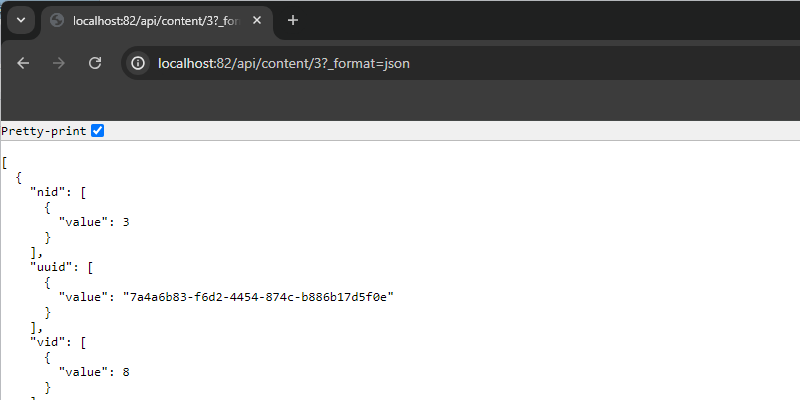
Note the number "1" in the URL (although in my screenshot it's 3, because I added a couple of other terms beforehand), which denotes the taxonomy term ID, which effectively refers to the Contextual filter that you entered in the view. Or it might denote the content ID, if you used that instead. In either case, note whichever filter you used for future reference. The "_format=json" at the end of the path tells Drupal to give you the result as JSON, which is important because it'll likely run out of memory otherwise (you can try it without that part to see the error message).
- One last thing to do in Drupal is to enable CORS, at least for demo purposes since we'll be creating the Nuxt app on localhost as well. Because when we run both Drupal and Nuxt on localhost, they're going to have to run on separate ports, but in general since an app running on one port isn't allowed to access an app running on another port since that's a violation of security, we'll need to enable CORS on Drupal's side.
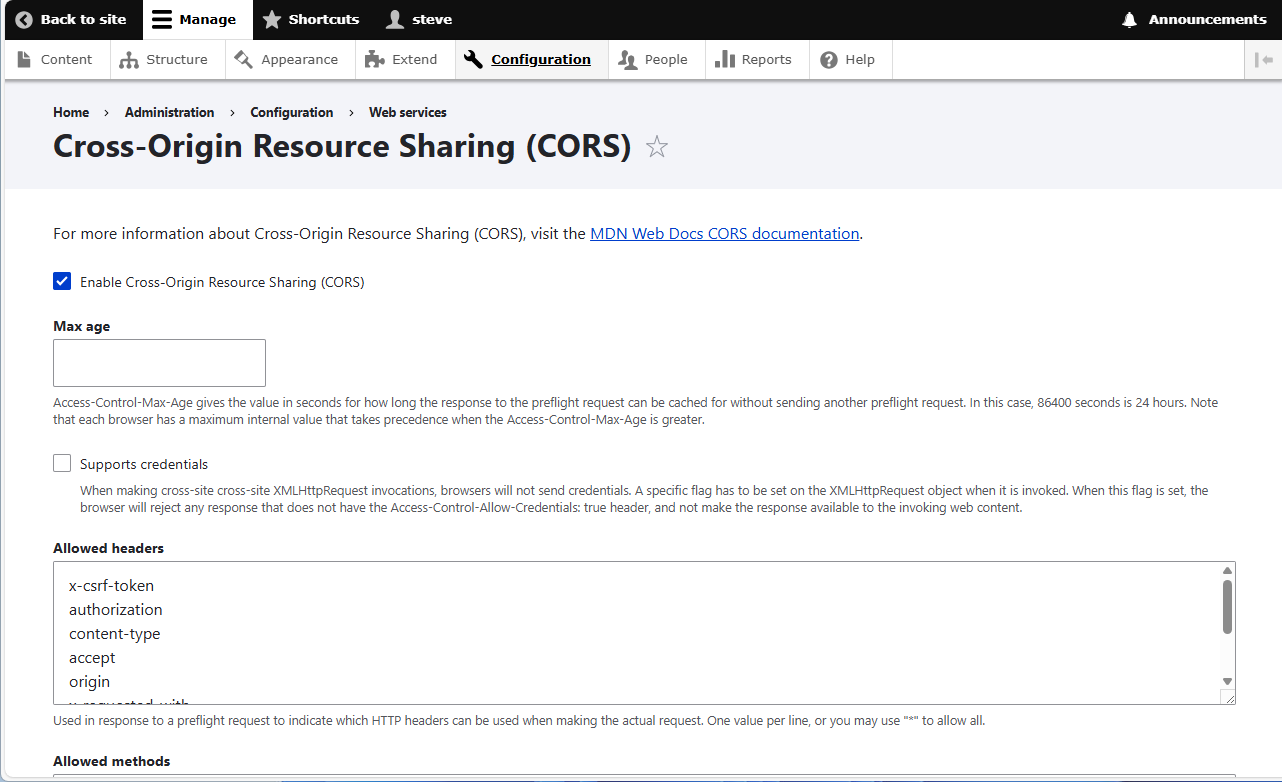
To do that, go to Configuration -> Web services -> Cross-Origin Resource Sharing (CORS), and check the box at the top to enable it. Inside the input fields for Allowed headers, Allowed methods, and Allowed origins, enter the asterisk "*" (without the quotes), then click Save configuration. Very important to note that normally you should NOT allow everything (i.e. which is what the asterisk means) to access Drupal because that would be a huge security risk. In the eventual outcome when you might want to deploy Drupal and Nuxt for production, you should limit all of these inputs to very specific actions and hosts, and only specify the host running the Nuxt app in production in the Allowed origins.
Building the Nuxt 3 front-end
We now have Drupal set up, but how about the Nuxt app? Let's go ahead and start building it out.
- Open your terminal/shell to follow the Nuxt installation instructions that are provided on the Nuxt site.
Note that "npx" is now included with the latest version of Node.js, so if running npx doesn't work, you may need to upgrade your Node.js/npm installation. You can give the Nuxt app any name you want, but for demo purposes I simply called mine "n3_app". Once the project directory is created, open it with VS Code, and "cd" into it.
- As good as Nuxt's documentation is, it doesn't explicitly tell you how to get started creating an app from scratch to build components into a slot-based layout, including pages, so we're going to do that first before we get the Nuxt server up and running.
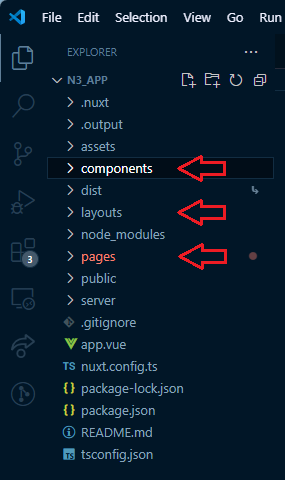
Create "components", "layouts", and "pages" in the project root directory as shown below in the screenshot. Components can helpfully act as a header and footer (or some other visual container that you might want to add in a complex UI), layouts can help to separate your UI appropriately using slots with components, and pages in Nuxt can act as your "static" pages which will typically store your more static content (informational pages like About).
For more info on components, layouts, and pages, the Nuxt documentation provides some helpful info, where you can explore the project directory tree, starting with components: https://nuxt.com/docs/guide/directory-structure/components
- It also makes sense to create some new blank files in these directories before spinning up the server. Create the files shown below inside the directories as well:
/components/AppFooter.vue
/components/AppHeader.vue
/layouts/default.vue
/pages/about.vue
/pages/onerepublic.vue (or whatever other content tag name you might've alternately used, one page per tag)
/pages/phantogram.vue
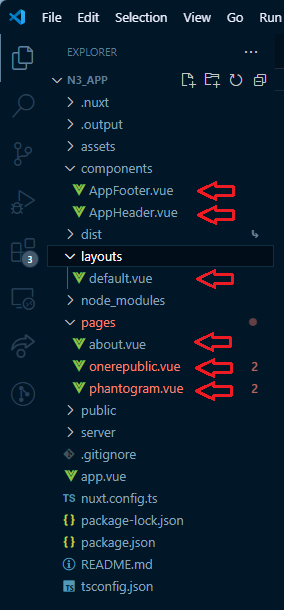
You can now spin up the server using "npm run dev", and point your browser to http://localhost:3000/ where we'll see the default new app screen.
Since Nuxt 3 supports adding the HTML title and meta tags right in the
/app.vuefile (in the project root directory), we'll go ahead and do that first and add the HTML boilerplate for the new app. Copy the below code into the file, overwriting to replace the content that's initially there, and you'll see the document title get updated. The Nuxt documentation has some helpful info on layouts and how they work on its Layouts page where you'll see that the <NuxtLayout> element defines the layout area, and the <NuxtPage> element defines the page area, which will come from the files in the/pagesdirectory.
<template>
  <div>
    <Head>
      <Title>Demo Site</Title>
      <Meta name="description" content="demo site for Nuxt 3 with headless Drupal" />
      <Meta name="keywords" content="nuxt, vue, drupal, headless, CMS" />
    </Head>
    <NuxtLayout>
      <NuxtPage />
    </NuxtLayout>
  </div>
</template>
It's considered conventional in Nuxt (and Vue by extension) to have a single "root" element inside the <template> element. This is normally a <div> element but doesn't have to be, and can alternately be a <section> or other semantic HTML element like <main> or <article>.
- Since we're not going to have multiple layouts and only need one, we'll go ahead and use the default layout which will be in
/layouts/default.vue, as mentioned in the Nuxt documentation. Right now that file is blank, but copying in the below code will fill in a somewhat standard template using the AppHeader and AppFooter files that we previously made back in step 3, and assign a dynamic slot component to everything in between.
<template>
  <div>
    <AppHeader />
    <slot />
    <AppFooter />
  </div>
</template>

<style>
body {
  background: #efefef;
  font-family: Arial, Helvetica, sans-serif;
}
.album {
    border: 1px solid grey;
    margin-bottom: 1em;
    padding: 1em;
}
</style>
This file is also where we can assign some base CSS styles to apply app-wide, much like if you wanted to apply some CSS styles on the <body> tag in a static HTML site to take global precedence over more specific rules for particular elements. So it's a good place to set things like the font and background color. I've also added a CSS class called "album" that'll be used later, on the pages showing the albums to help add some visual separation between them.
- Our Nuxt app is still looking very blank in the browser at the moment so we'll rectify this by finally adding something visible to the AppHeader component in
/components/AppHeader.vue. As is customary for most web apps that have a header component, we'll show a title and some site-wide navigation to make it easy for users to get around.
<template>
  <div class="nav">
    <h1>NuxtApp</h1>
    <span><NuxtLink to="/">home</NuxtLink>
    | <NuxtLink to="/about">about</NuxtLink>
    | <NuxtLink to="/onerepublic">OneRepublic</NuxtLink>
    | <NuxtLink to="/phantogram">Phantogram</NuxtLink>
    </span>
  </div>
</template>

<style scoped>
.nav {
  margin-bottom: 1em;
}
</style>
<NuxtLink> is Nuxt's way of adding internal links to your pages which it'll reference from the filename prefixes from the files in the /pages directory, so you should generally use these over the traditional <a href=""></a> type of link whenever doing internal page links (it's fine to use the <a> tag for external links, however). Of course these links won't show any actual content yet since we haven't added that, but you will see the navigation jump around on the blank pages that we created earlier. Some bottom margin has been added inside the <style> tag to help the bottom of the navigation look properly spaced above the page content; "scoped" inside the <style> tag means that the styles will apply to this component only and won't follow typical CSS cascade rules.
- Next, we'll add something to the AppFooter component in
/components/AppFooter.vueas well. Normally on most web apps you'll see things like copyright information and links to additional information in a footer, but in lieu of that we'll just settle for a copyright symbol with the year (it's possible to generate the year dynamically through JavaScript but we'll skip that here).
<template>
<div>
<p>© 2024</p>
</div>
</template>
- In the
/pagesdirectory, we'll start with the About page in/pages/about.vue. Nothing extensive, just something to serve as temporary page content.
<template>
  <section>
    <p>some text about this website</p>
  </section>
</template>
- Our pages for the content being pulled dynamically from our Drupal REST API is where things finally get interesting! The first thing we have to do is make a call to our API endpoint. If you look back at step 6 under the previous section "Setting up Drupal as an API", we're going to want to make a call to this URL: http://localhost:80/api/content/1?_format=json.
<script setup lang="ts">
const { data: results } = await useFetch('http://localhost:80/api/content/1?_format=json', {
  server: false
});
</script>
So let's start by doing exactly that at the top of the file (in my example /pages/onerepublic.vue). Nuxt gives us a built-in useFetch() method that we can use to make API calls, which has to be prefaced with await, since it's an asynchronous method. While it normally returns five values (data, status, error, refresh, and clear) and in a production app you should provide handling on at least data, status, and error, for our demo purposes we'll handle just data. The argument object containing server: false is a rule that tells Nuxt to not fetch the data on the server, and to fetch it on the client instead. This prevents an error where Nuxt will try to hydrate the data on the client but it doesn't exist there, and the data will end up not being rendered on the client.
<template>
  <section>
    <div class="album" v-for="result in results" :key="result.nid">
      <p>{{ result.title[0].value }}</p>
      <p>{{ result.created[0].value }}</p>
      <p v-html="result.body[0].value"></p>
    </div>
  </section>
</template>
The API call should work but since nothing is displaying on the page, let's rectify that as well to show the data from the response, which is provided above (this code can be placed directly below the script tags in the file, right afterwards). v-for is Vue's way of conditionally showing data from an array and requires a "key" to identify each unique element - in this case, the node ID that Drupal uses behind the scenes is the perfect key to use. And because Drupal content nodes contain actual HTML in their body text, we have to use some Vue trickery with v-html to render that HTML in place of the <p> tag, otherwise this will just show the actual HTML code, which we don't want.
- With one exception, we can copy all of the code for this page to the other page (in my example
/pages/phantogram.vue), only needing to modify the number in the API call to indicate the other taxonomy term ID.
<script setup lang="ts">
const { data: results } = await useFetch('http://localhost:80/api/content/2?_format=json', {
  server: false
});
</script>
- At this point our Nuxt app is functionally complete and retrieving data from our Drupal API! However, this app is far from being feature-complete for an actual user and there are some areas to note in which it can be further improved:
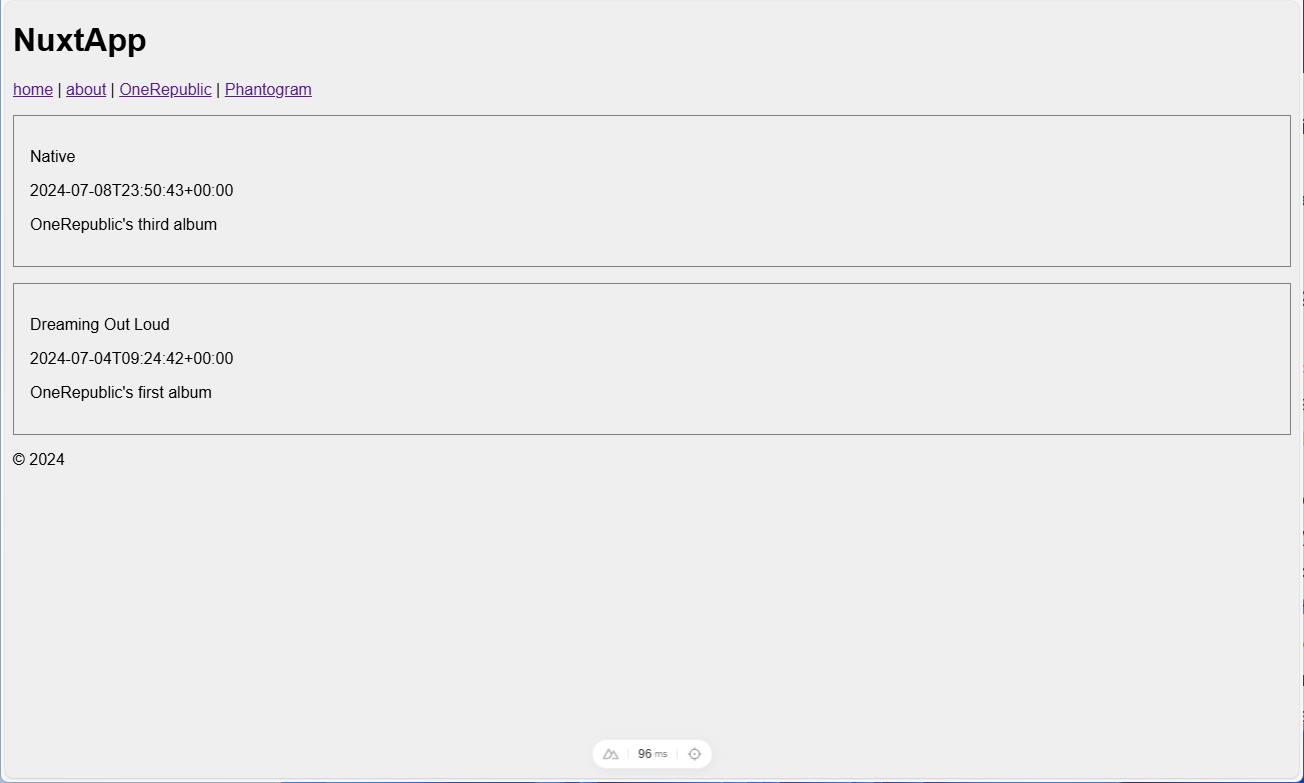
a. The Nuxt /pages directory isn't going to scale well once we start adding lots of different artists. It'd be highly impractical to have a Nuxt page for every single artist (and Drupal tag by extension). As a rhetorical exercise, while it could be vastly improved using music genres as tags instead, can you think of any other methods to simplify & reduce the number of required pages?
b. Related to the above point, our current two pages based around the Drupal taxonomy terms basically show exactly the same thing, and make almost the same exact API call (the only difference being a number at the end to denote a taxonomy term ID). Usually when you have this type of repetition, it means you only need one instance of that type. So realistically, we actually need only one page (or component) to show the results of this particular type of API call. This means that we probably need only one page (or component) to show any one particular artist. Can you think of how you might want to modify the app's architecture to support this? (Hint: making an API call in a parent component and sending the response data to another component, such as a child component, is the conventional way of doing this.)
c. The dates associated with the content nodes (that are displayed in the Nuxt app) are the dates of creation of the content, which naturally doesn't make sense to use. In our particular demo of music albums, it'd make more sense to get the release date of an album and use that instead. The text associated with each content node should also be something different. What would make more sense to use instead?
d. Part of the reason why I chose the example of music albums for this demo site was because it happens to be the concept of Spotify which is currently using Next.js with headless WordPress (how about that, eh?). Can you think of any features you might want to have here that Spotify already does, or maybe doesn't have?
e. The last thing to note that isn't a rhetorical question is that since Spotify has separate web and mobile apps, it happens to be a perfect demonstration of the benefit of a headless CMS, which is that it can provide content that can be readily consumed by different types of clients.
Conclusion
Hopefully this tutorial gave you something of a jumping-off point to start thinking about modifying the Nuxt app and adding on features, and adding more content to the Drupal CMS as well. Good luck!
]]>